


I had a few non English Windows 10 systems that I wanted to keep the license for, but otherwise have a clean Windows 10 English install on.
Some links; hopefully I can later make more notes.
Posted by jpluimers on 2021/12/24
I had a few non English Windows 10 systems that I wanted to keep the license for, but otherwise have a clean Windows 10 English install on.
Some links; hopefully I can later make more notes.

Posted in Power User, Windows, Windows 10 | Leave a Comment »
Posted by jpluimers on 2021/11/04
After doing Windows upgrades to Windows 10, every now and then I bump into applications that do not fully uninstall themselves and get stuck on the uninstall list (that you get when running appwiz.cpl or browse to the Control Pannel installed programs list).
[WayBack] How to Manually Remove Programs from the Add/Remove Programs List mentions to inspect registry key HKEY_LOCAL_MACHINE\Software\Microsoft\Windows\CurrentVersion\Uninstall, but that didn’t include some of the applications.
Then I found [WayBack] Remove entry from Windows 10 Apps & Features – Super User, where the answers mentions two other keys (thanks users [WayBack] Kreiggott and [WayBack] NutCracker):
HKEY_LOCAL_MACHINE\SOFTWARE\WOW6432Node\Microsoft\Windows\CurrentVersion\UninstallHKEY_CURRENT_USER\Software\Microsoft\Windows\CurrentVersion\UninstallNeat!
So I made the below PowerShell script to dump installed programs.
It grabs the list of registry keys containing installed software and their registry values, then empirically filters out most values that are also now shown in AppWiz.cpl.
Like database work, the values can have properties having a value or being null. So it’s SQL like expression galore to do the filtering.
This post is slightly related to Still unsolved since 2015 NetBeans: Bug 251538 – Your Installer is Creating Invalid Data for the NoModify DWORD Key which crashes enumeration of the Uninstall Key in at least PowerShell, where I already did (without documenting) some Uninstall spelunking.
## The collection of registry keys gives Name and Property of each registry key; where Property is compound containing all registry values of that key.
## Get-ItemProperty will get you all the values on which you can filter, including a few special PS* values that allow you to browse back to the registry key.

# x86 installs on x64 hardware: http://stackoverflow.com/questions/12199372/get-itemproperty-not-returning-all-properties/12200100#12200100
$nonUninstallableSoftwareRegistryKeys = (@
(Get-Item HKCU:\Software\Microsoft\Windows\CurrentVersion\Uninstall\*)) +
(Get-Item HKLM:\Software\Microsoft\Windows\CurrentVersion\Uninstall\*) +
(Get-Item HKLM:\Software\Wow6432Node\Microsoft\Windows\CurrentVersion\Uninstall\*)

#$nonUninstallableSoftwareRegistryKeys.GetType().FullName
#$nonUninstallableSoftwareRegistryKeys | Get-Member
#$nonUninstallableSoftwareRegistryKeys | Out-GridView
#$nonUninstallableSoftwareRegistryKeys | Get-ItemProperty | Get-Member
#$nonUninstallableSoftwareRegistryKeys | Get-ItemProperty | Out-GridView
#Return

$nonUninstallableSoftwareRegistryNameValues = $nonUninstallableSoftwareRegistryKeys |
    Get-ItemProperty |
    Where-Object {
        $_.SystemComponent -ne 1 -and $_.NoRemove -ne 1 -and
        $_.UninstallString -ne "" -and $_.UninstallString -ne $null
    }
# Filters out most things that AppWiz.cpl will leave out as well.
# Might need more fine tuning, but is good enough for now.

# PSPath shows the path to the underlying registry key of each value
$nonUninstallableSoftwareRegistryNameValues |
    Select-Object SystemComponent, NoRemove, DisplayName, DisplayVersion, UninstallString, PSChildName <#, PSPath #> |
    Sort-Object DisplayName |
    Out-GridView
# Need to find a good way to output this in a really wide Format-Table text format.
–jeroen
Posted in CommandLine, Development, Power User, PowerShell, PowerShell, Scripting, Software Development, Windows, Windows 10 | Leave a Comment »
Posted by jpluimers on 2021/10/12
After watching an autologon system not logging on automatically over the past years, the pattern seems to be that at least major, and some less minor Windows updates remove autlogon parts of the registry.
I’m not sure where the boundary between “major” and “less minor” lies (though I suspect “cumulative updates” and larger), nor if more than these values are affected:
"HKEY_LOCAL_MACHINE\SOFTWARE\Microsoft\Windows NT\CurrentVersion\Winlogon"
AutoAdminLogon gets removed or becomes value 0DefaultUserName gets removedDefaultPassword gets removedThis means that now after each startup, I need to schedule a task that runs a script setting the values I need depending if a password is needed or not.
The script also needs credentials, so I need to figure out how to properly do that.
I still need to decide between PowerShell or batch file script, as I already have the batch file from How to turn on automatic logon in Windows and automatic logon in Windows 2003.
For my future reference, some more links on things that can get deleted:
- [WayBack] Windows Update deletes custom registry settings
- [WayBack] Windows 10 update deletes the registry Run command – Super User
- [WayBack] Windows 10 May Delete Your Programs Without Asking
- [WayBack] Don’t break Windows 10 by deleting SID, Microsoft warns – Naked Security
- [WayBack] Windows 10 KB4532693 Update Bug Hides User Data, Loads Wrong Profile
- [WayBack] why has the latest windows update moved all my files into another user – Microsoft Community
Hopefully these links will help me writing the scripts:
For several reasons, mostly security-related, PowerShell scripts aren’t as easily portable and usable as batch scripts can be. However, we can bundle a batch script with our PowerShell scripts to work around these issues. Here, we’ll show you a few of those problem areas, and how to build a batch script to get around them.
–jeroen
Posted in Batch-Files, CommandLine, Development, Power User, PowerShell, PowerShell, Scripting, Software Development, Windows, Windows 10, Windows Development | Leave a Comment »
Posted by jpluimers on 2021/10/04
From a while back: [Archive.is] Jeroen Wiert Pluimers on Twitter: ‘Answering Yes to “You have an older version of PackageManagement known to cause issues with the PowerShell extension. Would you like to update PackageManagement (You will need to restart the PowerShell extension after)?” hung my Visual Studio Code.… ‘
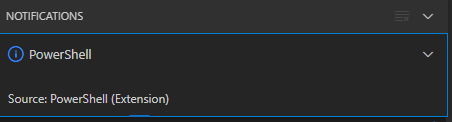
After clicking “Yes”, the the only thing visible was this notification that had an ever running “progress bar”:
Notifications – Powershell – Source: Powershell (Extension)
The first part of the solution was relatively simple: restart Visual Studio code, then the original notification showed, and after clicking “Yes”, the “Panel” (you can toggle it with Ctrl+J) showed the “Terminal” output (yes, I was working on [Wayback/Archive.is] PowerShell script for sending Wake-on-LAN magic packets to given machine hardware MAC address, more about that later):

Posted in .NET, Communications Development, Development, Encryption, HTTP, HTTPS/TLS security, Internet protocol suite, Power User, Security, Software Development, TCP, Visual Studio and tools, vscode Visual Studio Code, Windows, Windows 10 | Leave a Comment »
Posted by jpluimers on 2021/09/30
Posted in Development, Power User, Software Development, Windows, Windows 10, Windows 7, Windows 8, Windows 8.1, Windows Development | Leave a Comment »
Posted by jpluimers on 2021/09/09
When you do a choco upgrade all --yes on a system that – during upgrade – becomes low on disk space, you can end up with a lot of empty .nupkg files.
For those package, Chocolatey will not recognise they are installed any more.
The fix is this:
--force parameter before the --yes parameter like in
choco install --force --yes chocolatey
choco upgrade --all --yesI wrote a few PowerShell scripts assisting me in cleaning up the mess.
choco-list-installed.bat:: https://superuser.com/questions/890251/how-to-list-chocolatey-packages-already-installed-and-newer-version-available-fr choco list --localonly %*
choco-show-installed-package-names.bat:: `--limit-output` does not show Chocolatey version header and count footer. :: `--id-oonly` omits the version number, so you only get the package name choco list --local-only --limit-output --id-only
choco-show-installed-package-names-and-versions.bat:: `--limit-output` does not show Chocolatey version header and count footer. choco list --local-only --limit-output %*
choco-reinstall-empty-nupkg-by-names.ps1There is an environment variable set on installation,
ChocolateyInstall, which is set toC:\Chocolateyby default in versions of Chocolatey less than 0.9.8.27. After that, this defaults toC:\ProgramData\Chocolatey.NOTE: By default, the
C:\ProgramDatafolder on Windows is hidden. You will either need to enable hidden files and folders throughFolder Options | Viewor you can navigate directly to the path shown above by copy/pasting directly into the Windows Explorer address bar.In version 0.9.9 of Chocolatey, it actively moves from the old folder location to the new one.
A convenient way to obtain the string value rather than the dictionary entry (which is technically what
Get-ChildItemis accessing) is to just use the variable syntax:$Env:USERPROFILErather thanGet-ChildItem Env:USERPROFILE.$localpath = "$env:USERPROFILE\some\path"…
Also, the
Join-Pathcmdlet is a good way to combine two parts of a path.$localpath = Join-Path $env:USERPROFILE 'some\path'
<#
https://learningpcs.blogspot.com/2009/12/powershell-finding-0-byte-files.html

Zero length .nupkg files sorted by oldest first.

These are packages that choco will not show and likekly need a forced reinstall.

Choco does remember the version that was installed (so not all the choco config is hosed).

- https://stackoverflow.com/questions/28235388/where-is-the-chocolatey-installation-path/28239451#28239451
- https://stackoverflow.com/questions/41047123/powershell-concatenate-an-environment-variable-with-path/41047343#41047343

/#>
$LibPath = Join-Path $env:ChocolateyInstall 'lib'
$NuPkgExtension = 'nupkg'
$NupkgFilter = "*.$NuPkgExtension"

## Remove the empty .nupkg files for each argument
$args | ForEach-Object {
    $PackageName = $_
    Write-Output "Deleting any empty $PackageName.$NuPkgExtension under $LibPath :"

    Get-ChildItem -Path $LibPath -Recurse -Filter $NupkgFilter | Where-Object {
        ($_.Length -eq 0) -and ($_.BaseName -eq $PackageName)
    } | Sort-Object LastWriteTime | ForEach-Object {
        $PackageFullName = $_.FullName
        Write-Output "Deleting $PackageFullName"
        Remove-Item $PackageFullName
    }
}

## Force install the chocolatey package for each argument
$args | ForEach-Object {
    $PackageName = $_
    Write-Output "Installing $PackageName with Chocolatey:"
    choco install --force --yes $PackageName
}
Some more links that helped me solve this:
Some links on errors I encountered while recovering from this:
--ignorechecksum to choco --install (see [WayBack] CommandsInstall · chocolatey/choco Wiki · GitHub)--force parameterSysinternals Suite is going to be installed in ‘C:\ProgramData\chocolatey\lib\sysinternals\tools’
File appears to be downloaded already. Verifying with package checksum to determine if it needs to be redownloaded.
Error – hashes do not match. Actual value was ‘A510C31C2CC591A16F342E7CBA5DC8409EAF08C9B56729CF132C95C69E196787’.
Downloading sysinternals
from ‘https://download.sysinternals.com/files/SysinternalsSuite.zip’
Progress: 100% – Completed download of C:\Users\devCrPhoneDebug\AppData\Local\Temp\2\chocolatey\sysinternals\2018.12.27\SysinternalsSuite.zip (23.51 MB).
Download of SysinternalsSuite.zip (23.51 MB) completed.
Error – hashes do not match. Actual value was ‘A510C31C2CC591A16F342E7CBA5DC8409EAF08C9B56729CF132C95C69E196787’.
ERROR: Checksum for ‘C:\Users\devCrPhoneDebug\AppData\Local\Temp\2\chocolatey\sysinternals\2018.12.27\SysinternalsSuite.zip’ did not meet ‘b14466c6bf3be216ea71610a3f455030e791cd5ad1b42a283886194205d176b0’ for checksum type ‘sha256’. Consider passing the actual checksums through with –checksum –checksum64 once you validate the checksums are appropriate. A less secure option is to pass –ignore-checksums if necessary.
The install of sysinternals was NOT successful.
Error while running ‘C:\ProgramData\chocolatey\lib\sysinternals\tools\chocolateyInstall.ps1’.
See log for details.Chocolatey installed 0/1 packages. 1 packages failed.
See the log for details (C:\ProgramData\chocolatey\logs\chocolatey.log).
.nupkg files first, which will give you an idea on the potential missing dependencies. Retry by forcing reinstall each dependency..nupkg files. Example: [WayBack] Unable to resolve dependency · Issue #206 · chocolatey/choco · GitHub
choco-reinstall-empty-nupkg-by-names.ps1command, then retry.–jeroen
Posted in Chocolatey, COBOL, Development, Power User, PowerShell, PowerShell, Scripting, Software Development, Windows, Windows 10 | Leave a Comment »
Posted by jpluimers on 2021/08/31
This helped me big time finding failed logon attempts: [WayBack] Event Log Hell (finding user logon & logoff) – Ars Technica OpenForum
Alternatively, you can use the XPath query mechanism included in the Windows 7 event viewer. In the event viewer, select “Filter Current Log…”, choose the XML tab, tick “Edit query manually”, then copy the following to the textbox:
Code:<QueryList>
<Query Id="0" Path="Security">
<Select Path="Security">*[System[EventID=4624] and EventData[Data[@Name='TargetUserName'] = 'USERNAME']]</Select>
</Query>
</QueryList>This selects all events from the Security log with EventID 4624 where the EventData contains a Data node with a Name value of TargetUserName that is equal to USERNAME. Remember to replace USERNAME with the name of the user you’re looking for.
If you need to be even more specific, you can use additional XPath querying – have a look at the detail view of an event and select the XML view to see the data that you are querying into.
Thanks user Hamstro!
Notes:
eventvwr.exe running as an elevated process using an Administrative user CUA token.USERNAME needs to be the name of the user in UPPERCASE.TargetUserName with subjectUsername (as suggested by [WayBack] How to Filter Event Logs by Username in Windows 2008 and higher | Windows OS Hub) fails. 4624(S) An account was successfully logged on. (Windows 10) | Microsoft Docs4625(F) An account failed to log on. (Windows 10) | Microsoft Docs4626(S) User claims information./Device claims information. (Windows 10) | Microsoft Docs4634(S) An account was logged off. (Windows 10) | Microsoft Docs4797 (An attempt was made to query the existence of a blank password for an account) At the time of writing, it was undocumented, but it seems to be part of an account checking process as per [WayBack] Windows 8 Event ID 4797 in Security Log:That means that an application or service makes an attempt to query the accounts which have blank password. I think some security software may make such request.
Related:
–jeroen
Posted in Development, Microsoft Surface on Windows 7, Power User, Software Development, Windows, Windows 10, Windows 7, Windows 8, Windows 8.1, Windows 9, Windows Vista, Windows XP, XML/XSD | Leave a Comment »
Posted by jpluimers on 2021/08/23
From Windows 8 on, Microsoft has been pushing more and more stuff to the App UI (sometimes called Immersive User Interface).
By default they are only easily accessible from the search feature from the “Start” button or “Search” pane in the task bar.
This is cumbersome or even problematic when you have to remember the correct terms over many localisations.
In the past you could run this from the command prompt or Windows+R keyboard shortcut “Run” pop-up:
control printers
This does not work however in either of the two:
settings printers
This works from the Windows+R keyboard shortcut “Run” pop-up:
ms-settings:printers
This works from the command prompt:
start ms-settings:printers
The difference is that with control , it will eventually find control.exe on the path, but ms-settings: is the scheme bit of an URI. The start command can handle this, the plain command-line cannot.
What in fact happens is that the URI scheme handler, will have a Windows Service (which runs under NT AUTHORITY\SYSTEM) start "C:\Windows\ImmersiveControlPanel\SystemSettings.exe" -ServerName:microsoft.windows.immersivecontrolpanel under your current user.
Next to a List of applications behind the various control panel links – via “Stop user access to control panel”, below is a list of Settings URIs.
The below list is from [WayBack] The list of Settings pages URIs (ms-settings) in Windows 10 , but misses ms-settings:printers.
Posted in Power User, Windows, Windows 10, Windows 8, Windows 8.1 | Leave a Comment »
Posted by jpluimers on 2021/08/23
lFor Mac keyboard keys, almost all (except the old solid and open Apple logo’s) have a Unicode code point, see for instance the modifier keys from the [WayBack] List of Mac/Apple keyboard symbols · GitHub (the “Alt” column has a solid Apple logo in the bottom right; on non-Mac systems it will look differently as it is in the Unicode private range: [WayBack] Unicode Character ” (U+F8FF): ‘<Private Use, Last>’):
Sym Key Alt ⌃ Control ⌥ Option ⇧ Shift ⌘ Command
These are the code points for the “Sym” column:

Posted in Microsoft Surface on Windows 7, Power User, Windows, Windows 10, Windows 7, Windows 8, Windows 8.1, Windows 95, Windows 98, Windows NT, Windows Server 2000, Windows Server 2003, Windows Server 2003 R2, Windows Server 2008, Windows Server 2008 R2, Windows Server 2012, Windows Server 2012 R2, Windows Server 2016, Windows Vista, Windows XP | 1 Comment »
Posted by jpluimers on 2021/08/19
Wireshark is indispensable when doing network communications development or DevOps.
This is my choco-install-network-tools.bat batch file to install Wireshark and the pcap dependency which nmap provides:
choco install --yes nmap
:: wireshark requires a pcap for capturing; nmap comes with npcap which fulfills this dependency
:: see:
:: - https://chocolatey.org/packages/wireshark
:: - https://chocolatey.org/packages/win10pcap
:: - https://chocolatey.org/packages/WinPcap
:: - https://chocolatey.org/packages/nmap
choco install --yes wireshark
Yes, I know: Windows Subsystem for Linux could have an easier installation, but the above:
See:
–jeroen
Posted in *nix, *nix-tools, Communications Development, Development, Internet protocol suite, nmap, Power User, Software Development, Windows, Windows 10, Windows 8.1, WSL Windows Subsystem for Linux | Leave a Comment »

 The Wiert Corner - irregular stream of stuff