My second thought was that it was caused by idle behaviour. Disabling that was indeed the cause. Since doing that was kind of hard to circumvent, here is how:
if this happens to you, I recommend looking at the logs. It is the only way to get real information about what it going wrong. In some cases you may need to boot into the recovery console from installation media, but if your hard drive is working at all, it should be possible to view those files.
I had the same happening with Windows 81., and I asseume other Windows versions react the same way.
My conclusion is that various Microsoft updates now require 3 gigabytes of disk space.
This seems to be the case with the .NET Framework 4.5.1 KB 2858725 update, and probably more future updates. I tried installing the KB 2858725 update with slightly less than 3 gigabytes of space (and after the 3 gigabyte reserve.tmp appeared), and I was still getting error 13EC. But with slightly more than 3 gigabyte the update would install.
That is quite difficult when you run loads of VMs on SSDs: they usually don’t have an awful lot of disk space left.
The same issue holds for Microsoft .NET Framework 4.5.2 for Windows 7 x64-based Systems (KB2901983) which got released earlier this week:
When browsers are experiencing network problems, generally the first thing to test is your network proxy settings. Misconfigured settings, or misbehaving settings, can have a profound impact on your network traffic possibly resulting in pages not loading at all.
A lot of the links below have died due to link rot (sometimes even the domains have gone), but most of the WayBack machine links marked [Wayback] still work.
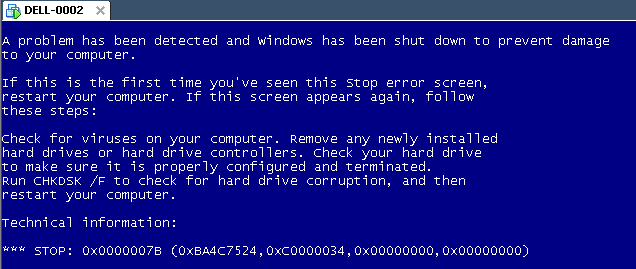
The same stop [Wayback] stop 0x0000007B can happen when converting a physical machine to VMware (I will schedule a separate post about this):
Windows XP Virtual Machine failing with stop 0x0000007B
Steps:
Put the SATA disk of the XP machine in a different one.
Disk2Vhd on the new machine to create a VHDX of the XP hard disk.
Install Hyper-V on the target Windows 8.1 machine (you need at least Pro for that).
Setup the base VM directory.
Setup a virtual network switch (decide if you want it to be internal, external or private, then bind it to a network adapter if needed).
Add a new VM.
Assign a new directory to it.
Assign memory to it.
Assign the virtual network switch to it.
Save it.
Edit the settings, then bind the DVD drive on the IDE controller 1 to C:\Windows\System32\vmguest.iso.
Connect to the VM.
Start it.
If you get a stop 0x0000007B (usually because of SATA/AHCI/IDE or other MassStorage controller driver issues), then read [Wayback] Jon’s Project Blog » disk2vhd using [Wayback] UBCD for Windows to solve the issue as there is no BIOS screen in Hyper-V that allows you to switch from AHCI to SATA and back.
As a follow up on the Cntlm configuration post last week, here is a small batch file that will find Cntlm.exe (on x86 and x64 systems) then start it in verbose mode.
This file contains hidden or bidirectional Unicode text that may be interpreted or compiled differently than what appears below. To review, open the file in an editor that reveals hidden Unicode characters. Learn more about bidirectional Unicode characters



 The Wiert Corner - irregular stream of stuff