Archive for the ‘Windows Server 2003’ Category
Posted by jpluimers on 2014/06/27
Console settings are kept in the registry.
The default settings are under HKEY_CURRENT_USER\Console in the DWORD values ScreenBufferSize and WindowSize.
Examples:
- buffer height/width
9999/120 is hex value 0x270f0078 in ScreenBufferSize (default 300 x 80 "ScreenBufferSize"=dword:012c0050").
- Window height/width
69/120 is hex value 0x00500078 in WindowSize (default 25 x 80 "WindowSize"=dword:00190050).
Depending on the window title, settings specific window title (console window name) are in additional keys under HKEY_CURRENT_USER\Console; each key has the name of the “console window name” with two twists:
- backslashes are replaced by underscores.
- your Windows directory is replaced with %SystemRoot%
So if your console window name is C:\Windows\system32\cmd.exe, the key name is HKEY_CURRENT_USER\Console\%SystemRoot%_system32_cmd.exe Read the rest of this entry »
Posted in Power User, Windows, Windows 7, Windows 8, Windows Server 2000, Windows Server 2003, Windows Server 2003 R2, Windows Server 2008, Windows Server 2008 R2, Windows Vista, Windows XP | Leave a Comment »
Posted by jpluimers on 2014/05/13
This article is a very brief example of how to use dsquery/dsget/find to get computer information from in the active direrctory of a domain.
The main aim for myself is to condense the information here, and have some links for background information.
If you have the right credentials then the below batch file works very well.
It uses these tools:
- dsquery to query the active directory on your domain controller for the existence and Distinguished Name (or ID/path) of various objects (in this example dsquery computer to check if a computer exists in a domain)
- dsget which can get you various detail information about an object (for instance dsget computer used in this example))
- find to raise the correct errorlevel (and indicate if we indeed found a CN – or Common Name – from a distinguished name)
The ds* tools do not raise any errorlevel, so that’s what find is used for.
Further reading: Read the rest of this entry »
Posted in Batch-Files, Development, Power User, Scripting, Software Development, Windows, Windows 7, Windows 8, Windows Server 2000, Windows Server 2003, Windows Server 2003 R2, Windows Server 2008, Windows Server 2008 R2, Windows Vista, Windows XP | Leave a Comment »
Posted by jpluimers on 2014/05/05
Thanks John Savill from Windows IT Pro:
To include comments in a registry file, place a semicolon (;) at the beginning of the line, as shown below:
; This will delete the key below because of the - sign

\[-HKEY_LOCAL_MACHINE\SOFTWARE\SavillTech\key\]
–jeroen
via: How do I place comments in a .reg file? | Windows Server content from Windows IT Pro.
Posted in Microsoft Surface on Windows 7, Power User, Windows, Windows 7, Windows 8, Windows Server 2000, Windows Server 2003, Windows Server 2003 R2, Windows Server 2008, Windows Server 2008 R2, Windows Vista, Windows XP | Leave a Comment »
Posted by jpluimers on 2014/04/20
I’m glad that junction did work to create a directory junction to link a directory from one NTFS file system to another with this small batch file (that falls back from mklink to junction):
  @echo off
:start
  if !%1!==!! goto :help
  goto :main
:help
  echo %0 TargetFolder
  echo   Creates directory symbolic link using MKLINK or JUNCTION so that TargetFolder points to %~dp0
  goto :eof
:main
  :: http://www.howtogeek.com/howto/windows-vista/using-symlinks-in-windows-vista/
  call :do mklink /D %1 %~dp0
  call :do junction %1 %~dp0
  goto :eof
:do
  echo %*
  %*
  goto :eof
Some more reading on juncions, hard links, symbolic links, etc:
Read the rest of this entry »
Posted in Power User, Windows, Windows 7, Windows 8, Windows 8.1, Windows Server 2000, Windows Server 2003, Windows Server 2003 R2, Windows Server 2008, Windows Server 2008 R2, Windows Vista, Windows XP | Tagged: Junction Points, NTFS file system, symbolic links | Leave a Comment »
Posted by jpluimers on 2014/04/16
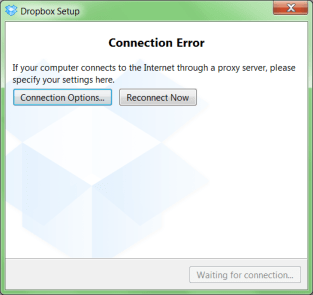
A while ago, I was working with a not so cooperative corporate firewall. All web browsers would work fine, but most other applications would not go through the proxy in a nice way.
For instance, DropBox would show the dreadfull “Connection Error” dialog shown on the right.
That dialog basically means “Dropbox has no clue what happens, try fiddling with your proxy or account settings, then press Reconnect Now” to retry.
Many other applications had issues (for instance Visual Studio connecting to Team Foundation System was very unreliable and the workarounds clumsy).
CNTLM: not the solution
I got inspired by the [WayBack] I code and code: Tutorial: How to use Dropbox behind a corporate proxy server using CNTLM, even though I was pretty sure the corporate firewall was not NTLM based.
And indeed, CNTLM -v -M http://google.com -c CNTLM.INI would give errors like this:
cntlm: Proxy returning invalid challenge!

headers_send: fd 4 warning -999 (connection closed)

Connection closed
HTTP Fiddler: looks promising
So I fired up my old buddy [WayBack] Fiddler 2 HTTP debugging proxy.
Further on, you will learn that Fiddler2 is much more, but right now it is enough to know that it basically sits as a local proxy between your applications and the outside world. Read the rest of this entry »
Posted in .NET, .NET 2.0, .NET 3.0, .NET 3.5, .NET 4.0, .NET 4.5, base64, Cntlm, Development, DropBox, Encoding, Fiddler, JavaScript/ECMAScript, NTLM, Power User, Scripting, SocialMedia, Software Development, Web Development, Windows, Windows 7, Windows 8, Windows Server 2000, Windows Server 2003, Windows Server 2003 R2, Windows Server 2008, Windows Server 2008 R2, Windows Vista, Windows XP, Windows-Http-Proxy | Leave a Comment »
Posted by jpluimers on 2014/04/11
This Explorer extension is brilliant: Path Copy Copy – Home.
It works in Windows XP and up (including 7, 8 .x, 20xx Server, etc).
The Open Source is done in Visual Studio with C++.
–jeroen
Read the rest of this entry »
Posted in C++, Development, Power User, Software Development, Visual Studio 2010, Visual Studio and tools, Windows, Windows 7, Windows 8, Windows 8.1, Windows Server 2003, Windows Server 2003 R2, Windows Server 2008, Windows Server 2008 R2, Windows Vista, Windows XP | Leave a Comment »
Posted by jpluimers on 2014/03/29
The upside of findstr is that it is included with Windows since a long time (at least since Windows XP, later: indeed since Windows ME) and supports a form of regex.
But often it drives you crazy.
When it does, read What are the undocumented features and limitations of the Windows FINDSTR command? – Stack Overflow.
–jeroen
Posted in Power User, Windows, Windows 7, Windows 8, Windows 8.1, Windows ME, Windows Server 2000, Windows Server 2003, Windows Server 2003 R2, Windows Server 2008, Windows Server 2008 R2, Windows Vista, Windows XP | Leave a Comment »
Posted by jpluimers on 2014/03/29
Brilliant piece of open source:
SmallestDotNet – SmallestDotNet.com is a single page site that does one thing. It tells you the smallest, easiest download you’d need to get the .NET Framework on your system.
Even on Mac OS X it is helpful and recommends Mono and on iOS it recommends looking at MonoTouch.
Thanks Scott Hanselman for making this available!
–jeroen
via:
Posted in .NET, .NET 1.x, .NET 2.0, .NET 3.0, .NET 3.5, .NET 4.0, .NET 4.5, Apple, Development, Mac, Mac OS X / OS X / MacOS, Mac OS X 10.4 Tiger, Mac OS X 10.5 Leopard, Mac OS X 10.6 Snow Leopard, Mac OS X 10.7 Lion, MacBook, MacBook Retina, MacBook-Air, MacBook-Pro, OS X 10.8 Mountain Lion, OS X 10.9 Mavericks, Power User, Software Development, Windows, Windows 7, Windows 8, Windows 8.1, Windows Server 2003, Windows Server 2003 R2, Windows Server 2008, Windows Server 2008 R2, Windows Vista, Windows XP | Tagged: .NET Framework, scott hanselman | Leave a Comment »
Posted by jpluimers on 2014/02/03
Once every while, a full screen app on your Mac hangs, and there is no way to Command-Tab to another application.
PC addicts then press Ctrl+Alt+Del, to either get to the Task Manager, or to logoff/reboot.
For a Mac, there are two:
- Force Quit Read the rest of this entry »
Posted in Apple, Keyboards and Keyboard Shortcuts, Mac, Mac OS X / OS X / MacOS, Mac OS X 10.4 Tiger, Mac OS X 10.5 Leopard, Mac OS X 10.6 Snow Leopard, Mac OS X 10.7 Lion, MacBook, MacBook-Air, MacBook-Pro, OS X 10.8 Mountain Lion, Power User, Windows, Windows 7, Windows 8, Windows Server 2000, Windows Server 2003, Windows Server 2003 R2, Windows Server 2008, Windows Server 2008 R2, Windows Vista, Windows XP | Leave a Comment »
Posted by jpluimers on 2014/01/13
This can happen when your Windows Security Token bloat has struck:
… the problem could be minor, or relatively major. You may get weird access denied messages, applications crashing, or strange entries in your event logs. Or worse yet a SID for a group that has a ‘deny permission’ on an object could be dropped into the virtual bit bucket, allowing a user to access a resource they are not supposed to access.
…
Summary of fixes for token bloat:
- Use global or universal groups instead of domain local.
- Increase the MaxTokenSize on all computers
- Convert security groups to distribution groups if they are only used for email lists.
…
There is a hard-coded limit of 1,024 SIDs for the Kerberos PAC (privilege attribute certificate)
…
Kerberos token size still remain to 64k in windows7 / win2008r2.
This is what UWWI did to avoid token bloat: UWWI Token Bloat – IAM – UW Information Technology Wiki.
–jeroen
via:
Posted in Power User, Windows, Windows 7, Windows 8, Windows Server 2000, Windows Server 2003, Windows Server 2003 R2, Windows Server 2008, Windows Server 2008 R2, Windows Vista, Windows XP | Leave a Comment »


 The Wiert Corner - irregular stream of stuff