Posted by jpluimers on 2021/11/01
Interesting:
Some corporate networks are behind HTTP proxy servers that use NTLM authentication. Dropbox currently doesn’t support this kind of proxy authentication. However, some users have reported some success using an intermediate proxy, such as [WayBack] NTLMAPS or [WayBack] cntlm, to get Dropbox running on their network.
This article explains steps on various systems to install proxies that support NTLM authentication: [WayBack] Allow Dropbox to Authenticate With a NTLM Proxy Server – The Unofficial Dropbox Wiki.
Need to try these. Maybe they work for Copy.com too (:
Some other links around HTTP Fiddler that might be relevant: Read the rest of this entry »
Posted in Cntlm, Copy.com, DropBox, NTLM, Power User, SocialMedia, Windows, Windows-Http-Proxy | Leave a Comment »
Posted by jpluimers on 2016/10/31
When you share a screenshot with Dropbox, then it will copy a URL to the clipboard like this: https://www.dropbox.com/s/mzm7uf775rnjvnv/Screenshot%202015-01-29%2022.25.15.png?dl=0
That is not the actual screenshot. It is a web page around the screenshot that contains a lot of hoopla so you cannot easily copy the download link of the image.
Getting that download link is easy: make the below replacement:
Example: https://www.dropbox.com/s/mzm7uf775rnjvnv/Screenshot%202015-01-29%2022.25.15.png?raw=01
Or embedded:

–jeroen
via How to directly link or embed Dropbox images – Canton Becker.
Posted in DropBox, Power User, SocialMedia | Leave a Comment »
Posted by jpluimers on 2016/03/23
As copy.com will go down on 20160501 (about 6 weeks from now), I’m searching for alternatives.
These tables weren’t really useful when digging information for my use cases:
Use cases
This is how we use copy.com (where our installed machines have Windows, Mac OS X and Linux on them) now:
- Sync and share between our scanner VM, the various machines of my wife and me (using the different accounts for each user) and including off-site/in-cloud storage.
This holds for about 20 gigabytes of data and grows about 1.5-2 gigabytes per year.
- Sync project documents between various business contacts and myself (the documents that aren’t part of versioning systems yet).
Not much data yet (100s of megabytes as most people tend to use DropBox for this even though Copy.com has the option of setting permissions)
- Sync and share my BIN directory tree with tools where my own user has read/write permissions and other users have read-only permissions.
This holds for about 2 gigabytes of data.
- Sync and share my installer directory (ISOs, MSIs, DMGs, etc) between my main Mac and Windows machines and various other ones.
This holds for about 40 gigabytes of data and grows faster than any of the others.
Dropbox doesn’t cut it for various reasons:
- It sucks at long filenames (especially on Windows).
- It won’t properly handle various encodings (like between Windows and Mac).
- Often it hangs on local-sync (although copy.com also does that, but less often).
What to choose?
On my shortlist to experiment with are Google Drive and Mega.nz, although it’s not clear if Mega.nz handles syncing well (Ken Logon thinks it looses data) and it’s security might not be good (although that’s a statement by Kim Dotcom who has stakes).
Any others? Or should I choose a mix of tooling?
Tencent/Weiyun might be useful for ISO images of installers (like the ISOs MSDN doesn’t have any more): Download Tencent/Weiyun 10TB cloud storage english language files
–jeroen
PS: later (20160402) via KPN stopt 1 augustus met cloudopslagdienst Up – IT Pro – Nieuws – Tweakers
Posted in Copy.com, DropBox, Power User, SocialMedia | 1 Comment »
Posted by jpluimers on 2016/02/05
Copy had some advantages and disadvantages. For instance, it was better handling long file names, character encodings in filenames and a lot easier to configure over a CNTLM proxy than DropBox, but unlike DropBox didn’t keep history of changes.
Alas no more copy.com as of 20160501: [WayBack] Barracuda Copy – Copy End-of-Life.
They suggest using [WayBack] Mover with OneDrive as target: [WayBack] Barracuda Copy – Moving Your Data from Copy
Note that Mover has many more connectors, including cloud storage ones (Box, Copy, Dropbox, Google Drive, OneDrive and Yandex.Disk are free):
[WayBack] Connectors • Mover: FTP, Dropbox, Box, GoogleDrive, Copy, Egnyte, Amazon S3, SharePoint, MySQL the list goes on!
For me it means it’s time to think about what kinds of cloud storage I want to use and how to share what data with others at which access level. As I’m already contemplating on how to use ZFS, I now have two storage concepts to think about.
–jeroen
Posted in Cloud, Cloud Apps, Cntlm, Copy.com, DropBox, Infrastructure, NTLM, Power User, SocialMedia, Windows, Windows-Http-Proxy | Leave a Comment »
Posted by jpluimers on 2015/08/21
I like this: the plug-up affordable FIDO U2F Security Key by HAPPLINK.
You could already use it for Google 2nd factor authentication (2FA) through Chrome. You can do this from your own applications for instance through the U2F reference implementation.
Now you can also as 2FA to DropBox, also through Chrome. And it is easy with the plug-up key (Thanks Kristian):
Uuuund… umgestellt. Das war ja einfach.
http://www.amazon.de/dp/B00OGPO3ZS
Es gibt andere Fido Token, die können mehr. Ich nehme dieses, das kostet fast nix und man kann die kaufen und verteilen wie Konfetti.
Or inside the Europe mainland, for instance in:
–jeroen
via: Dropbox adds u2f support … if you connect to it via Chrome. If I’m not….
Posted in Chrome, DropBox, Google, GoogleAuthenticator, LifeHacker, Power User, Security, SocialMedia, U2F FIDO Security Keys | Leave a Comment »
Posted by jpluimers on 2015/01/29
These tips usually won’t help: What do I do if Dropbox is stuck syncing, won’t launch, or reports an error? (Dropbox Help Center).
This one does help, but you need to terminate the Dropbox.exe process through Taskmanager first: How to Solve Dropbox Problems Syncing – LockerGnome.
Currently dropbox sync stalls after 50-300 files are transferred.
–jeroen
Posted in DropBox, SocialMedia | Leave a Comment »
Posted by jpluimers on 2014/07/18
Interesting for people that do not trust Cloud Storage providers: BitTorrent Labs’ BitTorrent Sync.
I’ve tried an early version, and it works “OK”. Not yet as well-integrated like for instance DropBox, but stable and fast enough.
Important thing for me: works on *nix, OS X and Windows. Hopefully mobile devices will follow soon.
At the time of writing (May 2013), it is the only cross platform freeware entry in Comparison of file synchronization software – Wikipedia, the free encyclopedia.
In the mean time, Thomas Mueller (dummzeuch)wrote a nice blog post with background information on this: Bittorrent Sync, a secure DropBox alternative » twm’s blog.
–jeroen
Posted in *nix, Apple, DropBox, Linux, Mac, Mac OS X / OS X / MacOS, MacBook, MacBook Retina, MacBook-Air, MacBook-Pro, OS X 10.8 Mountain Lion, Power User, SocialMedia, SuSE Linux | Leave a Comment »
Posted by jpluimers on 2014/04/16
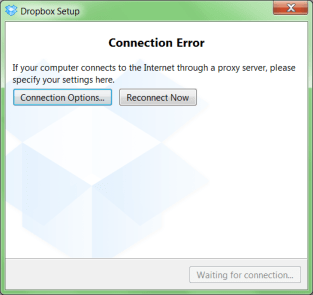
A while ago, I was working with a not so cooperative corporate firewall. All web browsers would work fine, but most other applications would not go through the proxy in a nice way.
For instance, DropBox would show the dreadfull “Connection Error” dialog shown on the right.
That dialog basically means “Dropbox has no clue what happens, try fiddling with your proxy or account settings, then press Reconnect Now” to retry.
Many other applications had issues (for instance Visual Studio connecting to Team Foundation System was very unreliable and the workarounds clumsy).
CNTLM: not the solution
I got inspired by the [WayBack] I code and code: Tutorial: How to use Dropbox behind a corporate proxy server using CNTLM, even though I was pretty sure the corporate firewall was not NTLM based.
And indeed, CNTLM -v -M http://google.com -c CNTLM.INI would give errors like this:
cntlm: Proxy returning invalid challenge!

headers_send: fd 4 warning -999 (connection closed)

Connection closed
HTTP Fiddler: looks promising
So I fired up my old buddy [WayBack] Fiddler 2 HTTP debugging proxy.
Further on, you will learn that Fiddler2 is much more, but right now it is enough to know that it basically sits as a local proxy between your applications and the outside world. Read the rest of this entry »
Posted in .NET, .NET 2.0, .NET 3.0, .NET 3.5, .NET 4.0, .NET 4.5, base64, Cntlm, Development, DropBox, Encoding, Fiddler, JavaScript/ECMAScript, NTLM, Power User, Scripting, SocialMedia, Software Development, Web Development, Windows, Windows 7, Windows 8, Windows Server 2000, Windows Server 2003, Windows Server 2003 R2, Windows Server 2008, Windows Server 2008 R2, Windows Vista, Windows XP, Windows-Http-Proxy | Leave a Comment »


 The Wiert Corner - irregular stream of stuff