The Wiert Corner – irregular stream of stuff

Jeroen W. Pluimers on .NET, C#, Delphi, databases, and personal interests

  • My badges

  • Twitter Updates

  • Pages

  • All categories

  • Enter your email address to subscribe to this blog and receive notifications of new posts by email.

    Join 1,854 other subscribers

Beyond console.log() – Matt Burgess – Medium

Posted by jpluimers on 2020/05/26

Not yet structured logging, but it brings more structure to your console.log() output:

There is more to debugging JavaScript than console.log to output values. It might seem obvious I’m going to pimp the debugger, but…

[WayBack]: Beyond console.log() – Matt Burgess – Medium

Via: [WayBack] Really useful article for #JavaScript developers: Going beyond #console.log for #debugging and #logging. Some gold i nthis article that may just save yo… – Jason Mayes – Google+

–jeroen

Posted in Development, JavaScript/ECMAScript, Scripting, Software Development, Web Development | Leave a Comment »

How to move Git submodule to sub-directory? – Stack Overflow

Posted by jpluimers on 2020/05/26

It’s a few steps as per [WayBackHow to move Git submodule to sub-directory? – Stack Overflow, so I’m not sure it is the best solution, but it at least works (thanks Philzen):

Had the same problem just the moment ago and ended up deleting the submodule reference (as outlined in this article) and recreating it where i wanted it to go.

To follow your example of moving submodule jquery into repos/jquery

  1. Delete the (typically three lines) submodule reference from .gitmodules.
  2. Check .git/config for references to the submodule and remove them, if existent
  3. do git rm --cached jquery to cut the submodule reference out of the repository
  4. remove the old submodule folder
  5. recreate you submodule reference (as you possibly did before) with git submodule add git://github.com/jquery/jquery.git repos/jquery

In case your submodule was set to specific tag, respectively commit (which you’ll surely have in a stable project) you will have set it again.

Due to this complex process i am strongly hoping there is (or will be, at least on the git roadmap) a more straightforward way of achieving this. If not, surely some scripts could be fumbled together to do this quicker…

References:

–jeroen

Posted in Development, DVCS - Distributed Version Control, git, Software Development, Source Code Management | Leave a Comment »

Jeroen Pluimers on Twitter: “Hi dpi is a mess, not just on Windows. It will take considerable time to overcome the decades long Pixel mess we’ve been coming from (:”

Posted by jpluimers on 2020/05/26

Two years later, it is a reminder to look at my statement again: [WayBackJeroen Pluimers on Twitter: “Hi dpi is a mess, not just on Windows. It will take considerable time to overcome the decades long Pixel mess we’ve been coming from (:”

–jeroen

Posted in Apple, Development, Mac OS X / OS X / MacOS, Power User, Software Development, Windows | Leave a Comment »

When NTFS shrink fails, despite using the default settings from the shrink dialog

Posted by jpluimers on 2020/05/25

Sometimes an NTFS shrink still fails, even though you use the built in Windows defragmentation tools, of SysInternals contig tool.

The best you can do is to follow the steps in:

  1. run diskmgmt.msc to try shrinking the disk, then often it is already in the error message: “You can’t shrink a volume beyond the point where any unremoveable files are located see the defrag event in application log for detailed information about the operation when it has completed.”
  2. use eventvwr.exe and look at the Windows Logs for the most recent Application entries that has Source set to defrag

Those defrag entries usually tell about the last file that could not be moved.

You can use wevtutill to query events on the commandline.

Note that contrary to [WayBack] WEVTUTIL – Windows CMD – SS64.com documentation, the option /rd cannot be expanded to /reversedirection , as you will get an error “invalid option reversedirection” – Google Search.

For querying the above defrag event, use this command line (replace /format:XML with /format:text for more readable but also more verbose output):

wevtutil query-events Application /count:2 /format:XML /rd:true /query:"*[System[(EventID=259)]]"

On Windows 10, this is often caused by “System Protection” which locks files under C:\Recovery, but I have also seen $BITMAP, $MFT and $DATA entries.

System protected drives

To view which drives are currently used for system protection (this opens the “System Properties” dialog focussed on the “System Protection” tab):

SystemPropertiesProtection.exe

To disable it for one drive:

Disable-ComputerRestore -Drive "C:"

To enable it for one drive:

Enable-ComputerRestore -Drive "C:"

There seems to be no easy one-command PowerShell way to view the drives have ComputerRestore enabled, as this does not show drive letters:

PowerShell Get-ComputerRestorePoint ^| Format-List

The above gives more detailed output than a plain PowerShell Get-ComputerRestorePoint

Deleting restore points

PowerShell does not have a built-in option to delete restore points, but vssadmin has, but calls them “shadows”.

First list them:

vssadmin list shadows

Then delete them (but be aware this will not prompt for confirmation because of the /quiet):

vssadmin delete shadows /for=C: /quiet

You can also delete them for all drives (this will not prompt for confirmation either):

vssadmin delete shadows /all /quiet

Stopping the volume shadow copy service:

net stop vss

Managing hibernation and page file

Hibernation:

powercfg.exe /hibernate off

powercfg.exe /hibernate on

Page file:

wmic pagefile list /format:list
AllocatedBaseSize=2944

CurrentUsage=0
Description=C:\pagefile.sys
InstallDate=20181018215808.683376+120
Name=C:\pagefile.sys
PeakUsage=0
Status=
TempPageFile=FALSE

wmic computersystem where name="%computername%" get AutomaticManagedPagefile
AutomaticManagedPagefile
TRUE

wmic computersystem where name="%computername%" set AutomaticManagedPagefile=False
Updating property(s) of '\\MYCOMPUTER\ROOT\CIMV2:Win32_ComputerSystem.Name="LAPTOPUW08"'
Property(s) update successful.

wmic computersystem where name="%computername%" get AutomaticManagedPagefile
AutomaticManagedPagefile
FALSE

wmic.exe pagefileset where name="C:\\pagefile.sys" delete
Deleting instance \\MYCOMPUTER\ROOT\CIMV2:Win32_PageFileSetting.Name="C:\\pagefile.sys"
Instance deletion successful.

Sometimes the deletion does not work (see below for workaround):

wmic pagefile list /format:list

AllocatedBaseSize=2944
CurrentUsage=0
Description=C:\pagefile.sys
InstallDate=20181018215808.683376+120
Name=C:\pagefile.sys
PeakUsage=0
Status=
TempPageFile=FALSE

Do not do this:

wmic pagefile delete
Deleting instance \\MYCOMPUTER\ROOT\CIMV2:Win32_PageFileUsage.Name="C:\\pagefile.sys"
ERROR:
Description = Provider is not capable of the attempted operation

wmic pagefileset set name="c:\\pagefile.sys",InitialSize=0,MaximumSize=0
No Instance(s) Available.

Sometimes it still fails, so then you have to use the UI:

  1. Run SystemPropertiesAdvanced.exe
  2. Under Performance, click on Settings
  3. Click the Advanced tab
  4. Under Virtual memory, click the Change button
  5. Ensure Automatically manage page file size for all drives is disabled
  6. Ensure No paging file is selected
  7. Click the Set button
  8. Confirm you really want no page file
  9. Press on the three OK buttons to fully leave the Advanced System Properties dialog.
  10. Reboot

After resizing the disk, reverse the steps:

  1. Run SystemPropertiesAdvanced.exe
  2. Under Performance, click on Settings
  3. Click the Advanced tab
  4. Under Virtual memory, click the Change button
  5. Ensure Automatically manage page file size for all drives is enabled
  6. Confirm you really want no page file
  7. Press on the three OK buttons to fully leave the Advanced System Properties dialog.
  8. Reboot

Bitmap file

Sometimes the file blocking the resize is the NTFS "\$BitMap::$DATA", which few defragmentation tools can move as it is the MFT Bitmap.

Background reading

–jeroen

Posted in CommandLine, Console (command prompt window), Development, Power User, PowerShell, PowerShell, Scripting, Software Development, Windows | Leave a Comment »

Raspberry Pi 1B OpenSuSE Tumbleweed zypper upgrade problem · GitHub

Posted by jpluimers on 2020/05/25

It looks like OpenSuSE has stopped supporting Raspberry Pi 1, so the best likely is to recycle it into a Pi-Hole as basically it’s been dead since mid 2017: [WayBack] Raspberry Pi 1B OpenSuSE Tumbleweed zypper upgrade problem · GitHub.

Build status for armv6l support: [WayBack] Project openSUSE:Factory:ARM Status Monitor – openSUSE Build Service

–jeroen

Read the rest of this entry »

Posted in *nix, *nix-tools, Debian, Development, Hardware Development, History, Linux, openSuSE, Power User, Raspberry Pi, Raspbian, SuSE Linux, Tumbleweed | Leave a Comment »

Secure Shell – Chrome Web Store

Posted by jpluimers on 2020/05/25

Interesting: Secure Shell – Chrome Web Store. But does not work behind an SSH blocking firewall, seem more on that below.

Terminal emulator and SSH client.

Secure Shell is an xterm-compatible terminal emulator and stand-alone ssh client for Chrome. It uses Native-Client to connect directly to ssh servers without the need for external proxies.

Secure Shell is a Beta release and has known bugs.

Please read the FAQ, available here: http://goo.gl/3i5AJ.

You can also exchange feedback in the chromium-hterm mailing list, available here: http://goo.gl/RYHiK.

Edit 20240818: the above Googl links will die; the redirects back at the time of writing in 2014 where to:

  1. [Wayback/Archive] [chromiumos/platform/assets.git] / chromeapps / nassh / doc / faq.txt which first moved to [Wayback/Archive] hterm and Secure Shell – nassh/doc/FAQ.md and later moved to [Wayback/Archive] hterm and Secure Shell – nassh/docs/FAQ.md.
  2. [Wayback/Archive] chromium-hterm – Google Groups which now has moved to [Wayback/Archive] chromium-hterm – Google Groups.

It is based on [WayBackGitHub – chromium/hterm: MOVED: Please use the new libapps repo on chromium.googlesource.com insteadf.

With relays, you can tunnel over SSH. Two relays are on github:

Resources:

--jeroen

via: Secure Shell – Chrome Web Store.

Posted in Chrome, Google, Power User | Leave a Comment »

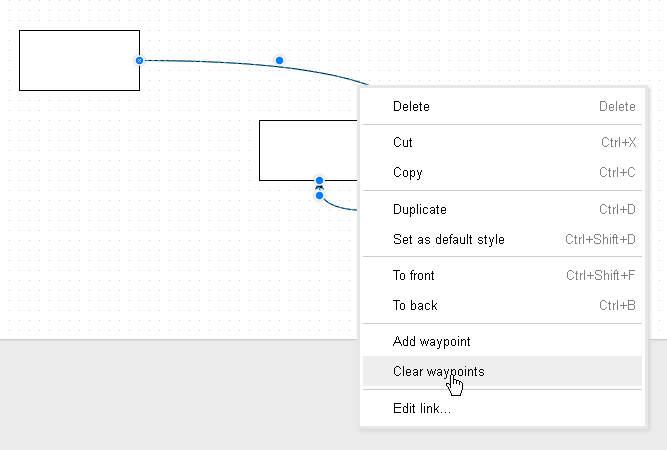
draw.io: the only way to remove shape waypoints is all of them via the context menu (via Tutorial 3 … draw.io Support)

Posted by jpluimers on 2020/05/22

Via [WayBack] Tutorial 3 – Connectors, Waypoints, and Altering Shapes – draw.io Online – draw.io Support: this is the only way to remove waypoints on a shape:

  1. context menu
  2. clear all

–jeroen

Posted in Cloud Apps, draw.io, Internet, Power User | Leave a Comment »

Expect your sites to be accessed over https and ensure your certificates match

Posted by jpluimers on 2020/05/22

igOver the last lustrum, there has been a steady increase in https usage. It crossed the 30% mark early 2016, crossing the 50% mark early 2017 and 80% mark early 2018, even the https-by-default configuration is now pretty large:

Ever since 2012, but especially with the increased HTTPS adoption, you can expect more and more users to run plugins like HTTPS Everywhere – Wikipedia which switch a request from insecure http to secure https.

Read the rest of this entry »

Posted in Encryption, HTTPS/TLS security, Let's Encrypt (letsencrypt/certbot), Power User, Security | Leave a Comment »

Authssh from Windows

Posted by jpluimers on 2020/05/22

Running autossh from Windows is still on my list, so here are a few links:

–jeroen

Posted in Communications Development, Development, Internet protocol suite, Power User, SSH, TCP, Windows | Leave a Comment »

learning golang

Posted by jpluimers on 2020/05/21

Interesting course: [WayBack] Go: The Complete Developer’s Guide (Golang) | Udemy Master the fundamentals and advanced features of the Go Programming Language (Golang)

It covers:

  • Basics / Hello world
  • Structs
  • Pointers
  • Interfaces
  • Channels / Go Routines

–jeroen

Posted in Development, Go (golang), Software Development | Leave a Comment »