The Wiert Corner – irregular stream of stuff

Jeroen W. Pluimers on .NET, C#, Delphi, databases, and personal interests

  • My badges

  • Twitter Updates

  • My Flickr Stream

  • Pages

  • All categories

  • Enter your email address to subscribe to this blog and receive notifications of new posts by email.

    Join 1,835 other subscribers

Google old content posted before a specific date

Posted by jpluimers on 2019/05/15

Steps:

  1. Start with something like https://www.google.com/search?q=”did+you+hear+about+the+man”+”he%27s+0K+now”
  2. Clicking Tools followed by Any Time, then Custom range often does not show a dialog.
  3. Appending &tbs=qdr:y to the URL magically enables that popup:
    https://www.google.com/search?q=”did+you+hear+about+the+man”+”he%27s+0K+now”&tbs=qdr:y
  4. After filling it in, you get a very different URL like https://www.google.com/search?q=”did+you+hear+about+the+man”+”he%27s+0K+now”&tbs=cdr:1,cd_min:,cd_max:01-01-2007

This is how I found the post in Did you hear about the man who got cooled to absolute zero? He’s 0K now.

I think cdr stands for custom date range and qdr for a built in date range as after searching for the abbreviations, I found [WayBack] Google Search URL Request Parameters | DETECTED that discusses tbm and tbo in addition to tbs.

The trick above is the successor of [WayBack] Filter Google Results by Date with a URL Trick which appended &as_qdr=d.

–jeroen

Posted in Google, GoogleSearch, Power User | Leave a Comment »

Need to try this: overloaded default properties

Posted by jpluimers on 2019/05/15

[Archive.is] Need to try this: … multiple default index properties having the same name …getters can be overloads … resolve …by type signature … – Thomas Mueller (dummzeuch) – Google+, thanks to marck for this brilliantly simple example:

private
  function GetColumnValue(const ColumnName: string): string; overload;
  function GetColumnValue(Index: Integer): string; overload;
  procedure SetColumnValue(Index: Integer; const Value: string);
public
  property Values[const ColumnName: string]: string read GetColumnValue; default;
  property Values[ColumnIndex: Integer]: string read GetColumnValue write SetColumnValue; default;
end;

This means:

  • you can have multiple default indexor properties
  • the multiple indexor properties can have the same name e.g., Values
  • the properties getters can be overloads (i.e. have the same name) e.g., GetColumnValue
  • Delphi will resolve the overloads by type signature

–jeroen

Posted in Delphi, Development, Software Development | Leave a Comment »

Time capsule opening ceremony today at MIT’s Stata Center after programmers solve MIT’s 20-year-old cryptographic puzzle | MIT CSAIL

Posted by jpluimers on 2019/05/15

[WayBack] Programmers solve MIT’s 20-year-old cryptographic puzzle | MIT CSAIL:

The capsule ceremony will happen Wednesday, May 15 at 4 p.m. at MIT’s Stata Center.

Cool work, with a very cool challenge.

Via/related:

  • a

–jeroen

Posted in Development, Power User, Security, Software Development | Leave a Comment »

Some links on ShellNew: a user local place (registry and file system) to have Visual Studio templates for Blank Solution files

Posted by jpluimers on 2019/05/14

Some systems to not have a %windir%\ShellNew directory, so here are some links and observations on ShellNew entries in the registry.

Originally, I needed this for Creating a blank Visual Studio solution without a directory, and sln Format Version numbers but found a default installation did not have a %windir%\ShellNew directory.

A similar Windows 8.1 system had these files there:

  • EXCEL12.XLSX
  • MSPUB.PUB

On the Windows 10 system, these files were in C:\Program Files (x86)\Microsoft Office\root\vfs\Windows\SHELLNEW, so apparently, Windows 10 has moved more into a Virtual File System structure.

Machine wide registered extensions

The key HKEY_CLASSES_ROOT\.zip\CompressedFolder\ShellNew on both systems has the below values, indicating you do not need a file template: a binary template in the registry suffices:

  • Data having REG_BINARY content of a 22-byte empty .zip file
  • ItemName having a REG_EXPAND_SZ content pointing to @%SystemRoot%\system32\zipfldr.dll,-10194

The key HKEY_CLASSES_ROOT\.rtf\ShellNew on both systems has the below values, indicating you do not need a file template: a text template in the registry suffices:

  • Data having REG_SZ content of a 7 character file content {\rtf1}
  • ItemName having a REG_EXPAND_SZ content pointing to @%ProgramFiles%\Windows NT\Accessories\WORDPAD.EXE,-213

The key HKEY_CLASSES_ROOT\.bmp\ShellNew on both systems has the below values, indicating you do not need a file template: a zero byte template in the registry suffices:

  • NullFile having an empty REG_SZ
  • ItemName having a REG_EXPAND_SZ content pointing to @%systemroot%\system32\mspaint.exe,-59414

User wide registered extensions

At HKEY_CURRENT_USER\Software\Microsoft\Windows\CurrentVersion\Explorer\Shell Folders, is a value named Templates having an absolute path which can be expanded from %AppData%\Microsoft\Windows\Templates.

That directory was empty, but it is connected to the HKEY_CURRENT_USER\Software\Classes counterpart of HKEY_CLASSES_ROOT (the latter is an alias for HKEY_LOCAL_MACHINE\SOFTWARE\Classes).

So in stead of putting template files in %WinDir%\ShellNew plus registering them underHKEY_CLASSES_ROOT, you can put them in %AppData%\Microsoft\Windows\Templates and register them under HKEY_CURRENT_USER\Software\Classes.

Empty Visual Studio solution files for the current user

Since people have requested empty solution files to be created without creating a directory for a long time ([WayBack] create solution without folder – Visual Studio) and Visual Studio still does not allow you to do that, I have amended the %WinDir%\ShellNew based solution I created some 7 years ago at  Creating a blank Visual Studio solution without a directory, and sln Format Version numbers, to a current user based one:

[WayBack] jeroenp / wiert.me / commit / 01e4430712a6 — Bitbucket:

Amend empty Visual Studio templates to support%AppData%\Microsoft\Windows\Templates referenced from HKEY_CURRENT_USER\Software\Classes

Future

I might be able to morph this into a registry-only solution by using REG_MULTI_SZtyped values containing the actual .sln template content as multi-line strings separated by zero bytes. Some starting links on this for future reading:

Related

–jeroen

Posted in Power User, Windows, Windows Explorer / Windows Shell | Leave a Comment »

On the Effectiveness of Static Typing in Detecting Public Bugs

Posted by jpluimers on 2019/05/14

Cool research paper from a while back but still soo relevant:

The project page for an ICSE’17 paper, To Type or Not to Type: Quantifying Detectable Bugs for JavaScript

JavaScript is also a dynamically typed language for which static type systems, notably Facebook’s Flow and Microsoft’s TypeScript, have been written. What benefits do these static type systems provide?

Source: [Archive.isOn the Effectiveness of Static Typing in Detecting Public Bugs


Other saved links:

–jeroen

via: [WayBack/Archive.is] Slashdot drew my attention to this ressearch … http://ttendency.cs.ucl.ac.uk/projects/type_study/ An argument for languages like Delphi. – Roland Kossow – Google+

Posted in Development, JavaScript/ECMAScript, Scripting, Software Development, TypeScript | Leave a Comment »

if statement – How to ask for batch file user input with a timeout – Stack Overflow

Posted by jpluimers on 2019/05/14

The trick is to use the choice command; see [WayBackif statement – How to ask for batch file user input with a timeout – Stack Overflow

–jeroen

Posted in Batch-Files, Development, Microsoft Surface on Windows 7, Power User, Scripting, Software Development, Windows, Windows 10, Windows 7, Windows 8, Windows 8.1, Windows 9, Windows Server 2000, Windows Server 2003, Windows Server 2003 R2, Windows Server 2008, Windows Server 2008 R2, Windows Server 2012, Windows Server 2012 R2, Windows Server 2016, Windows Vista, Windows XP | Leave a Comment »

Where is the Chrome settings file? – Super User

Posted by jpluimers on 2019/05/13

[WayBack] Where is the Chrome settings file? – Super User, on various platforms as a folder named Default under:

In Windows%LocalAppData%\Google\Chrome\User Data\
In OS X~/Library/Application Support/Google/Chrome/
In Linux~/.config/google-chrome/

The easiest way to find out the actual location is by browsing to chrome://version/ as per [WayBack] google chrome – Disabling “Sign In ” tab on startup – Super User. There the entry Profile Path will show the actual profile location.

Inside that path is a JSON file called preferences which you can edit if Chrome is closed (since Chrome will overwrite it regularly when active).

A few entries I saw are interesting:

  • Restoring the session on startup:
        "session": {
          "restore_on_startup": 1
        },
  • While running
        "exit_type": "Crashed",
        "exited_cleanly": true,
  • After closing
        "exit_type": "Normal",
        "exited_cleanly": true,
    

A trick to restore the session after you quite Chrome is to replace "exited_cleanly":true with "exited_cleanly":false in the Preferences file.

–jeroen

Posted in Chrome, Google, Power User | Leave a Comment »

Fashion – AGREEorDIE – How to tie a necktie not

Posted by jpluimers on 2019/05/13

Dozens of variations with links to youtube videos by Alex Krasny on how to tie them: [WayBackFashion – AGREEorDIE: How to tie a necktie not

–jeroen

Posted in LifeHacker, Power User | Leave a Comment »

command line – How to access a usb flash drive from the terminal? – Ask Ubuntu

Posted by jpluimers on 2019/05/13

Based on [WayBackcommand line – How to access a usb flash drive from the terminal? – Ask Ubuntu

Figure out the device:

  • lsblk
  • sudo blkid
  • sudo fdisk -l

Mount the device (assuming it is /dev/sdb1):

  • sudo mount /dev/sdb1 /media/usb
  • pmount /dev/sdb1
  • udisksctl mount -b /dev/sdb1

Unmounting and eject is in [WayBack] Linux (Ubuntu): safely remove USB flash disk via command line – Stack Overflow

–jeroen

Posted in *nix, *nix-tools, Linux, Power User | Leave a Comment »

When Ctrl-Click in a Windows VMware Fusion VM does right-click, when you thought you turned that off

Posted by jpluimers on 2019/05/10

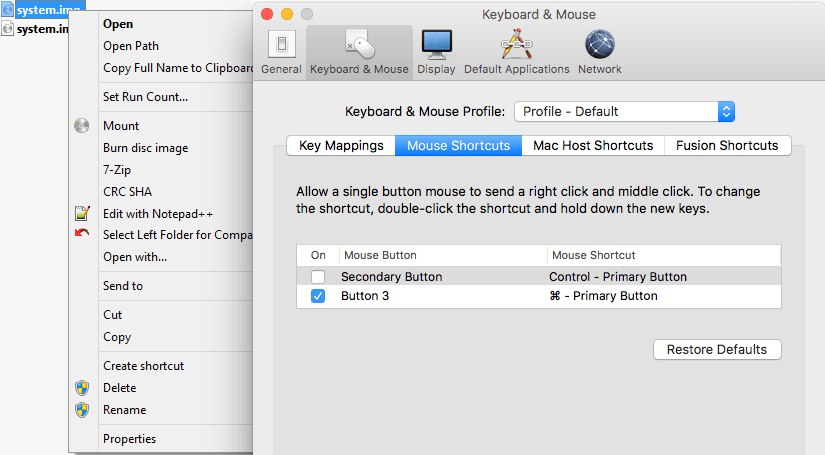
A while ago, I was surprised that in a Windows VM running under VMware Fusion, the Ctrl-Click performed a right click, despite me having changed the configuration:

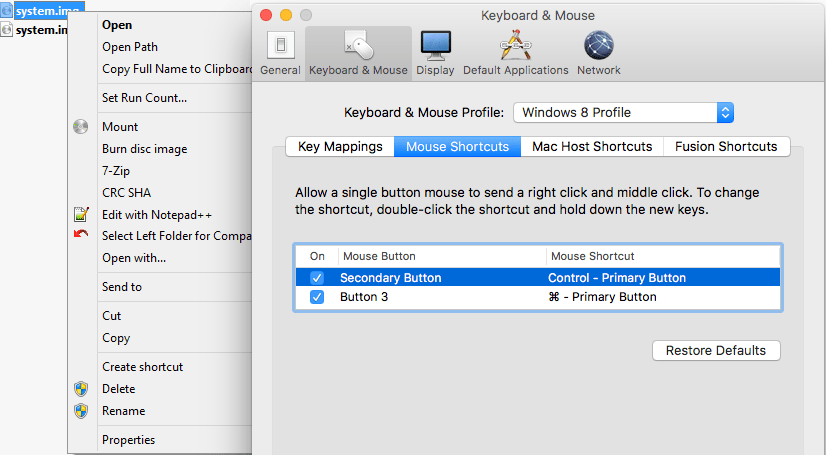
I was wrong, as I had forgotten I assigned the “Windows 8 Profile” tot hat VM (as it was running Windows 8.1), which had the Secondary Button still mapped to the Control+Primary Button:

Related:

–jeroen

Posted in Fusion, Power User, Virtualization, VMware, Windows | Leave a Comment »