The Wiert Corner – irregular stream of stuff

Jeroen W. Pluimers on .NET, C#, Delphi, databases, and personal interests

  • My badges

  • Twitter Updates

  • My Flickr Stream

  • Pages

  • All categories

  • Enter your email address to subscribe to this blog and receive notifications of new posts by email.

    Join 1,860 other subscribers

Archive for August, 2015

Zypper or YaST locked: System management is locked by the application with pid ##### (/usr/lib/YaST2/bin/y2base).

Posted by jpluimers on 2015/08/24

A while ago, I got this error:

Accessing the Software Management Failed
System management is locked by the application with pid 17730 (/usr/lib/YaST2/bin/y2base).
Close this application before trying again.

Would you like to abort or try again?

[Retry] [Abort]

What happened is that a terminal session that had YaST open got disconnected (don’t you love WiFi) while checking for updates.

I tried to re-login and re-check for updates and got this error.

Looking for process 17730 indeed revealed it was YaST:

snap:~ # ps 17730
  PID TTY      STAT   TIME COMMAND
17730 pts/0    Sl+    0:11 /usr/lib/YaST2/bin/y2base online_update ncurses

A simple kill would get rid of that process:

sudo kill 17730

–jeroen

via: yast locked.

Posted in *nix, Linux, openSuSE, Power User, SuSE Linux | Leave a Comment »

Was ist Cloud? Great presentation including transcript by Kristian Köhntopp.

Posted by jpluimers on 2015/08/23

When one of my DevOps friends asks: Was ist Cloud?.

Kristian Köhntopp even published it as a SlideShare deck with transcript: Was ist Cloud?.

There is even a video: Froscon “Was ist Cloud?” – Video.

Thanks a million, Kris, this is very much worth reading for anybody doing Ops, Dev or DevOps.

There is even a

If you can’t read German: tough luck (;

–jeroen

Read the rest of this entry »

Posted in Cloud, Development, Firewall, Infrastructure, Software Development | Leave a Comment »

Are these universal for any ceiling fan/light? (the IR receivers of our BULLIT one broke) – via: Home Theater Discussions And Reviews

Posted by jpluimers on 2015/08/22

Bullit ceiling fan with light.

Bullit ceiling fan with light.

We have two “Bullit” ceiling fans with built-in dimmable lights. Both of them started to malfunction after about 10 years of usage, about a year apart.

They are really nice, both in looks and build quality (heavy duty electric motor, cast aluminium block, screws nicely hidden away).

So this weekend, I took the canopy apart and found out that the receiver device that processes the infra-red signal has broken: it does not pass on the incoming current to either the light or the fan engine.

That receiver part looks like this (handheld is on the right):

  • bottom: 3 incoming wires (Phase, Earth, Neutral),
  • top: 3 outgoing wires (Phase Fan, Phase Light, Neutral),
  • connector for IR sensor
  • Connector to wire Earth to aluminium body

    Handheld infra-red transmitter (required 9-volt battery).

    Handheld infra-red transmitter (required 9-volt battery).

Bullit ceiling fan/light infra red receiver.

Bullit ceiling fan/light infra red receiver.

I came across a Westinghouse GS–26-78095-WH08 model. The image is below

Is that a universal replacement for many ceiling fan/light devices?


via Does an infrared ceiling fan exist? – AVS Forum | Home Theater Discussions And Reviews.

–jeroen   Read the rest of this entry »

Posted in LifeHacker, Power User | Leave a Comment »

Google thinks google.com is in German. How can I prevent that? +GoogleTranslate

Posted by jpluimers on 2015/08/22

This was a search for ISDN S0 bus: https://www.google.com/search?q=ISDN+S0+bus

Google thinks it is in German, but it is in English: even the html tag indicates it is in English:

<!doctype html><html itemscope="" itemtype="http://schema.org/SearchResultsPage" lang="en"><head><meta content="/images/google_favicon_128.png" itemprop="image"><meta content="origin" id="mref" name="referrer">

I cannot change the page so nothing I can use from the suggestions in html – Why does Chrome incorrectly determine page is in a different language and offer to translate? – Stack Overflow.

Anybody knows what can I do to prevent this wrong guess?

Can anyone from +GoogleTranslate please step in?

Read the rest of this entry »

Posted in Chrome, Google, GoogleSearch, GoogleTranslate, Power User | Leave a Comment »

Setting your DNS servers manually – via – Tweakers

Posted by jpluimers on 2015/08/21

Interesting Dutch thread about a major ISP having DNS issues because of DDos attacks. Many messages to set your DNS servers manually on various operating systems, and a list of good DNS server alternatives. Recommended reading:

Ziggo kampt weer met storing – update – IT Pro – Nieuws – Tweakers.

–jeroen

Posted in Internet, Power User, routers | Leave a Comment »

Dropbox adds u2f support … if you connect to it via Chrome. Using FIDO U2F. Easy with Plug-Up foldable key.

Posted by jpluimers on 2015/08/21

I like this: the plug-up affordable FIDO U2F Security Key by  HAPPLINK.

You could already use it for Google 2nd factor authentication (2FA) through Chrome. You can do this from your own applications for instance through the U2F reference implementation.

Now you can also as 2FA to DropBox, also through Chrome. And it is easy with the plug-up key (Thanks Kristian):

Uuuund… umgestellt. Das war ja einfach.

http://www.amazon.de/dp/B00OGPO3ZS

Es gibt andere Fido Token, die können mehr. Ich nehme dieses, das kostet fast nix und man kann die kaufen und verteilen wie Konfetti.

Or inside the Europe mainland, for instance in:

–jeroen

via: Dropbox adds u2f support … if you connect to it via Chrome. If I’m not….

Posted in Chrome, DropBox, Google, GoogleAuthenticator, LifeHacker, Power User, Security, SocialMedia, U2F FIDO Security Keys | Leave a Comment »

Excel: Set the printing order of worksheet pages; printing row/coumn headings

Posted by jpluimers on 2015/08/21

I keep forgetting these two settings, most likely because I hardly use spreadsheets that are both wide and tall.

First the print order

Basically there are two orders:

  • Prefer horizontal over vertical (Excel calls this “Over, then down”) so it prints columns first, then rows
  • Prefer top to bottom (Excel calls this “Down, then over”) so it prints rows first, then columns

Here is how to do it in Excel 2007 and up:

  1. Ensure your worksheet is active.
  2. Click the “Page Layout” tab.
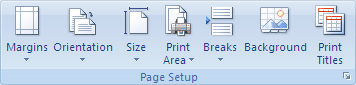
  3. In the “Page Setup” group, click the “Dialog Box Launcher” on the bottom right of the group (this tiny icon: Dialog box launcher).
  4. In the “Page Setup” dialog that appears, click on the “Sheet” tab.
  5. Under “Page order”, select either of these two options (the preview will change, see the images below).
    1. Down, then over
    2. Over, then down
  6. Click OK to close the “Page order” dialog.

Then the row/colum headings

This is actually much easier, and also works this way from Excel 2007 and up:

  1. Ensure your worksheet is active.
  2. Click the “Page Layout” tab.
  3. In the “Sheet Options” group, under “Headings”, select the “Print” check box.

–jeroen

via:

Image thanks to Microsoft:

Down, then over.

Down, then over.

Over, then down.

Over, then down.


Printing row/column headings

Posted in Excel, Office, Office 2007, Office 2010, Office 2013, Power User | Leave a Comment »

GoF Patterns in Delphi | Implementations of the famous Gang of Four Design Patterns in Delphi language – via Nick Hodges

Posted by jpluimers on 2015/08/20

Thanks to Nick Hodges for having Delphi-losophy | Flotsam and Jetsam #88 point me to GoF Patterns in Delphi | Implementations of the famous Gang of Four Design Patterns in Delphi language.

–jeroen

Posted in Delphi, Delphi 2007, Delphi 2009, Delphi 2010, Delphi XE, Delphi XE2, Delphi XE3, Delphi XE4, Delphi XE5, Delphi XE6, Delphi XE7, Development, Software Development | 2 Comments »

Locate and reset the last cell on a worksheet

Posted by jpluimers on 2015/08/19

The trick:

When you open the workbook again, the last cell of the data should be the last cell on the worksheet.

Which means that the “Last cell” only changes after a reload.

–jeroen

via Locate and reset the last cell on a worksheet.

Posted in Excel, Office, Power User | Leave a Comment »

Installing FireDAC 8 for Delpi 2007

Posted by jpluimers on 2015/08/19

Installing FireDAC 8 for Delpi 2007

Installation

  1. Obtain 29458_firedac_xe4_update_2_for_rad_studio_delphi_c_ent_ult_arch.zip from a registered Delphi XE4 or higher license: http://cc.embarcadero.com/item/29458:
  2. Extract it into FireDAC_8.0.5.3365.exe.
  3. Run FireDAC_8.0.5.3365.exe with the /showide parameter as described in http://support.embarcadero.com/article/42970:
  4. FireDAC_8.0.5.3365.exe /showide
    1. (When not running as Administrator: elevate to Administrator)
    2. Welcome screen: press next
    3. License screen: accept, then press next
    4. Destination selection screen: keep C:\Program Files (x86)\Embarcadero\FireDAC, then press next
    5. Select components screen: keep the selection (Full installation), then press next
    6. Select IDEs screen: choose Delphi 2007 (but not Delphi 2006), then press next
    7. Select Demo Databases screen: keep the settings (do not choose Interbase / Firebird server as then you have to provide the credentials for the server), then press next
    8. Start menu screen: keep Embarcadero FireDAC, then press next
    9. Ready to install screen: press install
    10. After installation: press finish, then read the readme
      1. or later browse to <file:///C:/Program%20Files%20(x86)/Embarcadero/FireDAC/Readme.html>
      2. That’s what actually tells you:

The installer automatically installs FireDAC in the Delphi XE4 and C++ Builder XE4 IDEs. For older versions of the IDEs, you can run the installer with the /SHOWIDE command line parameter.

After installation

To fix this when starting Delphi:

[Window Title]
Error

[Content]
Can't load package C:\Users\Public\Documents\RAD Studio\5.0\Bpl\AnyDAC_Dcl_D11.bpl.
The specified module could not be found.
Do you want to attempt to load this package the next time a project is loaded?

[Yes] [No]

The actual BPL sometimes is in C:\Users\<username>\AppData\Local\Documents\RAD Studio\5.0\Bpl\AnyDAC_Dcl_D11.bpl

The cause is that the BPL gets loaded from %BDSCOMMONDIR% which on some systems points to

  • %PUBLIC%\Documents\RAD Studio\5.0

and on others points to

  • %LOCALAPPDATA%\Documents\RAD Studio\5.0

This seems to be the case on machines where more different Windows users are using Delphi.

The installer does not fully recognize this distinction, so copies the BPL to %LOCALAPPDATA%\Documents\RAD Studio\5.0\Bpl and registers it as being in %PUBLIC%\Documents\RAD Studio\5.0\Bpl.

On these machines there is a difference between the definition of BDSCOMMONDIR in these registry keys:

  • HKEY_LOCAL_MACHINE\SYSTEM\CurrentControlSet\Control\Session Manager\Environment
    • points to C:\Users\Public\Documents\RAD Studio\5.0
  • HKEY_CURRENT_USER\Environment
    • points to C:\Users\<username>\AppData\Local\Documents\RAD Studio\5.0

Solution

reg delete "HKCU\Software\Borland\BDS\5.0\Known Packages" /v "%PUBLIC%\Documents\RAD Studio\5.0\Bpl\AnyDAC_Dcl_D11.bpl" /f
reg add "HKCU\Software\Borland\BDS\5.0\Known Packages" /v "%BDSCOMMONDIR%\Bpl\AnyDAC_Dcl_D11.bpl" /t REG_SZ /d "Embarcadero FireDAC Components" /f

–jeroen

via: jeroenp / BeSharp.net / source / Native / Delphi / Documentation / Install-FireDAC-8-in-Delphi-2007.md — Bitbucket.

Posted in Delphi, Delphi 2007, Delphi XE4, Development, Software Development | 4 Comments »