The Wiert Corner – irregular stream of stuff

Jeroen W. Pluimers on .NET, C#, Delphi, databases, and personal interests

  • My badges

  • Twitter Updates

  • My Flickr Stream

  • Pages

  • All categories

  • Enter your email address to subscribe to this blog and receive notifications of new posts by email.

    Join 1,860 other subscribers

Archive for June, 2016

Links for when I get `Not enough storage is available to process command` again

Posted by jpluimers on 2016/06/13

No, it’s not the Delphi Global Atom issue. I think it was having ran AQtime for too long.

–jeroen

Posted in Power User, Windows, Windows 7 | Leave a Comment »

OpenSuSE Tumbleweed notes

Posted by jpluimers on 2016/06/13

After zypper dup (dist-upgrade) or zypper up (update) a zypper ps will list processes using deleted files (i.e. processes that likely need to be restarted).

Some processes that can be restarted without reboot:

To research

  • dhcpcd
  • rs:main
  • agetty
  • lvmetad
  • agetty
  • dmeventd

Some processes that require a reboot:

–jeroen

Posted in *nix, ESXi5, ESXi5.1, ESXi5.5, ESXi6, Linux, openSuSE, Power User, SuSE Linux, Virtualization, VMware, VMware ESXi | Leave a Comment »

mercurial strip – Remove experimental branch – Stack Overflow

Posted by jpluimers on 2016/06/12

I found a working solution here.It works by using hg strip from the mq extension:$ hg strip my_pruned_branchAs mentioned in the comments, this should only be used for unpublished changesets.

Source: mercurial – Remove experimental branch – Stack Overflow

You need mercurial strip for that which ships with Mercurial 2.8 and up but isn’t enabled by default.

Enabling is easy and can be done globally or on a per-repository base which I like better: just edit your .hg/hgrc file inside your repository and add these lines:

[extensions]
strip =

The source StripExtension – Mercurial forgets to mention you can enable this on a repository base.

I used it to delete an experimental branch that I hadn’t yet pushed to the outside world.

–jeroen

Posted in Development, DVCS - Distributed Version Control, Mercurial/Hg, Source Code Management | Leave a Comment »

ThinkPad X201: fixing the “black screen” (without mouse pointer) after upgrading to Windows 10

Posted by jpluimers on 2016/06/10

After this Windows 10 boot screen the display goes blank without a mouse cursor.

After this Windows 10 boot screen the display goes blank without a mouse cursor.

So you upgraded your X201 from Windows 7 to Windows 10 even though it’s not in the listed on the Lenovo supported models page.

Now it gets through the boot screen, flashes the CapsLock/NumLock LEDS, blanks the screen (no mouse cursor) and continues booting without any visual feedback apart from the HDD LED flashing until it is finished booting

Since Windows 10 by default does not enable the F8 option any more, you need some more severe measures.

BIOS update

The first was to get the BIOS up to date. At the time of writing that was 1.40-1.15 from BIOS Update Bootable CD for Windows 8 (32-bit, 64-bit), 7 (32-bit, 64-bit), Vista (32-bit, 64-bit), XP – ThinkPad – Lenovo Support (US):

Then I had to burn the ISO. Which was a bit picky because most of my infrastructure is VM based and none of the physical machines had a DVD or CD-drive any more. Luckily I found a LiteOn SLW 831SX which Windows detects as Slimtype DVDRW SLW-831S USB Device. ImgBurn worked with that (elevated to Administrative mode that is: it requires that both for burning and grabbing an ISO image).

Upgrading the BIOS went fine, but the symptoms stayed.

Removing/re-inserting battery

Removing the battery for a while, then reinserting was suggested at one of the sites.  It didn’t help.

Force into Repair Mode

Then I read this:

If the system can’t load the necessary configuration more than two times, the system will  direct the display to Windows RE(Recovery environment).

Source: Windows 10 – How to enter Safe Mode if I can’t boot the system successfully?

They also have: Windows 10 – If I can’t enter the system, how can I restore the Windows 10 laptop or PC to default settings?

This very easy to do:

Prepairing Automatic Repair

Prepairing Automatic Repair

  1. Keep the power button down to power off the machine
  2. Power up the machine
  3. Wait for the boot screen to appear, then
    1. Keep the power button down to power off the machine
  4. Power up the machine
  5. Wait for the boot screen to appear, then
    1. Keep the power button down to power off the machine
  6. Wait for the “Prepairing Automatic Repair” to finish
  7. Wait for the “Diagnosing your PC” to finish
  8. Wait for the “Automatic Repair” to appear, then
    1. Wiggle with the mouse to get a mouse cursor
  9. Press the “Advanced Options” button
  10. Choose “Troubleshoot”
  11. Choose “Advanced Options”
  12. Choose “Startup Settings”
  13. Choose “Restart”
  14. Wait for the reboot and “Startup Settings” to appear (note: no mouse cursor)
  15. Hit F5 for “Enable Safe Mode with Networking”
  16. Wait for it to reboot twice.

This didn’t work as well as I hoped as now I was at the failure point as well.

But now at least I had a starting point to trip Windows into booting any way I wanted. I now only had to find which function key would get me into a state where I could see what was going on.

And the good things: The “Diagnosing your PC” only required one ‘manual power down” to appear.

  • F9 – Disable automatic restart after failure
  • F8 – Disable early launch anti-malware protection
  • F7 – Disable driver signature enforcement
  • F6 – Enable Safe Mode with Command Prompt
  • F5 – Enable Safe Mode with Networking
  • F4 – Enable Safe Mode
  • F3 – Enable low-resolution video
  • F2 – Enable boot logging
  • F1 – Enable debugging

F3 finally got me to the VIDEO_DRIVER_INIT_FAILURE (BSOD STOP 0x000000B4) which indicated the machine was so hosed that I had to to a clean install.

–jeroen
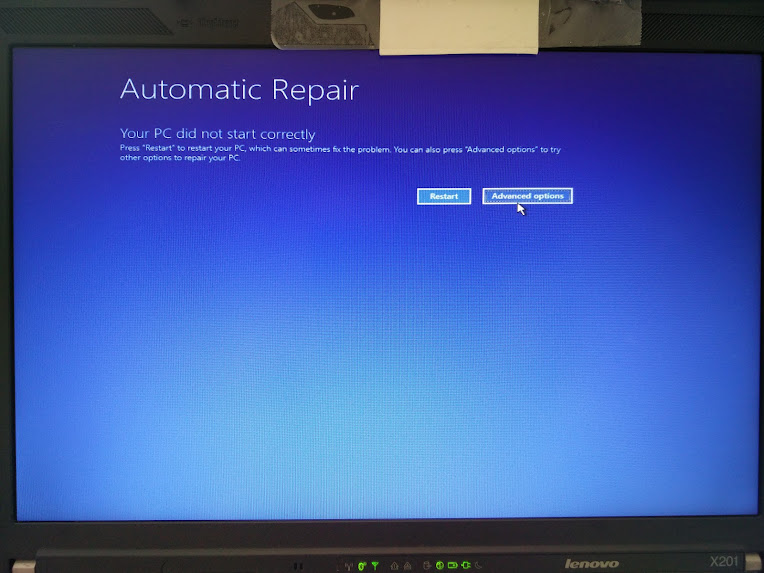
Automatic Repair - wiggle with the mouse and you have a cursor too!

Automatic Repair – wiggle with the mouse and you have a cursor too!

–jeroen

Images via:

Posted in BIOS, Boot, Power User, ThinkPad, UEFI, Windows, Windows 10, Windows 7, X201 | Leave a Comment »

Some Yubikey notes

Posted by jpluimers on 2016/06/10

For my own reference:

Always get at least two keys, configure them, and use only one. Store the rest in a safe place for when the first dies.

Get the NEO (if you need NFC) or NEO-n (if you don’t need NFC but love small form-factor).

–jeroen

(Image courtesy of Yubico)

Read the rest of this entry »

Posted in Encryption, Hashing, Power User, Security, U2F FIDO Security Keys | Leave a Comment »

How One Jira Ticket Made My Employer $1MM/Month: 7 Metrics that Actually Matter — JavaScript Scene — Medium

Posted by jpluimers on 2016/06/09

I fully agree with Kevin Powick who wrote Good article. Not only applicable to commercial website development, but almost all commercial software.

“You only get what you measure, so be careful what you measure.”

How One Jira Ticket Made My Employer $1MM/Month: 7 Metrics that Actually Matter — JavaScript Scene — Medium

And more highly valuable tips when writing any type of software.

Somewhere in the middle are his golden additions to the Agile values:

Individuals and interactions over processes and tools
Working software over comprehensive documentation
Customer collaboration over contract negotiation
Responding to change over following a plan

If that doesn’t look familiar, you really need to read this.

I’ll add some more of my favorite dev team values:

Skills over titles
Continuous delivery over deadlines
Support over blame
Collaboration over competition

After that he focuses on a few of them explaining where you could go completely wrong and how to do it “the right way”.

Highly recommended reading.

–jeroen

Posted in Agile, Development, Scrum, Software Development | Leave a Comment »

TUMBLEWEED: local console yast linedrawing characters garbage after first reboot

Posted by jpluimers on 2016/06/09

I long while after asking TUMBLEWEED: local console yast linedrawing characters garbage after first reboot, I researched the issue further.

First the workaround:

It is enough if any user on any console (for which /usr/bin/tty will usually show /dev/tty#) runs /bin/unicode_start.

After that, any user that logs on on any console will get the correct line-drawing characters with yast.

Then about the problem:

It looks like the problem is that during boot, nothing calls /bin/unicode_start. This was a solved bug, but seems to be back in Tumbleweed so I posted a comment to the bug.

I don’t think it is related to a truckload of PuTTY UTF-8 line-drawing issues like below. I’ve included them just for reference in any case proves me wrong (:

Same for changing unicode_start by hand:

–jeroen

via:

Original question thread:

Read the rest of this entry »

Posted in *nix, Linux, openSuSE, Power User, SuSE Linux | 1 Comment »

`Known IDE Packages` in Delphi prompted by a comment +Jeroen Wiert Pluimers made

Posted by jpluimers on 2016/06/08

Known IDE Packages in DelphiPrompted by a comment +Jeroen Wiert Pluimers ‘s Google+ post I had a look at what is actually listed in  [HKEY_CURRENT_USER\Software\Borland|Codegear|Embarcadero\BDS|Delphi\#.0\Known IDE Packages] … – Thomas Mueller (dummzeuch) – Google+

Source: Known IDE Packages in Delphi Prompted by a comment +Jeroen Wiert Pluimers ‘s…

Related:

Posted in Delphi, Development, Software Development, Uncategorized | 1 Comment »

Did you know… How to change the build order for your solution? – #333 – Sara Ford’s Weblog – Site Home – MSDN Blogs

Posted by jpluimers on 2016/06/08

Boy I wish I had known this earlier. Like years ago…

In the Solution Explorer:

  1. Right Click Project
  2. Project Build Oder.
  3. Use the dialog to change the build order

It is next to the “Project Dependencies” in this image from Sara Ford:

Sara Ford: change

Sara Ford: change “Project Build Order”

In the resulting dialog, you can change the build order within your solution.

This can be very useful when – for various reasons – you cannot have Project Level dependencies for an assembly, but have to have Assembly Reference dependencies for individual assemblies.

At a client I bumped into this, and this dialog was a life saver for us.

Others have used it because some Visual Studio versions miscalculate the dependencies.

–jeroen

Did you know… How to change the build order for your solution? – #333 – Sara Ford’s Weblog – Site Home – MSDN Blogs.

Posted in .NET, C#, C# 2.0, C# 3.0, C# 4.0, C# 5.0, C# 6 (Roslyn), Development, Software Development, Visual Studio 11, Visual Studio 2008, Visual Studio 2010, Visual Studio 2012, Visual Studio 2013, Visual Studio and tools | Leave a Comment »

How to send an email — 80’s style

Posted by jpluimers on 2016/06/07

WS 2000 modem information

WS 2000 modem information

History worth showing: How to send an email — 80’s style – Gmail – Google+

22 years ago, this was on TV in a series called Database, with this episode presented by Jane Ashton.

Some of the things you will see:

At first I thought the printer was an Epson FX-80, but it isn’t (it uses a different font and has plastic paper guidance). If anyone recognises the printer make and model, please let me know.

–jeroen

Read the rest of this entry »

Posted in History | Leave a Comment »