The Wiert Corner – irregular stream of stuff

Jeroen W. Pluimers on .NET, C#, Delphi, databases, and personal interests

  • My badges

  • Twitter Updates

  • My Flickr Stream

  • Pages

  • All categories

  • Enter your email address to subscribe to this blog and receive notifications of new posts by email.

    Join 1,860 other subscribers

Archive for July, 2018

Merry SysMas!

Posted by jpluimers on 2018/07/27

For all you SysAdmin’s: happy SysAdmin Day | System Administrator Appreciation Day.

For all others: please show some appreciation for your SysAdmins today. They are the ones keeping your business running. The less visible they are, the better they do their work.

Gifts are always welcome with them, but you can also appreciate SysAdmins by trying this:

And for the SysAdmins: have a laugh:

Read the rest of this entry »

Posted in Power User | Leave a Comment »

The Plastic equivalent of .gitignore is ignore.conf

Posted by jpluimers on 2018/07/26

A while ago, I landed a place using Plastic SCM, so I had to adopt some idiom from the git world.

The [WayBack] .gitignore equivalent in Pastic SCM is ignore.conf. Here are some links to documentation on it:

There is another file with a similar, but deceptively different name and behaviour: hidden_changes.conf. There ignore.conf ignores changes, hidden_changes.conf completely hides them. I am still not sure what subtleties are involved in the difference between “ignore” and “hide”, as the documentation is confusing and hidden_changes.conf can also appear in the root of a repository:

hidden_changes.conf Contains the paths of the controlled files to hide from the Pending changes view. The hidden changes are controlled items that can be changed but the user doesn’t want them to appear by default on the Pending changes view.

This config file is located in the plastic4 directory (under $HOME/.plastic4 on Linux/Mac systems or C:\Users\user\AppData\Local\plastic4 on Windows), in the root directory of the workspace, or in the plastic-global-config repository so that all clients have the same settings by default.

Learn about how to configure the hidden changes list.

ignore.conf Contains the paths of the private files to be ignored in the Pending changes view. The ignored files are files that you have no intention of placing under source control.

This config file is placed at the root directory of the workspace, or in the plastic-global-config repository so that all clients have the same settings by default.

Learn about how to configure the ignored list.

These configuration files are supported:

Important: These are the files that can be globally configured:

So I based mine on Tortoise SVN Global Ignore Pattern for Delphi and Visual Studio containing at least these:

*.identcache
*.local
*.dcu
*.rsm
*.bak
*.~*
*.tvsconfig
__history
__recovery
ModelSupport_*

–jeroen

Posted in Development, DVCS - Distributed Version Control, git, PlasticSCM, Software Development, Source Code Management | Leave a Comment »

Quickly generate queries for all non-system tables in your database in Firebird or InterBase

Posted by jpluimers on 2018/07/26

Change at will:

  select 'select * from ' || r.rdb$relation_name as query
    from rdb$relations r
   where 1=1
     and r.rdb$system_flag <> 1 -- no system relations
     and r.rdb$view_source is null -- only tables
order by r.rdb$relation_name

For the EMPLOYEE demo database, this results in:

select * from COUNTRY
select * from CUSTOMER
select * from DEPARTMENT
select * from EMPLOYEE
select * from EMPLOYEE_PROJECT
select * from JOB
select * from PROJECT
select * from PROJ_DEPT_BUDGET
select * from SALARY_HISTORY
select * from SALES 

–jeroen

Posted in Database Development, Development, Firebird, InterBase, Software Development | Leave a Comment »

Reminder to self: adopt the below code to do $(…) expansion like the Delphi IDE does

Posted by jpluimers on 2018/07/26

The below code expands %…% for environment variables and $(…) for CSIDL values.

Someday I will find time to convert it to something that does expansion like the $(…) one from the Delphi IDE.

  • ConfigExpanderUnit
  • CSIDLsUnit

References:

–jeroen

Read the rest of this entry »

Posted in Uncategorized | Leave a Comment »

New IP addresses for Bitbucket Cloud | Bitbucket Blog

Posted by jpluimers on 2018/07/25

If you are using bitbucket from behind a firewall, these might be important to you:

What are we doing? We’ll start a gradual rollout of changing our A records in DNS starting at 22:00 UTC on Sunday, July 29 2018 to point to new IP addresses. The rollout is expected to be completed for all our customers two weeks later, i.e by the 15th of August.

How will this affect you?

Most users will not have to do anything special for this migration. Your DNS servers should pick up the new IPs within a few minutes of the migration, and your systems should start using the new IPs right away. We’ll keep the old IPs running for a few weeks afterwards just in case, though.

Firewall considerations

If you control inbound or outbound access with a firewall, then you may need to update your configuration. Please whitelist these new IPs now; you should be able to remove the old IPs after the migration is complete. New destination IP addresses for bitbucket.org, bitbucket.com, api.bitbucket.org, bitbucket.io, bytebucket.org, altssh.bitbucket.org will be: IPv4: 18.205.93.0/25 and 13.52.5.0/25 IPv6: 2406:da00:ff00::0/96

SSH considerations

Our server’s SSH key is not changing, so most SSH clients will continue to work without interruption. However, a small number of users may see a warning similar to this when they push or pull over SSH: Warning: the RSA host key for ‘bitbucket.org’ differs from the key for the IP address ‘18.205.93.1’ The warning message will also tell you which lines in your ~/.ssh/known_hosts need to change. Open that file in your favorite editor, remove or comment out those lines, then retry your push or pull.

Additional resources Atlassian Public IP ranges JSON: https://ip-ranges.atlassian.com/ (will be updated with the new addresses as part of the new IPs rollout) https://confluence.atlassian.com/bitbucket/what-are-the-bitbucket-cloud-ip-addresses-i-should-use-to-configure-my-corporate-firewall-343343385.html (will be updated with the new addresses as part of the new IPs rollout)

From:

–jeroen

Posted in BitBucket, Development, Source Code Management | Leave a Comment »

When learning a new VCS drives you crazy: Plastic SCM indicating it cannot undo changes, but not providing an alternative

Posted by jpluimers on 2018/07/25

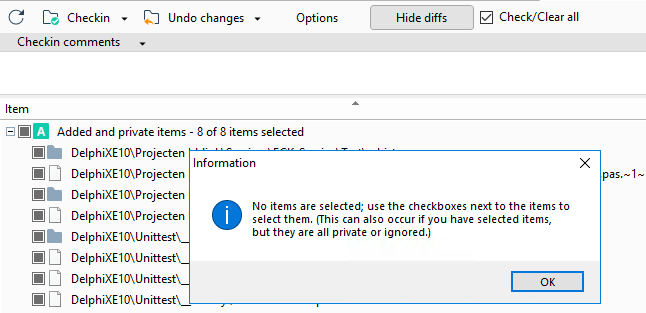
User experiences like this drives me crazy, this time in Plastic SCM, when you try to get the most recent files on a branch/label/changeset after you made some changes:
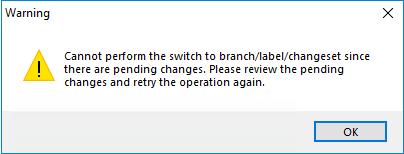
So you go to the pending changes, see it involves additions and you see a big “Undo changes” button that fails to work:

  • 8 of 8 items selected
  • plastic insisting there are none

The undocumented “secret” is at the end of the messages “added and private items” cannot be undone. You have to manually “delete” them, which the message does not tell you.

Of course there is no “Delete” entry in the toolbar. There is no “Delete” entry in the local menu either.

You have to know that you

  • can do “Delete” by using the keyboard,
  • after first manually selecting all the entries in the treeview (so they get blue, which is different than having checkmarks).

How is that for a lack of user-experience?

Versions

This is on a version 6 client with a version 6 server.

Later I found out this bit on versioning, which I totally did not expect, as it does not match semantic versioning:
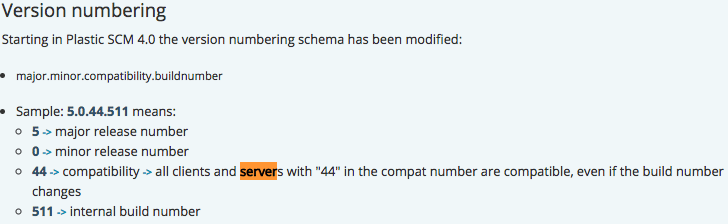
Version numbering

Starting in Plastic SCM 4.0 the version numbering schema has been modified:

  • major.minor.compatibility.buildnumber
  • Sample: 5.0.44.511 means:
    • 5 -> major release number
    • 0 -> minor release number
    • 44 -> compatibility -> all clients and servers with “44” in the compat number are compatible, even if the build number changes
    • 511 -> internal build number

So I have tried to to switch from
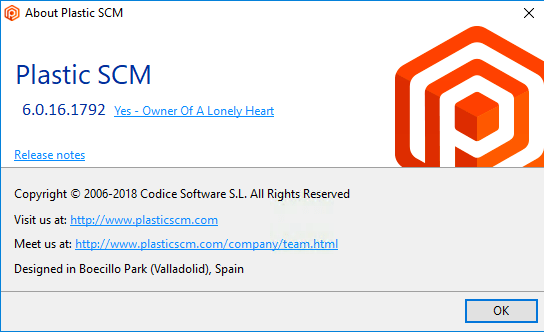
using the download at https://www.plasticscm.com/download/ to
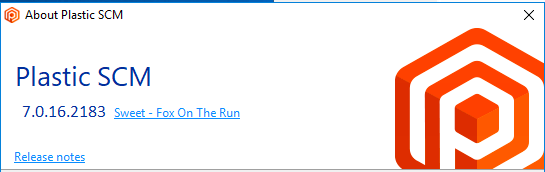
with no difference.

–jeroen

Posted in Development, PlasticSCM, Source Code Management | Leave a Comment »

Some notes on the MT940 format used by various banks to export transactions

Posted by jpluimers on 2018/07/25

I needed the below links to get a feel on how much effort it would be to convert ABNAMRO transactions from MT940 into CSV or XLS extracting as many useful fields as possible.

Maybe it useful for other people as well.

I know there is CAMT.053 as well, but that puts every transaction into a separate XML file but still spreads the description over a multi-line structured field (like :86: below).

Read the rest of this entry »

Posted in Development, Software Development | Leave a Comment »

Getting the Firebird server version from a client using SQL

Posted by jpluimers on 2018/07/25

Since Firebird 2.1, you can get the first 3 numbers of the version with this SQL statement:

SELECT rdb$get_context('SYSTEM', 'ENGINE_VERSION')
from rdb$database;

You get it in this format:

RDB$GET_CONTEXT                                                                                                                                                                                                                                                
---------------
2.5.7                                                                                                                                                                                                                                                          

Which means you will not get the build number, which for most purposes is still quite OK.

–jeroen

via: [WayBackHow to detect the server version?

Posted in Database Development, Development, Firebird | Leave a Comment »

RAD Studio 10.2.2 Annoying New Features. Help? – Forum – Embarcadero Community

Posted by jpluimers on 2018/07/24

Does anybody know a shorter, more permanent solution for [WayBackRAD Studio 10.2.2 Annoying New Features. Help? – Forum – Embarcadero Community.

Especially the first one is very important to me.

Ever since Delphi introduced IDE layouts, it would remember the last one selected. With Delphi 10.2.2 Tokyo not so any more: it ALWAYS starts with an imposed “Startup Layout”. If you delete it, it re-appears.

I have a carefully named set of layouts that depends on the monitors I am using.

The workaround – every time I switch monitors, at least a few times a day, especially when moving between places, for instance for meetings – is this:

  1. Start Delphi 10.2.2 Tokyo
  2. Select the layout for that monitor
  3. Save it as “Startup layout”

Then each time I tweak a layout, I have to remember to save it both as “Startup layout” and as the actual named layout.

The really dumb thing is that RSP-20138 Can not define default Startup layout is classified as

“Jira-Quality Sync Service added a comment – 29/May/18 2:50 AM
Issue is reclassified as ‘New Feature'”

Via [WayBack1, WayBack2] So Embarcadero broke the “Default layout” (now always enforces a new “Standard Layout”) upon IDE startup in 10.2 Tokyo, and commented on the bug report … – Jeroen Wiert Pluimers – Google+ which has quite a few nice comments and links, including:

Read the rest of this entry »

Posted in Delphi, Delphi 10.2 Tokyo (Godzilla), Development, Software Development | 3 Comments »

Starting your Delphi VCL app meanwhile your mouse is moving, no accelerators are shown (Menu, button, focus rect missing… etc.) same when clicking a button to open a new form

Posted by jpluimers on 2018/07/24

Problem (D2007 and up)

If you are starting your Delphi VCL app meanwhile your mouse is moving, no accelerators are shown (Menu, button, focus rect missing… etc.)

Something similar happens when you click on a button which opens a new form, somehow UI State becomes a state which is wrong.

Solution

In a detoured Form.DoShow(Or in every OnShow event) :Self.Perform(WM_CHANGEUISTATE, MakeLong(UIS_CLEAR, UISF_HIDEACCEL or UISF_HIDEFOCUS), 0);

  • No repaint penalty
  • no flicker
  • accels
  • focus rect are always shown
  • system is not touched.

Source: [WayBackSo, here is the thing…If you are starting your Delphi VCL app meanwhile your mouse is moving, no accelerators are shown (Menu, button, focus rect mis… – Attila Kovacs – Google+

Related: [WayBackc# – Show Hotkeys at All Times – Stack Overflow

–jeroen

Posted in Delphi, Development, Software Development | Leave a Comment »