


Two years later, it is a reminder to look at my statement again: [WayBack] Jeroen Pluimers on Twitter: “Hi dpi is a mess, not just on Windows. It will take considerable time to overcome the decades long Pixel mess we’ve been coming from (:”
–jeroen
Posted by jpluimers on 2020/05/26
Two years later, it is a reminder to look at my statement again: [WayBack] Jeroen Pluimers on Twitter: “Hi dpi is a mess, not just on Windows. It will take considerable time to overcome the decades long Pixel mess we’ve been coming from (:”
–jeroen

Posted in Apple, Development, Mac OS X / OS X / MacOS, Power User, Software Development, Windows | Leave a Comment »
Posted by jpluimers on 2020/05/25
Sometimes an NTFS shrink still fails, even though you use the built in Windows defragmentation tools, of SysInternals contig tool.
The best you can do is to follow the steps in:
diskmgmt.msc to try shrinking the disk, then often it is already in the error message: “You can’t shrink a volume beyond the point where any unremoveable files are located see the defrag event in application log for detailed information about the operation when it has completed.”eventvwr.exe and look at the Windows Logs for the most recent Application entries that has Source set to defragThose defrag entries usually tell about the last file that could not be moved.
You can use
wevtutillto query events on the commandline.Note that contrary to [WayBack] WEVTUTIL – Windows CMD – SS64.com documentation, the option
/rdcannot be expanded to/reversedirection, as you will get an error “invalid option reversedirection” – Google Search.For querying the above
defragevent, use this command line (replace/format:XMLwith/format:textfor more readable but also more verbose output):
wevtutil query-events Application /count:2 /format:XML /rd:true /query:"*[System[(EventID=259)]]"
On Windows 10, this is often caused by “System Protection” which locks files under C:\Recovery, but I have also seen $BITMAP, $MFT and $DATA entries.
To view which drives are currently used for system protection (this opens the “System Properties” dialog focussed on the “System Protection” tab):
SystemPropertiesProtection.exe
To disable it for one drive:
Disable-ComputerRestore -Drive "C:"
To enable it for one drive:
Enable-ComputerRestore -Drive "C:"
There seems to be no easy one-command PowerShell way to view the drives have ComputerRestore enabled, as this does not show drive letters:
PowerShell Get-ComputerRestorePoint ^| Format-List
The above gives more detailed output than a plain PowerShell Get-ComputerRestorePoint
PowerShell does not have a built-in option to delete restore points, but vssadmin has, but calls them “shadows”.
First list them:
vssadmin list shadows
Then delete them (but be aware this will not prompt for confirmation because of the /quiet):
vssadmin delete shadows /for=C: /quiet
You can also delete them for all drives (this will not prompt for confirmation either):
vssadmin delete shadows /all /quiet
Stopping the volume shadow copy service:
net stop vss
Hibernation:
powercfg.exe /hibernate off
powercfg.exe /hibernate on
Page file:
wmic pagefile list /format:list

AllocatedBaseSize=2944
CurrentUsage=0
Description=C:\pagefile.sys
InstallDate=20181018215808.683376+120
Name=C:\pagefile.sys
PeakUsage=0
Status=
TempPageFile=FALSE
wmic computersystem where name="%computername%" get AutomaticManagedPagefile
AutomaticManagedPagefile
TRUE
wmic computersystem where name="%computername%" set AutomaticManagedPagefile=False
Updating property(s) of '\\MYCOMPUTER\ROOT\CIMV2:Win32_ComputerSystem.Name="LAPTOPUW08"'
Property(s) update successful.
wmic computersystem where name="%computername%" get AutomaticManagedPagefile
AutomaticManagedPagefile
FALSE
wmic.exe pagefileset where name="C:\\pagefile.sys" delete
Deleting instance \\MYCOMPUTER\ROOT\CIMV2:Win32_PageFileSetting.Name="C:\\pagefile.sys"
Instance deletion successful.Sometimes the deletion does not work (see below for workaround):
wmic pagefile list /format:list
AllocatedBaseSize=2944
CurrentUsage=0
Description=C:\pagefile.sys
InstallDate=20181018215808.683376+120
Name=C:\pagefile.sys
PeakUsage=0
Status=
TempPageFile=FALSE
Do not do this:
wmic pagefile delete
Deleting instance \\MYCOMPUTER\ROOT\CIMV2:Win32_PageFileUsage.Name="C:\\pagefile.sys"
ERROR:
Description = Provider is not capable of the attempted operation
wmic pagefileset set name="c:\\pagefile.sys",InitialSize=0,MaximumSize=0
No Instance(s) Available.
Sometimes it still fails, so then you have to use the UI:
SystemPropertiesAdvanced.exePerformance, click on SettingsAdvanced tabVirtual memory, click the Change buttonAutomatically manage page file size for all drives is disabledNo paging file is selectedSet buttonOK buttons to fully leave the Advanced System Properties dialog.After resizing the disk, reverse the steps:
SystemPropertiesAdvanced.exePerformance, click on SettingsAdvanced tabVirtual memory, click the Change buttonAutomatically manage page file size for all drives is enabledOK buttons to fully leave the Advanced System Properties dialog.Sometimes the file blocking the resize is the NTFS "\$BitMap::$DATA", which few defragmentation tools can move as it is the MFT Bitmap.
–jeroen
Posted in CommandLine, Console (command prompt window), Development, Power User, PowerShell, PowerShell, Scripting, Software Development, Windows | Leave a Comment »
Posted by jpluimers on 2020/05/25
It looks like OpenSuSE has stopped supporting Raspberry Pi 1, so the best likely is to recycle it into a Pi-Hole as basically it’s been dead since mid 2017: [WayBack] Raspberry Pi 1B OpenSuSE Tumbleweed zypper upgrade problem · GitHub.
Build status for armv6l support: [WayBack] Project openSUSE:Factory:ARM Status Monitor – openSUSE Build Service
–jeroen
Posted in *nix, *nix-tools, Debian, Development, Hardware Development, History, Linux, openSuSE, Power User, Raspberry Pi, Raspbian, SuSE Linux, Tumbleweed | Leave a Comment »
Posted by jpluimers on 2020/05/25
Interesting: Secure Shell – Chrome Web Store. But does not work behind an SSH blocking firewall, seem more on that below.
Terminal emulator and SSH client.
Secure Shell is an xterm-compatible terminal emulator and stand-alone ssh client for Chrome. It uses Native-Client to connect directly to ssh servers without the need for external proxies.
Secure Shell is a Beta release and has known bugs.
Please read the FAQ, available here: http://goo.gl/3i5AJ.
You can also exchange feedback in the chromium-hterm mailing list, available here: http://goo.gl/RYHiK.
Edit 20240818: the above Googl links will die; the redirects back at the time of writing in 2014 where to:
- [Wayback/Archive] [chromiumos/platform/assets.git] / chromeapps / nassh / doc / faq.txt which first moved to [Wayback/Archive] hterm and Secure Shell – nassh/doc/FAQ.md and later moved to [Wayback/Archive] hterm and Secure Shell – nassh/docs/FAQ.md.
- [Wayback/Archive] chromium-hterm – Google Groups which now has moved to [Wayback/Archive] chromium-hterm – Google Groups.
It is based on [WayBack] GitHub – chromium/hterm: MOVED: Please use the new libapps repo on chromium.googlesource.com insteadf.
With relays, you can tunnel over SSH. Two relays are on github:
Resources:
nassh):nassh – apps/libapps – Git at Google--jeroen
via: Secure Shell – Chrome Web Store.
Posted in Chrome, Google, Power User | Leave a Comment »
Posted by jpluimers on 2020/05/22
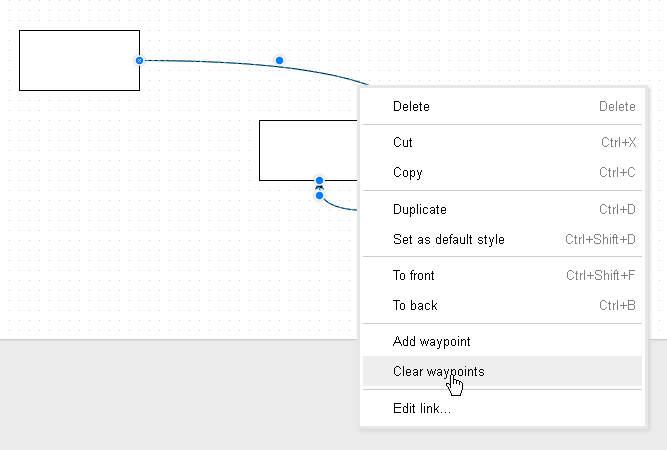
Via [WayBack] Tutorial 3 – Connectors, Waypoints, and Altering Shapes – draw.io Online – draw.io Support: this is the only way to remove waypoints on a shape:
–jeroen

Posted in Cloud Apps, draw.io, Internet, Power User | Leave a Comment »
Posted by jpluimers on 2020/05/22
igOver the last lustrum, there has been a steady increase in https usage. It crossed the 30% mark early 2016, crossing the 50% mark early 2017 and 80% mark early 2018, even the https-by-default configuration is now pretty large:
Ever since 2012, but especially with the increased HTTPS adoption, you can expect more and more users to run plugins like HTTPS Everywhere – Wikipedia which switch a request from insecure http to secure https.

Posted in Encryption, HTTPS/TLS security, Let's Encrypt (letsencrypt/certbot), Power User, Security | Leave a Comment »
Posted by jpluimers on 2020/05/22
Running autossh from Windows is still on my list, so here are a few links:
–jeroen
Posted in Communications Development, Development, Internet protocol suite, Power User, SSH, TCP, Windows | Leave a Comment »
Posted by jpluimers on 2020/05/21
Interesting course: [WayBack] Go: The Complete Developer’s Guide (Golang) | Udemy Master the fundamentals and advanced features of the Go Programming Language (Golang)
It covers:
–jeroen
Posted in Development, Go (golang), Software Development | Leave a Comment »
Posted by jpluimers on 2020/05/21
Almost 20 years old, but still a very nice read [Archive.is] David Korn Tells All – Slashdot.
Another funny story involving David Korn during the not-so open source times of Microsoft late last century: [WayBack] Korn Shell Story
–jeroen
Posted in *nix, *nix-tools, bash, bash, Development, History, Power User, Scripting, Software Development | Leave a Comment »
Posted by jpluimers on 2020/05/21
From [WayBack] Why would the compiler generate a "E2018 Record, object or class type required" helper when I use a ToUpperInvariant (or any TStringsHelper call) on t… – Jeroen Wiert Pluimers – Google+:
Why would the compiler generate a
"E2018 Record, object or class type required"when I use a ToUpperInvariant (or any TStringsHelper call) on theTextproperty of aTEdit?Full failing code is at [WayBack] https://gist.github.com/jpluimers/b5e3684f725216622bdcb80bf5f10698
Failing line is this:
Edit1.Text := Edit1.Text.ToUpperInvariant;
// the above line generates this error:
// [dcc32 Error] MainFormUnit.pas(29): E2018 Record, object or class type required
This fails as well:
Edit1.Text := TStringHelper.ToUpperInvariant(Edit1.Text);Why would the compiler (in this case XE8) throw this error?
Note the workaround is simple:
var
  lText: string;
begin
  lText := Edit1.Text;
  Edit1.Text := lText.ToUpperInvariant;
My suspicion is that the
Editproperty is of typeTCaptionwhich istype string.Could it be that simple?
To which David Heffernan responded:
Yup, the issue is
TCaptionhas no helper. Pretty distressing.
Typed types are indeed different types. They have been there for a long time (to facilitate generating different type information so you can for instance hook up different property editors to TCaption (a typed string) or TColor (a typed integer).
It is explained at [WayBack] Declaring Types. but has existed since Delphi 1 or Delphi 2.
More on the implications is at [WayBack] pascal – Delphi Type equivalence and Type equality syntax – Stack Overflow.
–jeroen
Posted in Conference Topics, Conferences, Delphi, Development, Event, Software Development | Leave a Comment »
 The Wiert Corner - irregular stream of stuff