The Wiert Corner – irregular stream of stuff

Jeroen W. Pluimers on .NET, C#, Delphi, databases, and personal interests

  • My badges

  • Twitter Updates

  • My Flickr Stream

  • Pages

  • All categories

  • Enter your email address to subscribe to this blog and receive notifications of new posts by email.

    Join 1,854 other subscribers

Archive for 2020

Always use SCSI for your VM guest disks – Jeroen Wiert Pluimers – Google+

Posted by jpluimers on 2020/01/20

Rephrased from [WayBackJeroen Wiert Pluimers – Google+:

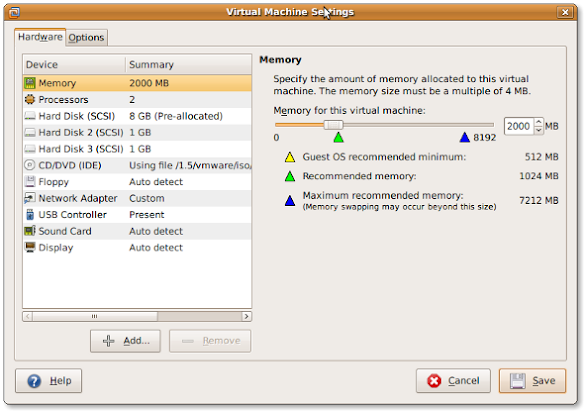
If you install a virtual machine, ensure the disk controller and disks are SCSI based.

This has many advantages, including:

  • speed (usually the SCSI drivers can be paravirtualised)
  • hot addition of new disks

It holds for virtually any virtualization platform including all non-ancient (less than ~10 year old) versions of:

  • VMware (Workstation, Viewer, but I expect this also to work on vSphere, ESXI, Fusion)
  • Hyper-V
  • KVM (and therefore Proxmox)
  • VirtualBox

Based on my notes in the above link and the links below:

Note this isn’t just for Linux guests/hosts: Most guests (including Windows) can do a SCSI bus re-scan and detect new SCSI devices.

The trick here is that the guest must already have a virtual SCSI controller (adding that will require a reboot of the guest).

Then adding a new SCSI disk on that controller from any host (Windows, Mac, ESXi, vSphere) should work fine.

–jeroen

Posted in ESXi4, ESXi5, ESXi5.1, ESXi5.5, ESXi6, ESXi6.5, Fusion, Hyper-V, KVM Kernel-based Virtual Machine, Power User, Proxmox, View, VirtualBox, Virtualization, VMware, VMware ESXi, VMware Workstation | Leave a Comment »

Tweaking4All.com – Topics – Delphi – How to change the font of a hint window

Posted by jpluimers on 2020/01/19

[WayBack] Tweaking4All.com – Topics – Delphi – How to change the font of a hint window: Delphi THintWindow are odd, as you cannot set the Vcl.Forms.HintWindowClass before uses it to initialise the hint window in the Application instance from the initialisation section in the Vcl.Forms unit.

The only way to change it is to:

  1. Set the HintWindowClass to a new class
  2. Toggle the state of Application.ShowHint

So the duplicate line below is no accident:

  HintWindowClass := TMyHintWindow;
  Application.ShowHint := not Application.ShowHint;
  Application.ShowHint := not Application.ShowHint;

References:

–jeroen

Posted in Delphi, Development, Software Development | Leave a Comment »

Waze “Isolated segment – all turns from it are closed” – Google Search

Posted by jpluimers on 2020/01/17

A blog entry since it was hard to find about [WayBack] “Isolated segment – all turns from it are closed” – Google Search as the source reveals not much: no explanation at [WayBack] wme-history/index.html at master · wazers/wme-history · GitHub (A repository containing the pretty-printed index and JavaScript files of the WME to investigate version differences – wazers/wme-history).

Same for [WayBack] “Added big junction” waze – Google Search and [WayBack] wme-history/index.html at master · wazers/wme-history · GitHub

Note that updates you make to the map can take a while to update to the actual live map (even after approval).

You can check at [WayBack] Waze Status for the latest updates.

I added a piece of road in between Thunstetten and Herzogenbugsee, but could not save it:

Read the rest of this entry »

Posted in LifeHacker, Power User, Waze | Leave a Comment »

XW6600 WOL – stopped working on Windows 10 – my trusty APC PDU to the rescue

Posted by jpluimers on 2020/01/17

A long time ago I wrote in Mac/PC: sending Wake-on-LAN (WOL) packets « The Wiert Corner – irregular stream of stuff “I’ve succesfully woken up these machines: HP XW6600 running ESXi 5.1 ThinkPad W701U running Windows 7”.

The XW6600 have now been demoted to Windows 10 machines that I only need every now and then, so most of the time they are shutdown.

However, with the installation of Windows 10 however, they stopped reacting to WOL (Wake on LAN).

Per web-search results, I’ve tried all the permutations of the below settings to no avail.

Luckily, my trusty APC PDU AP7921 (and little sister AP7920) helped out: when setting the “Reboot Duration” to 30 seconds or more (so the power fully drains), it can be rebooted.

Note that since I bought these a long time ago, they have been replaced by these:

Firmwares:

Power usage:

  • an XW66000 with 32 gigabytes of RAM and one hard disk takes between 0.6-1.2 Ampère of current, which at 230 Volt is 140-275 Watt.
  • over one day that is between 3.4 and 6.6 kWh

Settings tried

Read the rest of this entry »

Posted in Ethernet, Hardware, HP XW6600, Network-and-equipment, Power User, Wake-on-LAN (WoL), Windows, Windows 10 | Leave a Comment »

Famous Songs in Slightly Odd Time Signatures – A Guide to Rhythms – The Evil Jam

Posted by jpluimers on 2020/01/17

Time signatures, a musicians best friend if used wisely. Time signatures when used correctly can add other dimensions to a song, a feeling of awkwardness, incompleteness, shuffling dancing, rushing…

That’s the start of [WayBackFamous Songs in Slightly Odd Time Signatures – A Guide to Rhythms – The Evil Jam.

It has links to the tracks mentioned (usually as YouTube or Vimeo links) so it is easy to listen back to the marvels using these time signatures.

–jeroen

Posted in LifeHacker, Music, Power User | Leave a Comment »

visual studio code – Does the “editorWhitespace.foreground” workbench.colorCustomizations setting in VSCode actually work? – Stack Overflow

Posted by jpluimers on 2020/01/16

[WayBack] visual studio code – Does the “editorWhitespace.foreground” workbench.colorCustomizations setting in VSCode actually work? – Stack Overflow

Yes, it does. But after reading [WayBack] vscode-docs/theme-color-reference.md at master · Microsoft/vscode-docs · GitHub: Editor Colors or [WayBack] Visual Studio Code Theme Color Reference you might want to put it in the config straight like this:

see the editor white spaces, enable Toggle Render Whitespace.

  • editorWhitespace.foreground: Color of whitespace characters in the editor.

However, you need to embed it like this:

"workbench.colorCustomizations": {
    "editorWhitespace.foreground": "#333",
    "editorIndentGuide.background": "#333"
  }

The embedding makes it work.

References:

–jeroen

Posted in .NET, Color (software development), Development, Software Development, Visual Studio and tools, vscode Visual Studio Code | Leave a Comment »

Delphi – BDE to FireDAC: pack table, regenerate index – Stack Overflow

Posted by jpluimers on 2020/01/16

This works with any tool that can access ADO based dBase databases with MDX indices: [WayBackdelphi – BDE to FireDAC: pack table, regenerate index – Stack Overflow.

Related: [WayBack] CREATE INDEX for Paradox | Microsoft Docs

Thank you Thomas for this addition to my link archive!

–jeroen

via: [WayBack] > An old program of ours uses dBase tables and an .MDX index – other systems use these tables too, so we’re stuck with them. We wish to replace BDE with… – Thomas Mueller (dummzeuch) – Google+


Posted in Database Development, dBase, Development, Software Development | Leave a Comment »

Mad With PowerShell: FileInfo and DirectoryInfo objects are not populated upon creation in PowerShell

Posted by jpluimers on 2020/01/16

[WayBack] Mad With PowerShell: FileInfo and DirectoryInfo objects are not populated upon creation in PowerShell.

TL;DR:

  • Apart from the FullName property, the other poprerties of FileInfo and DirectoryInfo are populated later than their instance creation
  • A call to their Refresh method populates or re-populates them
  • That method is implicitly called when you request other properties than FullName

Example: see the [Archive.is]fileinfo.cs: Length property

–jeroen

Posted in .NET, C#, CommandLine, Development, F#, PowerShell, Software Development, VB.NET | Leave a Comment »

ρσℓα¢ķ͌͌͌͌͌͌͌͌͌͌͌͌͌͌ on Twitter : “The PowerShell console history file isn’t just useful for DFIR peeps, red team-ers should check it too! 4096 entries by default, here’s the path…”

Posted by jpluimers on 2020/01/15

Not sure why, but I checked a few of my systems and no  file at %userprofile%\AppData\Roaming\Microsoft\Windows\PowerShell\PSReadline\ConsoleHost_history.txt

Heck: no ConsoleHost_history.txt files on those systems anywhere.

[WayBack] ρσℓα¢ķ͌͌͌͌͌͌͌͌͌͌͌͌͌͌ on Twitter : “The PowerShell console history file isn’t just useful for DFIR peeps, red team-ers should check it too! 4096 entries by default, here’s the path: %userprofile%\AppData\Roaming\Microsoft\Windows\PowerShell\PSReadline\ConsoleHost_history.txt”

–jeroen

Read the rest of this entry »

Posted in CommandLine, Power User, PowerShell, PowerShell | Leave a Comment »

Drawbacks for separating TDS/TD32 symbol information in separate file for your Delphi applications? What about Visual Studio?

Posted by jpluimers on 2020/01/15

A while ago this interesting question came by: [WayBack] Delphi XE2 has got the Linking option “Place debug information in separate TDS file” … Does this have any adverse effects for Win32 Delphi executables? – Thomas Mueller (dummzeuch) – Google+

The answer is “no”.

By about mid 2018, the same holds for Visual Studio and PDB symbol information.

Delphi

Since long ago (I think about Delphi 2), the Delphi debugger understands TDS (historically also known as TD32) Turbo Debugger Symbol Information which can be either in the .EXE or in a separate .TDS file with the same name and directory as the .EXE.

Many other tools also know how to get the symbols from either place, see for instance TD32-TDS-SYMBOL-INFORMATION.

The advantage of keeping it in the EXE is that it is easier to ship to clients. Unless you do not want the clients to have it. Then it is easier to separate it in a file.

David Heffernan raises an important point though, as many people confuse these two topics:

  • the presence of Debug Symbols
  • the code generation of extra run-time checks and debug-assistance (like stack frames)

This is caused by both of the above usually being enabled in DEBUG mode and disabled in RELEASE mode.

However, nothing prevents you from generating the Debug Symbols in RELEASE mode, and they can highly help track down customer problems.

This is David’s comment:

There’s a common myth that “debug builds” perform worse than “release builds”.

Whether or not debug information is generated is completely independent from the performance of the code.

Visual Studio

For a long time, EXE files generated by Microsoft Tools could only include .DBG symbol information, but no .PDB symbol information.

[WayBack] executable – Embed .pdb debug symbol information into an .exe file in Visual Studio – Stack Overflow. Especially read the comments about:

–jeroen

Posted in Debugging, Delphi, Development, MAP Symbol Information, Software Development, TD32/TDS Symbol information | Leave a Comment »