The Wiert Corner – irregular stream of stuff

Jeroen W. Pluimers on .NET, C#, Delphi, databases, and personal interests

  • My badges

  • Twitter Updates

  • My Flickr Stream

  • Pages

  • All categories

  • Enter your email address to subscribe to this blog and receive notifications of new posts by email.

    Join 1,860 other subscribers

Archive for May, 2021

LGA 2011 – remove and insert a CPU

Posted by jpluimers on 2021/05/21

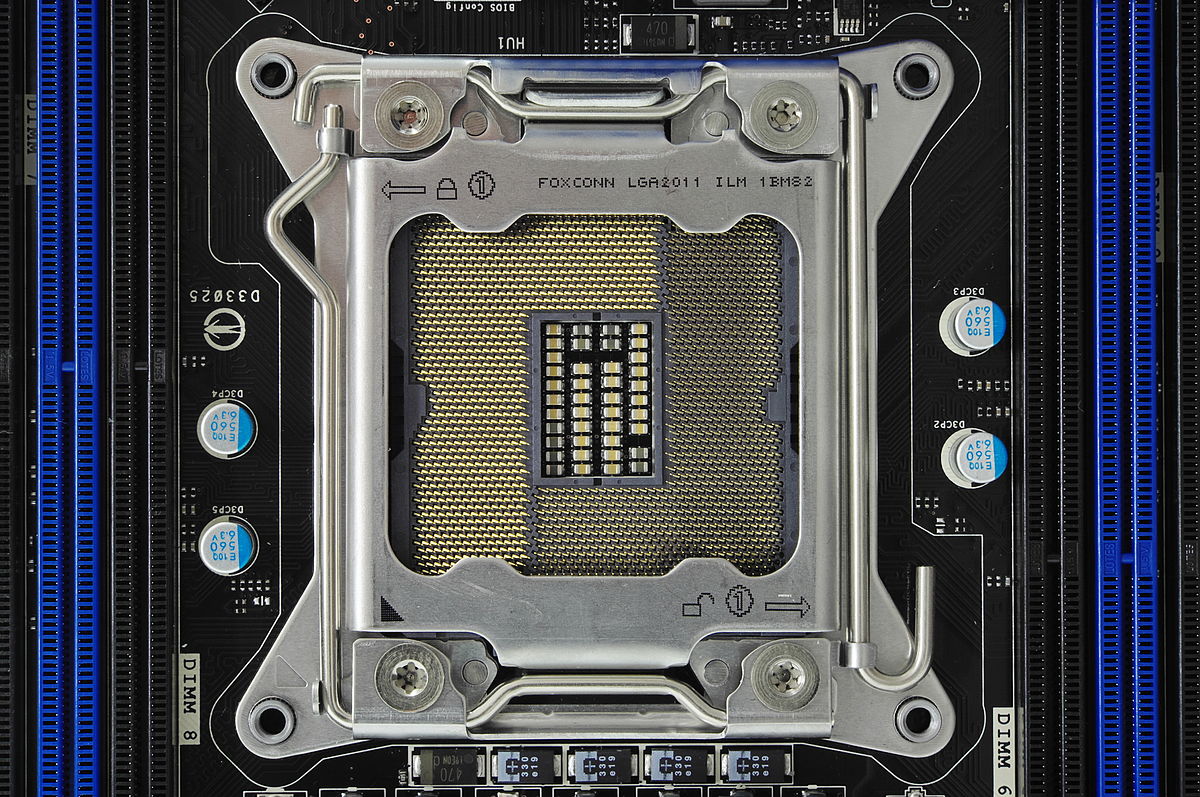
I while ago I needed to upgrade a processor in a LGA 2011  socket

If you know what the icons mean they are simple.

  • The (1) lock on the top left means that lever (with the triangle bend in it) needs to be done first when locking
  • The (1) unlock on the bottom right means that lever (with the rounded end) needs to be done first when unlocking

More details at:

–jeroen

Read the rest of this entry »

Posted in Hardware, Mainboards, Power User | Leave a Comment »

How to Copy files between ESXi hosts using SCP Command

Posted by jpluimers on 2021/05/21

Derived the bits below from [WayBack] How to Copy files between ESXi hosts using SCP Command.

Recursive copy from a remote machine to an existing local directory:

scp -rp root@192.168.71.97://vmfs/volumes/EVO860_500GB/VM1/ /vmfs/volumes/EVO860_250GB/VM2/

After this you need to edit the .vmxf files in the VM2 directory to ensure these are not duplicates.

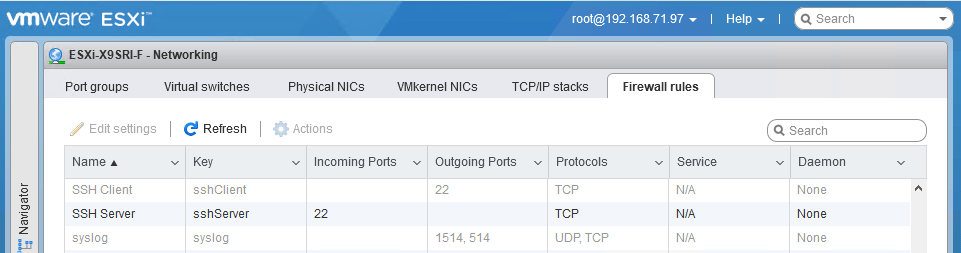
One thing to remember is that you need the current host to allow the SSH client in the firewall, which is disabled by default:

After enabling:

Be really careful with the -3 option to scp; it allows you to transfer from one remote machine to another remote machine, but when using keyboard-interactive, you have a high change to lock-out your accounts: SSH will try to keyboard-interactive to both hosts at the same time.

If you lock-out root, then you have to go through the local DCUI console (use ALT-F2 to go there), then reset the root account failure count using pam_tally2 --user root --reset.

So this can be bad:

scp -3 -rp root@192.168.71.97://vmfs/volumes/EVO860_500GB/VM1/ root@192.168.71.91://vmfs/volumes/EVO860_250GB/VM2/

This works, but assumes the SSH client is enabled from the first host:

scp -rp root@192.168.71.97://vmfs/volumes/EVO860_500GB/VM1/ root@192.168.71.91://vmfs/volumes/EVO860_250GB/VM2/

See these links:


[root@ESXi-X9SRI-F:~] esxcli network firewall get
   Default Action: DROP
   Enabled: true
   Loaded: true
[root@ESXi-X9SRI-F:~] esxcli network firewall ruleset list --ruleset-id sshClient
Name       Enabled
---------  -------
sshClient    false
[root@ESXi-X9SRI-F:~] esxcli network firewall ruleset set --ruleset-id sshClient --enabled true
[root@ESXi-X9SRI-F:~] esxcli network firewall ruleset list --ruleset-id sshClient
Name       Enabled
---------  -------
sshClient     true
[root@ESXi-X9SRI-F:~] esxcli network firewall ruleset set --ruleset-id sshClient --enabled false
[root@ESXi-X9SRI-F:~] esxcli network firewall ruleset list --ruleset-id sshClient
Name       Enabled
---------  -------
sshClient    false

–jeroen

Posted in *nix, *nix-tools, ESXi6, ESXi6.5, ESXi6.7, Power User, ssh/sshd, Virtualization, VMware, VMware ESXi | Leave a Comment »

I wanted to know the loaded DLLs in a process like Process Explorer shows, but from the console: Sysinternals ListDLLs to the rescue

Posted by jpluimers on 2021/05/20

In Windows, historically most people approach investigation GUI first. Having turned 50 a while ago, I am no exception.

My real roots however are on the command-line and scripting: roughly 1980s Apple DOS, CP/M, SunOS (yay sh Bourne shell!), MS-DOS, 4DOS, and VAX/VMS (yay DCL shell!), from the 1990s on, some Solaris, a little bit of AIX, HP-UX and quite a bit of Linux, MacOS (né OS/XMac OS),  and some BSD descendants derivatives (SunOS, AIX and MacOS are based on the Berkeley Software Distribution), and this century a more growing amount of PowerShell).

So I was glad to find out the makers of Process Explorer also made [WayBack] ListDLLs – Windows Sysinternals | Microsoft Docs (via windows get dlls loaded in process – Google Search)

List all the DLLs that are currently loaded, including where they are loaded and their version numbers.

ListDLLs is a utility that reports the DLLs loaded into processes. You can use it to list all DLLs loaded into all processes, into a specific process, or to list the processes that have a particular DLL loaded. ListDLLs can also display full version information for DLLs, including their digital signature, and can be used to scan processes for unsigned DLLs.

Usage

listdlls [-r] [-v | -u] [processname|pid]
listdlls [-r] [-v] [-d dllname]

Parameter Description
processname Dump DLLs loaded by process (partial name accepted).
pid Dump DLLs associated with the specified process id.
dllname Show only processes that have loaded the specified DLL.
-r Flag DLLs that relocated because they are not loaded at their base address.
-u Only list unsigned DLLs.
-v Show DLL version information.

Download: [WayBack] ListDlls.zip.

Now it is much easier to generate a draft deploy list of DLLs (and for Delphi: BPLs) based on a process running on a development machine.

Example output (the -r flags relocation warnings; the first part is the [WayBack] shim that Chocolatey created around the second which is from SysInternals):

Read the rest of this entry »

Posted in Conference Topics, Conferences, Delphi, Development, Event, History, Software Development, Windows Development | Leave a Comment »

Oracle Instant Client – no chocolatey package for automatic install on Windows (yet?)

Posted by jpluimers on 2021/05/20

I tried finding a chocolatey package for the [WayBack] Oracle Instant Client – Free tools and libraries for connecting to Oracle Database.

The [WayBack] Instant Client editions support light-weight installations of the Oracle database client.

I was especially interested in automating the install of the basic or basic basic light varieties:

Instant Client Package

Description

References

Basic

All files required to run OCI, OCCI, and JDBC-OCI applications for Oracle Database

OCI
OCCI
JDBC-OCI

Basic Light

Smaller version of the Basic package, with only English error messages and Unicode, ASCII, and Western European character set support

OCI
OCCI
JDBC-OCI

Having this is a prerequisite of many DAC layers, including ODBC, although for the latter, you also need this one:

Instant Client Package

Description

References

ODBC

Additional libraries providing ODBC

ODBC

Since there is no chocolatey maintained package for any of these, these are the steps to download them:

  1. Ensure you have a Oracle account
  2. Sign in on www.oracle.com/webapps/redirect/signon?nexturl=https://www.oracle.com/technetwork/developer-tools/sql-developer/downloads
  3. Accept cookies if asked for
  4. Click on the “Downloads” button to go to [WayBack] Oracle Instant Client Downloads
  5. Click on either [WayBack] Instant Client for Microsoft Windows (32-bit) (note that [WayBack] Instant Client for Microsoft Windows (x64) is specific for Win64 applications; many are 32-bit only, especially end-user ones, for instance many supporting Microsoft Office (including Outlook addins, or document storage systems)
  6. Click on the “Accept License Agreement” radio button
  7. Select the version you need.
  8. Download and install the required files.
  9. Unzip and add the directories to the PATH

TNSPING

Note that these downloads not include TNSPING; for some reason, Oracle only adds that to the fat client. So you need to use alternatives:

You can also use sqlplus with sscripting, but that is much harder on Windows than on Linux:

Note there are very distinctive differences between tnsping and sqlplus, see How to do tnsping? | Oracle Community  which I will quote large parts of soon.

For sqlplus: it works with TNSNAMES.ORA, but you can also do without it.

For all the other tnsping substitutes: ensure your TNS_ADMIN points to a directory with a correct TNSNAMES.ORA file.

What I usually do is this:

  1. Create directory a directory ORA under %LOCALAPPDATA%
  2. Store TNSNAMES.ORA inside %LOCALAPPDATA%\ORA
  3. Point TNS_ADMIN environment variable to %LOCALAPPDATA%\ORA
  4. Unzip any of the instantclient-basiclite-nt-*.zip into %LOCALAPPDATA%\ORA\InstantClient
  5. Unzip any of the instantclient-sqlplus-nt-*.zip into %LOCALAPPDATA%\ORA\SqlPlus
  6. Add %LOCALAPPDATA%\ORA\InstantClient;%LOCALAPPDATA%\ORA\SqlPlus to the user PATH

Related

My blog post Chocolatey: installing Oracle SQL Developer and updating the chocolatey package (which works without the instantclient).

[WayBack] Install Oracle Instant Client on Linux and Windows | HelloDog:  Install Oracle instantclient basic and instantclient sqlplus on Linux and Windows (and some tnsping examples).

[Archive.is] oracle – How to set tnsnames.ora location for SQL Developer in Windows 10 – Stack Overflow

–jeroen

Posted in Database Development, Development, ODBC, OracleDB, Software Development | Leave a Comment »

ODAC default install paths for Delphi 10.2 Tokyo

Posted by jpluimers on 2021/05/20

A few notes on the ODAC install:

  1. Download of x.x.x is at [WayBack] www.devart.com/odac/odac25.exe via [WayBack] www.devart.com/odac/download.html

    The 25 is DllSuffix minus trailing zero for Delphi 10.2 Tokyo, or the “real” Delphi version; see Delphi version info table.

  2. It requires local administrator access when installing
  3. When installing it installs the Demos using the %USERPROFILE% directory of the local administrator user that installed it: %USERPROFILE%\Documents\Devart\ODAC for RAD Studio 10.2\Demos
    • You can replace this directory at install time; I prefer %PUBLIC%\Documents\Devart\ODAC for RAD Studio 10.2\Demos
  4. The rest of the files are in the global directory %ProgramFiles(x86)%\Devart\ODAC for RAD Studio 10.2
  5. If your Delphi license does not include certain targets (like Linux) they do not get installed at all.

–jeroen


Posted in Delphi, Development, Software Development | Leave a Comment »

PlasticSCM ignore.conf: globally ignoring certain file types, but allowing them recursively in a subdirectory

Posted by jpluimers on 2021/05/19

I needed this for a project there 3rdParty libraries could have .dcu and .obj files (to either speed up building, or because not all source code was supplied), but those files should not be present nowhere else in the repository.

This is an ignore.conf template for that:

*.obj
*.dcu

!/3rdParty/**/*.dcu
!/3rdParty/**/*.obj

The ! exclamation mark undoes the ignore according to the pattern following it.

Note the starting slashes after the !: they indicate the root directory of the repository and are mandatory.

Based on (warning, the JavaScript on these pages are extremely CPU intensive!):

–jeroen

Posted in Development, PlasticSCM, Software Development, Source Code Management | Leave a Comment »

Small batch file wrapper around PowerShell to uniquely sort file based content

Posted by jpluimers on 2021/05/19

From my batch file library; note this PowerShell wrapper does not support stdin, but that is OK for me.

For Windows 10 and up, sort /unique works too and supports stdin.

:: note: does not work on stdin, unliqke sort which does support standard input
:: http://secretgeek.net/ps_duplicates
PowerShell Get-Content %1 ^| Sort-Object ^| Get-Unique
:: note that for Windoww 10 and up, there is a sort /unique switch, but Windows versions below it do not.
:: https://superuser.com/questions/1316317/is-there-a-windows-equivalent-to-the-unix-uniq

Related:

–jeroen

Posted in Batch-Files, CommandLine, Development, PowerShell, PowerShell, Scripting, Software Development | Leave a Comment »

Much Turbo Pascal history (via What is a Delphi DCU file? – Stack Overflow)

Posted by jpluimers on 2021/05/19

Editing [WayBack] What is a Delphi DCU file? – Stack Overflow for more historic correctness and adding links prompted me to archive some older material and search for some more, basically because while historically very relevant, link rot makes a lot of that stuff harder and harder to find.

The legendary full page colour advert published in the 12th 1983 issue of Byte Magazine on page 456 is at the bottom of this post (Many BYTE magaine issues have been archived at https://archive.org/details/byte-magazine).

The smaller version below is from WayBack: Sip from the Firehose : November 2008 marks the 25th anniversary of Turbo Pascal v1.0! (this article is not available on the Embarcadero or Idera site any more).

I also included more adverts in reverse chronological order at the end:

The last two via [WayBack] saundby.com: Software for the Ampro Little Board.

--jeroen

Read the rest of this entry »
Posted in Conference Topics, Conferences, CP/M, Delphi, Development, Event, History, MS-DOS, Pascal, Power User, Software Development, Turbo Pascal, UCSD Pascal, Z80 | Leave a Comment »

Plastic SCM: add the current directory recursively

Posted by jpluimers on 2021/05/18

Since I always forget the command (I do not use it often enough) [WayBack] Plastic SCM – Branch per task guide:

cm add -R .

That adds the current directory (.) recursively, taking into account the ignore.conf file.

–jeroen

Posted in Development, PlasticSCM, Software Development, Source Code Management | Leave a Comment »

SQL Server: RowVersion is not the same format as BigInt

Posted by jpluimers on 2021/05/18

A while ago, I needed to get RowVersion binary data out of SQL Server. People around me told me it is stored as BigInt.

I luckily bumped into [WayBack] sql server – Cast rowversion to bigint – Stack Overflow.

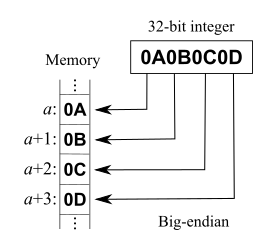
That post explains RowVersion is not stored as BigInt. Both RowVersion and BigInt take up 8 bytes of storage, but RowVersion is big-endian and unsigned, whereas BigInt is little-endian and signed.

A few quotes from it:

In my C# program I don’t want to work with byte array, therefore I cast rowversion data type to bigint:

SELECT CAST([version] AS BIGINT) FROM [dbo].[mytable]

So I receive a number instead of byte array. Is this conversion always successful and are there any possible problems with it? If so, in which data type should I cast rowversion instead?

and

You can convert in C# also, but if you want to compare them you should be aware that rowversion is apparently stored big-endian, so you need to do something like:

byte[] timestampByteArray = ... // from datareader/linq2sql etc...
var timestampInt = BitConverter.ToInt64(timestampByteArray, 0);
timestampInt = IPAddress.NetworkToHostOrder(timestampInt);

It’d probably be more correct to convert it as ToUInt64, but then you’d have to write your own endian conversion as there’s no overload on NetworkToHostOrder that takes uint64. Or just borrow one from Jon Skeet (search page for ‘endian’).

Code: [WayBack] Jon Skeet: Miscellaneous Utility Library

Related:

--jeroen

Posted in .NET, Database Development, Delphi, Development, Jon Skeet, Software Development, SQL Server | Leave a Comment »