The Wiert Corner – irregular stream of stuff

Jeroen W. Pluimers on .NET, C#, Delphi, databases, and personal interests

  • My badges

  • Twitter Updates

  • My Flickr Stream

  • Pages

  • All categories

  • Enter your email address to subscribe to this blog and receive notifications of new posts by email.

    Join 1,860 other subscribers

Archive for August, 2021

No GitHub: re-introducing an Inbox or Direct Messages is a bad idea!

Posted by jpluimers on 2021/08/18

Yesterday I published about Yet again, GitHub violates the Web Content Accessibility Guidelines by stealing a key: not it is the dot (.), and this week some feelers were put out for a kind of GitHub Inbox / Direct Message feature:

[Archive.is] GitHub Projects on Twitter: “What if there was 📨 DM/inbox feature on GitHub?”

There already is gitter.im (which is public instant messaging around GitHub repositories), and people have enough trouble managing all their incoming private message streams (be it paper/email inbox, social media and others), in large part because of SPAM and harassment messages.

It wasn’t by accident that the Private Messaging at GitHub feature was ditched almost a decade ago during [Wayback/Archive.is] 2012 Spring Cleaning | The GitHub Blog:

Private Messaging, however, was a step backwards: nobody wants another inbox. And a sub-par one, at that. Email is still the best way to contact someone.

Today we’re removing Private Messaging from GitHub. If you want people to contact you, please provide a public email address for your profile.

So I’m with all these:

Yes, I know [Archive.is] Tierney Cyren on Twitter: “A reminder that this account doesn’t actually represent GitHub nor any feature planning GitHub is doing… “, but I want to make absolutely clear to GitHub that another private message feature is a very bad idea.

–jeroen

Posted in Development, DVCS - Distributed Version Control, GitHub, Source Code Management | Leave a Comment »

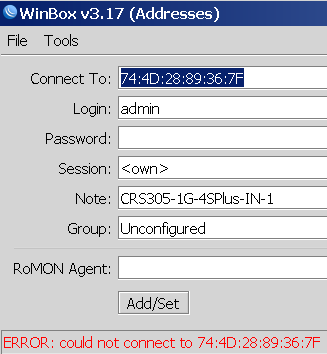
Winbox 3.19 can connect via MAC whereas Winbox 3.17 cannot

Posted by jpluimers on 2021/08/17

Not sure why, but Winbox 3.17 could not connect to out of the box blank MikroTik equipment at all.

Winbox 3.19 complains every now and than, but usually connects fine.

This was while configuring a bunch of [WayBack] MikroTik Routers and Wireless – Products: CRS305-1G-4S+IN.

Read the rest of this entry »

Posted in Development, Internet, MikroTik, Power User, RouterOS, routers, Scripting, Software Development | Leave a Comment »

delphi – How to embed the MIDAS.DLL in the client executable – Stack Overflow

Posted by jpluimers on 2021/08/17

I hardly use the [WayBack] TClientDataSet Class any more, so every once in a while I bump into a legacy project that does.

Often that forgets provide a deployment list, so usually with deployment of the underlying DLL is forgotten.

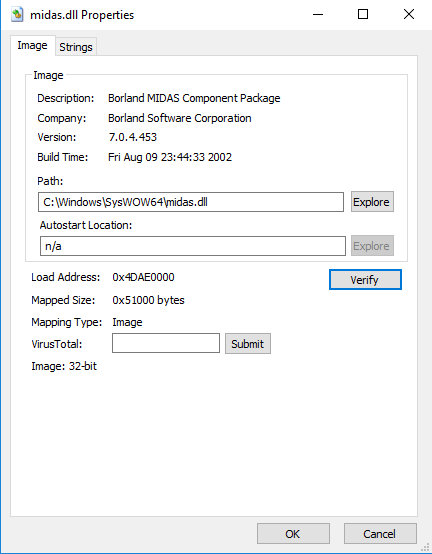
Those moments, it slips my mind that the original name for the underlying DataSnap technology is called MIDAS, and the DLL is MIDAS.DLL. Sometimes even a wrong version of that DLL is distributed (unicode versus non-unicode still can still be a thing).

You can avoid loading it (often at a premium of reduced speed) my adding MidasLib to the uses list of any unit in your project:

When you use BPLs instead of full units, then missing this can lead to a nasty access violation like this one where the ClientDataSet cannot be created because the wrong Midas.dll (non-unicode) was loaded, see the screenshot and stack overflow below.

Lessons re-learned:

  1. Use a minimal deployment footprint
  2. Ensure your test systems are clean, so no older versions of dependencies can be loaded at any time.

OS EAccessViolation at adress 5110E007: Access violation at address 5110E007 in module 'dsnap250.bpl'. Read of address 00000000
{occured in main thread}

Stack:
[50060B13]{rtl250.bpl  } System.@HandleAnyException
[00404815]{GVS.exe     } FastMM4.CalculateHeaderCheckSum$qqrp29Fastmm4.TFullDebugBlockHeader (Line 9098, "FastMM4.pas" + 1)
[50060039]{rtl250.bpl  } System.@AfterConstruction
[00404815]{GVS.exe     } FastMM4.CalculateHeaderCheckSum$qqrp29Fastmm4.TFullDebugBlockHeader (Line 9098, "FastMM4.pas" + 1)
[00404824]{GVS.exe     } FastMM4.UpdateHeaderAndFooterCheckSums$qqrp29Fastmm4.TFullDebugBlockHeader (Line 9108, "FastMM4.pas" + 1)
[004057C6]{GVS.exe     } FastMM4.DebugGetMem$qqri (Line 9649, "FastMM4.pas" + 42)
[00405817]{GVS.exe     } FastMM4.DebugGetMem$qqri (Line 9686, "FastMM4.pas" + 79)
[5005A247]{rtl250.bpl  } System.@ReallocMem
[50065674]{rtl250.bpl  } System.DynArraySetLength
[50065715]{rtl250.bpl  } System.@DynArraySetLength
[5110D001]{dsnap250.bpl} Datasnap.Dbclient.TCustomClientDataSet.CreateDSBase
[51111571]{dsnap250.bpl} Datasnap.Dbclient.TCustomClientDataSet.CreateDataSet
[500E920D]{rtl250.bpl  } System.Rtti.TValue._op_Implicit
[00559D29]{CDSDemo.exe } MainDataModuleUnit.TMainDataModule.DataModuleCreate (Line 50, "MainDataModuleUnit.pas" + 1)
[5016E7EF]{rtl250.bpl  } System.Classes.TDataModule.DoCreate
[5016E69C]{rtl250.bpl  } System.Classes.TDataModule.AfterConstruction
[50060039]{rtl250.bpl  } System.@AfterConstruction
[5016E67A]{rtl250.bpl  } System.Classes.TDataModule
[00544941]{CDSDemo.exe } MainFormUnit.TMainForm.PageControlChange (Line 30, "MainFormUnit.pas" + 19)
[0054598B]{CDSDemo.exe } MainFormUnit.TMainForm.FormShow (Line 40, "MainFormUnit.pas" + 47)
[50C075DD]{vcl250.bpl  } Vcl.Forms.TCustomForm.DoShow
[50C0BF7D]{vcl250.bpl  } Vcl.Forms.TCustomForm.CMShowingChanged
[5005FD9F]{rtl250.bpl  } System.TObject.Dispatch
[50AC4C16]{vcl250.bpl  } Vcl.Controls.TControl.WndProc
[50AC97FB]{vcl250.bpl  } Vcl.Controls.TWinControl.WndProc
[50C080B5]{vcl250.bpl  } Vcl.Forms.TCustomForm.WndProc
[50AC4850]{vcl250.bpl  } Vcl.Controls.TControl.Perform
[50AC8B71]{vcl250.bpl  } Vcl.Controls.TWinControl.UpdateShowing
[50AC8C80]{vcl250.bpl  } Vcl.Controls.TWinControl.UpdateControlState
[50ACB9D6]{vcl250.bpl  } Vcl.Controls.TWinControl.CMVisibleChanged
[50AC4C16]{vcl250.bpl  } Vcl.Controls.TControl.WndProc
[50AC97FB]{vcl250.bpl  } Vcl.Controls.TWinControl.WndProc
[50C080B5]{vcl250.bpl  } Vcl.Forms.TCustomForm.WndProc
[50C0E597]{vcl250.bpl  } Vcl.Forms.TScreen.GetMonitor
[50C094C5]{vcl250.bpl  } Vcl.Forms.TCustomForm.SetWindowToMonitor
[50AC4850]{vcl250.bpl  } Vcl.Controls.TControl.Perform
[50AC31E6]{vcl250.bpl  } Vcl.Controls.TControl.SetVisible
[50C078C1]{vcl250.bpl  } Vcl.Forms.TCustomForm.SetVisible
[50C11DCF]{vcl250.bpl  } Vcl.Forms.TApplication.Run
[004B3B28]{CDSDemo.exe } VclApplication.TApplication.Run (Line 113, "VclApplication.pas" + 1)
(00161097){CDSDemo.exe } [00562097]

–jeroen

Posted in Delphi, Development, Software Development | Leave a Comment »

Yet again, GitHub violates the Web Content Accessibility Guidelines by stealing a key: not it is the dot (.)

Posted by jpluimers on 2021/08/17

More sites seem to have a tendency of stealing keyboard shortcuts and violating the WCGA (Web Content Accessibility Guidelines), especially the (lowest!) conformance level A in [Wayback] WCAG version 2.1, section Success Criterion 2.1.4 Character Key Shortcuts

If a keyboard shortcut is implemented in content using only letter (including upper- and lower-case letters), punctuation, number, or symbol characters, then at least one of the following is true:

1. Turn off
mechanism is available to turn the shortcut off;
2. Remap
A mechanism is available to remap the shortcut to use one or more non-printable keyboard characters (e.g. Ctrl, Alt, etc);
3. Active only on focus
The keyboard shortcut for a user interface component is only active when that component has focus.

Mind you, I’m a keyboard person, there is even a: Keyboards and Keyboard Shortcuts category, but they always need to be configurable, anything else is a sin.

And GitHub did it again: [Archive.is] GitHub on Twitter: “🤫 New shortcut: Press . on any GitHub repo.… “.

So I’m totally with these:

Now they have started to steal the dot (.) keyboard to (in-place, with a fully new URL and no indication how to easily go back) start Visual Studio Code in the current repository.

Going back, though not documented, actually takes between one and three “back” movements in your web-browser history: utterly ridiculous for a key one can accidentally hit.

This behaviour violates all three above sub-criterions:

  1. it cannot be turned off
  2. there is no way to remap it
  3. it is almost always activated (unless there a text input – like “search” or “goto file” – has focus)

This is a very bad way to cope with accessibility, especially as conformance level A is yet again violated.

[Wayback] WCAG 2.1: section 5.2.1 Conformance Level:

One of the following levels of conformance is met in full.

  • For Level A conformance (the minimum level of conformance), the Web page satisfies all the Level A Success Criteria, or a conforming alternate version is provided.
  • For Level AA conformance, the Web page satisfies all the Level A and Level AA Success Criteria, or a Level AA conforming alternate version is provided.
  • For Level AAA conformance, the Web page satisfies all the Level A, Level AA and Level AAA Success Criteria, or a Level AAA conforming alternate version is provided.

To me another cardinal sin is that they stole Ctrl-F / Command-F (depending if you use non-MacOS or MacOS) from the web browser. So now it does not find it in the full page, but only in the currently selected file. (You guessed it, I’m with [Archive.is] KewlCat on Twitter: “I hate it when they intercept “/” and even [Ctrl]-F… “ too)

More of those conformance violation sins are at [Wayback] Keyboard shortcuts – GitHub Docs.

It isn’t hard to prevent this kind of thinking: it’s a mind set as described by [Archive.is] Patrick Joannisse on Twitter: “I don’t know if you are expecting a real answer but here goes: it starts with the mindset. In my training they had us wear goggles to block our vision and made us use a screen reader for a while. We met people with disabilities and they would show us how they work.… “

If you still like it and want to know how it works

–jeroen

Read the rest of this entry »

Posted in accessibility (a11y), Development, GitHub, Keyboards and Keyboard Shortcuts, Power User, Software Development, Source Code Management | Leave a Comment »

UUOC apparently is/was a thing: useless use of cat

Posted by jpluimers on 2021/08/16

A while ago I bumped into UUOC: [WayBack] cat (Unix): Useless use of cat – Wikipedia.

For me the post important reason to choose between cat and a redirect is realising from the above article:

  • input redirection forms allow command to perform random access on the file, whereas the cat examples do not.
  • cat written with UUOC might still be preferred for readability reasons, as reading a piped stream left-to-right might be easier to conceptualize

I ended up at UUOC through [WayBack] bash – Calling multiple commands through xargs – Stack Overflow.

Invoking multiple commands with the same xargs parameter.

The above question also led me to two better solutions for my original xargs problem.

I liked both below solutions.

The first (by [WayBack] ckhan) uses sh as subshell and substitutes the parameter with a readable name.

The second (by [WayBack] shivams) uses a function which gets way more readable code when the command-line gets longer.

[WayBack] shell – xargs : using same argument in multiple commands – Unix & Linux Stack Exchange:

  1. you’ll want to explicitly execute a subshell:
    echo 95 | xargs -n1 -I_percent -- sh -c '[ _percent -ge 95 ] && echo "No Space on disk _percent% full -- remove old backups please"'

    Note also I’m using _percent instead of {} to avoid extra quoting headaches with the shell. It’s not a shell variable; still just an xargs replacement string.

  2. An alternative way, which is more readable, is to define a separate function which contains all your other commands and then call that function with xargs in a sub-shell.Hence, for example:
    myfunc(){
      [ "$1" -ge 95 ] && echo "No Space on disk $1% full -- remove old backups please"
      echo "Another command echoing $1"
    }
    
    export -f myfunc
    
    echo 95 | xargs -n1 -I_percent -- sh -c 'myfunc "_percent"'

–jeroen

Posted in bash, Development, Scripting, Software Development | Leave a Comment »

Mikrotik CCR devices based on NAND memory will eventually die

Posted by jpluimers on 2021/08/16

If you own a Mikrotik CCR device based on NAND memory, then be prepared that it will die.

I had this on a (now discontinued [WayBack] MikroTik Routers and Wireless – Products: CCR1009-8G-1S-1S+PC, superseded by the less functional [WayBack] MikroTik Routers and Wireless – Products: CCR1009-7G-1C-1S+PC, which is also NAND based).

Many more people had this or very similar problems:

It also happens due to bad capacitors on the (also discontinued) [WayBack] MikroTik Routers and Wireless – Products: RB1200:

There have been quite a few NAND related changes to the firmware over the years that have to do with handling corruption:

If you are really lucky (I was not), then it is a bad power supply: [WayBack] bootloop on CCR1036-12g-4s (almost 5 years old) [SOLVED] – MikroTik.

Sometimes you can partially recover using the Console port or NetInstall, but eventually you will trip another part of the faulty NAND storage and it will die again, until it has spent all its lives.

Unlike a cat, those are usually far less than 9 lives.

If you do need to recover, the links might help you:

–jeroen

Posted in Internet, MikroTik, Power User, routers | Leave a Comment »

OCR on documents with Adobe Acrobat XI Standard

Posted by jpluimers on 2021/08/16

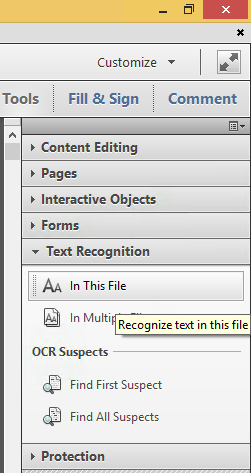
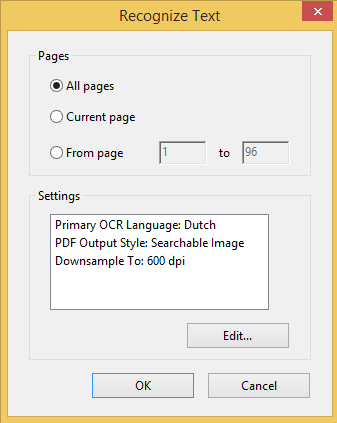
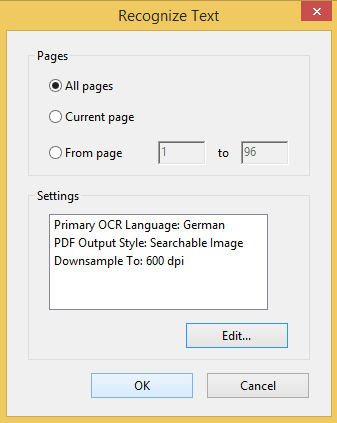
Steps to convert PDF to OCR on all pages in Acrobat XI Standard (STD) via [WayBack] PDF to text, how to convert a PDF to text | Adobe Acrobat DC:

  1. Open a PDF file containing a scanned image in Acrobat.
  2. Click on the Edit PDF tool in the right pane. Acrobat automatically applies optical character recognition (OCR) to your document and converts it to a fully editable copy of your PDF.
  3. Choose File > Save As and type a new name for your editable document.

Screenshots:

You can select from many OCR languages:

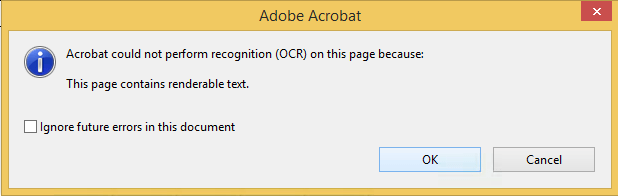
On pages without bitmap content, you see this message:

Only in Acrobat XI or older

Note that Acrobat XI was the last version where this was possible in the Standard edition.

More recent versions of Acrobat, need the Pro version for OCR:

Read the rest of this entry »

Posted in Adobe, Adobe Acrobat, Fujitsu ScanSnap, Hardware, ix100, Power User, Scanners | Leave a Comment »

IPMI will not grab IP even with DHCP turned on : homelab

Posted by jpluimers on 2021/08/13

TL;DR

  1. ensure the IPMI network cable is connected before connecting the power cable
  2. ensure the IPMI LAN is using the dedicated interface
  3. ensure the IPMI LAN interface is connected to a “non green” port of your network switch
  4. ensure the DHCP server has been cold rebooted
  5. ensure the IPMI VLAN configuration matches your network
  6. ensure the IPMI firewall configuration matches the network you try to reach IPMI from
  7. ensure the motherboard does not have a short-circuit anywhere

Otherwise SuperMicro devices might not get a DHCP address on the IPMI (BMC) interface, despite the tooling like [WayBack] ipmicfg indicating getting DHCP was succesful.

This especially holds for X9 boards, likely for newer boards as well.

Personally I never had the 4. and up above, but I bumped into 1. and 2. with SuperMicro boards and 3. with other devices.

Based on

Read the rest of this entry »

Posted in Hardware, Mainboards, Power User, SuperMicro, X9SRi-3F, X9SRi-F | Leave a Comment »

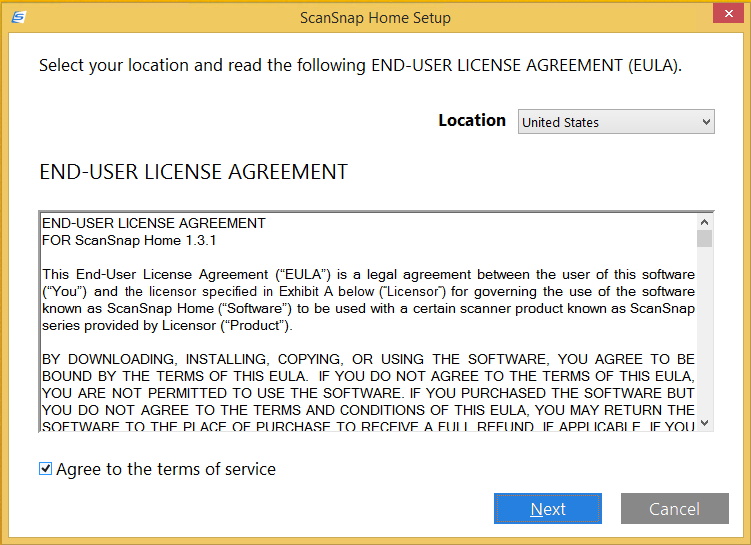
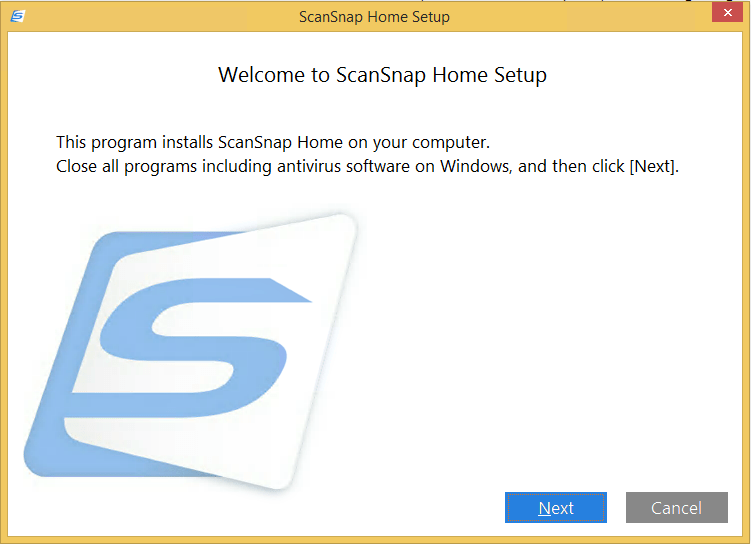
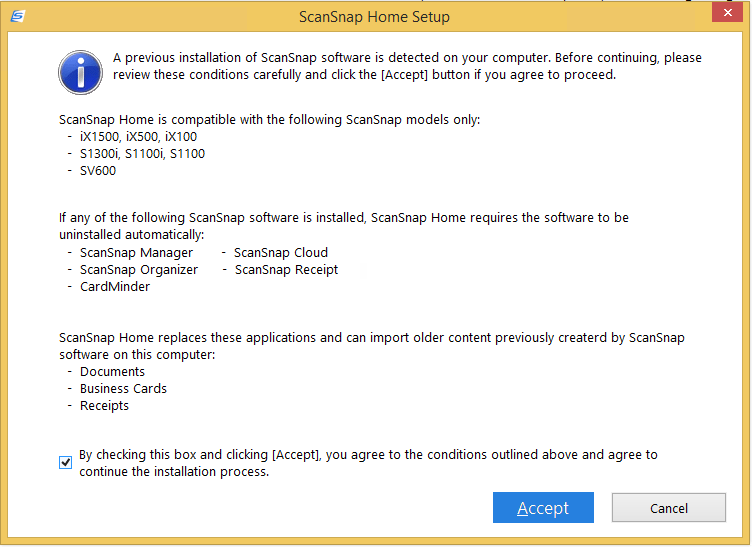
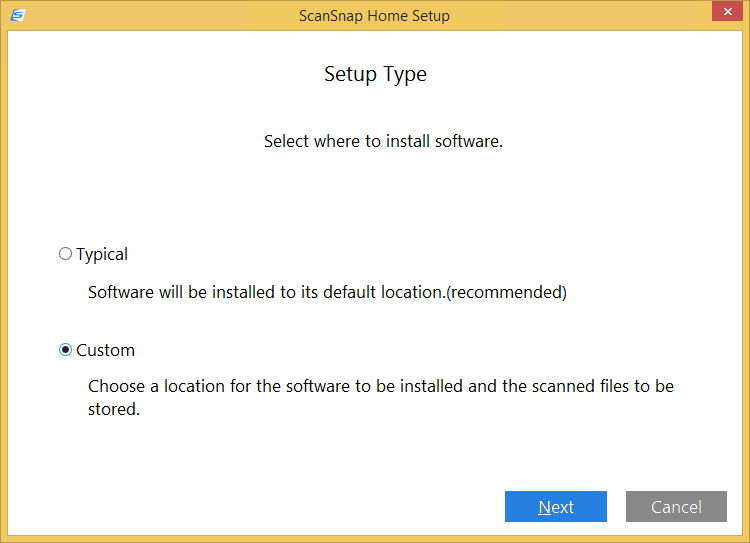
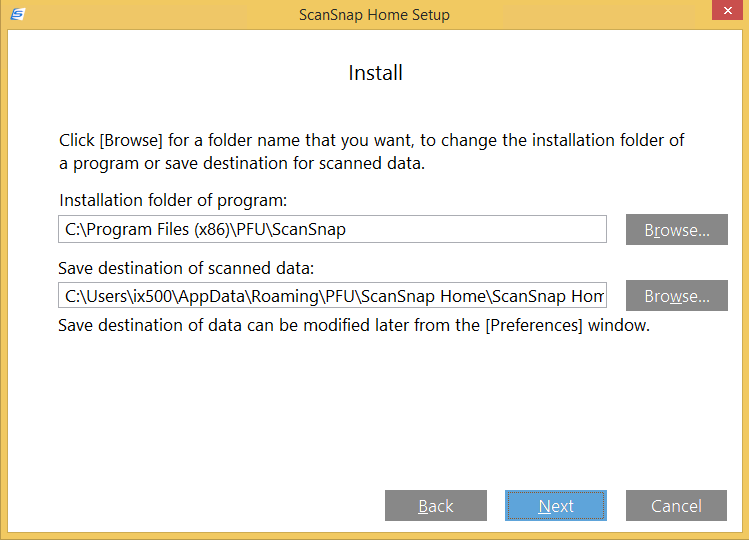
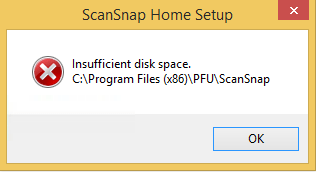
Installing a Fujitsu PFU ScanSnap ix1500: ScanSnap Home upgrade screenshots

Posted by jpluimers on 2021/08/13

For my screenshot archive:

A retry with about 5 gigabyte of free space went further:

Read the rest of this entry »

Posted in Fujitsu ScanSnap, Hardware, ix1500, Power User, Scanners, Windows, Windows 8.1 | Leave a Comment »

ScanSnap Advanced Operation Guide (Mac OS) Creating Searchable PDF Files

Posted by jpluimers on 2021/08/13

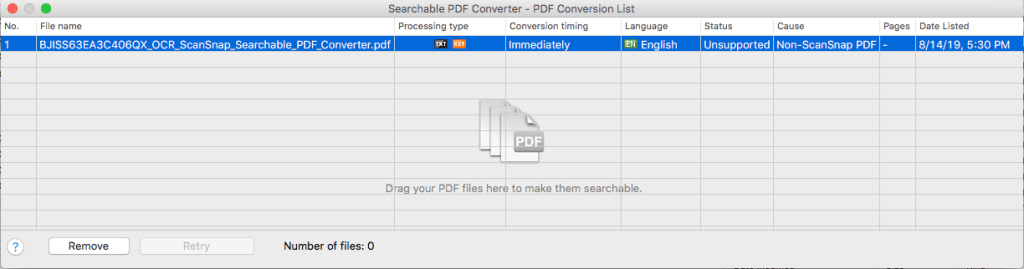
This works only for PDF files originally created by ScanSnap (otherwise “Unsuccessful” with “Non-ScanSnap PDF”: [WayBack] ScanSnap Advanced Operation Guide (Mac OS) Creating Searchable PDF Files

ATTENTION

  • Vertical text can be searched with Adobe Acrobat, but not with Spotlight or Preview.

HINT

The [Searchable PDF Converter] icon Searchable PDF Converter Icon appears in the status menu of the menu bar while Searchable PDF Converter is running. For details, refer to the ScanSnap Manager Help.

  1. Click the [Searchable PDF Converter] icon Searchable PDF Converter in the Quick Menu.
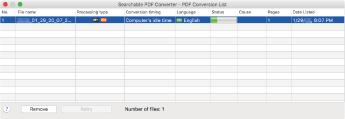
    • The [Searchable PDF Converter – PDF Conversion List] window appears, and conversion starts.
      Searchable PDF Converter

    HINT

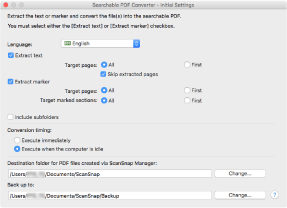
    On a window that appears when [Searchable PDF Converter] is started for the first time, click the [OK] button to open the [Searchable PDF Converter – Initial Settings] window. In the [Searchable PDF Converter – Initial Settings] window, specify the processes that are to be performed, the conversion timing, and the folder to which the converted files are saved while conversion into searchable PDF files is being performed.

    Searchable PDF Converter - Initial Settings

When using different kinds of PDFs, you get this error:

I have not figured out yet how it recognises ScanSnap generated PDF files.

–jeroen

Posted in Fujitsu ScanSnap, Hardware, ix500, Power User, Scanners | Leave a Comment »