Archive for the ‘Encoding’ Category
Posted by jpluimers on 2022/02/08
As a precursor to a post tomorrow showing that serving UTF8 does not mean organisations go without unicode problems, first some statistics.
The first Unicode ideas got drafted some 30 years ago in 1987. In 1991, more than 30 years ago, the Unicode Consortium saw the light. Nowadays more than 95% percent of the web-pages (close to 100% when you include plain ASCII) is served using the UTF-8 encoding.
It means that nowadays there is a very small chance you
will see mangled characters (what Japanese call mojibake) when you’re surfing the web.
Some nice graphs of unicode growth are at these locations are at these locations:
I think especially important are 2008 (when UTF-8 had outgrown all other individual encodings) and slightly after 2010, when UTF-8 alone covered more than 50% of the pages served. These exclude ASCII-only pages. Adding those would make the figures even larger.
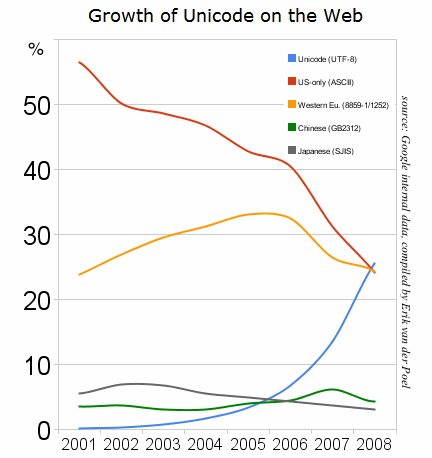


Historical yearly trends in the usage statistics of character encodings for websites, June 2021
–jeroen
Posted in Development, Encoding, Software Development, UTF-8, UTF8, Web Development | Leave a Comment »
Posted by jpluimers on 2022/01/06
Contrary to what many believe is that MySQL utf8 is not always full blown UTF-8 support, but actually utf8mb3, which has been deprecated for a while now.
Only utf8mb4 will give you full blown UTF-8 support.
This when someone reminded me of this in a Delphi application:
When I insert :joy: emoji into mysql varchar filed I got an error :
#22007 Incorrect string value: '\xF0\x9F\x98\x82' for column 'remarks' at row 1
database charset is utf8
Note that the :joy: emoji is 😂 and has Unicode code point U+1F602 which is outside the basic multilingual plane.
See:
- [Wayback] Unicode Character ‘FACE WITH TEARS OF JOY’ (U+1F602)
- Plane (Unicode): Overview, Basic Multilingual Plane – Wikipedia
- [Archive.is] Kristian Köhntopp on Twitter: “MySQL also, for quite some time now, no longer updates its own charsets and collations internally, for the same reason. So utf8 in MySQL is utf8mb3, the three byte variant of Unicode UTF-8 implementation that covers only the BMP (unicode up to U+FFFF).”
- Kristian Köhntopp
»Where does PostgreSQL’s collation logic come from?
PostgreSQL relies on external libraries to order strings.
– libc, meaning the operating system locale facility (POSIX or Windows)
– icu, meaning the ICU project (if PostgreSQL was built with ICU support)«
- MySQL does things differently:
MySQL binary data files are independent of the host operating system in byte order, number representation (as long as the host fulfils MySQLs basic requirements), collation and even time zone handling.
- So MySQL implements collations internally, also to guarantee stability across OS updates.
If it didn’t, a libc update changing collations would mean you have to recreate a lot of indexes. Also, you would not be able to safely move data files from host to host.
- MySQL also, for quite some time now, no longer updates its own charsets and collations internally, for the same reason.
So utf8 in MySQL is utf8mb3, the three byte variant of Unicode UTF-8 implementation that covers only the BMP (unicode up to U+FFFF).
- When moving to fuller (multiplane) UTF-8 support, a new name was needed, and utf8mb4 was chosen.
So when you actually want modern utf8 in MySQL, you have to use utf8mb4, and now you know why.
- utf8 is deprecated and will be upgraded to utf8mb4 in some future MySQL release. This will be a breaking upgrade, and I wonder if it will require dropping and recreating all indexes affected by the change.
That will be painful.
- https://dev.mysql.com/doc/refman/8.0/en/charset-unicode-utf8mb3.html …
utf8mb3 page in the MySQL 8.0 manual, with deprecation notice.
What will change is the meaning of the alias utf8 (currently an alias for utf8mb3).
- [Wayback] MySQL: Some Character Set Basics | Die wunderbare Welt von Isotopp
- [Wayback] MySQL :: MySQL 8.0 Reference Manual :: 10.9.2 The
utf8mb3 Character Set (3-Byte UTF-8 Unicode Encoding)
utf8 is an alias for utf8mb3; the character limit is implicit, rather than explicit in the name.
Note
The utf8mb3 character set is deprecated and you should expect it to be removed in a future MySQL release. Please use utf8mb4 instead. Although utf8 is currently an alias for utf8mb3, at some point utf8 is expected to become a reference to utf8mb4. To avoid ambiguity about the meaning of utf8, consider specifying utf8mb4 explicitly for character set references instead of utf8.
- [Wayback] MySQL :: MySQL 8.0 Reference Manual :: 10.9.1 The utf8mb4 Character Set (4-Byte UTF-8 Unicode Encoding)
utf8mb4 contrasts with the utf8mb3 character set, which supports only BMP characters and uses a maximum of three bytes per character:
- For a BMP character,
utf8mb4 and utf8mb3 have identical storage characteristics: same code values, same encoding, same length.
- For a supplementary character,
utf8mb4 requires four bytes to store it, whereas utf8mb3 cannot store the character at all. When converting utf8mb3 columns to utf8mb4, you need not worry about converting supplementary characters because there are none.
–jeroen
Posted in Conference Topics, Conferences, Database Development, Delphi, Development, Encoding, Event, MySQL, Software Development, UTF-8, UTF8 | Leave a Comment »
Posted by jpluimers on 2022/01/06

Model 100489-14-01 wall clock
Just in case I need it again.
The signal quality fluctuates during the day (it is a lot better at night when there is less inionisation in the atmosphere), and is worsened by concrete walls (like our home).
Best way to get prolonged reception is at night, on the top floor behind a window or outside.
The clock usually needs between 3 and 10 minutes to pick up the DCF77 signal from the transmitter.
Wall clock manual: [Wayback] 100489_EN.pdf of which this abstract:
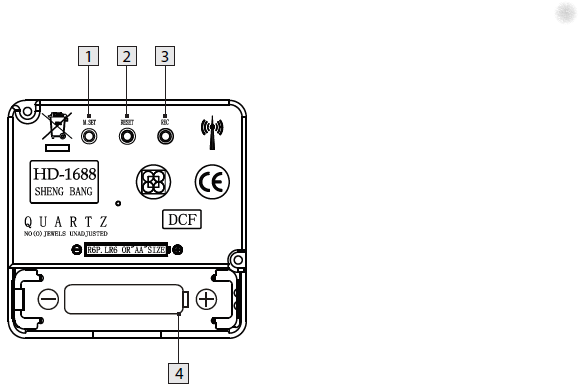
DCF77 HD-1688 clock mechanism
Numbers:
- M.SET button
- Press and keep pressed the M.SET button 1 at least 3 seconds. The wall clock switches into manual mode.
- Press and keep pressed the M.SET button again until the hands reach the correct position for you to set the time.
- Briefly pressing the M.SET button moves the hands forward in one minute steps to enable you to set the current time manually.
Note: After 8 seconds without pressing the M.SET button, the wall clock switches out of manual mode and keeps the time as normal. The manually set value is overwritten as soon as reception of the DCF radio time signal is successful.
- RESET button
- Press the RESET button 2 to reset the radio clock settings. Alternatively, remove the batteries from the device and insert them again.
- The product now automatically starts to search for the DCF radio time signal.
- REC button
- Press and keep pressed the REC button 3 at least 5 seconds. The wall clock attempts to receive the DCF radio time signal. This process takes a few minutes to complete.
- Battery compartment
- Battery type: 1 x 1.5 V ⎓ AA, LR6
More on the signal, transmitter and encoding: DCF77 – Wikipedia, where the below images are from:

DCF77 reception area from Mainflingen

DCF77 signal strength over a 24-hour period measured in Nerja, on the south coast of Spain 1,801 km (1,119 mi) from the transmitter. Around 1 AM it peaks at ≈ 100 µV/m signal strength. During the day, the signal is weakened by ionization of the ionosphere due to solar activity.
Another DCF77 clock I have: CSL Bearware 302658 DCF clock manual
–jeroen
Posted in Development, Encoding, Hardware Development, LifeHacker, Power User, Software Development | 2 Comments »
Posted by jpluimers on 2021/09/29
The below one will fail in a script, both both work from the PowerShell prompt:
Success
Get-NetFirewallRule -DisplayGroup "File and Printer Sharing" | ForEach-Object { Write-Host $_.DisplayName ; Get-NetFirewallAddressFilter -AssociatedNetFirewallRule $_ }
Failure
Get-NetFirewallRule –DisplayGroup "File and Printer Sharing" | ForEach-Object { Write-Host $_.DisplayName ; Get-NetFirewallAddressFilter -AssociatedNetFirewallRule $_ }
The error you get this this:
At C:\bin\Show-File-and-Printer-Sharing-firewall-rules.ps1:5 char:52
+ ... -TCP-NoScope" | ForEach-Object { Write-Host $_.DisplayName ; Get-NetF ...
+                 ~~~~~~~~~~~~~~~~~~~~~~~~~~~~~~~~~~~~~~~~~~~~~~~~~~~~~~~~~
The string is missing the terminator: ".
    + CategoryInfo          : ParserError: (:) [], ParentContainsErrorRecordException
    + FullyQualifiedErrorId : TerminatorExpectedAtEndOfString
Via [WayBack] script file ‘The string is missing the terminator: “.’ – Google Search, I quickly found these that stood out:
Cause and solution
Before DisplayGroup, the first line has a minus sign and the second an en-dash. You can see this via [WayBack] What Unicode character is this ?.
Apparently, when using Unicode on the console, it does not matter if you have a minus sign (-), en-dash (–), em-dash (—) or horizontal bar (―) as dash character. You can see this in [WayBack] tokenizer.cs at function [WayBack] NextToken and [WayBack] CharTraits.cs at function [WayBack] IsChar).
When saving to a non-Unicode file, it does matter, even though it does not display as garbage in the error message.
Similarly, PowerShell has support for these special characters:
    internal static class SpecialChars
    {
        // Uncommon whitespace
        internal const char NoBreakSpace = (char)0x00a0;
        internal const char NextLine = (char)0x0085;

        // Special dashes
        internal const char EnDash = (char)0x2013;
        internal const char EmDash = (char)0x2014;
        internal const char HorizontalBar = (char)0x2015;

        // Special quotes
        internal const char QuoteSingleLeft = (char)0x2018; // left single quotation mark
        internal const char QuoteSingleRight = (char)0x2019; // right single quotation mark
        internal const char QuoteSingleBase = (char)0x201a; // single low-9 quotation mark
        internal const char QuoteReversed = (char)0x201b; // single high-reversed-9 quotation mark
        internal const char QuoteDoubleLeft = (char)0x201c; // left double quotation mark
        internal const char QuoteDoubleRight = (char)0x201d; // right double quotation mark
        internal const char QuoteLowDoubleLeft = (char)0x201E; // low double left quote used in german.
    }
The easiest solution is to use minus signs everywhere.
Another solution is to save files as Unicode UTF-8 encoding (preferred) or UTF-16 encoding (which I dislike).
–jeroen
Posted in .NET, CommandLine, Development, Encoding, PowerShell, PowerShell, Scripting, Software Development, Unicode, UTF-16, UTF-8, UTF16, UTF8 | Leave a Comment »
Posted by jpluimers on 2021/08/04
Not all letters have superscript or subscript counterparts. The counterparts are from different ranges, so might not look nice when next to each other.
I think 20th using Unicode lowercase superscript looks ugly 20ᵗʰ. With uppercase superscript it is somewhat OK: 20ᵀᴴ.
The list is from [WayBack] javascript – How to find the unicode of the subscript alphabet? – Stack Overflow:
Take a look at the wikipedia article Unicode subscripts and superscripts. It looks like these are spread out across different ranges, and not all characters are available.
Consolidated for cut-and-pasting purposes, the Unicode standard defines complete sub- and super-scripts for numbers and common mathematical symbols ( ⁰ ¹ ² ³ ⁴ ⁵ ⁶ ⁷ ⁸ ⁹ ⁺ ⁻ ⁼ ⁽ ⁾ ₀ ₁ ₂ ₃ ₄ ₅ ₆ ₇ ₈ ₉ ₊ ₋ ₌ ₍ ₎ ), a full superscript Latin lowercase alphabet except q ( ᵃ ᵇ ᶜ ᵈ ᵉ ᶠ ᵍ ʰ ⁱ ʲ ᵏ ˡ ᵐ ⁿ ᵒ ᵖ ʳ ˢ ᵗ ᵘ ᵛ ʷ ˣ ʸ ᶻ ), a limited uppercase Latin alphabet ( ᴬ ᴮ ᴰ ᴱ ᴳ ᴴ ᴵ ᴶ ᴷ ᴸ ᴹ ᴺ ᴼ ᴾ ᴿ ᵀ ᵁ ⱽ ᵂ ), a few subscripted lowercase letters ( ₐ ₑ ₕ ᵢ ⱼ ₖ ₗ ₘ ₙ ₒ ₚ ᵣ ₛ ₜ ᵤ ᵥ ₓ ), and some Greek letters ( ᵅ ᵝ ᵞ ᵟ ᵋ ᶿ ᶥ ᶲ ᵠ ᵡ ᵦ ᵧ ᵨ ᵩ ᵪ ). Note that since these glyphs come from different ranges, they may not be of the same size and position, depending on the typeface.
After a nice chat with my nephew EWD, I did some research and found the above via
–jeroen
Posted in Development, Encoding, internatiolanization (i18n) and localization (l10), Power User, Software Development, Unicode | Leave a Comment »
Posted by jpluimers on 2021/07/21
If you get the below error when running hg.exe, then you are mixing a 64-bit Mercurial with 32-bit dependencies:
C:\>hg --version
Traceback (most recent call last):
  File "hg", line 43, in
  File "hgdemandimport\demandimportpy2.pyc", line 150, in __getattr__
  File "hgdemandimport\demandimportpy2.pyc", line 94, in _load
  File "hgdemandimport\demandimportpy2.pyc", line 43, in _hgextimport
  File "mercurial\dispatch.pyc", line 22, in
  File "hgdemandimport\demandimportpy2.pyc", line 248, in _demandimport
  File "hgdemandimport\demandimportpy2.pyc", line 43, in _hgextimport
  File "mercurial\i18n.pyc", line 28, in
  File "hgdemandimport\demandimportpy2.pyc", line 150, in __getattr__
  File "hgdemandimport\demandimportpy2.pyc", line 94, in _load
  File "hgdemandimport\demandimportpy2.pyc", line 43, in _hgextimport
  File "mercurial\encoding.pyc", line 24, in
  File "mercurial\policy.pyc", line 101, in importmod
  File "mercurial\policy.pyc", line 63, in _importfrom
  File "hgdemandimport\demandimportpy2.pyc", line 164, in __doc__
  File "hgdemandimport\demandimportpy2.pyc", line 94, in _load
  File "hgdemandimport\demandimportpy2.pyc", line 43, in _hgextimport
  File "mercurial\cext\parsers.pyc", line 12, in
  File "mercurial\cext\parsers.pyc", line 10, in __load
ImportError: DLL load failed: %1 is geen geldige Win32-toepassing.
The equivalent English error is [WayBack] “ImportError: DLL load failed: %1 is not a valid Win32 application.” – Google Search.
The problem is the bitness of hg.exe: [WayBack] python – Error while installing Mercurial on IIS7 64bit: “DLL Load Failed: %1 is not a valid Win32 application” – Stack Overflow
You can quickly figure out the bitness of hg.exe:
C:\>where hg
C:\Program Files\Mercurial\hg.exe

C:\>sigcheck "C:\Program Files\Mercurial\hg.exe"

Sigcheck v2.72 - File version and signature viewer
Copyright (C) 2004-2019 Mark Russinovich
Sysinternals - www.sysinternals.com

c:\program files\mercurial\hg.exe:
        Verified:       Unsigned
        Link date:      17:49 9-7-2019
        Publisher:      n/a
        Company:        n/a
        Description:    Fast scalable distributed SCM (revision control, version control) system
        Product:        mercurial
        Prod version:   5.0.2
        File version:   5.0.2
        MachineType:    64-bit
Forcing x86 of Mercurial
Since I use chocolatey for most my installs, I forced x86 the Chocolatey way:
So after these:
choco uninstall --yes hg
choco install --yes --force86 hg
I got this signature check:
C:\>sigcheck "C:\Program Files (x86)\Mercurial\hg.exe"

Sigcheck v2.72 - File version and signature viewer
Copyright (C) 2004-2019 Mark Russinovich
Sysinternals - www.sysinternals.com

c:\program files (x86)\mercurial\hg.exe:
        Verified:       Unsigned
        Link date:      17:50 9-7-2019
        Publisher:      n/a
        Company:        n/a
        Description:    Fast scalable distributed SCM (revision control, version control) system
        Product:        mercurial
        Prod version:   5.0.2
        File version:   5.0.2
        MachineType:    32-bit
–jeroen
Posted in Development, DVCS - Distributed Version Control, Encoding, Mercurial/Hg, Python, Scripting, Software Development, Source Code Management | Leave a Comment »
Posted by jpluimers on 2021/06/29
A few statements go get database names and IDs based on these functions or system tables:
Part of it has the assumption that a master database always exists.
-- gets current database name
select db_name() as name
;
name
--------------------------------------------------------------------------------------------------------------------------------
acc

(1 row affected)
-- gets current database ID
select db_id() as dbid
;
dbid
------
5

(1 row affected)
-- gets all database IDs and names
select dbid,name from sys.sysdatabases
;
dbid   name
------ --------------------------------------------------------------------------------------------------------------------------------
1      master
5      acc

(2 rows affected)
-- gets current database name by ID
select db_name(db_id()) as name
;
name
--------------------------------------------------------------------------------------------------------------------------------
acc

(1 row affected)
-- gets case corrected database name for sys.sysdatabases.name having a case insensitive collation sequence
select dbid,name from sys.sysdatabases
where name='Master'
;
dbid   name
------ --------------------------------------------------------------------------------------------------------------------------------
1      master

(1 row affected)
-- gets case corrected database name for sys.sysdatabases.name having a case sensitive collation sequence
select dbid,name from sys.sysdatabases
where name = 'Master' collate Latin1_General_100_CI_AI
;
dbid   name
------ --------------------------------------------------------------------------------------------------------------------------------
1      master

(1 row affected)
Note that:
- even though by default the SQL server collation sequence is case insensitive, it can make sense to do a case insensitive search, for example by using the
upper function, specifying a collation, or casting to binary. I like upper the most, because – though less efficient – it is a more neutral SQL idiom.
- the most neutral case insensitive collation seems to be
Latin1_General_100_CI_AI
Related:
- [WayBack] SQL server ignore case in a where expression – Stack Overflow answered by Solomon Rutzky, summarised as:
- Do not use
upper as upper with lower does not always round-trip.
- Do not use
varbinary as it is not case insensitive.
- Neither the
= or like operators are case sensitive by default: both need a collate clause.
- Find the collation of the column(s) involved; if it contains
_CI, then you are done (it is already case insensitive); if it contains _CS, then replace that with _CI (case insensitive) and add that in a collate clause.
- Collations are per
predicate, so not per query, per table, per column nor per database. This means you have to specify them if you want to use a different one than the default.
- [WayBack] What is Collation in Databases? | Database.Guide
Latin1_General_100_CI_AI |
Latin1-General-100, case-insensitive, accent-insensitive, kanatype-insensitive, width-insensitive |
- [WayBack] Collation Info: Information about Collations and Encodings for SQL Server
- [WayBack] SQL Instance Collation – Language Neutral Required:
I recommend using Latin1_General_100_CI_AI. I recommend this because:
…
- If
Latin1_General_CI_AI is supported, then there’s almost no chance thatLatin1_General_100_CI_AI (which is a far better choice) isn’t also supported. The version 100 collation has about 15,400 more sort weight definitions, plus 438 more uppercase/lowercase mappings. Not having those sort weights means that 15,400 more characters in the non-100 version equate to space, an empty string, and to each other. Not having those case mappings means that 438 more characters in the non-100 version return the character passed in (i.e. no change) for the UPPER() and LOWER() functions. There is no reason at all to want Latin1_General_CI_AI instead of Latin1_General_100_CI_AI. There might be a need if code was put into place to work around these deficiencies, and that code would behave incorrectly under the newer, better version of that collation. However, it’s highly unlikely that code was put into place to account for this, and extremely unlikely that if such code did exist, that it would error or doing things incorrectly due to the newer collation.
- [WayBack] Differences Between the Various Binary Collations (Cultures, Versions, and BIN vs BIN2) – Sql Quantum Leap
- [WayBack] How to do a case sensitive search in WHERE clause (I’m using SQL Server)? – Stack Overflow answered by Jonas Lincoln:
By using collation or casting to binary, like this:
SELECT *
FROM Users
WHERE
    Username = @Username COLLATE SQL_Latin1_General_CP1_CS_AS
    AND Password = @Password COLLATE SQL_Latin1_General_CP1_CS_AS
    AND Username = @Username
    AND Password = @Password
The duplication of username/password exists to give the engine the possibility of using indexes. The collation above is a Case Sensitive collation, change to the one you need if necessary.
The second, casting to binary, could be done like this:
SELECT *
FROM Users
WHERE
    CAST(Username as varbinary(100)) = CAST(@Username as varbinary))
    AND CAST(Password as varbinary(100)) = CAST(@Password as varbinary(100))
    AND Username = @Username
    AND Password = @Password
- [WayBack] sql – How to get Database name of sqlserver – Stack Overflow
–jeroen
Posted in Database Development, Development, Encoding, internatiolanization (i18n) and localization (l10), SQL Server | Leave a Comment »
Posted by jpluimers on 2021/06/24
Usually when I see this error [Wayback] “No mapping for the Unicode character exists in the target multi-byte code page” – Google Search, it is in legacy code that uses string buffers where decoding or decompressing data into.
This is almost always wrong no matter what kind of data you use, as it will depend in your string encoding.
I have seen it happen especially in these cases:
- base64 decoding from string to string (solution: decode from a string stream into a binary stream, then post-process from there)
- zip or zlib decompress from binary stream to string stream, then reading the string stream (solution: decompress from binary stream to binary stream, then post-process from there)
Most cases I encountered were in Delphi and C code, but surprisingly I also bumped into C# exhibiting this behaviour.
I’m not alone, just see these examples from the above Google search:
–jeroen
Posted in .NET, base64, C, C#, C++, Delphi, Development, Encoding, Software Development, Unicode | Leave a Comment »
Posted by jpluimers on 2021/04/21
Every now and then it is useful to be able to do maintenance work from the ESXi console addition to the ESXi web-user interface.
I know there are many sites having this information, but many of them forgot to format the statements with code markup, so parameters with two dashes -- (each a Wayback Unicode Character ‘HYPHEN-MINUS’ (U+002D)) now have become an [Wayback] Unicode Character ‘EN DASH’ (U+2013) which is incompatible with most console programs, especially the ESXi ones (as they are Busybox based to minimise footprint).
Note you can use this small site (which runs in-browser, so does not phone home) to get the unicode code points for any string: [Wayback] What Unicode character is this ?.
Links like below (most on the vmware.com domain) have this EN DASH and make me document things on my blog instead of trying code directly from blogs or forum posts:
So below are three commands I use that have to do with the maintenance mode (the mode that for instance you can use to update an ESXi host to the latest patch level).
-
- Check the maintenance mode (which returns
Enabled or Disabled):
esxcli system maintenanceMode get
- Enable maintenance mode (which returns nothing when succeeded, and
Maintenance mode is already enabled. when failed):
esxcli system maintenanceMode set --enable true
- Disable maintenance mode (which returns nothing when succeeded, and
Maintenance mode is already disabled. when failed):
esxcli system maintenanceMode get
Some examples, especially an the various output possibilities (commands in bold, output in italic):
# esxcli system maintenanceMode get
Disabled
# esxcli system maintenanceMode set --enable false
Maintenance mode is already disabled.
# esxcli system maintenanceMode set --enable true
# esxcli system maintenanceMode get
Enabled
# esxcli system maintenanceMode set --enable true
Maintenance mode is already enabled.
# esxcli system maintenanceMode set --enable false
# esxcli system maintenanceMode get
Disabled
I made these scripts for this:
esxcli-maintenanceMode-show.sh:
#!/bin/sh
esxcli system maintenanceMode get
esxcli-maintenanceMode-enter.sh:
#!/bin/sh
esxcli system maintenanceMode set --enable true
esxcli-maintenanceMode-exit.sh:
#!/bin/sh
esxcli system maintenanceMode set --enable false
Note I have not checked the exit codes for these esxcli commands yet, but did blog about how to do that: Busybox sh (actually ash derivative dash): checking exit codes.
–jeroen
Posted in BusyBox, Development, Encoding, ESXi6, ESXi6.5, ESXi6.7, ESXi7, Power User, Software Development, Unicode, Virtualization, VMware, VMware ESXi | Leave a Comment »
Posted by jpluimers on 2021/04/14
I could not find a syntax for “current changeset”, but since cm log accepts the output of cm status as changeset identifier:
for /F "tokens=*" %l in ('call cm status --nochanges') do (call cm log %l --itemformat )
Or in batch file form:
for /F "tokens=*" %%l in ('call cm status --nochanges') do (call cm log %%l --itemformat )
Two important parts of the trick that ensure each command only outputs what is needed:
- The empty
--itemformat specification for cm log indicates that no details about files should be logged.Without it, cm log will list both the changeset information and information about each item in the changeset.
- The other trick is
--nochanges for cm status: it only shows the status line, and no other changes.Without it, cm status will emit one line per changed file.
–jeroen
Read the rest of this entry »
Posted in Development, Encoding, PlasticSCM, Software Development, Source Code Management | Leave a Comment »


 The Wiert Corner - irregular stream of stuff