


Some notes if I ever want to do something like this.
In this case I worked around it by having the Items include different text (since I had object pointers in the TStrings anyway) so I could stick to the csDropDown Style.
|
|||
|
|
|||
|
|


–jeroen
Posted by jpluimers on 2013/04/17
Some notes if I ever want to do something like this.
In this case I worked around it by having the Items include different text (since I had object pointers in the TStrings anyway) so I could stick to the csDropDown Style.
|
|||
|
|
|||
|
|
–jeroen

Posted in Delphi, Delphi XE2, Delphi XE3, Development, Software Development | 3 Comments »
Posted by jpluimers on 2013/04/16
Just in case you missed it too:
Xamarin Studio is MonoDevelop plus a set of add-ins. Those add-ins provide the required functionality for working with Android and iOS projects, and integrate some Xamarin services such as the Component Store.
The development of MonoDevelop will continue like it has been in the past. All the improvements which are not related to Xamarin’s commercial offerings will be done in MonoDevelop, and we have plans for a lot of them: code analysis, version control, debugger, etc. We are committed to keep evolving MonoDevelop, because a better MonoDevelop means a better Xamarin Studio.
MonoDevelop will also keep working on Linux. There may be some rough edges with MonoDevelop 4.0 on Linux, since for this release we put our focus on Mac and Windows, since that’s what Xamarin’s customers use. So if you find any problems please file bugs!
–jeroen
via: [MonoDevelop] MonoDevelop and Xamarin Studio.
Posted in .NET, Development, Mono for Android, MonoDevelop, MonoTouch, Software Development, Xamarin Studio | Leave a Comment »
Posted by jpluimers on 2013/04/16
So I won’t forget to research this:
Somehow this occurs with Excel and the .NET app only having a few dozen megabytes of memory in use, so the cause must be something a lot more simple than “out of memory”.
It is a complex export, but I might just be able to get this going using ADO.NET, and make sure it is not a 60+k rows or 60+k characters issue.
–jeroen
Posted in .NET, .NET 4.0, C#, C# 4.0, Development, Excel, Office, Power User, Software Development, Visual Studio 2010, WinForms | Leave a Comment »
Posted by jpluimers on 2013/04/11
A small duh moment when I found this out myself the hard way: when repeatedly drawing anti-aliased text, it will alter the background on each draw.
So you cannot do that. Not in Delphi, not in .NET, not in Cocoa, nowhere (:
–jeroen
via: delphi – “Additive” text rendering on TCanvas? – Stack Overflow.
Posted in .NET, Delphi, Development, FireMonkey, Software Development, User Experience (ux), WinForms, WPF, XNA | 7 Comments »
Posted by jpluimers on 2013/04/10
For my research queue:
I should look at the below ConnectionStrings to access dBase with ADO from Delphi, If I ever need to do that.
Thanks Cromulent for asking, Nelson for editing and Pieter for answering:
Microsoft dBase ODBC driver
Driver={Microsoft dBASE Driver (*.dbf)};DriverID=277;OLE DB Services = -1;Extended Properties=dBase IV;Dbq=c:\mypathdoing operations like ADOTable1.Open are very fast (good) but GetIndexNames returns nothing (bad).
Microsoft Jet OLEDB 4.0 driver
Provider=Microsoft.Jet.OLEDB.4.0;Extended Properties=dBASE IV;OLE DB Services=-1;Data Source=c:\mypathdoing operations like ADOTable1.Open are exceedingly slow (bad) while GetIndexNames does return index names the way it should (good).
How do I get both speed and the index info via ADO for the dBase tables?
Microsoft Paradox Driver 7.x
“We use the following connection string which works really well.”
Provider=MSDASQL.1;Persist Security Info=False;Extended Properties="Driver={Microsoft Visual FoxPro Driver};UID=;SourceDB=c:\mypath;SourceType=DBF;Exclusive=No;BackgroundFetch=Yes;Collate=Machine;Null=Yes;Deleted=Yes;"
–jeroen
via Delphi + ADO + dBase – Stack Overflow.
Posted in Delphi, Delphi 2005, Delphi 2006, Delphi 2007, Delphi 2009, Delphi 2010, Delphi 5, Delphi 6, Delphi 7, Delphi XE, Delphi XE2, Delphi XE3, Development, Software Development | 8 Comments »
Posted by jpluimers on 2013/04/09
A few interesting links for my archive:
–jeroen
Posted in Delphi, Development, FreePascal, Pascal, Software Development | 3 Comments »
Posted by jpluimers on 2013/04/08
Last quarter, 11 issues of Micro Cornucopia appeared on BitSavers including the final May 1990 issue.
This month, another 7 issues appeared, most of which cover a form of Pascal in one or more of the articles and advertisements:
A fun thing to notice are the advertisements for Modula-2. Logitech Modula-2. Yes though the Logitech Wikipedia page does not mention it at all, Logitech didn’t only sell mice, keyboards and web-cams. They had more products. Being Swiss, they were big in Modula-2. And Bitsavers has a PDF of that too: Logitech_Modula-2_86_1.0_Feb84.pdf
The only issues still to be scanned are #28 till #32.
–jeroen
Posted in Assembly Language, BitSavers.org, C, C++, Delphi, Development, History, Pascal, Software Development, Turbo Assembler, Turbo Pascal, x86 | Tagged: computer, Media, research, science, technology | 2 Comments »
Posted by jpluimers on 2013/04/04
Thanks Jeb for answering this:
You can solve it with delayed expansion, because delayed expansion works different than percent expansion.
:START
setlocal EnableDelayedExpansion
@echo What folder do you want to process? (Provide a path without a closing backslash)
set /p datapath=

::Is string empty?
IF X!datapath! == X GOTO:START

::Does string have a trailing slash? if so remove it
IF !datapath:~-1!==\ SET "datapath=!datapath:~0,-1!"

echo !datapath!
It expands later than the percent expansion, and after the delayed expansion no more parsing is done, so even spaces or special characters have any effect.
–jeroen
via:
Posted in Batch-Files, Development, Power User, Scripting, Software Development | Leave a Comment »
Posted by jpluimers on 2013/04/03
Just found this great answer by vcldeveloper to autoscroll a readonly logging memo in Delphi which works from Delphi 1 and up (:
For such a simple task, you don’t need to buy a commercial component! All you need to do is to send an EM_LINESCROLL message to that memo control, to make it scroll to the last line:
procedure ScrollToLastLine(Memo: TMemo);
begin
  SendMessage(Memo.Handle, EM_LINESCROLL, 0,Memo.Lines.Count);
end;
If your memo is read-only to users and is updated automatically by the application, you can put a call to the above procedure in its OnChange event-handler, so that whenever the text inside the memo is changed, it is automatically scrolled down to the last line.
–jeroen
via: autoscrolling memo in delphi – Stack Overflow.
Posted in Delphi, Delphi 1, Delphi 2005, Delphi 2006, Delphi 2007, Delphi 2009, Delphi 2010, Delphi 3, Delphi 4, Delphi 5, Delphi 6, Delphi 7, Delphi x64, Delphi XE, Delphi XE2, Delphi XE3, Development, Software Development | 9 Comments »
Posted by jpluimers on 2013/04/02
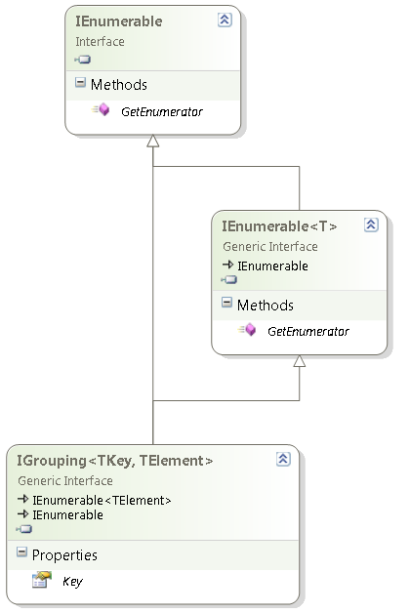
IGrouping interface diagram (click to enlarge)
One of the things most people find hard to use in LINQ is GroupBy or the LINQ expression group … by (they are mostly equivalent).
When starting to use that, I was also confused, mainly because of two reasons:
TElement members for the current group inside the grouping.Most people don’t see the IGrouping<TKey, TElement> because they use the var keyword to implicitly the LINQ result.
Often – when using any anonymous type – var is the only way of using that result.
That is fine, but has the consequence that it hides the actual type, which – when not anonymous – is a good way of seeing what happens behind the scenes.
David Klein gave an example for the multi column grouping and also shows that if you use LINQPad, you can actually see the IGrouping<TKey, TElement> in action.
Mike Taulty skipped the Group By Syntax for Grouping on Multiple Columns in his Grouping in LINQ is weird (IGrouping is your friend). So my examples include that.
Note that I don’t cover all the LINQ group by stuff, here, for instance, I skipped the into part.
There are some nice examples on MSDN covering exactly that both using Method based and Expression based LINQ.
The examples are based on these two classes, similar to what Mike did. Read the rest of this entry »

Posted in .NET, .NET 3.5, .NET 4.0, .NET 4.5, C#, C# 3.0, C# 4.0, C# 5.0, Development, LINQ, Software Development | Leave a Comment »
 The Wiert Corner - irregular stream of stuff
TComboBoxStyleHook. – David Heffernan Sep 9 at 13:13Business Layergives me aTStringswith theObjectsfilled (it is pre-Delphi-2009, so no generics yet). That’s why I can get out theTextsou easy (: First I need to finish about a week of .NET work though. – Jeroen Wiert Pluimers Sep 10 at 16:03TExtComboBoxand its own VCL styles feature. – Warren P Sep 10 at 20:45Objectinstance references are already in theTStrings, I wrote a small function to return a new temporaryTStringsthat has the string values with the captions I needed and keep theObjectreferences. Since it has the same item ordering, and sameObjectreferences I don’t need any mapping at all. Just need to make sure I free the newTStringsat the right moment. – Jeroen Wiert Pluimers Sep 10 at 21:24