The Wiert Corner – irregular stream of stuff

Jeroen W. Pluimers on .NET, C#, Delphi, databases, and personal interests

  • My badges

  • Twitter Updates

  • My Flickr Stream

  • Pages

  • All categories

  • Enter your email address to subscribe to this blog and receive notifications of new posts by email.

    Join 1,828 other subscribers

Archive for the ‘Software Development’ Category

When you wished that Excel had short-circuit boolean evaluation: Excel IF, OR and SEARCH function combination

Posted by jpluimers on 2012/09/04

I had a function like this in Excel:

=IF(OR(B2=""; SEARCH(C2;B2)); "ok"; "INCONSISTENT")

The situation should be OK when either:

  • Cell B2 is empty (an empty cell is considered equal to a zero length string).
  • One or more occurrences of the value in cell C2 can be found in the value of cell B2

Since most of my software development is outside of Excel, I’m used to short-circuit boolean evaluation.

Not with Excel: the OR is a function, not an operator, so all other function calls will be evaluated.

Since SEARCH will return #VALUE! when the first argument does not have a value, and #VALUE! propagates in a similar way as NULL in SQL does (SQL has the Boolean datatype inconsistency though).

So you need to get rid of #VALUE! as soon as you can using the one of the IS functions like the ISERROR function or the ISNUMBER function.

ISNUMBER, contrary to popular belief, not only distinguishes numbers from text, but in fact from any non-numeric value as Glaswegian kindly explained on the TechSupport forum:

Excel IF and SEARCH function combination

I am trying to do the following:

If cell A1 contains the characters “ABC” anywhere in the string or value, then “Y”, else “N”. I almost have it by using =if((search(“ABC”,A1)),”Y”,”N”). However, with the “else” if “ABC” is not found, it returns #VALUE! as opposed to “N”.

[…]
Try

=IF(ISNUMBER(SEARCH("abc",A1,1)),"Y","N")

ISNUMBER checks the type of value and returns TRUE or FALSE. The #VALUE error refers to the fact that Excel could not translate the value to the type required.

So the code ends up as this:

=IF(OR(B2=""; ISNUMBER(SEARCH(C2;B2))); "ok"; "INCONSISTENT")

–jeroen

via: Excel IF and SEARCH function combination – Tech Support Forum.

Posted in Development, Excel, Office, Power User, Software Development | Leave a Comment »

If a program you wrote can’t start becuase MSVCR*.dll is missing, then you forgot to ship the Visual C++ runtime…

Posted by jpluimers on 2012/08/30

Too often I see quesions like the one below on software that people distribute:

The Program can’t start becuase MSVCR100.dll is missing from your computer. Try reinstalling the program to fix this problem.

I am getting follwing error when i am trying to open Computer management in windows 7,the error is as follows ,

The Program can’t start becuase MSVCR100.dll is missing from your computer. Try reinstalling the program to fix this problem.

Where can i found this dll file, and help me to download and install.

The reason is that many programmers and companies still fail to ship the correct Visual C++ run-time.

Even for a one-off, you should need to get your installation set right. And writing stuff in a version of Visual C++ almost always means you need to ship the run-time for that particular version of Visual C++ with your application (though sometimes you can get away by putting the DLLs in the directory of your application, this is not recommended, as that way you won’t receive security updates).

User Marilyn O was so kind to sum up most of the download locations (I did a bit of post-editing, added all the non-“FamilyID” links, all naming differences are from the MS site):

I would install the Microsoft Visual C++ Redistributable dll that is needed for projects built with Visual Studio 2010.

Download the files below depending on your operating system version. […] Check in Programs and Features, do you show that you have installed Microsoft Visual C++ … Redistributable? If not, download from the links here.

–jeroen

via: The Program can’t start becuase MSVCR100.dll is missing from your – Microsoft Answers.

Posted in C++, Development, Power User, Software Development, Visual Studio 2005, Visual Studio 2008, Visual Studio 2010, Visual Studio and tools, Windows, Windows 7, Windows 8, Windows Server 2000, Windows Server 2003, Windows Server 2003 R2, Windows Server 2008, Windows Server 2008 R2, Windows Vista, Windows XP | 3 Comments »

VS2010 Workfold Command: allows moving a local working folder for a WorkSpace, but not unmapping it when you have multiple workspaces with the same name

Posted by jpluimers on 2012/08/29

Just found a glitch in the unmap support for tf workfold (and found out it has already been reported).

First what I tried to do:

  1. move D:\develop.TFS02 into D:\develop\CodePlex\TFS02 using tf map (which BTW allows you to do in place branch switching).
  2. unmap D:\develop.TFS02\besharp from TFS

First a few things; the first one succeeded (as it implicitly uses the /map command), the last ones failed because /unmap is ambivalent on the /collection parameter: on the one hand it wants to do without, but when it discovers it cannot do without, it wrongly indicates it requires it.

D:\develop.TFS02\besharp>tf workfold /collection:https://tfs.codeplex.com/tfs/tfs02 /workspace:%COMPUTERNAME% $/ D:\develop\CodePlex\TFS02

D:\develop.TFS02\besharp>tf workfold /collection:https://tfs.codeplex.com/tfs/tfs02 /workspace:%COMPUTERNAME% /unmap $BeSharp
The option collection is not allowed.

D:\develop.TFS02\besharp>tf workfold /unmap /collection:https://tfs.codeplex.com/tfs/tfs02 /workspace:%COMPUTERNAME% D:\develop.TFS02\besharp
The option collection is not allowed.

D:\develop.TFS02\besharp>tf workfold /unmap D:\develop.TFS02\besharp
Unable to determine the workspace. You may be able to correct this by running 'tf workspaces /collection:TeamProjectCollectionUrl'.

D:\develop.TFS02\besharp>tf workfold /unmap /workspace:%COMPUTERNAME% D:\develop.TFS02\besharp
Multiple workspaces exist with the name T61PJWP.
Please specify the Team Foundation Server or qualify the name with the owner.

Workaround

The workaround is to

  1. start Visual Studio,
  2. unmap $/,
  3. recursively map $/ to D:\develop\CodePlex\TFS02,
  4. perform a get latest.

–jeroen

Via:

Posted in .NET, Development, Software Development, Source Code Management, TFS (Team Foundation System), Visual Studio 2010, Visual Studio and tools | Leave a Comment »

Many more event videos available at Channel 9 (was: PDC10 – view Microsoft PDC 2010 sessions on your PC)

Posted by jpluimers on 2012/08/28

Dang; I thought this had long left the posting queue, but somehow it ended in the drafts (:

Since then, many more event videos made it to Channel 9, including Build 2011, and TechDays 2012.

Anyway, here it is:

Microsoft’s PDC 2010 was held at the end of October 2010 in Redmond, WA, USA.

For the people that could not attend, it is very nice to view the sessions using the PDC10 player (it seems still people didn’t learn and start stripping the century parts from years again!).

Even if you are not using Visual Studio, .NET Azure or other Microsoft Technologies, there are a lot of interesting sessions showing the directions that Microsoft is taking.
Comparing that to what you do today is always a good thing to do: it helps you reflect, an important part of your personal development.

A few things I found interesting (in no particular order):

  • Asynchrony support in C# 5 and VB.NET 11 based on the Task Parallel Library
  • The choice to favour HTML 5 over SilverLight, even though Internet Explorer 9 and Microsoft’s HTML 5 authoring/development tools are far from ready
  • Azure reporting: is reporting the next big thing on clouds?
  • Offline versus online in the cloud world
  • NuPack – does it bring package management to the same level as Ruby or *nix?
  • XNA for XBox, Windows and Windows Phone

Enjoy!

–jeroen

Posted in .NET, .NET 4.5, C#, C# 4.0, C# 5.0, Channel9, Cloud Development, Database Development, Delphi, Development, HTML, HTML5, Mobile Development, SilverLight, SocialMedia, Software Development, Visual Studio 11, Visual Studio 2010, Visual Studio and tools, Web Development, Windows Azure, Windows Phone Development, XNA | 2 Comments »

Is Embarcadero going to use a way around WinRT sideloading only being available on Windows 8 Enterprise SKUs?

Posted by jpluimers on 2012/08/27

One of the Enterprise SKU of Windows 8 is that it allows side-loading of WinRT apps. It gives you the opportunity to load internally developed Metro-style applications that use WinRT on Windows 8 without a developers license installed on that Windows 8 machine.

This feature was described on many sources, including:

But since many apps (including Delphi written apps as they cannot link to the Visual C++ Run-Time DLL) don’t directly run on WinRT, there is a clear demand of enabling this side-loading feature for non-Enterprise SKUs of Windows 8:

The last link describes a way to circumvent this, and I think that is what Embarcadero is aiming at to enable Delphi XE3 Metropolis style applications to run on WinRT:

Note I updated my Delphi WinRT link clearance post with the last two links.

–jeroen

Posted in Delphi, Delphi XE3, Development, Software Development, WinRT-with-Delphi | 2 Comments »

Link clearance on the recent Delphi XE3 and WinRT stir

Posted by jpluimers on 2012/08/25

Just for my own record, a link clearance of WinRT in relation to Delphi.

I amended this a couple of time already, will try to do so over time: Read the rest of this entry »

Posted in Delphi, Development, Software Development, WinRT-with-Delphi | Tagged: , , , , , | 3 Comments »

Jazzy icons for Metropolis UI Applications that you can create with Delphi XE3

Posted by jpluimers on 2012/08/24

Now for some lighter Delphi XE3 related stuff:

These icons seem to go very well with the Metropolis UI Applications that you can create (and convert from VCL!) with Delphi XE3 (see the XE3 video at 0:30).

–jeroen

via:

Posted in Delphi, Delphi XE3, Development, Software Development, UI Design | 2 Comments »

iOS, Delphi XE3 and XE2

Posted by jpluimers on 2012/08/23

I hope I read these mobile and iOS parts of the XE3 and beyond : A look at mobile post by John Ray “JT” Thomas correctly: Read the rest of this entry »

Posted in Delphi, Delphi XE2, Delphi XE3, Development, Software Development | 7 Comments »

Solving the “Some projects have been bound to server locations that may be incorrect.” in Visual Studio 2010 when using Team Foundation System 2010 #VS2010 #TFS2010

Posted by jpluimers on 2012/08/23

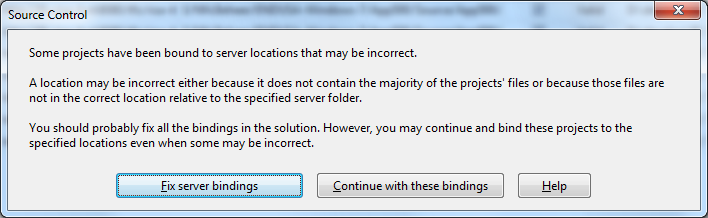
A while ago, I inherited a bunch of C# and VB.NET projects. One of them always generated the below error when including it in Team Foundation System (yes, the original projects were salvaged from Visual Source Shredder version 6.0c):

[Source Control]
Some projects have been bound to server locations that may be incorrect.
A location may be incorrect either because it does not contain the majority of the projects' files or because those files are not in the correct location relative to the specified server folder.
You should probably fix all the bindings in the solution. However, you may continue and bind these projects to the specified locations even when some may be incorrect.
[Fix server bindings] [Continue with these bindings] [Help]

First I tried the Help button: it links to a Help page on MSDN explaining the error can be cause with some statistics on projects not being in the source control system. Since all projects were, there, I looked for more information.

I tried finding a “Fix Server Bindings” or a 2010 “Some projects have been bound to server locations that may be incorrect” link that fitted my use case (getting projects from VSS into TFS), but the solutions I tried eventually all led to the same issue.

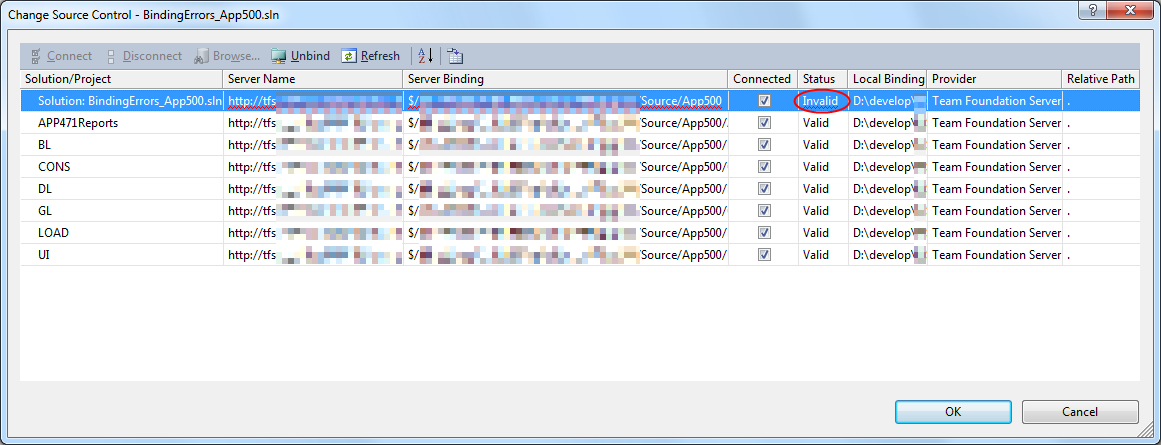
Fixing the server bindings would always fail: the solution (which itself is also a project) would get the status Invalid.

The next steps were these:

  1. add an empty solution in the same directory as the original one,
  2. add that solution to TFS
  3. add the projects from the original solution to this solution one by one
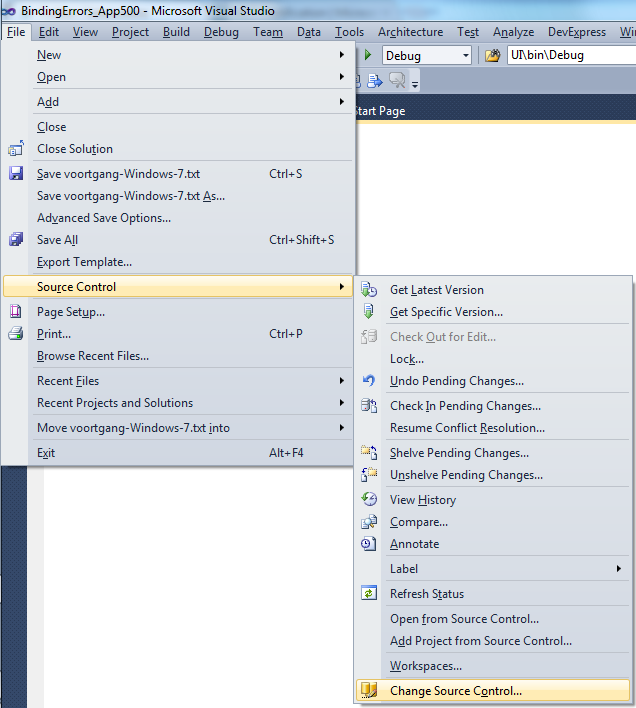
  4. check after each addition of the bindings were still OK using the “File”, “Source Control”, “Change Source Control” sequence on the right.
    (note that you don’t always see “Change Source Control”, if you don’t select the solution in the Solution Explorer before going to the File menu).
  5. text compare both .SLN solution files
  6. observe that “Solution Items” actually is a project just like the others:
    Project("{2150E333-8FDC-42A3-9474-1A3956D46DE8}") = "Solution Items", "Solution Items", "{8D9964D4-6129-4B8F-9238-F9161A02B968}"
    ProjectSection(SolutionItems) = preProject
    ...
    Framework\Config.dll = Framework\Config.dll
    ...
    EndProjectSection
    EndProject
  7. add the existing solution item from the original solution to this solution one by one, check
  8. check after each addition of the bindings were still OK using the “File”, “Source Control”, “Change Source Control” sequence on the right.
    (note that you don’t always see “Change Source Control”, if you don’t select the solution in the Solution Explorer before going to the File menu).
  9. copy the non-existing solution items to the solution one by one using the text compare tool (yes, a lot of the projects are dirty and contain references to files that are not in the version control system)
    save after every copy, then reload the project in Visual Studio
  10. check after each addition of the bindings were still OK using the “File”, “Source Control”, “Change Source Control” sequence on the right.
    (note that you don’t always see “Change Source Control”, if you don’t select the solution in the Solution Explorer before going to the File menu).
  11. after a few files, suddenly the “Invalid” appeared, so the issue has to do with missing files.

Reading the Help more carefully, with in the back of my mind keeping “Solution Items” all as projects, I finally got the cause:

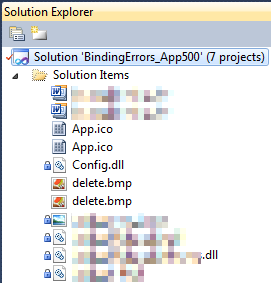
When some percentage of Solution Items cannot be found locally, and are not in the version control system, Visual Studio marks the solution binding to the version control system as “Invalid”.

The temporary solution is to ignore the error, until I have found all the missing files (they are scattered around some network shares), or made sure they are not needed at all.
There are many of those (you recognize them from the missing padlock icon in the Solution Explorer).

Version control rot is just like link rot, that’s why one of the high priority action items is to introduce for build automation at this client, then deploy those as clean builds into the Develop and Test stages of the DTAP, then verify if the solutions still work).

–jeroen

Posted in .NET, C#, C# 1.0, C# 2.0, C# 3.0, C# 4.0, C# 5.0, Development, Internet, link rot, Power User, Software Development, Source Code Management, TFS (Team Foundation System), VB.NET, Visual Studio 2010, Visual Studio and tools, WWW - the World Wide Web of information | Leave a Comment »

.NET/C#: Generating a WordPress posting categories page – part 2

Posted by jpluimers on 2012/08/22

In Generating a WordPress posting categories page – part 1, you learned how to

  1. get the HTML with all the category information from your WordPress.com blog,
  2. convert that to XHTML,
  3. generate an XSD for the XHTML,
  4. generate C# classes from that XSD

This episode, you will learn how the data read from the XHTML can be transformed to a simple tree in HTML suited for a posting categories page like mine.

In the final post, the same data will be transferred into a real category cloud with font sizes indicating the frequency of the category usage.

From there, you can go into other directions (for instance generating squarified treemaps from the data).

That’s the cool thing about data: there are many ways to visualize, and this series was meant – next to some groundwork on how to get the data – as inspiration into some forms of visualization.
Hope you had fun reading it!

Getting a HTML tree from the optionType items

                StringBuilder outputHtml = new StringBuilder();
                string rootUrl = args[1];
                foreach (optionType item in select.option)
                {
                    if (item.Level == optionType.RootLevel)
                        continue;

                    // <a style="font-size: 100.3986332574%; padding: 1px; margin: 1px;" title="XML/XSD (23)" href="https://wiert.me/category/development/xmlxsd/">XML/XSD</a>
                    string url = String.Format("{0}/category{1}", rootUrl, item.HtmlPath);
                    string prefix = new string('.', item.Level * 5);// optionType.NbspEscaped.Repeat(item.Level);
                    outputHtml.AppendFormat("{0}<a title="{2}" href="{1}">{2} ({3})</a>", prefix, url, item.Category, item.Count);
                    outputHtml.AppendLine();
                }

One way of generating an HTML tree, is to prefix every node with a series of dots corresponding with the level of that node. Not the most pretty sight, but it will suffice for this episode.

Inside each node, I want to show the Category and Count.

Since the optionType as generated from the XSD only contains the below properties, a major portion on this posting is how to decode the Value so we can generate HTML like this:

...............<a href='https://wiert.me/category/development/software-development/net/c-' title='C#'>C#&nbsp;(118)</a>
....................<a href='https://wiert.me/category/development/software-development/net/c-/c--2-0' title='C# 2.0'>C# 2.0&nbsp;(46)</a>
....................<a href='https://wiert.me/category/development/software-development/net/c-/c--3-0' title='C# 3.0'>C# 3.0&nbsp;(33)</a>
....................<a href='https://wiert.me/category/development/software-development/net/c-/c--4-0' title='C# 4.0'>C# 4.0&nbsp;(31)</a>
....................<a href='https://wiert.me/category/development/software-development/net/c-/c--5-0' title='C# 5.0'>C# 5.0&nbsp;(2)</a>

Decoding the optionType Value property

optionType only contains the these properties:

  1. class
    • the class used to reference the style in the stylesheet
    • example value: “level-4”
  2. value
    • internal unique WordPress ID for the category (this allows you to alter the Slug and Value without breaking the links between posts and categories
    • example value: “45149061”
  3. Value
    • string that WordPress uses to make the category combobox look like a tree structure
    • example value: “&nbsp;&nbsp;&nbsp;&nbsp;&nbsp;&nbsp;&nbsp;&nbsp;&nbsp;&nbsp;&nbsp;&nbsp;C# 5.0&nbsp;&nbsp;(2)”

The extra properties needed for the HTML generation logic above are these:

  1. Category
    • the Value undone from leading non breaking space character escapes, and the trailing count information
    • example value: C# 5.0
  2. Count
    • the Value undone from leading non breaking space character escapes, Caption information, separator non breaking space character escapes, and surrounding parenthesis
    • example value: 2
  3. Level
    • the class undone from the level- prefix
    • example value: 4
  4. Slug
    • the category slug is the unique value for a category that WordPress uses to form category urls. It is auto-generated from the Category, but you can also edit it. I don’t, as it is not in the combobox HTML, so I derive it from the Category. Note there are also posting slugs used in the permalink of each post.
    • example value: c--5-0 (it consists of lowercase letters and hyphens derived from the Category)
  5. HtmlPath
  6. parent (used internally for making the HtmlPath code much easier

The really cool thing about XSD2Code is that it generated the optionType C# code as a partial class.
Which means we can extend the generated partial classes in a seperate C# file like the code fragments below (you can download it from the WordPressCategoriesDropDown.cs file at BeSharp.CodePlex.com)

    partial class optionType
    {
        public const int RootLevel = -1;

        private const string slash = "/";
        private const char hyphen = '-';
        public const string NbspEscaped = "&nbsp;";
        private const string emptyCountInParenthesis = "(-1)";

        public optionType parent { get; set; }

        public string Category
        {
            get
            {
                string result;
                string countInParenthesis;
                splitValue(out result, out countInParenthesis);
                return result;
            }
        }

        public int Count
        {
            get
            {
                string category;
                string countInParenthesis;
                splitValue(out category, out countInParenthesis);
                string count = countInParenthesis.Substring(1, countInParenthesis.Length - 2);
                int result = int.Parse(count);
                return result;
            }
        }

        public int Level
        {
            get
            {
                if (string.IsNullOrWhiteSpace(@class))
                    return RootLevel;
                string[] split = @class.Split(hyphen);
                string number = split[1];
                int result = int.Parse(number);
                return result;
            }
        }

        /// <summary>
        /// This is the HTML part that WordPress uses to reference a Category
        /// </summary>
        public string Slug
        {
            get
            {
                StringBuilder result = new StringBuilder();
                foreach (char item in Category)
                {
                    if (char.IsLetterOrDigit(item))
                        result.Append(item.ToString().ToLower());
                    else
                        if (result.Length > 0)
                            result.Append(hyphen);
                }
                return result.ToString();
            }
        }

        public string HtmlPath
        {
            get
            {
                if (RootLevel == Level)
                    return string.Empty;

                string result = Slug;
                if (null != parent)
                    result = parent.HtmlPath + slash + result;
                return result;
            }
        }

        private void splitValue(out string category, out string countInParenthesis)
        {
            // might want to do this using RegEx, but that is a write-only language https://wiert.me/category/development/software-development/regex/
            string result = Value;
            int nbspCountToStripFromLeftOfValue = Level * 3; // strip 3 &nbsp; for each Level
            for (int i = 0; i < nbspCountToStripFromLeftOfValue; i++)
            {
                int nbspEscapedLength = NbspEscaped.Length;
                if (result.StartsWith(NbspEscaped))
                    result = result.Substring(nbspEscapedLength, result.Length - nbspEscapedLength);
            }
            string doubleNbspEscaped = NbspEscaped + NbspEscaped;
            if (result.Contains(doubleNbspEscaped))
            {
                string[] separators = new string[] { doubleNbspEscaped };
                string[] split = result.Split(separators, StringSplitOptions.None);
                category = split[0];
                countInParenthesis = split[1];
            }
            else
            {
                category = result;
                countInParenthesis = emptyCountInParenthesis;
            }
        }

        public override string ToString()
        {
            string result = string.Format("Level {0}, Count {1}, Slug {2}, HtmlPath {3}, Category '{4}'", Level, Count, Slug, HtmlPath, Category);
            return result;
        }
    }

The bulk of the above code is in the splitValue method (that could have used RegEx, but I try to avoid RegEx when I can do without it).
Note that the HtmlPath propererty uses the parent property. Without it, the HtmlPath code would have been very complex. The value of the parent properties for all optionType instances is generated in the selectType.FixParents method below since the selectType instance contains all the optionType instances in its’ option property.

    partial class selectType
    {
        public void FixParents()
        {
            Stack<optionType> itemStack = new Stack<optionType>();
            optionType parent = null;
            int previousLevel = optionType.RootLevel;

            foreach (optionType item in option)
            {
                int itemLevel = item.Level;
                if (itemLevel == previousLevel)
                {
                    if (optionType.RootLevel != itemLevel)
                    {
                        itemStack.Pop();
                        item.parent = parent;
                    }
                    itemStack.Push(item);
                }
                else
                {
                    if (itemLevel > previousLevel)
                    {
                        parent = itemStack.Peek();
                    }
                    else
                    {
                        do
                        {
                            itemStack.Pop();
                            parent = itemStack.Peek();
                            previousLevel = parent.Level;
                        }
                        while (previousLevel >= itemLevel);
                    }
                    itemStack.Push(item);
                    item.parent = parent;
                    previousLevel = itemLevel;
                }
            }
        }
    }

–jeroen

Posted in .NET, C#, C# 4.0, C# 5.0, Development, LINQ, Software Development, Usability, User Experience (ux), Web Development, WordPress, WordPress, XML, XML escapes, XML/XSD, XSD | 4 Comments »