


Some links that helped me getting this working:
Archive for the ‘Software Development’ Category
Setting up a GitHub project so it is served over https as a github.io and a custom subdomain
Posted by jpluimers on 2022/04/27

Posted in Cloud, Cloudflare, Communications Development, Development, Encryption, GitHub, HTML, HTTP, HTTPS/TLS security, Infrastructure, Internet protocol suite, Let's Encrypt (letsencrypt/certbot), Power User, Security, Software Development, Source Code Management, TCP, TLS, Web Development | Leave a Comment »
GitHub – bbbradsmith/flompy: DOS floppy disk dumper
Posted by jpluimers on 2022/04/26
Need one day when archiving old floppies: [WayBack] GitHub – bbbradsmith/flompy: DOS floppy disk dumper
Via: [WayBack] Brad Smith on Twitter: “So I wrote a floppy disk dumper program for DOS. I dunno if this is really a very useful thing, but it’s open-source at least! 💾⚡🖥 “
Full thread at [WayBack] Thread by @bbbradsmith: “Hrm… why doesn’t the floppy controller status register have its non-DMA bit set, even though I’ve used a specify command to set it… and […]”:
Share this:

Posted in Development, History, MS-DOS, Power User, Software Development | Leave a Comment »
How to view the html page source of a website in Safari – Macintosh How To
Posted by jpluimers on 2022/04/14
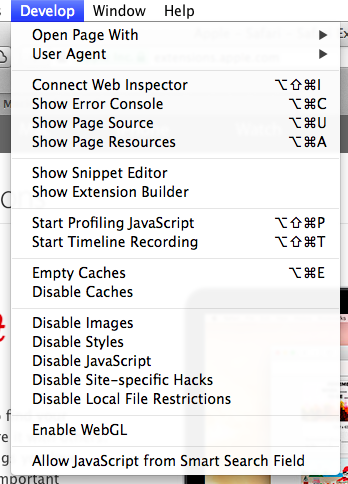
[Wayback] How to view the html page source of a website in Safari – Macintosh How To
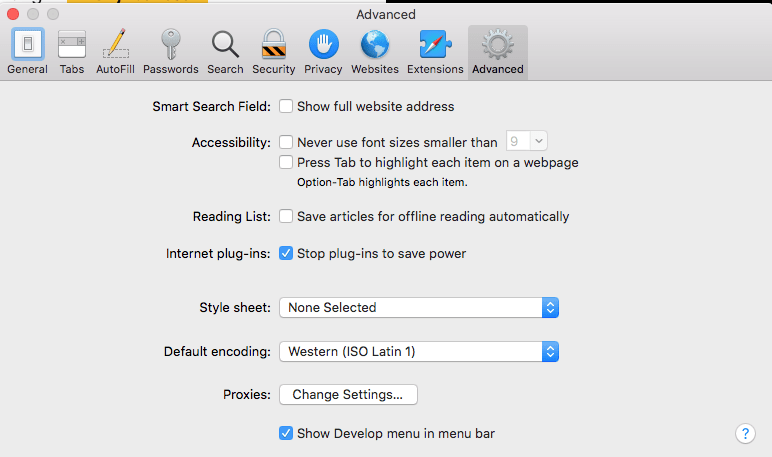
You can enable the extra menu in Safari by selecting ‘Preferences’ under Safari in the OS X menu bar and then under the ‘Advanced’ pane select the checkbox that says ‘Show Develop menu in menu bar.’
…
This is the option you need:
a
MacOS – Safari – Show Develop menu in menu bar
–jeroen
Share this:

Posted in Apple, Development, Mac OS X / OS X / MacOS, Power User, Safari, Software Development, Web Browsers, Web Development | Leave a Comment »
Kris on Twitter is a bit radical against shell scripts. Learn why.
Posted by jpluimers on 2022/04/13
I say to people: only use shell interactively, don’t write scripts. Never. Not one.
But Kris, they ask, why so radical?
Because of this:
is the literal English Google Translation of the German text
Ich sage den Leuten: benutzt Shell nur interaktiv, schreibt keine Scripte. Nie. Nicht eines.
Aber Kris, fragen sie, wieso so Radikal?
Deswegen:
then links to [Wayback/Archive] Jan Schaumann on Twitter: “TIL zgrep(1) is a shell script. BSD basically does “zcat | grep”, but GNU does “gzip -dc | sed”. How did I learn that? The fun way! CVE-2022-1271, arbitrary-file-write and code execution vulnerability in GNU zgrep / gzip. …”:
Share this:

Posted in *nix, *nix-tools, Apple, ash/dash, ash/dash development, bash, bash, BSD, Development, Mac, Mac OS X / OS X / MacOS, Power User, Scripting, Software Development | Leave a Comment »
When some virtual machines cannot run VMware Tools: Graceful shutdown of an ESXi 5.1 host and guest VMs (free edition) using the shell/command line/scripting (UPS friendly)
Posted by jpluimers on 2022/04/12
An interesting set of scripts from [Wayback/Archive.is] No Joke IT: Graceful shutdown of an ESXi 5.1 host and guest VMs (free edition) using the shell/command line/scripting (UPS friendly).
If all ESXi virtual machines support running of VMware Tools, then the solution is a plain /sbin/shutdown.sh && /sbin/poweroff (see [Wayback/Archive.is] No Joke IT: Shut down ESXi 5.1 guest VMs and the host (free edition) via SSH – the easy way!).
Code is in the repository at [Wayback/Archive.is] sixdimensionalarray/esxidown: A shell script to shutdown VMware ESXi host servers, with these two main files:
- [Wayback/Archive.is] esxidown/async.sh at master · sixdimensionalarray/esxidown
#!/bin/sh # Runs a shell command asynchronously. if [ "$1" != "" ]; then nohup sh $1 > /dev/null 2>&1 & fi - [Wayback/Archive.is] esxidown/esxidown.sh at master · sixdimensionalarray/esxidown with this interesting code fragment right before the script finishes:
# exit maintenance mode immediately before server has a chance to shutdown/power off
# NOTE: it is possible for this to fail, leaving the server in maintenance mode on reboot!
echo "Exiting maintenance mode..."
if [ $TEST -eq 0 ]; then
    esxcli system maintenanceMode set -e false -t 0
fi
Note: the No Joke IT web-site has vanished, so only the [Wayback] and [Archive.is] links of it still work. The github code was still there at the time of writing.
Via: [Wayback] Solved: Read only Files – VMware Technology Network VMTN
Related: Some notes on replacing parts of a text file with template text using sed on a Busybox system.
–jeroen
Share this:

Posted in *nix, *nix-tools, ash/dash, ash/dash development, Development, ESXi5, ESXi5.1, ESXi5.5, ESXi6, ESXi6.5, ESXi6.7, Power User, Scripting, Software Development, Virtualization, VMware, VMware ESXi | Leave a Comment »
Prevent link rot before the public condemns you
Posted by jpluimers on 2022/04/05
I’ve written about link rot quite a few times (it even has a category on my blog).
Preventing it is important, as it improves user experience.
For most users this is an unconscious thing when it works and becomes consciously annoying when it fails.
Some user groups are vocal enough to force you to fix link rot after the fact, causing brand reputation damage.
One good example was last year: [Wayback] Users condemn Microsoft for removing KB IDs from some bug documentation | Computerworld.
Share this:
Posted in Bookmarklet, Development, Internet, link rot, Power User, Software Development, Web Browsers, Web Development, Windows, WWW - the World Wide Web of information | Leave a Comment »
Mumen Rusto: “Ceci n’est pas une Captcha.… “
Posted by jpluimers on 2022/04/01
Every site should present this as a captcha today.
Via [WayBack] Mumen Rusto on Twitter: “Ceci n’est pas une Captcha.… “

The captcha is by [WayBack] Senior Oops Engineer on Twitter: “Captcha: select all squares that contain a pipe Magritte: 😓”.
He posted it about 2 years ago as [WayBack] Senior Oops Engineer on Twitter: “oh fuck oh no… “.
–jeroen
Share this:

Posted in Apri1st, Development, Fun, Hosting, Power User, Software Development, Web Browsers, Web Development | Leave a Comment »
Bookmarklet to force WordPress classic-editor
Posted by jpluimers on 2022/03/29
A while ago, WordPress.com heavily started to de-emphasise the Classic Editor in order to boost the Gutenberg editor which is bloaty (in both browser DOM usage (heavily slowing down editing) and content (lots of meta tags that are added to blog source) and is missing essential features (especially nesting of blocks often breaks things).
With 7000+ blog posts in the Classic Editor format (a few in still supported markdown format: that experiment failed horribly!) that still require editing (especially because of link rot)
So here is the Bookmarklet code to switch back an editing URL that you can use for as long as the Classic Editor is there:
javascript:location.href=document.location.href+'&classic-editor';
Yup, it is that simple: it appends &classic-editor to the URL.
Share this:
Posted in Bookmarklet, Classic editor, Development, Gutenberg editor, Internet, link rot, Power User, Software Development, Web Browsers, Web Development, WordPress, WWW - the World Wide Web of information | Leave a Comment »
WordPress undocumented Classic-Editor shortcut “Shift-Ctrl-F” that goes full screen
Posted by jpluimers on 2022/03/28
Suddenly, a while ago, because of a stuck modifier key I suddenly had the WordPress classic editor running in full screen without any indication to go back, nor an opportunity to save the content.
It wasn’t the usual “Shift-Alt-W” [Wayback] Distraction Free Writing – Make WordPress Support (which still allows you to hover over the sidebars to make them visible, and has a visual indication of the mode).
After lot’s of trying, I figured out the toggle “Shift-Ctrl-F” toggles between normal and full screen mode. It seems unavailable in the new editor, so that might be a reason ([Wayback] Keyboard Shortcuts | WordPress.org)
The shortcut is odd too, as in most tooling “Ctrl-F” modifications like “Shift-Ctrl-F” have something to do with find or replace operations.
It was quite tough finding any reference to this shortcut, as my initial search revealed none: [Wayback] “WordPress” “Shift-Ctrl-F” full screen – Google Search.
Later I reversed the modifiers in [Wayback] “WordPress” “Ctrl-Shift-F” full screen – Google Search and found [Wayback] How to disable non-system hotkeys on Windows – gHacks Tech News
Simple Disable Key is a free software program for Microsoft Windows devices that enables you to block non-system hotkeys.
…
Not all hotkeys are useful however. When I work on a WordPress site for instance, I sometimes press the shortcut Ctrl-Shift-F by accident. This switches the editor to full screen view which I never use.
First time I invoked the full screen editor I had to look up the shortcut as I could not reproduce it.
–jeroen
Share this:
Posted in Development, SocialMedia, Software Development, Web Development, WordPress, WordPress | Leave a Comment »
Chocolatey 1.0.0 got released last week (chocolatey/choco · GitHub)
Posted by jpluimers on 2022/03/24
Last week finally there was the stable [Wayback/Archive] Release version 1.0.0 · chocolatey/choco · GitHub.
So I fixed the Wikipedia page
- from: [Wayback/Archive] Chocolatey – Wikipedia (only mentioning 0.12.1 preview release)
- to: [Wayback/Archive] Chocolatey – Wikipedia (now including the 1.0.0 stable release)
It was a few days after the 11th birthday “Celebration”: [Wayback/Archive] Chocolatey Software Blog | This One Goes To 11! Celebrating 11 Years Of Chocolatey. Not a really festive post, though it does have a really nice overview of 11 years of Chocolatey history and clearly showing the momentum of it has been a few years behind us.
The thing is: hardly anybody noticed the celebration nor the 1.0.0 release. Being at various 0.* versions for like a decade makes people not follow sudden version bumps closely. I only noticed when updating a bunch of testing VMs of which one had a problem, so I inspected the logs and saw the 1.0.0 version.
So these recent tweets did not gain much attention:
- 20220321: [Wayback/Archive] Chocolatey on Twitter: “Join us in ONE HOUR to mark a milestone in Chocolatey history! No excuses. Take the dog out. Grab a coffee. Sit down. Watch us on Twitch. 4pm UTC. “
- 20220320: [Wayback/Archive] Chocolatey on Twitter: “Join the Chocolatey Team TOMORROW, 21 March, and mark a milestone in Chocolatey history! On Twitch. 4pm UTC. And join our Discord server for a little thank you to our Community. “
- 20220317: [Wayback/Archive] Chocolatey on Twitter: “ICYMI we have a … special event marking a milestone in Chocolatey history this Monday, 21 March at 4pm UTC. Join @pauby, @gep13 and the @chocolateynuget Team. And join our Discord server for a little thank you to our Community. “
Anyway: the release notes indicate a few things scheduled for 2.0.0. Given the sudden 0.12.0 -> 1.0.0 bump, I have no clue far (or near!) in the future that will be.
It is kind of both a saddening and relieved feeling: like for instance Stack Overflow/Stack Exchange (both in the same age cohort as Chocolatey), Chocolatey is just there and mostly works.
–jeroen
Share this:
Posted in .NET, Batch-Files, C#, Chocolatey, CommandLine, Development, Power User, PowerShell, PowerShell, Scripting, Software Development, Windows | Leave a Comment »
 The Wiert Corner - irregular stream of stuff