Archive for the ‘PowerShell’ Category
Posted by jpluimers on 2016/07/25
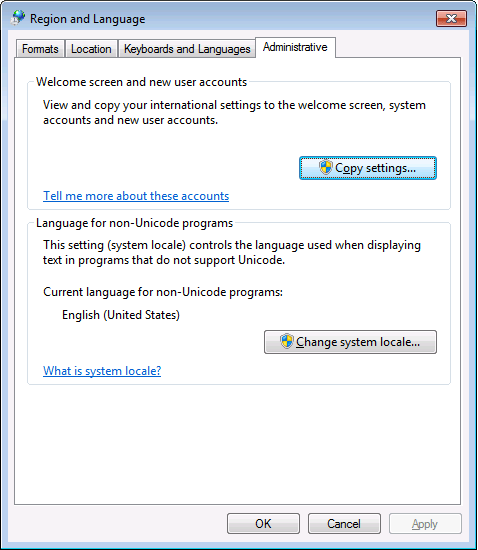
PowerShell 4.0 is madly in love with “English (United States)”
A long time ago I started writing up my blog post like this in March 2015 when I bumped into this the first time when upgrading from PowerShell 2 to PowerShell 4:
It seems there is no real workaround:
Good and not so good news: after reading the below linked posts, this is what works:
- PowerShell 4 and up works fine with any [Wayback] Lucida Console size (including 12) and boldness
- only when the “Language for non-Unicode programs” is set to “English (United States)”.
- PowerShell 4 works fine with [Wayback] Consolas on any size and boldness
- for any “Language for non-Unicode programs”
So if you’re like me and switch between “Dutch (Netherlands)” and “English (Ireland)” a lot (both use the EURO as currency, but have distinct enough other locale settings to cover a lot of European stuff) then you need to get used to the Consolas font.
Source:
Edit 20210930: a possible solution
I need to fire up some old systems having PowerShell v3 or v4 on them to test the below possible solution.
Read the rest of this entry »
Posted in CommandLine, Development, Font, Lucida Console, Power User, PowerShell, PowerShell, Scripting, Software Development, Windows, Windows 10, Windows 7, Windows 8, Windows 8.1, Windows 9 | Leave a Comment »
Posted by jpluimers on 2015/07/21
Brilliant! Cast to xml, if it is nil, then the second cast to bool will give false, otherwise true:
Thanks Shay Levy!
[bool]Get-Content c:\Path\To\xml_file.xml -as [xml]
–jeroen
via How to determine XML type in Powershell? – Stack Overflow.
Posted in Development, PowerShell, Scripting, Software Development | Leave a Comment »
Posted by jpluimers on 2015/01/22
Wow: I feel like having lived under a stone for 8 years, as RosettaCode has been alive since it was founded in 2007 by Mike Mol.
The idea is that you solve a task and learn from that, or learn by seeing how others have solved tasks or draft tasks.
So in a sense it is similar to the Rosetta stone: it has different languages phrasing the same tasks.
There are already a whole bunch of languages on RosettaCode (of which a few are in the categories below), and you can even suggest or add your own languages.
When you want to solve tasks, be sure to look at the list unimplemented tasks by language that leads to automatic reports by language (for instance two of the languages I use most often: C# and Delphi).
I’m sure there are lots of programming chrestomathy sites, even beyond the ones, and it feels very similar to programming kata sites.
–jeroen
Posted in .NET, APL, Awk, bash, Batch-Files, C, C#, C++, COBOL, CommandLine, Delphi, Development, Fortran, FreePascal, Java, JavaScript/ECMAScript, Lazarus, Object Pascal, Office VBA, Pascal, Perl, PHP, PowerShell, PowerShell, Prism, Scripting, sed script, Sh Shell, Software Development, Turbo Prolog, VB.NET, VBS, VBScript, Visual Studio and tools, Web Development | Leave a Comment »
Posted by jpluimers on 2014/11/13
A while ago, I wrote a via PowerShell script to show the component packages (BPL) files for all installed Delphi (actually: BDS) versions (now at List-Delphi-Installed-Packages.ps1) for a couple of reasons:
- I was creating installation instructions for getting new development machines set-up
- The new machines had to either have a minimum subset of installed Delphi versions + components, or the maximum superset of all the existing development machines
- Sifting through the installed Packages in the IDE, or registry by hand was cumbersome
Note that in the mean time (I queued this blog entry somewhere in 2013) the script has moved to BitBucket, I’ve written more scripts (like Dependencies.bat which is documented in Dependencies.md and Run-Dependend-rsvars-From-Path.bat), all modified all scripts to support all BDS versions I had access to, and a write nice conference paper on Build Automation for Delphi that references the scripts.
Since none of the machines were using pre BDS installations, I could limit the script to BDS 1.0 and up.
The very first (1.0) version of BDS (also known as the Gailileo IDE foundation) was in fact not a Delphi version, but C# Builder 1.0. All Delphi versions since then are based on BDS. The script is based on the BDS registry keys I researched and wrote about in Files in your Delphi settings directory; How to relocate the Favourites on your Welcome page.
Since registry access can be very much flow based, the pipeline architecture of PowerShell is a good fit.
So I wrote a PowerShell script (:
Note Thomas Mueller has written a batch file around the same set of registry keys; the thread there also has some insight in the HKLM versus HKCU keys.
I will explain my script step by step, and start with the most important one: Set-StrictMode -Version Latest. Read the rest of this entry »
Posted in CommandLine, Delphi, Delphi 2005, Delphi 2006, Delphi 2007, Delphi 2009, Delphi 2010, Delphi 8, Delphi x64, Delphi XE, Delphi XE2, Delphi XE3, Delphi XE4, Delphi XE5, Development, PowerShell, Software Development | Leave a Comment »
Posted by jpluimers on 2014/10/31
When searching for powershell ise indent tab, I came across this very nice post by rpscripter:
If one selects multiple lines, then pressing tab will indent them all. Pressing shift+tab will un-indent them all.
Yes, I know the PowerShell is limited, so the indents are tabs (not spaces) and you cannot change the tab size: Powershell ISE – change indent/tab size + keep tabs.
–jeroen
via:
Posted in CommandLine, Development, Power User, PowerShell, PowerShell, Scripting, Software Development, Windows, Windows 7, Windows 8, Windows Server 2003, Windows Server 2003 R2, Windows Server 2008, Windows Server 2008 R2, Windows Vista, Windows XP | Leave a Comment »
Posted by jpluimers on 2014/10/30
PowerShell does some powerful conversions.
Always be aware of that, especially when using booleans. For instance: strings are always TRUE, and $ inside strings are not always evaluated, and often people you define their own string to boolean conversions.
It is better to use the automatic variables $True and $False when you really want to make something is TRUE or FALSE.
Read Boolean Values and Operators – Windows PowerShell Blog – Site Home – MSDN Blogs why.
Oh and don’t forget to turn Strict-Mode on to warn for uninitialized variables and other stuff (as of PowerShell version 2; use Set-PsDebug -strict if you are still in PowerShell version 1)
–jeroen
Posted in Development, PowerShell, Scripting, Software Development | Leave a Comment »
Posted by jpluimers on 2014/07/01
For DOS programs, date and time stamps were used to mark versions of files. For instance, Turbo Pascal 6.0, had a 06:00 time stamp on every file.
You can still do this in Windows, but need to watch for a couple of things:
- daylight saving time
- more than one time stamp per file
There are various ways to do it. Besides a graphical Attribute Changer at www.petges.lu (thanks User Randolf Richardson), these are console approaches via How can I change the timestamp on a file?:
Read the rest of this entry »
Posted in *nix, Apple, Batch-Files, Cygwin, Development, Linux, Mac, Mac OS X / OS X / MacOS, Mac OS X 10.4 Tiger, Mac OS X 10.5 Leopard, Mac OS X 10.6 Snow Leopard, Mac OS X 10.7 Lion, MacBook, MacBook Retina, MacBook-Air, MacBook-Pro, OS X 10.8 Mountain Lion, Power User, PowerShell, Scripting, Software Development, SuSE Linux, Windows, Windows 7, Windows 8, Windows Server 2000, Windows Server 2003, Windows Server 2003 R2, Windows Server 2008, Windows Server 2008 R2, Windows Vista, Windows XP | 2 Comments »
Posted by jpluimers on 2014/06/19
Many people confuse a shell with a console.
They are distinct: the shell executes commands, and the console hooks up video and keyboard to them.
Some products (like Take Command Console, of which Noah Coad is a huge fan) combine the two.
Some shells you can use for Windows: Read the rest of this entry »
Posted in Batch-Files, CommandLine, Development, PowerShell, PowerShell, Scripting, Software Development | Leave a Comment »
Posted by jpluimers on 2014/06/18
I’ve a long history in DOS/Windows 9x COMMAND.COM and Windows cmd.exe shell programming.
The switch to PowerShell is steep, but for me it is worth it: it has so much more functionality than cmd.exe, and taps right into the .NET ECO system.
If you look for something intermediate, you might want to consider TCC. Formerly TCC was known as 4NT, which has its roots in 4DOS (I totally loved 4DOS back when cmd wasn’t there yet).
A small overview: Read the rest of this entry »
Posted in Batch-Files, CommandLine, Development, Power User, PowerShell, PowerShell, Scripting, Software Development, Windows | Leave a Comment »
Posted by jpluimers on 2014/06/17
Thanks Joel Bennett (aka Jaykul) from Huddled Masses for answering my Stack Overflow question PowerShell Get-DiskUsage CmdLet: how to list from a different drive/directory?
In addition to answering it, he also added a complete new and lighter implementation of that script explaining why it was lighter and what idioms to follow in PowerShell.
After reading his aswer, I was even more aware of these two things than I was before:
- I should emphasize the importance of the object pipeline even more than I already did.
- You should try to cut down on the dynamically instantiated objects. Like any language with heavy objects, they provide the huge benefit of fast development, but also an inherent cost.
I wasn’t aware you can put your own crafted objects into the pipeline in a very easy way. But you can: Read the rest of this entry »
Posted in Development, PowerShell, Scripting, Software Development | 1 Comment »


 The Wiert Corner - irregular stream of stuff