Archive for the ‘Keyboards and Keyboard Shortcuts’ Category
Posted by jpluimers on 2016/04/01
IRC so: »i> Isotopp: Ich habe jetzt nen Mac als Arbeitsplatzrechner… Was will man als UNIX Hacker zuerst an Tools installieren?«
Source: IRC so: »i> Isotopp: Ich habe jetzt nen Mac als Arbeitsplatzrechner… Was will… by Kristian Köhntopp.
Since G+ is very bad at searching, I created this summary of the tools; read the full G+ post (Google Translate is quite OK), including comments on why.
Edit: 20160402 – I’m posting regular updates based on the comments for that G+ post. I’ve changed or added German iTunes store links to US-English ones.
Read the rest of this entry »
Posted in Apple, Audacity, Audio, Fusion, Hardware, Keybase, Keyboards and Keyboard Shortcuts, KVM keyboard/video/mouse, Mac, Mac OS X / OS X / MacOS, MacBook, MacBook Retina, MacBook-Pro, Media, OS X 10.10 Yosemite, OS X 10.11 El Capitan, Power User, Security, VirtualBox, Virtualization, VMware | Leave a Comment »
Posted by jpluimers on 2016/02/19
Just updated Cool: Vysor screen sharing by Koush with this:
Edit 20160217: new keyboard/mouse shortcuts
- Old: keyboard shortcuts
Escape -> Back Button;F1 -> Menu Button;Home -> Home Button;
- New: mouse shortcuts
Middle Click -> Home;Right Click -> Back
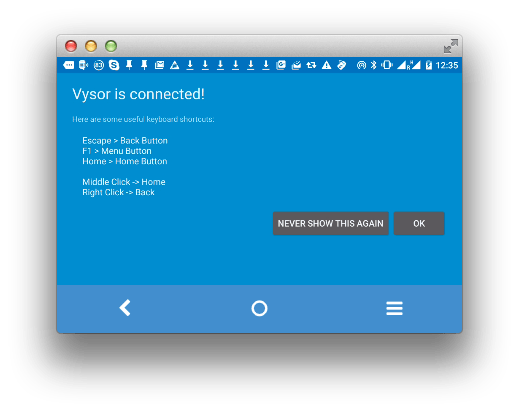
Now hopefully the screen resolution thing will be fixed: [Wayback/Archive] github.com/koush/vysor.io/issues/68
–jeroen
Posted in Android, Android Devices, Chrome, Development, Google, Keyboards and Keyboard Shortcuts, KVM keyboard/video/mouse, Mobile Development, Power User, Vysor | Leave a Comment »
Posted by jpluimers on 2016/02/10
Thanks User Josh Close – Stack Overflow. for answering the below on Stack Overflow: it got my Resharper Alt-Enter key workign again.
Re-apply Visual Studio keyboard scheme:
- (VS2013 latest ReSharper)
- ReSharper > Options > Environment > Keyboard & Menus > ReSharper Platform keyboard scheme: Visual Studio > Apply Scheme > Save.
- This will reset the shortcut keys for ReSharper.
- (older versions)
- ReSharper > Options > Environment > General > Visual Studio Integration > Apply
–jeroen
via: visual studio – Resharper Alt Enter not working – Stack Overflow.
Posted in .NET, C#, Development, Keyboards and Keyboard Shortcuts, Power User, Software Development, Visual Studio 2013, Visual Studio and tools | Leave a Comment »
Posted by jpluimers on 2016/02/04
Back in the late 80s and early 90s of last century, engineers Richard E. Berry, Cliff J. Reeves set a standard that still influences the user interfaces and user experience of today: the IBM Common User Access.
I mentioned CUA a few times before, but since an old client of mine managed to throw away their paper originals in a “we don’t need that old stuff any more as we are now all digital” frenzy, I wanted to locate some PDFs. And I promised to write more about CUA.
If anyone has printed versions of the non-PDF documents below, please donate them to aek at bitsavers.org or scanning at archive.org as they are really hard to get.
A few search queries I used:
The PDFs I think are most interesting:
Read the rest of this entry »
Posted in BitSavers.org, Development, Hardware, History, IBM SAA CUA, Keyboards and Keyboard Shortcuts, KVM keyboard/video/mouse, Power User, Software Development, UI Design, Usability, User Experience (ux) | 3 Comments »
Posted by jpluimers on 2015/12/28
Unlike SourceTree for Windows, SourceTree for Mac still doesn’t automagically detect Beyond Compare even though that has been available for Mac OS X since : [SRCTREE-2092] Add built-in support for Beyond Compare version 4 – Atlassian JIRA.
Even modifying my ~/.gitconfig didn’t work, but manual configuration did. Here are the steps:
- Start the UI version of Beyond Compare
- Select the Beyond Compare menu, install the command-line tools
Read the rest of this entry »
Posted in Apple, Beyond Compare, Development, DVCS - Distributed Version Control, Keyboards and Keyboard Shortcuts, Mac, Mac OS X / OS X / MacOS, MacBook, MacBook Retina, MacBook-Air, MacBook-Pro, OS X 10.10 Yosemite, OS X 10.8 Mountain Lion, OS X 10.9 Mavericks, Power User, Source Code Management, SourceTree | 3 Comments »
Posted by jpluimers on 2015/12/14
IBM/Lenovo stopped producing ThinkPad UltraNav keyboards with 7 rows of keys a while ago. It stopped me from buying ThinkPad machines (together with the screen issues), but I still use the external USB UltraNav keyboards which are harder and harder to get.
So here some SKU/FRU/PN/EAN that seem to have a horizontal enter key and US layout.
Read the rest of this entry »
Posted in Keyboards and Keyboard Shortcuts, Power User, ThinkPad, UltraNav keyboards | Leave a Comment »
Posted by jpluimers on 2015/11/16
The only reliable way to create a remote print-screen is by using the Windows On-Screen Keyboard. It even works with Alt-Prt+Sc to make screenshots of individual Windows.
Just run OSK to start the On-Screen Keyboard.
–jeroen
via: osx – How to print screen in Remote Desktop Client (RDS) on Mac OS X? – Super User.
Posted in Apple, Keyboards and Keyboard Shortcuts, Mac, Mac OS X / OS X / MacOS, Mac OS X 10.7 Lion, MacBook, MacBook Retina, MacBook-Air, MacBook-Pro, MacMini, OS X 10.10 Yosemite, OS X 10.8 Mountain Lion, OS X 10.9 Mavericks, Power User | Leave a Comment »
Posted by jpluimers on 2015/09/07
Too bad the Citrix Receiver remaps the keyboard shortcuts in a way that keyboards without a numeric keypad is a pain.
First of all, it was a bit tough to find the shortcuts, and I have not found a way to modify them.
Here is what I did find:
Read the rest of this entry »
Posted in Keyboards and Keyboard Shortcuts, Power User, Remote Desktop Protocol/MSTSC/Terminal Services, Windows | Leave a Comment »


 The Wiert Corner - irregular stream of stuff