The Wiert Corner – irregular stream of stuff

Jeroen W. Pluimers on .NET, C#, Delphi, databases, and personal interests

  • My badges

  • Twitter Updates

  • My Flickr Stream

  • Pages

  • All categories

  • Enter your email address to subscribe to this blog and receive notifications of new posts by email.

    Join 1,860 other subscribers

Archive for the ‘Ethernet’ Category

Going to test some USB 3 gigabit ethernet adapters based on Realtek RTL8153 and Asix AX88179 chips

Posted by jpluimers on 2018/07/27

Later on, I might add a USB31000S in the mix, but I will do some initial testing with USB 3 gigabit ethernet adapters based on Realtek RTL8153 and Asix AX88179 chips.

Things I will focus on with my Retina MacBook Pro 2015 model are:

  • CPU usage
  • Throughput
  • Duration between reconnect on USB after suspend, and renewing the DHCP lease
  • Promiscuous mode capabilities

Some links for my references:

A first impression from the above links is that for Realtek chipset based devices, drivers are more readily included in operating systems, and these chipsets are better at VLAN handling.

–jeroen

Posted in Ethernet, LifeHacker, Network-and-equipment, Power User, USB, USB, USB-C | Leave a Comment »

MAC address ranges safe for testing purposes (Locally Administered Address)

Posted by jpluimers on 2017/10/25

Similar to IP ranges for private networks that are safe for testing

  • 10.0.0.0/8 (255.0.0.0)
  • 172.16.0.0/12 (255.240.0.0)
  • 192.168.0.0/16 (255.255.0.0)
  • fd00::/8

there are also locally administered MAC address ranges safe for testing

  • x2:xx:xx:xx:xx:xx
  • x6:xx:xx:xx:xx:xx
  • xA:xx:xx:xx:xx:xx
  • xE:xx:xx:xx:xx:xx

Thanks to [WayBack] Sam and [WayBackPeter for answering.

–jeroen

References:

Posted in Ethernet, Internet, Network-and-equipment, Power User | Leave a Comment »

T568A and T568B termination – TIA/EIA-568 – Wikipedia

Posted by jpluimers on 2017/08/04

Note to self: looking at the various patch cables, it looks like most manufacturers prefer T568B over T568A. Not sure why. I adopted T568B to avoid any confusion.

As I always forget the images on FTP/STP/UTP wiring in both connectors and outlets and forget which standard is T568A and T568B: T568A and T568B termination – TIA/EIA-568 – Wikipedia:

Pin T568A Pair T568B Pair 10BASE-T 100BASE-TX 1000BASE-T Signal ID Wire T568A Color T568B Color Pins on plug face (socket is reversed)
1 3 2 TX+ DA+ tip Pair 3 Tip
white/green stripe
Pair 2 Tip
white/orange stripe
Rj45plug-8p8c.png
2 3 2 TX- DA- ring Pair 3 Ring
green solid
Pair 2 Ring
orange solid
3 2 3 RX+ DB+ tip Pair 2 Tip
white/orange stripe
Pair 3 Tip
white/green stripe
4 1 1 DC+ ring Pair 1 Ring
blue solid
Pair 1 Ring
blue solid
5 1 1 DC- tip Pair 1 Tip
white/blue stripe
Pair 1 Tip
white/blue stripe
6 2 3 RX- DB- ring Pair 2 Ring
orange solid
Pair 3 Ring
green solid
7 4 4 DD+ tip Pair 4 Tip
white/brown stripe
Pair 4 Tip
white/brown stripe
8 4 4 DD- ring Pair 4 Ring
brown solid
Pair 4 Ring
brown solid

Note that the only difference between T568A and T568B is that pairs 2 and 3 (orange and green) are swapped.

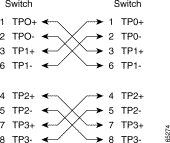
For cross-over cables (used less and less because of Auto MDI-X which is standard in 10000BASE-T) this is slightly different Appendix B: Ethernet Crossover Cables – Configuring and Troubleshooting Ethernet 10/100/1000Mb Half/Full Duplex Auto-Negotiation – Cisco [WayBack]:

Four Twisted-Pair Crossover Cable Schematics for 10/100/1000 and 1000BASE-T GBIC Module Ports

3a.gif

3c.gif

There are some nice colour coded wiring diagrams at Tech Stuff – LAN Wiring and Pinouts [WayBack] for both straight wiring [WayBack] and crossed wiring [WayBack]:

All work fine for CAT5, CAT5E and CAT6.

–jeroen

Posted in Ethernet, Network-and-equipment, Power User | Leave a Comment »

Getting the vendor from an ethernet network MAC address on-line through the Wireshark OUI Lookup Tool.

Posted by jpluimers on 2016/11/18

In networks, often you want to know which manufacturer or vendor is behind a MAC address.

An easy way to look this up on-line is by using the
Wireshark · OUI Lookup Tool which should have had MAC or MAC address in the title.

It uses both the extensive /etc/manuf Wireshark Ethernet vendor codes and well-known MAC address prefixes (which is a long text file generated from several sources). Some of the prefixes are just the 24-bit (6-hex digit) OUIs, but others are much more fine grained.

What’s really cool is that the tool accepts a very lenient formatting of inputs: full, partial, various hex separators (including none), case insensitive, and vendor names/abbreviations. So entries like these magically work.

0000.0c
08:00:20
01-00-0C-CC-CC-CC
missouri

–jeroen

Posted in Ethernet, Network-and-equipment, Power User | Leave a Comment »

MikroTik CRS226-24G-2S+RM Review – A super switch

Posted by jpluimers on 2016/04/18

Interesting device: Our review of the MikroTik CRS226-24G-2S+RM a 1U rackmount 24 port gigabit switch with dual 10 gigabit Ethernet SFP+ ports and a slick management interface.

Source: MikroTik CRS226-24G-2S+RM Review – A super switch

It’s fanless, support SFP+ and many people seem to like it.

Pictures are at Just got my CRS226-24G-2s+RM! – MikroTik RouterOS.

There is also a desktop version of it called CRS226-24G-2S+IM.

–jeroen

Future reading:

Posted in Ethernet, Network-and-equipment, Power User | Leave a Comment »

Mac/PC: sending Wake-on-LAN (WOL) packets

Posted by jpluimers on 2014/07/25

I’ve succesfully woken up these machines:

  • HP XW6600 running ESXi 5.1
  • ThinkPad W701U running Windows 7

I still need to try to wake up a Mac Mini Server running OS X 10.6 (Snow Leopard).

MacBook Air on 10.7 (Lion) and Retina on 10.8 (Mountain Lion) won’t work as they are WiFi only, and WOL does not work over WiFi.

On 10.7 and up it might not work on a Mac Mini Server either, as Apple Introduced Dark Wake.

I used these tools to send WOL packets: Read the rest of this entry »

Posted in *nix, Apple, ESXi5.1, Ethernet, Hardware, HP XW6600, Linux, Mac OS X / OS X / MacOS, Mac OS X 10.6 Snow Leopard, Mac OS X 10.7 Lion, Network-and-equipment, openSuSE, OS X 10.8 Mountain Lion, Power User, SuSE Linux, Virtualization, VMware, VMware ESXi, Wake-on-LAN (WoL), Windows, Windows 7 | Leave a Comment »

Some Mikrotik and RouterOS Links to get it running on ESXi for experimental purposes.

Posted by jpluimers on 2014/03/27

RouterOS runs on many kinds of hardware. Of course on the MikroTik hardware itself (which always comes with a license), but also on x86 hardware, even virtualized systems.

In that respect, it looks a bit like pfSense, or Endian, but on steroids and closed source.

Here are some links focused on MikroTik  on ESXi (which is great for experimental purposes):

WOL (Wake ON LAN)

–jeroen

via: Routers.

Posted in ESXi4, ESXi5, ESXi5.1, ESXi5.5, Ethernet, Internet, Network-and-equipment, Power User, routers, Virtualization, VMware, VMware ESXi, Wake-on-LAN (WoL) | Tagged: , | Leave a Comment »

More ESXi5 installation steps

Posted by jpluimers on 2013/06/10

(note: part of this post is unfinished, but I wanted to make sure all the links are publicly accessible, so I posted earlier and incomplete)

I already did a few ESXi5 postings (they apply to 5.1 as well) of which the most important are:

Time to finish up some additional installation steps (with a big thanks to Matthijs ter Woord):

Read the rest of this entry »

Posted in BIOS, Boot, ESXi5, ESXi5.1, Hardware, HP XW6600, Keyboards and Keyboard Shortcuts, Power User, PowerCLI, Virtualization, VMware, VMware ESXi, Wake-on-LAN (WoL), Windows, Windows 7, Windows 8, Windows Server 2000, Windows Server 2003, Windows Server 2003 R2, Windows Server 2008, Windows Server 2008 R2, Windows Vista, Windows XP | Leave a Comment »