The Wiert Corner – irregular stream of stuff

Jeroen W. Pluimers on .NET, C#, Delphi, databases, and personal interests

  • My badges

  • Twitter Updates

  • My Flickr Stream

  • Pages

  • All categories

  • Enter your email address to subscribe to this blog and receive notifications of new posts by email.

    Join 1,860 other subscribers

Archive for the ‘Hardware’ Category

One second code: Do YOU know how much your computer can do in a second?

Posted by jpluimers on 2021/02/11

[WayBack] One second code: Do YOU know how much your computer can do in a second? is a quiz version of the [WayBack] Numbers Every Programmer Should Know By Year.

[WayBack] About this game revealed it was made by 3 people curious in the speed of their hardware which – not surprisingly – has been relatively stable over the last decade or so.

Source code is at [WayBack] GitHub – kamalmarhubi/one-second: Fun performance game!

I bumped into it via these tweets:

I like games like this (ever played the The Deadlock Empire multi-threading game?), so I played the computers-are-fast.github.io tests, and learned a lot:

Read the rest of this entry »

Posted in Conference Topics, Conferences, Development, Event, Hardware, Power User, Software Development | Leave a Comment »

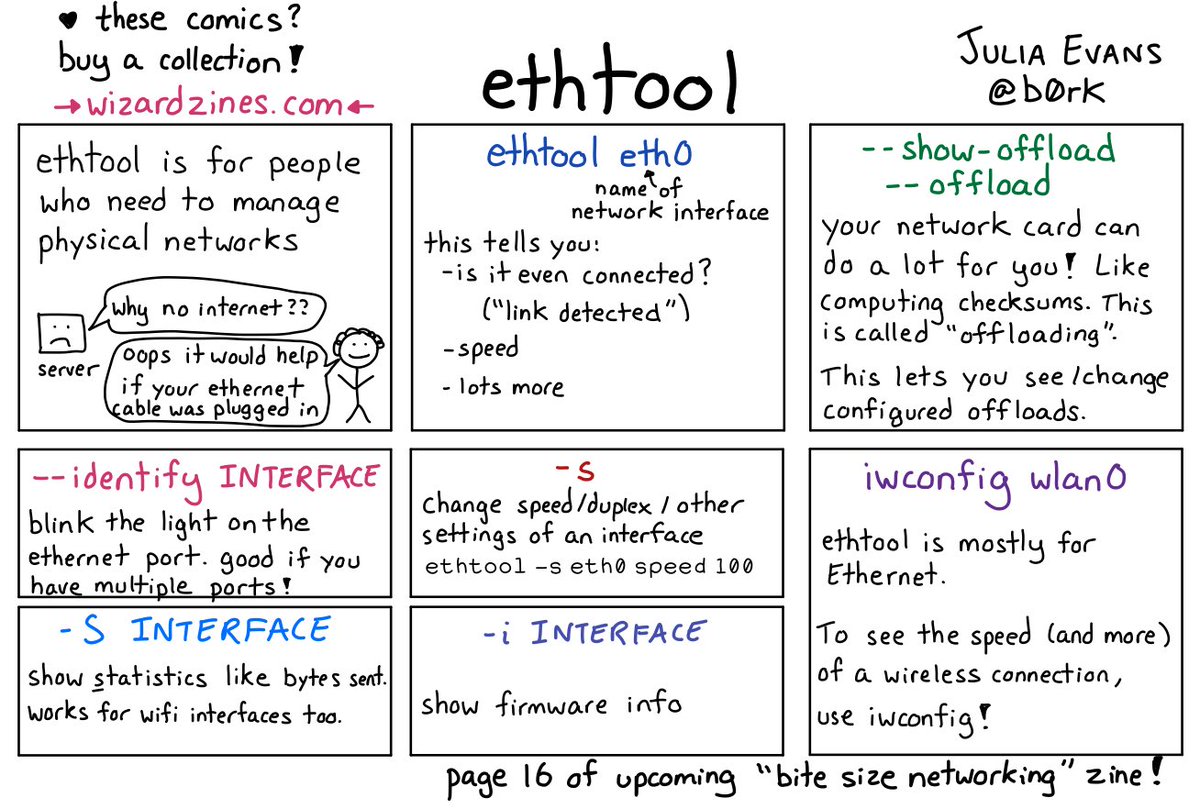
🔎Julia Evans🔍 on Twitter: “ethtool… “

Posted by jpluimers on 2021/02/08

[WayBack] 🔎Julia Evans🔍 on Twitter: “ethtool… “

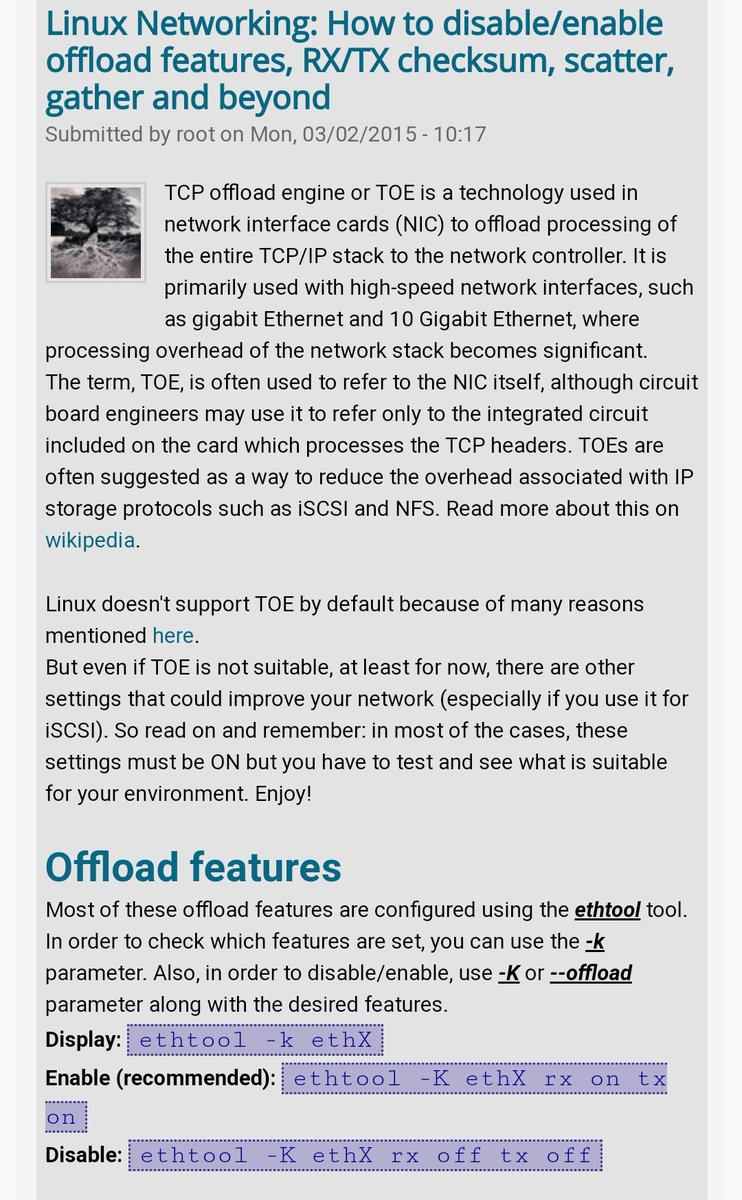
With a lot of responses, including:

–jeroen

Posted in *nix, *nix-tools, Network-and-equipment, Power User | Leave a Comment »

A choco install list

Posted by jpluimers on 2021/02/03

Sometimes I forget the choco install mnemonics for various tools, so here is a small list below.

Of course you have to start with an administrative command prompt, and have a basic Chocolatey Installation in place.

If you want to clean cruft:

choco install --yes choco-cleaner

Basic install:

choco install --yes 7zip
choco install --yes everything
choco install --yes notepadplusplus
choco install --yes beyondcompare
choco install --yes git.install --params "/GitAndUnixToolsOnPath /NoGitLfs /SChannel /NoAutoCrlf /WindowsTerminal"
choco install --yes hg
choco install --yes sourcetree
choco install --yes sysinternals

For VMs (pic one):

choco install --yes vmware-tools
choco install --yes virtio-drivers

For browsing (not sure yet about Chrome as that one has a non-admin installer as well):

choco install --yes firefox

For file transfer (though be aware that some versions of Filezilla contained adware):

choco install --yes filezilla
choco install --yes winscp

For coding:

choco install --yes vscode
choco install --yes atom

For SQL server:

choco install --yes sql-server-management-studio

For web development / power user:

choco install --yes fiddler

For SOAP and REST:

choco install --yes soapui

If you don’t like manually downloading SequoiaView at gist.github.com/jpluimers/b0df9c2dba49010454ca6df406bc5f3d (e8efd031d667de8a1808d6ea73548d77949e7864.zip):

choco install --yes windirstat

For drawing, image manipulation (paint.net last, as it needs a UI action):

choco install --yes gimp
choco install --yes imagemagick
choco install --yes paint.net

For ISO image mounting in pre Windows 10:

choco install --yes wincdemu

For hard disk management:

choco install --yes hdtune
choco install --yes seatools
choco install --yes speedfan

For Fujitsu ScanSnap scanners (not sure yet this includes PDF support):

choco install --yes scansnapmanager

–jeroen

Posted in 7zip, atom editor, Beyond Compare, Chocolatey, Compression, Database Development, Development, DVCS - Distributed Version Control, Everything by VoidTools, Fiddler, Firefox, Fujitsu ScanSnap, git, Hardware, Mercurial/Hg, Power User, Scanners, SOAP/WebServices, Software Development, Source Code Management, SQL Server, SSMS SQL Server Management Studio, SysInternals, Text Editors, Versioning, Virtualization, VMware, VMware ESXi, vscode Visual Studio Code, Web Browsers, Web Development, Windows | Leave a Comment »

Node-RED is on my research list.

Posted by jpluimers on 2021/01/19

Cool stuff that is on my research list: redundancy through Node-RED.

NodeRED Multi-Node Redundancy Example – YouTube:

A simple proof of concept showing how to implement multi-node redundancy using four NodeRED instances, with Modbus TCP Remote IO.

Example Flow: https://app.box.com/s/mevo3fq9u6x6khr…

Parts used:

  • WAGO
    • 750-352 Ethernet Coupler ModbusTCP
    • 750-1506 8ch DI/DO 24VDC Module
    • 750-461 RTD Module
    • 750-600 End Module
    • 787-1602 24VDC 1A PS
    • 789-801 DIN push button
  • Raspberry Pi 3b +
  • DIN Rail mount: www.DINrPlate.com

–jeroen

Read the rest of this entry »

Posted in Development, Hardware, Software Development | Leave a Comment »

Google Chrome URL chrome://devices/ -> your registered Google Cloud devices like printers

Posted by jpluimers on 2021/01/18

Just learned a new Google Chrome URL chrome://devices/ which lists your Google Cloud devices like printers.

Though in the case of OKI printers, you have to enter your printers at the printer which the Menu button is a painful exercise. [WayBackoki-c332dn-control-panel_maxwidth.jpg (525×550).

You can also view the device list in https://www.google.com/cloudprint#printers

For some OKI printers (including the MC342 series) you need to update the firmware. For a Mac, you need the below firmware update tool that automagically:

  1. detects the printers
  2. finds the firmware on the internet
  3. updates the printer

Tool: [WayBackFWUP_020000_10.7.dmg via [WayBackFirmware Update | OKI Global

–jeroen

Posted in Chrome, Google, Hardware, OKI C332, OKI Printers, Power User | Leave a Comment »

Forced routing of selective emails to ISP SMTP via Mikrotik Routing | Syed Jahanzaib Personal Blog to Share Knowledge !

Posted by jpluimers on 2021/01/14

For my link archive: [WayBack] Forced routing of selective emails to ISP SMTP via Mikrotik Routing | Syed Jahanzaib Personal Blog to Share Knowledge !

–jeroen

Posted in Development, MikroTik, Power User, RouterOS, routers, Scripting, Software Development | Leave a Comment »

OKI C332/MC342 – reset (short) device name, location, asset number and contact name

Posted by jpluimers on 2021/01/08

I’ve found out that the only way to reset the below fields on an OKI printer is to

  1. go to the printer main page at http://192.168.124.34 (use the IP address of your own printer here)
  2. logon as Administrator (on an OKI C332 that’s user admin which has default password 999999, on an OKI MC342 the password is aaaaaa)
  3. go to the page http://192.168.124.34/setupfrm.htm (use the IP address of your own printer here) as that page can potentially be skipped during login
  4. update these fields:
    • Device Name
    • Short Device Name
    • Asset Number
    • Contact Name – Administrator

Image source: [Archive.csChecking or Changing the Settings of This Machine from a Computer (MC853, MC873)

–jeroen


Posted in OKI C332, OKI Printers, Power User, Printers | Leave a Comment »

Fiber cables: speed and connectors

Posted by jpluimers on 2021/01/07

Similar to the CAT# designation for speed categories, fiber cables have an OM# designation. [WayBack] OM1 fiber, OM2 fiber, OM3 fiber and OM4 fiber overview explain this well, and has this quote and image tables:

There are four kinds of multimode fibers: OM1 fiber, OM2 fiber, OM3 fiber and OM4 fiber. The letters “OM” stand for optical multi-mode.

Both OM1 and OM2 work with LED based equipment that can send hundreds of modes of light down the cable, while OM3 and OM4 are optimized for laser (eg. VCSEL) based equipment.

I have combined the tables in html as:

OM1 OM2 OM3 OM4
Maximum distance for 100 Mbit/s 2000m 2000m 2000m 2000m 100BASE -FX
Maximum distance for 1 Gbit/s 275m 550m 550m 1000m 1000BASE-SX
Maximum distance for 10 Gbit/s 33m 82m 300m 550m 10GBASE-SR
Maximum distance for 40 Gbit/s not specified not specified 100m 150m 40GBASE-SR4
Maximum distance for 100 Gbit/s not specified not specified 100m 150m 100GBASE-SR10 / 100GBASE-SR4
Diameter 62.5/125µm 50/125µm 50/125µm 50/125µm
Jacket coulors (often also cable colours) Orange Orange Aqua Aqua
Optical source LED LED VCSEL VCSEL
Bandwidth 200MHz*km 500MHz*km 2000MHz*km 4700MHz*km


Unlike CAT cabling, fiber cables can have various connectors, of which SC and LC are the most common as explained in [WayBack] SC vs LC—What’s the difference? which has this quote and image table:

  • Size: LC is half the size of SC. Actually, one SC-adapter is exactly the same size as a duplex LC-adapter. Therefore LC is more and more common in central offices where packing density (number of connections per area) is an important cost factor
  • Handling: SC is a true “push-pull-connector” and LC is a “latched connector”, although there are very innovative, real “push-pull-LCs” available which have the same handling capabilities like SC.
  • The History of Connector: The LC is the “younger” connector of the two, SC is wider spread around the world but LC is catching up. Both connectors have the same insertion loss and return loss capabilities. Generally, it depends where in the network you want to use the connector, no matter SC or LC, even the other different kinds of connector.

In html:

Name Mating
cycles
Ferrule
size
Typical
insertion loss
(dB)
IEC
specification
Cost Ease
of
use
Application
features
SC 1000 Ø 2.5mm
ceramic
0.25-0.5 61754-4 $$ ••••• Mainstream, reliable, fast deployment, field fit
LC 500 Ø 1.25mm
ceramic
0.25-0.5 61754-20 $$ ••••◦ High density, cost effective, field fit

Related:

–jeroen

Posted in Ethernet, Network-and-equipment, Power User | Leave a Comment »

Automating the closing of the Creative Cloud signing and ABBY FindReader for ScanSnap 5.0 dialogs

Posted by jpluimers on 2021/01/06

Every time my scan VM logs on I get the dialog on the right.

Every time I finish an OCR scan, I get the dialog below.

There are two reasons I want to close the ABBY dialog:

  1. While open, it will keep both the original PDF and OCR PDF files alive.When after a while, Windows updates auto-reboots the machine, before clicking the OK buttons I have to manually check if the conversion succeeded before removing the non-OCR PDF.This is time consuming.
  2. While open, it still consumes a lot of system resources: about 100 megabyte for a simple single monochrome A4 page. Much more for complex, multi-page or colour documents.When scanning a lot of document this causes the system to run out of memory, after becoming much much slower because the truckload of Window handles and underlying threads drags Windows down.

I do not want to fully get rid of these dialogs, as often being aware of the progress is important, and I always forget how to re-enable things. If you can do without the dialogs, then try these:

Finding the Windows and controls

I did use one nice feature of AutoHotKey: their Windows Spy utility, which is implemented as a AHK script: [WayBack] AutoHotKey-scripts/WindowSpy.ahk at master · elig0n/AutoHotKey-scripts · GitHub. In the past this was a separate executable, so do not start looking for that any more. You can get it either after a full install of the [WayBack] Releases · Lexikos/AutoHotkey_L · GitHub, or by extracting from the most current AutoHotKey.zip from [Archive.is] AutoHotkey Downloads.

Related:

This gets these for the Create Cloud and ABBY windows:

Automating the click

I contemplated about using AutoIt (freeware, but closed source) or AutoHotKey_L (the current active fork of AutoHotKey).

AutoIt is now closed source, forked in the past as AutoHotKey, which has a lot of half backed – usually poorly documented – scripts needing you to learn a new API wrapper around existing Windows API functionality.

So I reverted back to using the Windows API using Delphi: a simple repeat loop, to check for the existence of the underlying processes, windows and controls, plus some logic to terminate then the user stops the application (Ctrl-C, Ctrl-Break), logs off, or Windows shuts down.

Releated Windows API  keywords and posts:


I could have used AutoHotKey with these hints to get it working:

MacOS

Note that when you run on MacOS, you need an alternative like for instance the video below shows via [WayBack] Stop ScanSnap From Prompting You When You Scan.

–jeroen

Read the rest of this entry »

Posted in Development, Fujitsu ScanSnap, Hardware, ix100, ix500, Power User, Scanners, Scripting, Software Development, Windows, Windows 10, Windows 8.1 | Leave a Comment »

Electronics-Salon DIN Rail Mount +/-20Amp AC/DC Current Sensor Module, based on ACS712: Amazon.com: Industrial & Scientific

Posted by jpluimers on 2020/12/24

For my link archive (this DIN rail device allow sensing current used by a circuit; models for 5A/20A/30A).

Thanks Matthijs ter Woord for pointing me to this.

Schematics show it uses an LM317 linear voltage regulator (to get 5V out of a 8V-35V range) next to the ACS712 current sensor (based on the [WayBack] Hall effect) available in 5A, 20A and 30A varieties.

Documentation:

Schematics:


Read the rest of this entry »

Posted in Development, Hardware, Hardware Development, Hardware Interfacing | Leave a Comment »