The Wiert Corner – irregular stream of stuff

Jeroen W. Pluimers on .NET, C#, Delphi, databases, and personal interests

  • My badges

  • Twitter Updates

  • My Flickr Stream

  • Pages

  • All categories

  • Enter your email address to subscribe to this blog and receive notifications of new posts by email.

    Join 1,861 other subscribers

Archive for the ‘Internet’ Category

Reminder to self: get less dependent on the various clouds

Posted by jpluimers on 2021/06/04

For my link archive: [WayBack] Grote Google-storing trof Gmail, YouTube en diensten van derden – IT Pro – Nieuws – Tweakers.

It has some interesting tips for IoT video doorbell products that are less depending on single-choice clouds:

Er bestaan er minimaal eentje; smart deurbel met camera en evt speaker, eigen intern netwerk, compatible met SIP (en video), zelf verantwoordelijk voor opnamen, etc. Enige nadeel is dan wel de prijs, het is een Duits kwaliteitsproduct, dus reken rond de 350 euro voor het absolute basismodel. Doorbird heet het; oa te koop bij Robbshop en CoolBlue of direct bij de fabiraknt’s website.


Je moet je huis flink geautomatiseerd hebben wil je echt nut van die api willen hebben.

als je alles zelf in de hand wil hebben doe je dat ook. Je zorgt er zelf voor dat je webinterface via een externe URL bereikbaar is en dan is het enkel je eigen hardware en internetverbindingen die als SPOF dienen en je kan dan ook makkelijker van solution-provider wisselen zonder vast te zitten.


wellicht is dit een oplossing voor jou?

https://www.instructables…oorbell-for-Less-Than-40/


–jeroen

Posted in Cloud Apps, Internet, IoT Internet of Things, Network-and-equipment, Power User | Leave a Comment »

Microsoft subdomains

Posted by jpluimers on 2021/06/02

Almost every company I know has more than one subdomain, but while researching why support.microsoft.com could not be archived in the WayBack machine, I realised how many they have and bumped into a few sites listing most of them:

All via microsoft.com subdomains – Google Search.

–jeroen

Posted in Development, DNS, Internet, Power User, Software Development, Web Development | Leave a Comment »

Fritz!Box repeater and other devices: “Radar detection enabled. At the moment no wireless LAN connection (5 GHz) is possible; please wait.”

Posted by jpluimers on 2021/05/31

If any of your Fritz!Box devices under “Wireless” -> “Radio Channel” -> “5-GHz band”  the indicates “Radar detection enabled. At the moment no wireless LAN connection (5 GHz) is possible; please wait.” – Google Search:

  1. Click on the “Refresh Auto Channel” button
  2. Wait until it has chosen a new 5Ghz channel
  3. Verify you can connect over 5Ghz
  4. If you still cannot connect, retry steps 1…3 once.

I had this only happen on 1750E repeaters so far, but others seem to have had it on other Fritz!Box devices as well.

In the Netherlands, potentially affected channels seem to be 52 through 140.

Related:

–jeroen

Posted in Fritz!, Fritz!Box, Fritz!WLAN, Internet, Power User | Leave a Comment »

Running ArchiveTeam Warrior version 3.2 on ESXi

Posted by jpluimers on 2021/05/05

A while ago I wrote about Helping the WayBack ArchiveTeam team: running their Warrior virtual appliance on ESXi.

Since it was scheduled before my cancer treatment started and got posted when still recovering from it, I missed that version 3.2 of the [Wayback] ArchiveTeam Warrior appliance appeared in the [Wayback] Releases · ArchiveTeam/Ubuntu-Warrior at [Wayback] Release v3.2 · ArchiveTeam/Ubuntu-Warrior. You can download it form these places:

These two sites have not yet been updated, so they contain the older versions:

The source code now has been moved three times:

Read the rest of this entry »

Posted in *nix, *nix-tools, ArchiveTeamWarrior, Cloud, Containers, diff, Docker, ESXi5, ESXi5.1, ESXi5.5, ESXi6, ESXi6.5, ESXi6.7, ESXi7, Infrastructure, Internet, InternetArchive, Kubernetes (k8n), KVM Kernel-based Virtual Machine, patch, Power User, VirtualBox, Virtualization, VMware, VMware ESXi, VMware Workstation, WayBack machine | Leave a Comment »

Need to do some reading on local domains on the internal network

Posted by jpluimers on 2021/04/09

A long time I wondered why I saw ESXi systems on my local network have two entries in their /etc/hosts file:

[root@ESXi-X10SRH-CF:~] cat /etc/hosts
# Do not remove the following line, or various programs
# that require network functionality will fail.
127.0.0.1   localhost.localdomain localhost
::1     localhost.localdomain localhost
192.168.71.91   ESXi-X10SRH-CF ESXi-X10SRH-CF

Then I bumped into someone who had a different setup:

[root@ESXi-X10SRH-CF:~] cat /etc/hosts
# Do not remove the following line, or various programs
# that require network functionality will fail.
127.0.0.1   localhost.localdomain localhost
::1     localhost.localdomain localhost
192.168.0.23    esxi.dynamic.ziggo.nl esxi

So now I knew that the first entry can have a domain resolving it (it still makes be wonder why ziggo is using a top-level domain to resolve local stuff; but searching for  dynamic.ziggo.nl did not get me further on that).

So I installed a quick ESXi machine on that local network, and got the same.

When back home the machine still thought it was esxi.dynamic.ziggo.nl, though clearly I was outside a Ziggo network

I wanted to get rid of it, but that was hard.

Since I forgot to take screenshots beforehand, I can only provide the ones without a search domain bellow.

Reminder to self: visit someone within the Ziggo network, then retry.

Normally you can edit things like these in the default TCP/IP stack. There are two places to change this:

Neither of these allowed me to change it to a situation like this, but luckily the console did.

In the below files, I had to remove the bold parts, then restart the management network (I did keep a text dump, lucky me):

[root@esxi:/etc] grep -inr ziggo .
./vmware/esx.conf:116:/adv/Misc/HostName = "esxi.dynamic.ziggo.nl"
./resolv.conf:2:search dynamic.ziggo.nl 
./hosts:5:192.168.71.194    esxi.dynamic.ziggo.nl esxi
[root@esxi:/etc] cat /etc/resolv.conf 
nameserver 192.168.71.3
search dynamic.ziggo.nl 
[root@esxi:/etc] cat /etc/hosts
# Do not remove the following line, or various programs
# that require network functionality will fail.
127.0.0.1   localhost.localdomain localhost
::1     localhost.localdomain localhost
192.168.71.194  esxi.dynamic.ziggo.nl esxi

Future steps

  1. Read more on local domains, search domains and related topics
  2. Configure a local domain on my local network, so DHCP hands it out, and DHCP handed out host names are put in the local DNS
  3. Test if all services on all machines still work properly

Reading list

Read the rest of this entry »

Posted in DNS, ESXi6.5, ESXi6.7, Hardware, Internet, Mainboards, Network-and-equipment, Power User, SuperMicro, Virtualization, VMware, VMware ESXi, X10SRH-CF, X9SRi-3F | Leave a Comment »

email file decoding: Encode/Decode Quoted Printable – Webatic

Posted by jpluimers on 2021/03/26

For my link archive: [WayBack] Encode/Decode Quoted Printable – Webatic.

It did a splendid job at decoding email files in MIME format Quoted-printable.

–jeroen

Posted in *nix, *nix-tools, Communications Development, Development, eMail, Encoding, Internet, Internet protocol suite, Power User, sendmail, SMTP, SocialMedia, Software Development | Leave a Comment »

Interactive tool to record a web-site, then archive it as WARC: GitHub – webrecorder/webrecorder-user-guide: webrecorder user guide and glossary

Posted by jpluimers on 2021/03/26

Learned about this in the fall of G+: [WayBack] GitHub – webrecorder/webrecorder-user-guide: webrecorder user guide and glossary

Back then, fully automated tools were easier.

So it is on my list of things to try one day for smaller projects.

From the glossary:

Quick Start

  1. Enter a URL in the box in the center of the screen labeled ‘URL to capture’.
  2. Press the ‘start’ button (look down and to the right of the box where you entered the URL).
  3. Interact with the web page that loads so Webrecorder can capture the content displayed on this page. To collect audio or video from a page be sure to press ‘play’ so the file will load into the browser.
  4. Continue to visit and browse the pages you would like to capture. Each page you view will be included in your capture session. Note: you will be capturing the contents of each page you visit but will not automatically obtain pages that are linked to on the pages you collect (hyperlinks).
  5. To end your capture session hover over the ‘Capture’ button in the upper left corner of the screen so it changes to read ‘Stop’ then click that button.
  6. Your capture will then be browsable. Note: the capture will not ‘replay’ like a linear recording but instead be an interactive copy of the pages you have collected.
  7. If you are a logged-in user, this session will be saved to your account automatically. If you are not logged in an account, you can sign up for an account or log in to your existing account to save the collection after you create it. If you do not log in you can still download your collection for a limited time (approximately 90 minutes from when you stop your recording session).

–jeroen

Posted in Internet, InternetArchive, Power User | Leave a Comment »

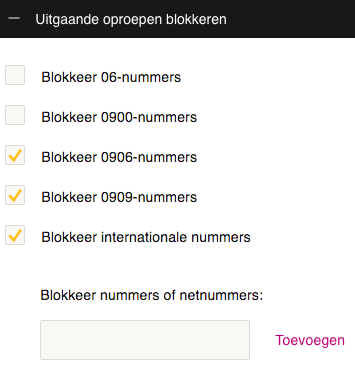
xs4all voip with Fritz!Box equipment: do not combine Fritz!Box “With prefix” number formats with xs4all “Block international numbers”: it will block non-international numbers too.

Posted by jpluimers on 2021/03/22

If you use xs4all VoIP from any Fritz!Box device, then keep the “Telephone Number Format” for “Country code” on “No”, and “Area code” to “None”:


If you have changed these to “With prefix” like I did:

combined with VoIP settings to block international numbers on the right, then when you dial a number outside your area, you will get a friendly voice telling you “this number is blocked”

–jeroen

Posted in Internet, ISP, Power User, Telephony, VoIP, xs4all | Leave a Comment »

Helping the WayBack ArchiveTeam team: running their Warrior virtual appliance on ESXi

Posted by jpluimers on 2021/03/19

The [WayBack] Archiveteam helps the WayBack machine with feeding new content.

You can help that team by running one or more “warrior” virtual machine instances. The VM is distributed as a virtual appliance in an ova file according to the Open Virtualization Format.

That format sounds more generic than it actually is, so the (at the time of writing) archiveteam-warrior-v3-20171013.ova file at [WayBack] Index of /downloads/warrior3/ was created for VirtualBox.X

This meant running it on VMware ESXi or VMware vSphere takes a few steps for patching it, then uploading it to your VMware host.

Since I might want to run the appliance on multiple places or multiple instances, I wanted to have a ready-to-go solution, I created a git repository with both the patch instructions and the update at [WayBack] wiert.me / public / ova / archiveteam-warrior-v3-20171013.ESXi · GitLab.

Read the rest of this entry »

Posted in ArchiveTeamWarrior, Cloud, Containers, Docker, Infrastructure, Internet, InternetArchive, Kubernetes (k8n), Power User, WayBack machine | Leave a Comment »

Domeinnaam prijzen – Internetproviders en Hosting – GoT

Posted by jpluimers on 2021/03/12

For my link archive: domain name registration prices in The Netherlands: [WayBack] Domeinnaam prijzen – Internetproviders en Hosting – GoT

–jeroen

Posted in DNS, Hosting, Internet, Power User | Leave a Comment »