The Wiert Corner – irregular stream of stuff

Jeroen W. Pluimers on .NET, C#, Delphi, databases, and personal interests

  • My badges

  • Twitter Updates

  • My Flickr Stream

  • Pages

  • All categories

  • Enter your email address to subscribe to this blog and receive notifications of new posts by email.

    Join 1,835 other subscribers

Archive for the ‘MarkDown’ Category

Some Markdown links on phrasing more difficult markdown for correct rendering

Posted by jpluimers on 2019/08/20

After blogging on Markdown notes in 2014, Markdown support has come a long way. It also means that the documents written in Markdown has become more complex, and that more tools can render it.

Given the vague aspects of many Markdown dialects, rendering can be troublesome (see my post Babelmark 2 online Markdown checker), so below are some links on some aspects I had trouble with getting right.

Note that there are two markdown linters:

Sometimes, issues are present in one, but not in the other; see:

The command line interface to the Ruby version is easier to install than the JavaScript version as everything is in one gemmdl, unlike the npm, where the cli is in markdown-cli and the library in markdownlint.

–jeroen

Related:

Read the rest of this entry »

Posted in *nix, *nix-tools, Development, Lightweight markup language, MarkDown, pandoc document converter, Power User, Ruby, Software Development | Leave a Comment »

syntax – Comments in Markdown – Stack Overflow

Posted by jpluimers on 2019/06/17

Comments that are not emitted to the output:

The most platform-independent syntax is

(empty line)
[comment]: # (This actually is the most platform independent comment)

Thanks nick-volynkin for answering this at [WayBack] syntax – Comments in Markdown – Stack Overflow.

–jeroen

Posted in Development, Lightweight markup language, MarkDown | Leave a Comment »

Various online CSV to Markdown converters: best is Markdown Tables generator – TablesGenerator.com

Posted by jpluimers on 2019/01/03

TL;DR: use Markdown Tables generator – TablesGenerator.com as it has the most features.

A few tools that help converting CSV (with separators like comma, semicolon and tab) to Markdown online:

  1. [Archive.csMarkdown Table Maker
    • Supports:
      • Use first line as headers
      • Auto detection of separator
      • Tab separated
      • Comma separated
      • Semicolon separated
    • Does not support:
      • Quote characters
  2. [WayBack] CSV to Markdown Table Generator — Donat Studios
    • Supports:
      • Use first line as headers
      • Tab separated
      • Comma separated
      • Semicolon separated
    • Does not support:
      • Quote characters
  3. [WayBackMarkdown Tables generator – TablesGenerator.com
    • Supports auto detection of:
      • Use first line as headers
      • Tab separated
      • Comma separated
      • Semicolon separated
      • Quote characters

–jeroen

Posted in CSV, Development, Lightweight markup language, MarkDown, Power User, Software Development | Leave a Comment »

Babelmark 2 online Markdown checker

Posted by jpluimers on 2018/11/07

Some markdown tools have their own page online allowing you to experiment with their rendering; [WayBack] markdown-it demo is one of them.

I was looking for a page showing the renderings of many engines in order to improve my markdown writing skills.

I found the [WayBackbabelmark2 online markdown checker, which works great.

  • It runs the markdown through various processors showing either the log with HTML produced, or a view of the rendered output.
  • It has one limitation: 1000 characters of markdown text so the markdown rendering servers will not get overloaded.

Documentation is at [WayBack] Babelmark 2 – FAQ.

In addition, this is also very useful: [WayBack] markdownlint demo Demo for [WayBack] GitHub – DavidAnson/markdownlint: A Node.js style checker and lint tool for Markdown/CommonMark files.

Note that the Visual Studio Code markdownlint support, uses the above markdownlint, which is a different one than the Ruby based [WayBack] GitHub – markdownlint/markdownlint: Markdown lint tool.

Both are far easier to use than [WayBack] GitHub – michelf/mdtest: Test suite for Markdown implementations.

Via

–jeroen

Read the rest of this entry »

Posted in Development, Lightweight markup language, MarkDown, Software Development | Leave a Comment »

Online markup conversion from markdown to mediawiki: pandoc

Posted by jpluimers on 2018/07/06

Since Mediawiki needs an extension to display Markdown, and many MediaWiki installations do not have that extension, I was looking for an online conversion from markdown to MediaWiki markup.

Luckily the Pandoc try has this conversion: [WayBack] Try pandoc! Markdown(pandoc) -> MediaWiki

These links helped me get there:

–jeroen

Posted in *nix, *nix-tools, Development, Lightweight markup language, MarkDown, MediaWiki, pandoc document converter, Power User, Software Development | Leave a Comment »

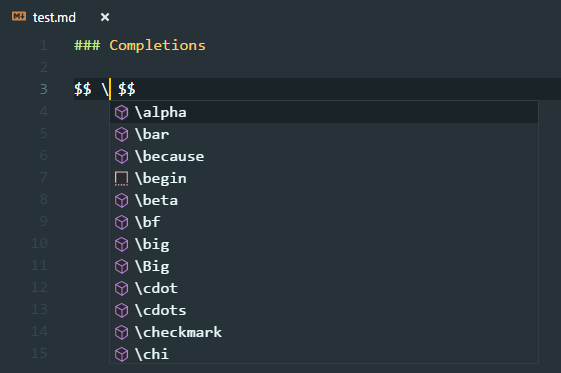
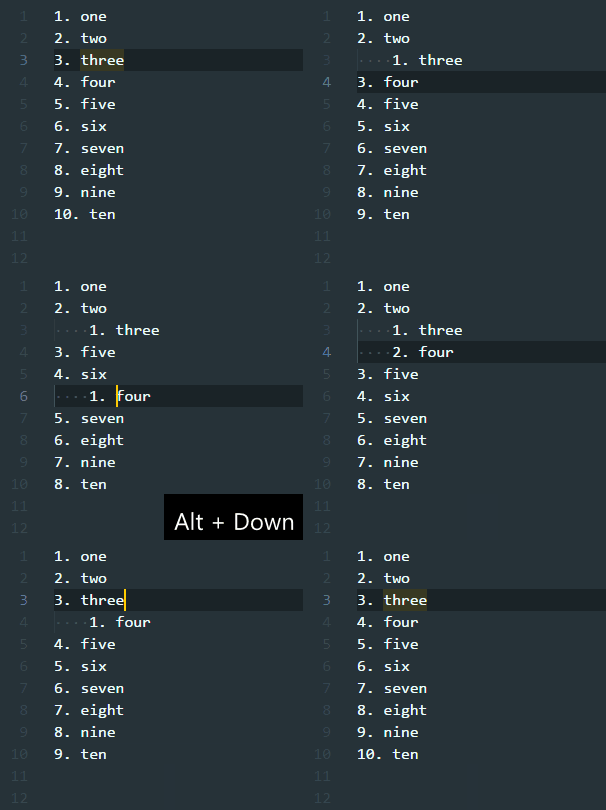
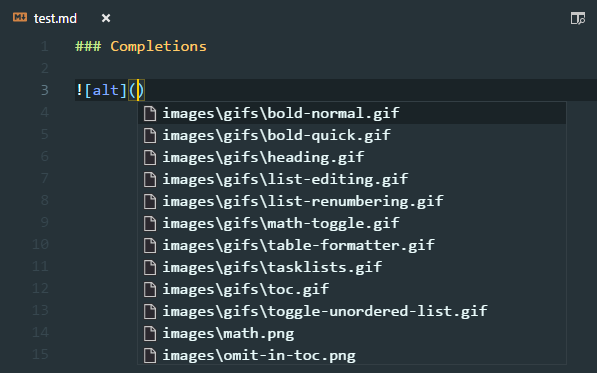
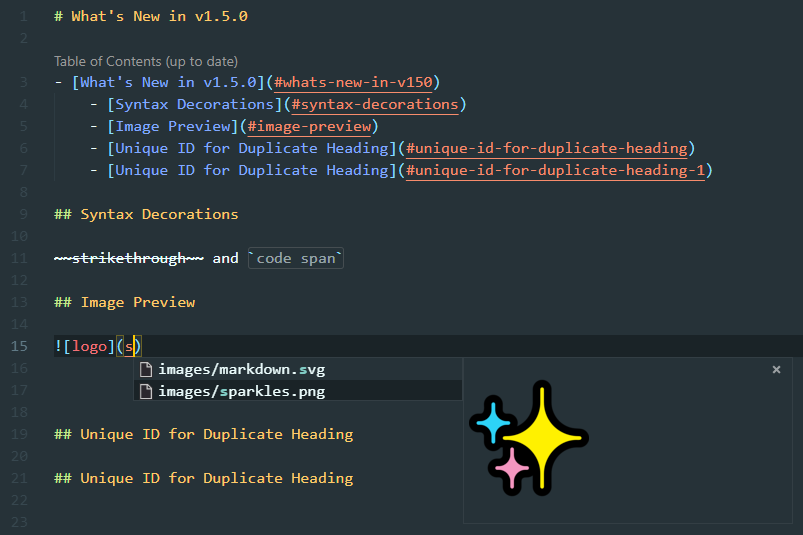
Two reasons I love Visual Studio Code over Atom.io: built-in markdown support and vscode-markdown; just watch the CHANGELOG.md at master · neilsustc/vscode-markdown · GitHub

Posted by jpluimers on 2018/07/03

Boy, I love this so much: [WayBack] vscode-markdown/CHANGELOG.md at master · neilsustc/vscode-markdown · GitHub

Just a few of the screen videos:

  • Formula support
  • Table of Contents (ToC) support including leaving out individual headings:
  • On the fly list renumbering:
  • Image reference completion including image preview:

–jeroen

Posted in Development, Lightweight markup language, MarkDown, Software Development | Leave a Comment »

Finding out why Github doesn’t render your reStructuredText as expected

Posted by jpluimers on 2018/04/13

One of the cool Github features is that it renders reStructuredText (and other markup documents like markdown).

Often however, your .rst file on GitHub looks very differently on GitHub as your local render. Heck: sometimes Github will not even render it at all.


–jeroen

Posted in Development, Lightweight markup language, MarkDown, Power User, reStructuredText, Software Development | Leave a Comment »

YouTube videos in Markdown – via Markdown Cheatsheet · adam-p

Posted by jpluimers on 2018/02/28

Clever, as I didn’t know you could directly refer to the YouTube preview image using the “/0.jpg” trick:

Youtube videos

They can’t be added directly but you can add an image with a link to the video like this:

<a href="http://www.youtube.com/watch?feature=player_embedded&v=YOUTUBE_VIDEO_ID_HERE
" target="_blank"><img src="http://img.youtube.com/vi/YOUTUBE_VIDEO_ID_HERE/0.jpg" 
alt="IMAGE ALT TEXT HERE" width="240" height="180" border="10" /></a>

Or, in pure Markdown, but losing the image sizing and border:

[![IMAGE ALT TEXT HERE](http://img.youtube.com/vi/YOUTUBE_VIDEO_ID_HERE/0.jpg)](http://www.youtube.com/watch?v=YOUTUBE_VIDEO_ID_HERE)

Source: [WayBackMarkdown Cheatsheet · adam-p/markdown-here Wiki · GitHub

Gif using gifs.com

If you allow using resources outside of YouTube, then you can use gifs.com to render the video into a gif image and use that image in the above construct.

I tried that with a few seconds from http://www.youtube.com/watch?v=iHOpw55TI-U which resulted in https://gifs.com/gif/liquid-prompt-Lg1kPp and the gif file https://j.gifs.com/Lg1kPp.gif

via: [WayBackflash – How to embed a video into GitHub README.md? – Stack Overflow (thanks [WayBackaloisdg for answering)

–jeroen

Read the rest of this entry »

Posted in Development, Lightweight markup language, MarkDown, Power User, SocialMedia, Software Development, YouTube | Leave a Comment »

Comparison of Common markup for Markdown and reStructuredText · GitHub

Posted by jpluimers on 2017/10/09

This is a very good comparison of how to use reStructuredText and Markdown well for rendering at GitHub: [WayBackCommon markup for Markdown and reStructuredText · GitHub.

It is being updated by Alex Dupuy over time at https://gist.github.com/dupuy/1855764 and has two sections:

And it refers to http://pandoc.org/try/ which I had missed when starting with reStructuredText a long time ago.

Examples in there are actually more useful to me than these reStructuredText ones:

–jeroen

Posted in Development, Lightweight markup language, MarkDown, Power User, reStructuredText, Software Development | 2 Comments »

If only there was a plugin to convert a Google Suite Document into Markdown S…

Posted by jpluimers on 2017/06/29

via If only there was a plugin to convert a Google Suite Document into Markdown Syntax… – Kristian Köhntopp – Google+ [WayBack]

GitHub – mangini/gdocs2md: Convert a Google Drive Document to the Markdown format, suitable for publishing. [WayBack]

In the gapps language: Apps Script  |  Google Developers

Maybe one day – when I use Google Docs more often – I make a reStructuredText version

–jeroen

Posted in Development, gapps Google Apps Script, Google, Google Apps, Lightweight markup language, MarkDown, Power User, reStructuredText, Scripting, Software Development | Leave a Comment »