The Wiert Corner – irregular stream of stuff

Jeroen W. Pluimers on .NET, C#, Delphi, databases, and personal interests

  • My badges

  • Twitter Updates

  • My Flickr Stream

  • Pages

  • All categories

  • Enter your email address to subscribe to this blog and receive notifications of new posts by email.

    Join 1,854 other subscribers

Archive for the ‘*nix-tools’ Category

mtr does ping and traceroute in one go – bold/red lines are for non-responding hosts

Posted by jpluimers on 2018/01/19

I learned about mtr via [WayBackBufferbloat Demystified – Andrew Clunis which I found via  [WayBack] Älterer Artikel, der Bufferbload und https://en.wikipedia.org/wiki/CoDel erklärt. – Kristian Köhntopp – Google+

mtr is cool:

mtr combines the functionality of the ‘traceroute’ and ‘ping’ programs in a single network diagnostic tool.

Running it, I saw occasional bold lines that were not mentioned in the README, but after a search in the repo I found it to be in documented NEWS:

Draw names in red (GTK) or bold (Curses) if host doesn’t respond.

Some times from here across to California back when I still had ADSL:

Read the rest of this entry »

Posted in *nix, *nix-tools, Power User | Leave a Comment »

Using hardware security tokens cross-platform is only slightly more complicat…

Posted by jpluimers on 2018/01/17

Thanks for the excellent comment explaining how to use hardware tokens as a comment to [WayBack] Using hardware security tokens cross-platform is only slightly more complicated than piloting a Space Shuttle. ##sarcasm – Jan Wildeboer – Google+

Jan Wildeboer:

+Jeroen Wiert Pluimers OK. Let’s look a bit at how this works. There are several competing standards/ways to use a security token. Typically you’ll decide between the two most used ones. As a CCID device AKA SmartCard with OpenSC or using gpg-agent. And that’s an either/or question. Some of the security tokens can only work with gpg-agent, some can do both (but not at the same time) and some are only useful as CCID style (e.g. the Nitrokey HSM).

OK. So now we look at platforms. CCID using OpenSC mostly works everywhere, but you might need to install some additional software depending on your OS. Older versions of MacOS X were notoriously bad, since (High) Sierra it has become better.

On Linux it again really depends. The gnome-keyring-agent that is active in a Gnome session really messes everything up, so better deactivate that. Which is not really trivial. But you have to have a socket for ssh-agent to pick up the key, so some stuff goes to your .bash.rc and you have to make some changes to Gnome config.

If you want to use a Yubikey for 2FA, note that it cannot do TOTP (Time based One Time Password) which Amazon wants for AWS auth. So you need another helper app on your computer.

Here’s some articles that explain it in detail:

The middle two links are actually part of the series [WayBack] Yubikey All The Things | EngineerBetter | More than Cloud Foundry specialists which has a third post [WayBack] Yubikeys for Static Secrets | EngineerBetter | More than Cloud Foundry specialists

–jeroen

Posted in *nix, *nix-tools, Communications Development, Development, Internet protocol suite, Power User, Security, SSH, TCP | Leave a Comment »

du -h -c -s *  — shows human readable total sizes of all subdirectories and a overall total

Posted by jpluimers on 2018/01/15

Inspired by [WayBacklinux command line: du — how to make it show only total for each directories – Stack Overflow

du -h -s -c *

This displays the human readable (-h) total (-s) with a grand total (-c) of all subdirectories (*).

–jeroen

Posted in *nix, *nix-tools, Power User | Leave a Comment »

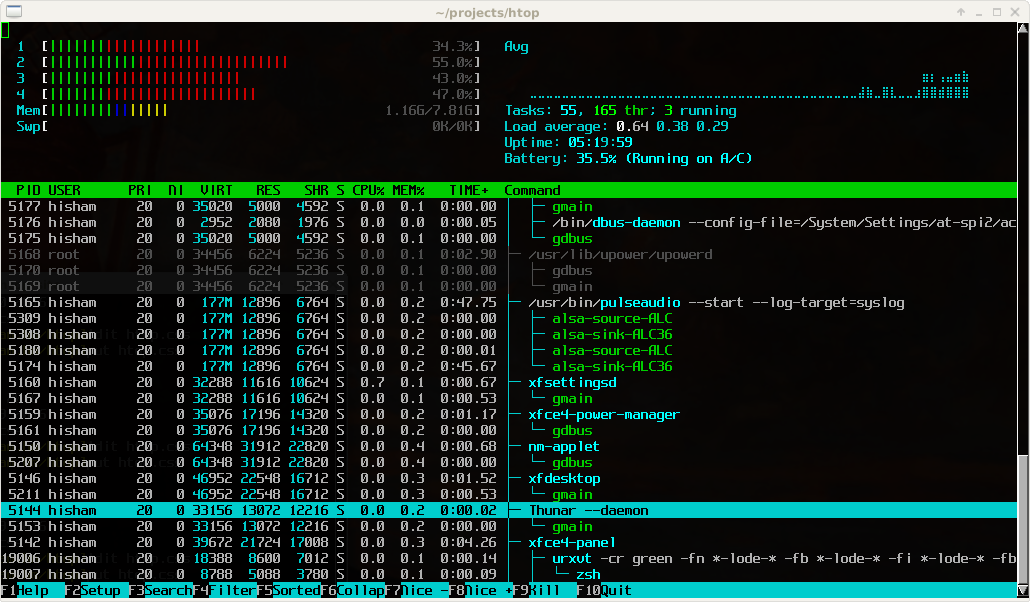
htop – an interactive process viewer for Unix

Posted by jpluimers on 2017/12/25

Great tool: [WayBackhtop – an interactive process viewer for Unix because it’s both interactive and supports a wide range of OSes: Linux, FreeBSD, OpenBSD and Mac OS X.

Thanks to Warren Postma who suggested it in his comment at [WayBack18 Useful Commands to Get Hardware Information on Linux – Linuxslaves.

Note that on OS X you get this warning after brew install htop :

htop requires root privileges to correctly display all running processes,
so you will need to run `sudo htop`.
You should be certain that you trust any software you grant root privileges.

On Linux you don’t get this message as there you have the /proc file system providing enough information as explained at [WayBackosx – Why does htop on Mac OS X require root privileges to see data for all processes, but on Linux it runs without root – Super User.

A workaround (involving the setuid bit) is at [WayBackRunning htop on Mac OS X needs root. Why?! | Blog | JoeNyland.me or by running visudo ensuring you don’t need a password for it at [WayBackosx – htop isn’t returning CPU or memory usage!? – Super User

–jeroen


Posted in *nix, *nix-tools, Apple, BSD, Linux, Mac OS X / OS X / MacOS, macOS 10.12 Sierra, OS X 10.11 El Capitan, OS X 10.9 Mavericks, Power User | Leave a Comment »

Fixing Invalid HELO’s – major.io

Posted by jpluimers on 2017/12/08

for postfix and sendmail: [WayBackFixing Invalid HELO’s – major.io

Posted in *nix, *nix-tools, postfix, Power User, sendmail | Leave a Comment »

iptables debugging « \1

Posted by jpluimers on 2017/11/28

Using the TRACE target: [WayBackiptables debugging « \1 via [WayBack] iptables Debugging using the TRACE chain – Kristian Köhntopp – Google+

Docs:

TRACE
This target marks packes so that the kernel will log every rule which match the packets as those traverse the tables, chains,
rules. (The ipt_LOG or ip6t_LOG module is required for the logging.) The packets are logged with the string prefix: “TRACE:
tablename:chainname:type:rulenum ” where type can be “rule” for plain rule, “return” for implicit rule at the end of a user
defined chain and “policy” for the policy of the built in chains.
It can only be used in the raw table.

Way more details in the linked article.

–jeroen

Posted in *nix, *nix-tools, Firewall, Infrastructure, iptables, Power User | Leave a Comment »

TLS tests for your mail server

Posted by jpluimers on 2017/11/09

Need to do some more research on this to ensure I didn’t goof up:

–jeroen

Posted in *nix, *nix-tools, Communications Development, Development, Internet protocol suite, postfix, Power User, Security, sendmail, SMTP | Leave a Comment »

MX Backup – Postfix Email Server | samhobbs.co.uk

Posted by jpluimers on 2017/11/09

Interesting as it has steps for both OpenSuSE and Debian each well suited for running on a Raspberry Pi.

[WayBackMX Backup – Postfix Email Server | samhobbs.co.uk

It seems postfix is a lot easier to configure than sendmail so I already like it.

First I need to read a bit more in Postfix greylisting.

I’ll need to catch up on Sam’s other parts with the postfix tag as well:

–jeroen

Posted in *nix, *nix-tools, Debian, Development, Hardware Development, Linux, openSuSE, Power User, Raspberry Pi, Raspbian, sendmail, SuSE Linux, Tumbleweed | Leave a Comment »

bash: `printf` supports `\e` just like `echo -e` does

Posted by jpluimers on 2017/11/07

Learned a few things when modifying https://github.com/gkotian/gautam_linux/blob/master/scripts/colours.sh

Note: `printf` supports emitting `ESC` (ASCII character `\033` aka `27` aka `0x1B`)as `\e` the same way that `echo` does

https://linux.die.net/man/1/printf
https://linux.die.net/man/1/echo

Format strings are at https://linux.die.net/man/3/printf
%-10s means left adjusted (aligned) string of length 10

–jeroen

via:

I was investigating how the colour definitions on my OpenSuSE system actually work internally so I added some extra output: ${TYPE} and ${COLOUR}.

Source: Show type and colour definition in addition to the rendered colour. by jpluimers · Pull Request #5 · gkotian/gautam_linux

Posted in *nix, *nix-tools, bash, bash, Development, Linux, openSuSE, Power User, Scripting, Software Development, SuSE Linux | Leave a Comment »

Windows/*n*x: Getting curl to output HTTP status code – Super User

Posted by jpluimers on 2017/10/24

The first trick works in Windowa and nx (thanks [WayBackpvandenberk):

curl -s -o /dev/null -I -w "%{http_code}" http://www.example.org/

Inside a Windows batch file you need to escape the % to %% so you get this:

curl -s -o /dev/null -I -w "%%{http_code}" http://www.example.org/

The second is slick but only works on nx (thanks [WayBackHeath Borders):

#creates a new file descriptor 3 that redirects to 1 (STDOUT)
exec 3>&1
# Run curl in a separate command, capturing output of -w "%{http_code}" into HTTP_STATUS
# and sending the content to this command's STDOUT with -o >(cat >&3)
HTTP_STATUS=$(curl -w "%{http_code}" -o >(cat >&3) 'http://example.com')

[WayBackGetting curl to output HTTP status code? – Super User

–jeroen

Posted in *nix, *nix-tools, bash, Batch-Files, cURL, Development, Power User, Scripting, Software Development | Leave a Comment »