The Wiert Corner – irregular stream of stuff

Jeroen W. Pluimers on .NET, C#, Delphi, databases, and personal interests

  • My badges

  • Twitter Updates

  • My Flickr Stream

  • Pages

  • All categories

  • Enter your email address to subscribe to this blog and receive notifications of new posts by email.

    Join 1,854 other subscribers

Archive for the ‘Power User’ Category

Windows command prompt: decrementing loop

Posted by jpluimers on 2020/12/30

I needed a decrementing loop on the Windows command prompt, but that seems very hard from batch files without programming your own kind of while loop:

PowerShell to the rescue to loop back from and including 463 down to and including 290:

PowerShell -Command "for ($i=463; $i -ge 290; $i--) { Write-Host "Value " $i}"

This outputs:

Value 463
Value 462
...
Value 291
Value 290

In a similar way, you can execute a cmd command, but then you need to be careful on how to pass parameters: the \" is important to you can have quotes within quoted strings..

PowerShell -Command "for ($i=463; $i -ge 290; $i--) { & echo \"Value $i\"}"

gives this:

Value 463
Value 462
...
Value 291
Value 290

Read the rest of this entry »

Posted in Batch-Files, CommandLine, Console (command prompt window), Development, PowerShell, PowerShell, Scripting, Software Development, Windows | 1 Comment »

BMW E46 Engine heating for the 320i M54B22 engine

Posted by jpluimers on 2020/12/28

Heating the M54B22 engine of the BMW E46 320i can be done with this set of parts of [Archive.isEngine heaters • DEFA:

BMW 320 i (2001-)

Engine heater
Engine heater
411869
Mounting time
>1.5t
Power Cable Kit
460762
Connecting kit
460785

Parts of the set:

Read the rest of this entry »

Posted in cars, E46 320i touring, LifeHacker, Power User | Leave a Comment »

Uptimerobot: TCP uptime only verifies the three-way TCP handshake

Posted by jpluimers on 2020/12/28

I like uptimerobot a lot (wrote about it earlier, and will write about it soon again), but there are two important things to keep in mind on how it does connection uptime verification:

  1. HTTP checks: [WayBack] Introducing “HTTP Method Selection” (HEAD/GET/POST/PUT/PATCH/DELETE) | Uptime Robot – Blog
    • HTTP requests by default are HEAD for plain HTTP monitors or GET for HTTP keyword monitors, but in the advanced settings, you have options to choose other methods as well: HEAD/GET/POST/PUT/PATCH/DELETE are supported, which means the only unsupported methods (see Hypertext Transfer Protocol: Request Methods – Wikipedia) are TRACE/OPTIONS/CONNECT.
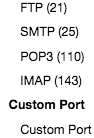
  2. TCP checks: [WayBack] New Feature – Monitoring Ports | Uptime Robot – Blog

If you want to see a few specific TCP protocol tests in action, then check these:

I did not find a good site to test IMAP servers in a simple way like the above sites. If anyone has one: please share it in a comment below.

I did find a post with public FTP servers (they are becoming rare): [WayBack] Is there a Public FTP server to test upload and download? – Stack Overflow

jeroen

Posted in *nix, Monitoring, Power User, Uptimerobot | Leave a Comment »

Getting confused with the many YouTube subdomains and first level paths

Posted by jpluimers on 2020/12/28

Just a short list, as there are many more (see zzz and zzz), and the vast amount in the longer lists confuses me:

So the ones I use are below; are there any interesting ones missing?

These I hardly use in the below list, anyone using them often?

Most ad blockers block ads.youtube.com, so I never see it.

–jeroen

Posted in Power User, SocialMedia, YouTube | Leave a Comment »

Syncopation in pop/rock music – Open Music Theory

Posted by jpluimers on 2020/12/25

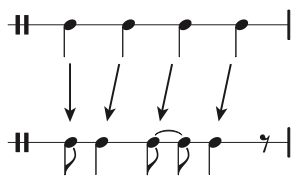
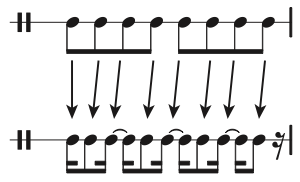
Because this is explained the basics of off-beat rhytms so well: [WayBack] Syncopation in pop/rock music – Open Music Theory:

Of course there are way more complicated things to do with it, so if you are into that, read the links below.

But if you are new, then listen and watch to the first video below the fold.

More advanced:

Oh, and I learned about bouncy metronome, which is a great tool on Windows:

–jeroen

Read the rest of this entry »

Posted in About, Adest Musica, LifeHacker, Music, Personal, Power User | Leave a Comment »

Mariuz’s Blog: Understanding Debian: The Universal Operating System

Posted by jpluimers on 2020/12/25

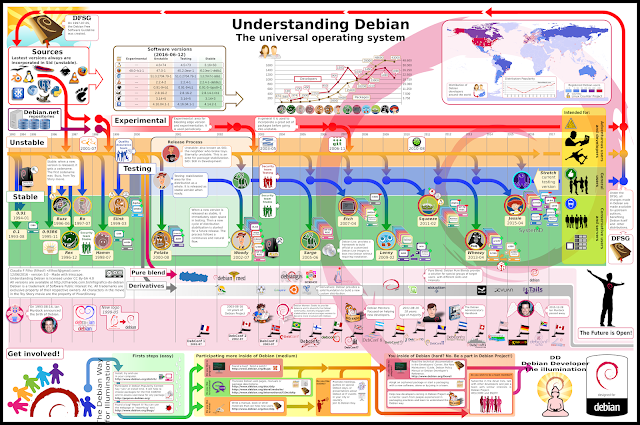
Blast from the past: [WayBack] Mariuz’s Blog: Understanding Debian: The Universal Operating System.

Small image below; large image: [WayBackinfographic_debian.png.

Via [WayBack] Adrian Marius Popa – Google+

–jeroen

Posted in *nix, Debian, Linux, Power User | Leave a Comment »

Jira “Preformatted” is not “Preformatted”

Posted by jpluimers on 2020/12/25

Found out that Jira has its own markdown for issues and comments.


I knew the editor for it has a Style drop down with a “Preformatted” entry.

Initially, pasted text looks preformatted, but after saving the issue or comment, often all or part of that text did either:

  • did not display as preformatted
  • had curly braces around them

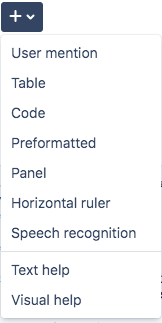
A co-worker indicated the plus sign on the right can insert blocks (I thought that while it was next to inserting emoticons, it was for inserting unicode symbols like plus).

Alas, no: it is for adding things that are not symbols at all, and too has a “Preformatted” entry.

For sake of consistency, both “Preformatted” entries produce different markup.

The “Style” entry of “Preformatted” basically surrounds all lines with curly braces, then upon saving tries to do some interpretation and removes parts.

The “Plus” entry of “Preformatted” surrounds a block of lines with {noformat} entries at start of end.

Then there is the “Code” entry under “Plus”. It insert a code block, does not allow you to select the language, but assumes everyone loves programming in Java, as now the surrounding entries are {code:java} at the start and {code} at the end. The default block is this one in “Visual” mode:

{code:java}
// code placeholder
{code}

and this one in “Text” mode:

Read the rest of this entry »

Posted in Development, Issue/Bug tracking, JIRA, Power User, Software Development | Leave a Comment »

Electronics-Salon DIN Rail Mount +/-20Amp AC/DC Current Sensor Module, based on ACS712: Amazon.com: Industrial & Scientific

Posted by jpluimers on 2020/12/24

For my link archive (this DIN rail device allow sensing current used by a circuit; models for 5A/20A/30A).

Thanks Matthijs ter Woord for pointing me to this.

Schematics show it uses an LM317 linear voltage regulator (to get 5V out of a 8V-35V range) next to the ACS712 current sensor (based on the [WayBack] Hall effect) available in 5A, 20A and 30A varieties.

Documentation:

Schematics:


Read the rest of this entry »

Posted in Development, Hardware, Hardware Development, Hardware Interfacing | Leave a Comment »

Windows Sandbox – Microsoft Tech Community – 301849

Posted by jpluimers on 2020/12/21

For my link archive, as I totally missed it when it was released: [WayBack] Windows Sandbox – Microsoft Tech Community – 301849:

  1. Install Windows 10 Pro or Enterprise, Insider build 18305 or newer
  2. Enable virtualization:
    • If you are using a physical machine, ensure virtualization capabilities are enabled in the BIOS.
    • If you are using a virtual machine, enable nested virtualization with this PowerShell cmdlet:
    • Set-VMProcessor -VMName <VMName> -ExposeVirtualizationExtensions $true
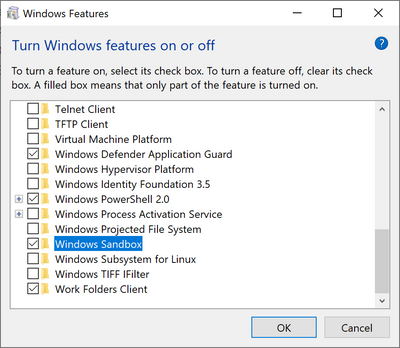
  3. Open Windows Features, and then select Windows Sandbox. Select OK to install Windows Sandbox. You might be asked to restart the computer.
  4. Optional Windows Features dlg.png
  5. Using the Start menu, find Windows Sandbox, run it and allow the elevation
  6. Copy an executable file from the host
  7. Paste the executable file in the window of Windows Sandbox (on the Windows desktop)
  8. Run the executable in the Windows Sandbox; if it is an installer go ahead and install it
  9. Run the application and use it as you normally do
  10. When you’re done experimenting, you can simply close the Windows Sandbox application. All sandbox content will be discarded and permanently deleted
  11. Confirm that the host does not have any of the modifications that you made in Windows Sandbox.

–jeroen

Posted in Power User, Windows, Windows 10 | Leave a Comment »

mkcert: valid HTTPS certificates for localhost (Windows/Mac/Linux) — a short blog post about it, by FiloSottile

Posted by jpluimers on 2020/12/21

Cool: [WayBack] Filippo Valsorda on Twitter: “mkcert: valid HTTPS certificates for localhost — a short blog post mkcert now that it’s almost done 🔒 “

Blog post: [WayBackmkcert: valid HTTPS certificates for localhost:

The web is moving to HTTPS, preventing network attackers from observing or injecting page contents. But HTTPS needs TLS certificates, and while deployment is increasingly a solved issue thanks to the ACME protocol and Let’s Encrypt, development still mostly ends up happening over HTTP because no one can get an…

Code: [WayBack] GitHub – FiloSottile/mkcert: A simple zero-config tool to make locally trusted development certificates with any names you’d like.

It is cross platform and works way better than good old Windows makecert (which is from the 2000’s era: [Archive.is] Public Key Infrastructure: Second European PKI Workshop: Research and … – David Chadwick, Greece) European PKI Workshop: Research and Applications (1st : 2004 : Samos Island – Google Books).

Related:

–jeroen

Read the rest of this entry »

Posted in *nix, Apple, Encryption, HTTPS/TLS security, Linux, Mac OS X / OS X / MacOS, Power User, Security, Windows | Leave a Comment »