The Wiert Corner – irregular stream of stuff

Jeroen W. Pluimers on .NET, C#, Delphi, databases, and personal interests

  • My badges

  • Twitter Updates

  • My Flickr Stream

  • Pages

  • All categories

  • Enter your email address to subscribe to this blog and receive notifications of new posts by email.

    Join 1,854 other subscribers

Archive for the ‘Power User’ Category

Automating the closing of the Creative Cloud signing and ABBY FindReader for ScanSnap 5.0 dialogs

Posted by jpluimers on 2021/01/06

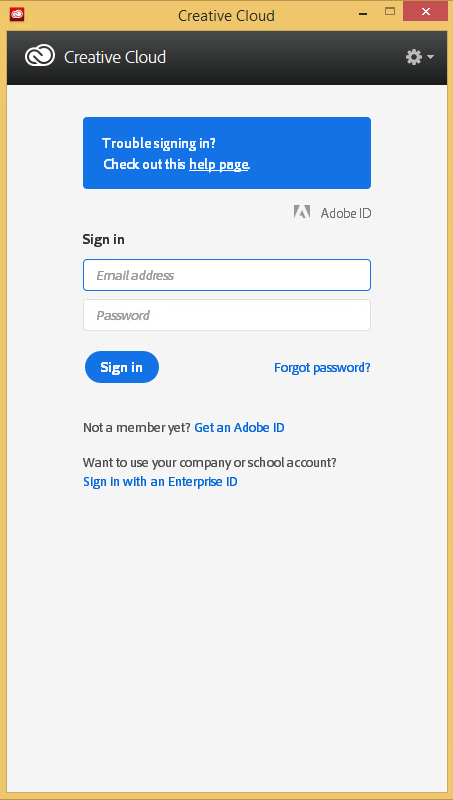
Every time my scan VM logs on I get the dialog on the right.

Every time I finish an OCR scan, I get the dialog below.
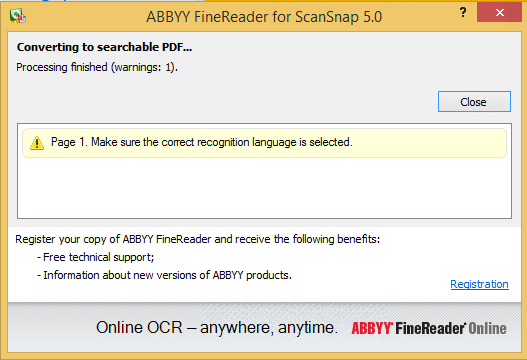
There are two reasons I want to close the ABBY dialog:

  1. While open, it will keep both the original PDF and OCR PDF files alive.When after a while, Windows updates auto-reboots the machine, before clicking the OK buttons I have to manually check if the conversion succeeded before removing the non-OCR PDF.This is time consuming.
  2. While open, it still consumes a lot of system resources: about 100 megabyte for a simple single monochrome A4 page. Much more for complex, multi-page or colour documents.When scanning a lot of document this causes the system to run out of memory, after becoming much much slower because the truckload of Window handles and underlying threads drags Windows down.
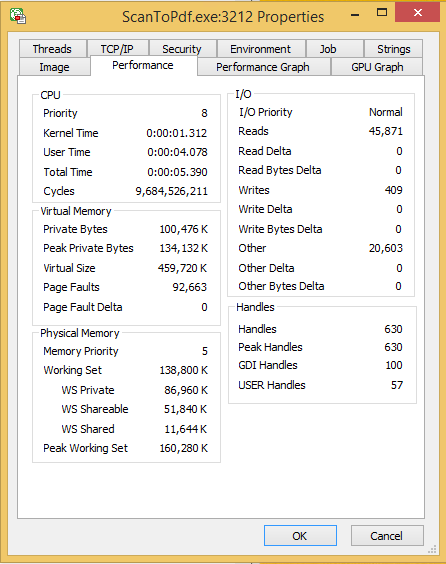
I do not want to fully get rid of these dialogs, as often being aware of the progress is important, and I always forget how to re-enable things. If you can do without the dialogs, then try these:

Finding the Windows and controls

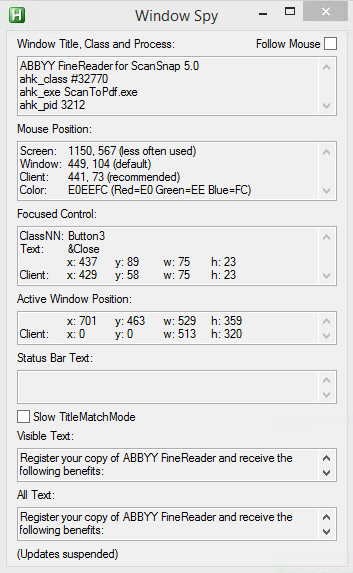
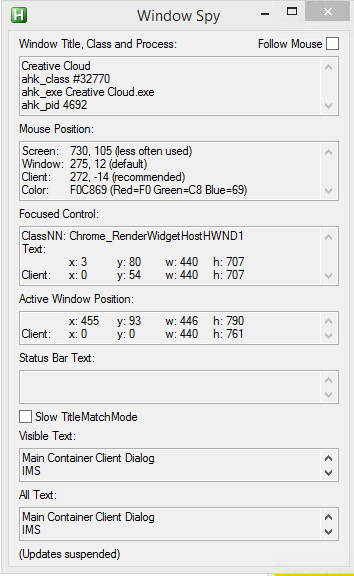
I did use one nice feature of AutoHotKey: their Windows Spy utility, which is implemented as a AHK script: [WayBack] AutoHotKey-scripts/WindowSpy.ahk at master · elig0n/AutoHotKey-scripts · GitHub. In the past this was a separate executable, so do not start looking for that any more. You can get it either after a full install of the [WayBack] Releases · Lexikos/AutoHotkey_L · GitHub, or by extracting from the most current AutoHotKey.zip from [Archive.is] AutoHotkey Downloads.

Related:

This gets these for the Create Cloud and ABBY windows:
Automating the click

I contemplated about using AutoIt (freeware, but closed source) or AutoHotKey_L (the current active fork of AutoHotKey).

AutoIt is now closed source, forked in the past as AutoHotKey, which has a lot of half backed – usually poorly documented – scripts needing you to learn a new API wrapper around existing Windows API functionality.

So I reverted back to using the Windows API using Delphi: a simple repeat loop, to check for the existence of the underlying processes, windows and controls, plus some logic to terminate then the user stops the application (Ctrl-C, Ctrl-Break), logs off, or Windows shuts down.

Releated Windows API  keywords and posts:


I could have used AutoHotKey with these hints to get it working:

MacOS

Note that when you run on MacOS, you need an alternative like for instance the video below shows via [WayBack] Stop ScanSnap From Prompting You When You Scan.

–jeroen

Read the rest of this entry »

Posted in Development, Fujitsu ScanSnap, Hardware, ix100, ix500, Power User, Scanners, Scripting, Software Development, Windows, Windows 10, Windows 8.1 | Leave a Comment »

GitHub – andOTP/andOTP: Open source two-factor authentication for Android

Posted by jpluimers on 2021/01/05

[WayBack] GitHub – andOTP/andOTP: Open source two-factor authentication for Android.

A few highlights:

  • andOTP is a two-factor authentication App for Android 4.4+.It implements Time-based One-time Passwords (TOTP) and HMAC-Based One-Time Passwords (HOTP). Simply scan the QR code and login with the generated 6-digit code.
  • OpenPGP: OpenPGP can be used to easily decrypt the OpenPGP-encrypted backups on your PC.
  • BroadcastReceivers: AndOTP supports a number of broadcasts to perform automated backups, eg. via Tasker. These will get saved to the defined backup directory. These only work when KeyStore is used as the encryption mechanism
    • org.shadowice.flocke.andotp.broadcast.PLAIN_TEXT_BACKUP: Perform a plain text backup. WARNING: This will save your 2FA tokens onto the disk in an unencrypted manner!
    • org.shadowice.flocke.andotp.broadcast.ENCRYPTED_BACKUP: Perform an encrypted backup of your 2FA database using the selected password in settings.
  • All three versions (Google Play, F-Droid and the APKs) are not compatible (not signed by the same key)! You will have to uninstall one to install the other, which will delete all your data. So make sure you have a current backup before switching!

PlayStore: [WayBack] andOTP – Android OTP Authenticator – Apps on Google Play

•  Free and Open-Source
•  Requires minimal permissions:
•  Camera access for QR code scanning
•  Storage access for import and export of the database
•  Encrypted storage with two backends:
•  Android KeyStore (can cause problems, please only use if you absolutely have to)
•  Password / PIN
•  Multiple backup options:
•  Plain-text
•  Password-protected
•  OpenPGP-encrypted
•  Sleek minimalistic Material Design with three different themes:
•  Light
•  Dark
•  Black (for OLED screens)
•  Great Usability
•  Compatible with Google Authenticator

Via: [WayBack] ‘Aanvallen via ss7-protocol om 2fa-sms’jes te onderscheppen nemen toe’ – Computer – Nieuws – Tweakers

Check out @Jaykul’s Tweet: https://twitter.com/Jaykul/status/1091200778121957377

Instead of Google authenticator and Authy

Via https://twitter.com/martinfowler/status/1091097388201230339

Related :

Nope. It’s just a secret encoded in a QR code.

Here’s the docs on the format of the URI in the QR code: https://t.co/AJhT6PFAzx

The QR code delivers a simple, durable, shared secret.

Use U2F if you can. It is much safer, as it cannot be phished or copied.

Depends on your risk model. Device to device transfer would be a good mid-ground, but doesn’t solve the “my phone was stolen/bricked/damaged” scenario.

Which is your bigger risk – duplicating (normally encrypted) secrets or losing your device and access to everything?


–jeroen

Posted in Android, Authy, Development, Mobile Development, Security, Software Development | Leave a Comment »

Releases · upx/upx · GitHub

Posted by jpluimers on 2021/01/04

I totally forgot that upx – UPX – the Ultimate Packer for eXecutables has been on GitHub for quite a while, which meant I was running a really old version 3.91.

There have been quite a few things updated and documented in [Archive.is] upx-news.txt covering these milestones:

  1. [Archive.is] milestone 1 (for version 3.92)
  2. [Archive.is] milestone 2 (for version 3.93)
  3. [Archive.is] milestone 3 (for version 3.94)

Via UPX – Wikipedia

–jeroen

Posted in Development, Power User, Software Development, Windows, Windows Development | Leave a Comment »

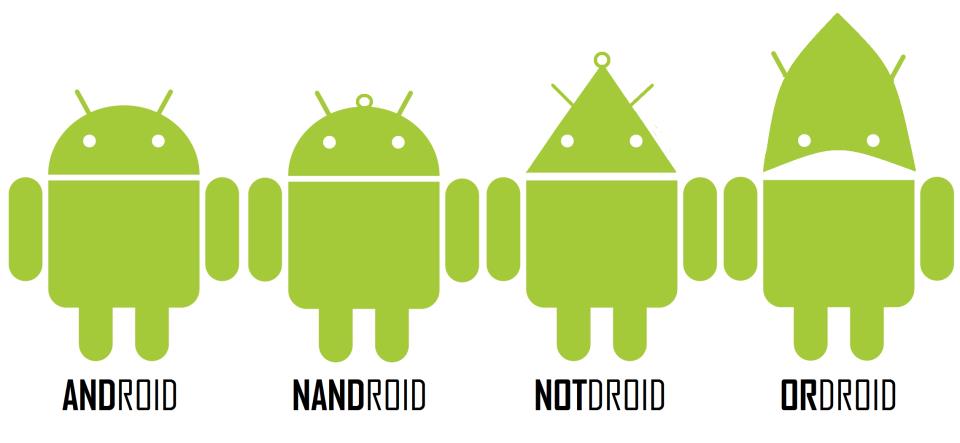
The logicdroid family

Posted by jpluimers on 2021/01/04

Almost complete droid family:

Source: CodeProject – Google+: The whole Droid family

A complete family would include ANDroid, NANDroid, NOTdroid, ORdroid, NORdroid, XORdroid, XNORdroid, so it’s missing the 74266.

Based on the 2011 ANDroid NANDroid NOTdroid ORdroid idea that got a picture in 2012:

–jeroen

Read the rest of this entry »

Posted in Android Devices, Fun, Power User | Leave a Comment »

Interesting pieces of RetroMacCast : RMC Episode 433: Clamshell G4 iBook – first virus and Apple ][ forever

Posted by jpluimers on 2021/01/04

From the [WayBackRetroMacCast : RMC Episode 433: Clamshell G4 iBook the most interesting pieces to me were these:

–jeroen

Posted in 6502, Apple, Apple ][, History, Power User | Leave a Comment »

Windshield frost protection and removal

Posted by jpluimers on 2021/01/01

Choices:

Or not cover but having to use an ice scraper (I prefer the ones made from Brass – Dutch/German: Messing):

[Archive.is] SILUK_ 2 X Eiskratzer Eisschaber Messingschaber Besten Preis!!! (Model 1): Amazon.de: Auto

Related:

Read the rest of this entry »

Posted in LifeHacker, Power User | Leave a Comment »

Binding #Uptimerobot monitoring to your own subdomain: embarcaderomonitoring.wiert.me

Posted by jpluimers on 2021/01/01

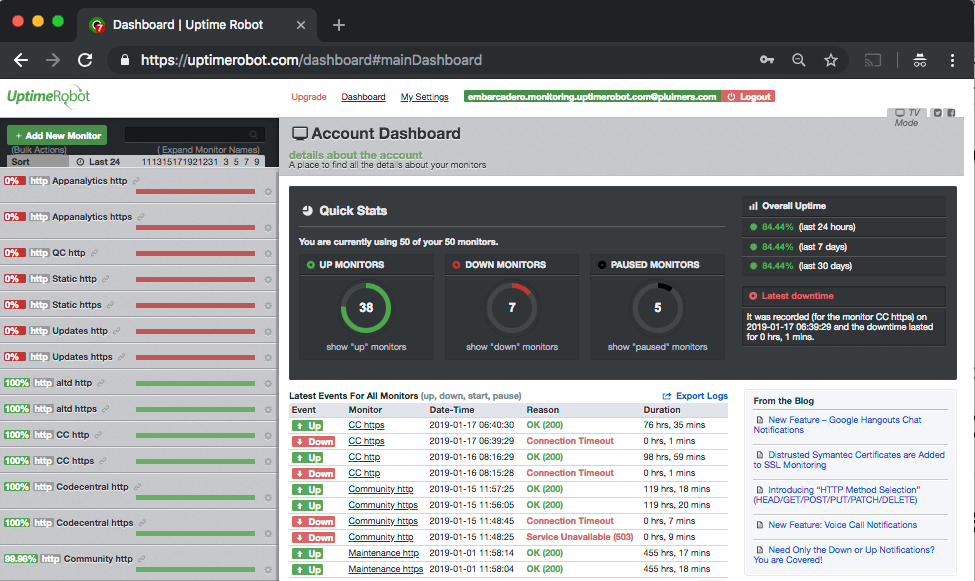
Below a few screenshots on how to bind your own subdomain to a set of uptimerobot monitors.

This case is about [Archive.isembarcaderomonitoring.wiert.me, which I setup because of the not so well way that Embarcadero maintained their web facing infrastructure in the past.

The steps for that are really simple, assuming you already have an uptimerobot account and some monitor set-up. If you don’t: check out the first video (thanks onewebstreet!) linked below the fold, as it is a step-by-step introduction.

Steps for your own subdomain

If you like video more than a list of steps, check out the second video (thanks Kyle!) below the fold.

  1. Ensure you have a DNS CNAME record that points your subdomain (in my case embarcaderomonitoring.wiert.me) to stats.uptimerobot.com:

    Note that [Archive.is] stats.uptimerobot.com by itself will not display any dashboard, as it requires a CNAME to be involved that is registered in the Uptime robot Custom Domain list.

  2. Login to Uptime robot, which brings you to uptimerobot.com/dashboard#mainDashboard
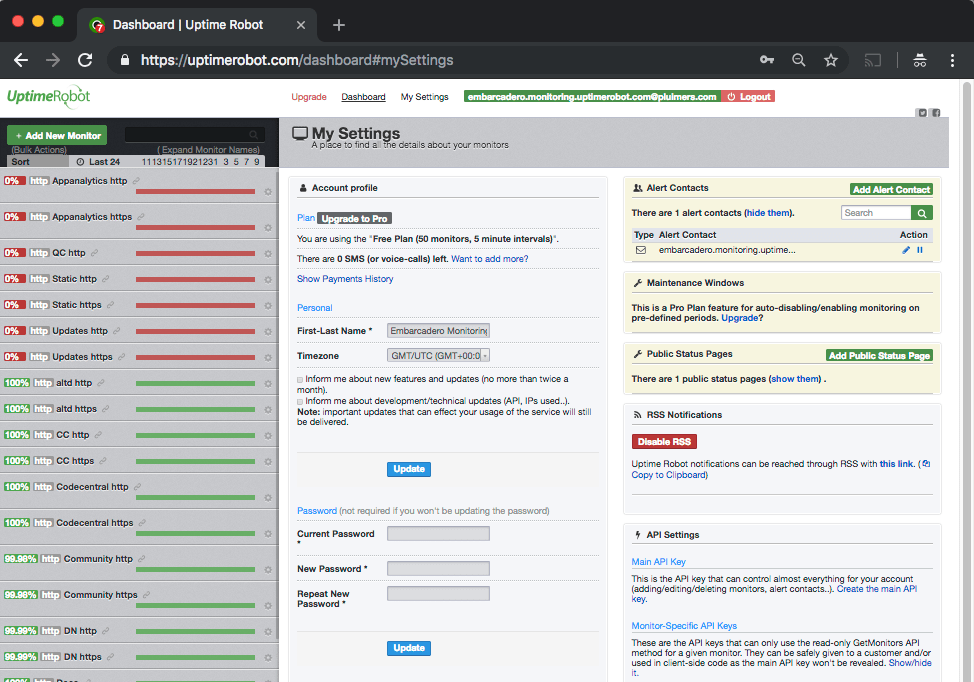
  3. Click on settings, which brings you to uptimerobot.com/dashboard#mySettings
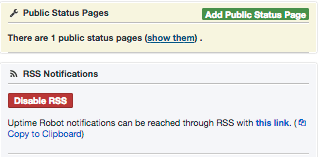
  4. Observe the “Disable RSS” (or “Enable RSS” if you have not yet enabled it) and the “this link” (which in my case points to this RSS feed [WayBack])
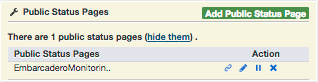
  5. Clicking on “show them” will get you something like this:
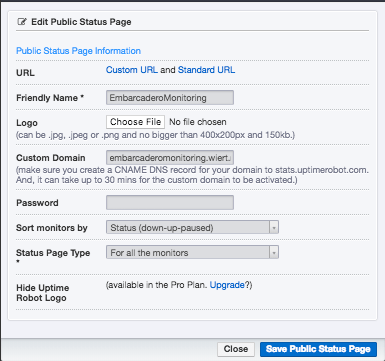
  6. Clicking on the pencil icon then will get you where you can set the “Custom Domain”, which notes

    Custom Domain

    (make sure you create a CNAME DNS record for your domain to stats.uptimerobot.com. And, it can take up to 30 mins for the custom domain to be activated.)

  7. Wait a while and check your CNAME for a valid Uptime robot status dashboard.

–jeroen

Read the rest of this entry »

Posted in *nix, LifeHacker, Monitoring, Power User, Uptimerobot | Leave a Comment »

Emotional Intelligence: Components and Emotional Competence Frameworks (Part-2) | iammoulude

Posted by jpluimers on 2021/01/01

Not just because of the charts below: [WayBack] Emotional Intelligence: Components and Emotional Competence Frameworks (Part-2) | iammoulude.

Via:

Read the rest of this entry »

Posted in Awareness, LifeHacker, Power User | Leave a Comment »

Syncing your fork to the original repository via the browser · KirstieJane/STEMMRoleModels Wiki · GitHub

Posted by jpluimers on 2020/12/31

[WayBack] Syncing your fork to the original repository via the browser · KirstieJane/STEMMRoleModels Wiki · GitHub

TL;DR: you can do the sync from the Web UI, but it always gives you an extra merge commit.

–jeroen

Posted in Development, DVCS - Distributed Version Control, git, GitHub, LifeHacker, Power User, Source Code Management | Leave a Comment »

Windows command prompt: decrementing loop

Posted by jpluimers on 2020/12/30

I needed a decrementing loop on the Windows command prompt, but that seems very hard from batch files without programming your own kind of while loop:

PowerShell to the rescue to loop back from and including 463 down to and including 290:

PowerShell -Command "for ($i=463; $i -ge 290; $i--) { Write-Host "Value " $i}"

This outputs:

Value 463
Value 462
...
Value 291
Value 290

In a similar way, you can execute a cmd command, but then you need to be careful on how to pass parameters: the \" is important to you can have quotes within quoted strings..

PowerShell -Command "for ($i=463; $i -ge 290; $i--) { & echo \"Value $i\"}"

gives this:

Value 463
Value 462
...
Value 291
Value 290

Read the rest of this entry »

Posted in Batch-Files, CommandLine, Console (command prompt window), Development, PowerShell, PowerShell, Scripting, Software Development, Windows | 1 Comment »