Archive for the ‘OpenSSL’ Category
Posted by jpluimers on 2026/02/25
Often I need to generate passwords or uuids (on some systems called guids). I usually try to do that in a relatively platform agnostic way as I use MacOS, Windows and Linux in various mixes for many reasons (for instance that I have had developed quite hefty RSI in the early 1990s of the and the best keyboard/pointing-device combination for is the MacBook built in keyboard/touchpad combination so basically MacBooks are my window to all other operating systems).
Generating randomly with a good random number generator them makes sense as for most usage, it is important that both passwords and uuids are hard to guess which means having an entropy that is as high as possible.
A cool thing about OpenSSL is that:
- most of not all systems have it installed (it was no coincidence I published Installing OpenSSL on Windows a few days ago)
- it has a very good pseudo-random number generator and as of [Wayback/Archive] OpenSSL version 1.1.1 first released in 2018 has solved the problem around [Wayback/Archive] Random fork-safety – OpenSSLWiki, see [Wayback/Archive] Our Review of the OpenSSL 1.1.1 Random Number Generation Update – OSTIF.org.
- it supports various useful output formats
hex (hexadecimal) and base64 (next to the default of octet – or by today’s naming convention byte – output)
The easiest to generate are passwords. Yes I know that password managers can do this too, but there are some systems I cannot use them on or sync between them (don’t you love the corporate world) so my aim is to use a random password generator in a platform agnostic way which usage is easy to remember. Read the rest of this entry »
Posted in *nix, *nix-tools, Apple, base64, bash, bash, Batch-Files, Conference Topics, Conferences, Development, Encoding, Event, HEX encoding, Mac, Mac OS X / OS X / MacOS, MacBook, OpenSSL, Power User, Python, Scripting, Software Development, Windows | Leave a Comment »
Posted by jpluimers on 2020/09/14
I needed to get myself an OOB license for the BIOS update over the IPMI console or SUM (Supermicro Update Manager). An IPMI update can be done without an OOB license from the IPMI console, but the BIOS requires a license.
Links that initially helped me with that to get a feel for what I needed:
I thought that likely I need to purchase a key for it:
Obtain the license code from your IPMI BMC MAC address
But then I found out the below links on reverse engineering.
From those links, I checked both the Perl and Linux OpenSSL versions. Only the Perl version works on MacOS.
Then I fiddled with the bash version: unlike the OpenSSL version above, this one printed output. It wrongly printed the last groups of hex digits instead of the first groups of hex digits that the Perl script prints.
Here is the corrected bash script printing the first groups of hex digits (on my systems, I have an alias supermicro_hash_IPMI_BMC_MAC_address_to_get_OOB_license_for_BIOS_update for it):
#!/bin/bash
function hash_mac {
  mac="$1"
  key="8544e3b47eca58f9583043f8"
  sub="\x"
  #convert mac to hex
  hexmac="\x${mac//:/$sub}"
  #create hash
  code=$(printf "$hexmac" | openssl dgst -sha1 -mac HMAC -macopt hexkey:"$key")
  #DEBUG
  echo "$mac"
  echo "$hexmac"
  echo "$code"

  echo "${code:0:4}-${code:4:4}-${code:8:4}-${code:12:4}-${code:16:4}-${code:20:4}"
}
Steps
Reverse engineering links
- [WayBack] The better way to update Supermicro BIOS is via IPMI – VirtualLifestyle.nl
Another way to update the BIOS via the Supermicro IPMI for free is simply calculating the license key yourself as described here: https://peterkleissner.com/2018/05/27/reverse-engineering-supermicro-ipmi/ [WayBack].
- [WayBack] Reverse Engineering Supermicro IPMI – peterkleissner.com
Algorithm:
MAC-SHA1-96(INPUT: MAC address of BMC, SECRET KEY: 85 44 E3 B4 7E CA 58 F9 58 30 43 F8)
Update 1/14/2019: The Twitter user @astraleureka posted this code perl code which is generating the license key:
#!/usr/bin/perl
use strict;
use Digest::HMAC_SHA1 'hmac_sha1';
my $key  = "\x85\x44\xe3\xb4\x7e\xca\x58\xf9\x58\x30\x43\xf8";
my $mac  = shift || die 'args: mac-addr (i.e. 00:25:90:cd:26:da)';
my $data = join '', map { chr hex $_ } split ':', $mac;
my $raw  = hmac_sha1($data, $key);
printf "%02lX%02lX-%02lX%02lX-%02lX%02lX-%02lX%02lX-%02lX%02lX-%02lX%02lX\n", (map { ord $_ } split '', $raw);
Update 3/27/2019: There is also Linux shell version that uses openssl:
echo -n 'bmc-mac' | xxd -r -p | openssl dgst -sha1 -mac HMAC -macopt hexkey:8544E3B47ECA58F9583043F8 | awk '{print $2}' | cut -c 1-24
- [WayBack] Modular conversion, encoding and encryption online — Cryptii
Web app offering modular conversion, encoding and encryption online. Translations are done in the browser without any server interaction. This is an Open Source project, code licensed MIT.
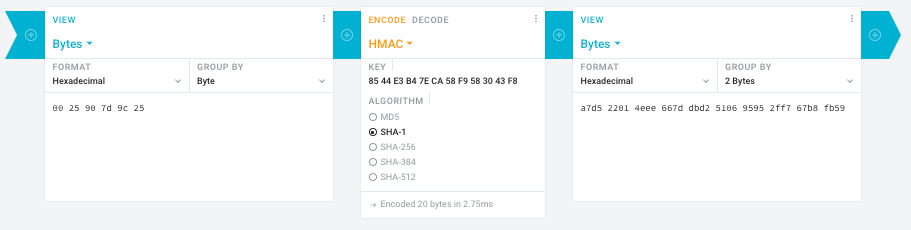
Steps:
- In the left pane, select the “View” drop-down to be “Bytes”, then paste the HEX bytes of your IPMI MAC address there (like
00 25 90 7d 9c 25)
- In the middle pane, select the drop-down to become “HMAC” followed by the radio-group to be “SHA1“, then paste these bytes into the “Key” field:
85 44 E3 B4 7E CA 58 F9 58 30 43 F8
- In the right pane, select the drop-down to become “Bytes”, then the “Group by” to become “2 bytes”, which will you give the output (where the bold part is the license key: 6 groups of 2 bytes):
a7d5 2201 4eee 667d dbd2 5106 9595 2ff7 67b8 fb59
Result:
- Michael Stapelberg’s private website, containing articles about computers and programming, mostly focused on Linux.[WayBack] Securing SuperMicro’s IPMI with OpenVPN
- [WayBack] GitHub – ReFirmLabs/binwalk: Firmware Analysis Tool
- [WayBack] The better way to update Supermicro BIOS is via IPMI – VirtualLifestyle.nl
Ahh…..a few corrections :-P
#!/bin/bash
function hash_mac {
  mac="$1"
  key="8544e3b47eca58f9583043f8"
  sub="\x"
  #convert mac to hex
  hexmac="\x${mac//:/$sub}"
  #create hash
  code=$(printf "$hexmac" | openssl dgst -sha1 -mac HMAC -macopt hexkey:"$key")
  #DEBUG
  echo "$mac"
  echo "$hexmac"
  echo "$code"
  echo "${code:9:4} ${code:13:4} ${code:17:4} ${code:21:4} ${code:25:4} ${code:29:4}"
}
#hex output with input
hash_mac "$1"

#Look out for the quotes, they might get changed by different encoding
- [WayBack] The better way to update Supermicro BIOS is via IPMI – VirtualLifestyle.nl
Thanks Peter. For anyone interested, here’s a bash script that takes the MAC as the only argument and outputs the activation key:
#!/bin/bash
function hash_mac {
  mac="$1"
  key="8544e3b47eca58f9583043f8"
  sub="\x"
  #convert mac to hex
  hexmac="\x${mac//:/$sub}"
  #create hash
  code=$(printf "$hexmac" | openssl dgst -sha1 -mac HMAC -macopt hexkey:"$key")
  ## DEBUG
  echo "$mac"
  echo "$hexmac"
  echo "$code"
  echo "${code:9:4} ${code:13:4} ${code:17:4} ${code:21:4} ${code:25:4} ${code:29:4}"
}
## hex output with input
hash_mac "$1"
–jeroen
Read the rest of this entry »
Posted in Development, Encoding, Hardware, Hashing, HMAC, Mainboards, OpenSSL, Power User, Security, SHA, SHA-1, Software Development, SuperMicro, X10SRH-CF | Leave a Comment »
Posted by jpluimers on 2020/06/05
If you want to harden your ssh server, read at least [WayBack] sshd_config – How to configure the OpenSSH server | SSH.COM.
After that use some ssh tools to check your config from the outside world. They work in a similar way as the TLS/SSL/https scans from Source: SSL Server Test (Powered by Qualys SSL Labs) or these console based scans and documentation references:
Simiarly for SSH:
Then read further on more in depth SSH topics around key management:
–jeroen
Posted in Encryption, Hashing, https, HTTPS/TLS security, OpenSSL, Power User, Security, testssl.sh | Leave a Comment »
Posted by jpluimers on 2019/03/19
While checking out an issue with the SSH server for ContinuaCI issue (see info below), I wanted to look at the files leading to the issue: .pem and .rsa files with the private key for the SSH server.
So I browsed through my series of openssl related articles to see if I already had made a script better explaining the cryptic openssl command-line parameters. I didn’t have it yet, but it turned out to be really simple:
C:\ProgramData\VSoft\ContinuaCI\SSHD>"C:\Program Files (x86)\Git\usr\bin\openssl.exe" rsa -in server_keypair.rsa
writing RSA key
-----BEGIN RSA PRIVATE KEY-----
...
-----END RSA PRIVATE KEY-----
C:\ProgramData\VSoft\ContinuaCI\SSHD>"C:\Program Files (x86)\Git\usr\bin\openssl.exe" rsa -in server_keypair.rsa -text
Private-Key: (1024 bit)
modulus:
    ..:..:..:.....
publicExponent: 35 (0x23)
privateExponent:
    ..:..:..:.....
prime1:
    ..:..:..:.....
prime2:
    ..:..:..:.....
exponent1:
    ..:..:..:.....
exponent2:
    ..:..:..:.....
coefficient:
    ..:..:..:.....
writing RSA key
-----BEGIN RSA PRIVATE KEY-----
...
-----END RSA PRIVATE KEY-----
C:\ProgramData\VSoft\ContinuaCI\SSHD>"C:\Program Files (x86)\Git\usr\bin\openssl.exe" rsa -in server_keypair.pem
Enter pass phrase for server_keypair.pem:
unable to load Private Key
2675996:error:06065064:digital envelope routines:EVP_DecryptFinal_ex:bad decrypt:evp_enc.c:529:
2675996:error:23077074:PKCS12 routines:PKCS12_pbe_crypt:pkcs12 cipherfinal error:p12_decr.c:108:
2675996:error:2306A075:PKCS12 routines:PKCS12_item_decrypt_d2i:pkcs12 pbe crypt error:p12_decr.c:139:
2675996:error:0907B00D:PEM routines:PEM_READ_BIO_PRIVATEKEY:ASN1 lib:pem_pkey.c:141:
C:\ProgramData\VSoft\ContinuaCI\SSHD>"C:\Program Files (x86)\Git\usr\bin\openssl.exe" rsa -in server_keypair.pem -passin pass:password
unable to load Private Key
2675996:error:06065064:digital envelope routines:EVP_DecryptFinal_ex:bad decrypt:evp_enc.c:529:
2675996:error:23077074:PKCS12 routines:PKCS12_pbe_crypt:pkcs12 cipherfinal error:p12_decr.c:108:
2675996:error:2306A075:PKCS12 routines:PKCS12_item_decrypt_d2i:pkcs12 pbe crypt error:p12_decr.c:139:
2675996:error:0907B00D:PEM routines:PEM_READ_BIO_PRIVATEKEY:ASN1 lib:pem_pkey.c:141:
The command-lines use the [WayBack]rsa tool with:
- the
-in parameter
- (for the first file) the
-text parameter to dump it into human readable form
- (for the second file) the
-passin parameter with a [WayBack] pass phrase argument pass:password.
The server_keypair.pem file (having the header -----BEGIN ENCRYPTED PRIVATE KEY----- and footer -----END ENCRYPTED PRIVATE KEY-----) was a password protected RSA private key where somehow ContinuaCI had the wrong password for.
I’m not sure it’s a good idea that the server_keypair.pem file has not password at all.
Read the rest of this entry »
Posted in Continua CI, Continuous Integration, Development, OpenSSL, Power User, Security, Software Development | Leave a Comment »
Posted by jpluimers on 2018/08/08
[WayBack] ngHttp2 DLLs has a simple a version scheme. The build inside the Windows PHP distribution includes these version numbers. The TreadSafe versions work as plug in replacement for github.com/grijjy/DelphiScalableClientSockets/tree/master/Bin which is used by github.com/grijjy/GrijjyFoundation/blob/master/Grijjy.Http.pas#L11. You obtain them via [WayBack] PHP For Windows: Binaries and sources Releases; and at the time of writing these were the most recent versions:
[WayBack] OpenSSL DLLs has a much more complex version scheme, as they are numeric but OpenSSL releases are not.
- DLLs have four numbers
a.b.c.d
- OpenSSL versions have three numbers and a letter
a.b.c.x
- The letter matches the fourth digit, though the ones marked with * have not been used yet:
| # |
letter |
# |
letter |
# |
letter |
# |
letter |
# |
letter |
remark |
| 1 |
a |
6 |
f |
11 |
k |
16 |
p |
21 |
u |
|
| 2 |
b |
7 |
g |
12 |
l |
17 |
q |
22 |
v |
* |
| 3 |
c |
8 |
h |
13 |
m |
18 |
r |
23 |
w |
* |
| 4 |
d |
9 |
i |
14 |
n |
19 |
s |
24 |
x |
* |
| 5 |
e |
10 |
j |
15 |
o |
20 |
t |
25 |
y |
* |
|
|
|
|
|
|
|
|
26 |
z |
* |
[WayBack] Index of /SSL has “Pre-compiled Win32/64 libraries without external dependencies to the Microsoft Visual Studio Runtime DLLs, except for the system provided msvcrt.dll.”
These work no matter what development/deployment stacks you use (including a Visual Studio based stack).
The most recent version as of writing is 1.0.2o, which maps to 1.0.2.20 which contains libeay32.dll and ssleay32.dll for both the i386-win32 and x86_64-win64 build (not sure why they both use 32 in the name):
openssl-1.0.2o-i386-win32.zip
openssl-1.0.2o-x64_86-win64.zip which supports x86_64 as this site is about the only one using x64_86 in the name
Background reading:
These binaries are for instance used by (most of them are behind or far behind on the OpenSSL version):
- Avira Antivirus
- subversion
- git mingw64
- VMware Tools
- Microsoft OneDrive
- Delphi Indy communications library
Speaking of which: this is a recent Delphi wrapper around libeay32.dll: [WayBack] GitHub – lminuti/Delphi-OpenSSL: Delphi implementation of OpenSSL
–jeroen
Posted in Delphi, Development, OpenSSL, Power User, Security, Software Development | 2 Comments »
Posted by jpluimers on 2018/07/23
If you get an error like this in one of your tools
OpenSSL: error:1407742E:SSL routines:SSL23_GET_SERVER_HELLO:tlsv1 alert protocol version
it means you are using a tool not yet properly supporting TLS 1.2 or higher.
Or in other words: update your tool set.
The reason is that – after turning off TLS 1.0 a while ago – more and more sites do the same for TLS 1.1.
A prime example of a site that warned on this in a clear way very early on is github:
Others have done this too, for instance:
TLS 1.0 is vulnerable to many attacks, and certain configurations of TLS 1.1 as well (see for instance [WayBack] What are the main vulnerabilities of TLS v1.1? – Information Security Stack Exchange), which means that properly configuring the non-vulnerable TLS 1.1 over times gets more and more complex. An important reason to say goodbye to that as well, as TLS 1.2 (from 2008) is readily available for a long time. The much more recent TLS 1.3 (from 2018) will take a while to proliferate.
I ran in the above error because on one of my systems, an old version of wget was luring around, so I dug up the easiest place to download recent Windows binaries for both win32 (x86) and win64 (x86_64):
[WayBack] eternallybored.org: GNU Wget for Windows having a table indicating the OpenSSL version for each wget build.
–jeroen
Reference: Transport Layer Security – Wikipedia: History and development
Posted in *nix, https, HTTPS/TLS security, OpenSSL, Power User, Security, wget | Leave a Comment »
Posted by jpluimers on 2018/03/07
It was fitting to bump into [WayBack] Packet Sender is a good tool when debugging protocols…” Written by Dan Nagle… – Lars Fosdal – Google+ on the day presenting [WayBack] Conferences/Network-Protocol-Security.rst at master · jpluimers/Conferences · GitHub
It also means that libssh2-delphi is getting a bit more love soon and will move to github as well after a conversion from mercurial.
Some of the things I learned or got confirmed teaching the session (I love learning by teaching):
Here is some more info:
–jeroen
Read the rest of this entry »
Posted in Communications Development, Delphi, Development, Encryption, Hardware, Harman Kardon, Home Audio/Video, HTTP, https, HTTPS/TLS security, Internet protocol suite, Let's Encrypt (letsencrypt/certbot), OpenSSL, Power User, Security, Software Development, TCP, TLS | Leave a Comment »
Posted by jpluimers on 2017/08/07
sslh accepts connections on specified ports, and forwards them further based on tests performed on the first data packet sent by the remote client.
Probes for HTTP, SSL, SSH, OpenVPN, tinc, XMPP are implemented, and any other protocol that can be tested using a regular expression, can be recognised. A typical use case is to allow serving several services on port 443 (e.g. to connect to ssh from inside a corporate firewall, which almost never block port 443) while still serving HTTPS on that port.
Hence sslh acts as a protocol demultiplexer, or a switchboard. Its name comes from its original function to serve SSH and HTTPS on the same port.
sslh supports IPv6, privilege dropping, transparent proxying, and more.
Interesting…
–jeroen
Posted in *nix, https, Linux, OpenSSL, OpenVPN, Power User, Security | Leave a Comment »
Posted by jpluimers on 2017/07/31
testssl.sh has supported IPv6 for a long while if the OpenSSL binary supports it
See the below thread, specifically the mentioned comments.
- IPv6 · Issue #11 · drwetter/testssl.sh [WayBack]
- OpenSSL with IPv6 support is needed:
- You need to specify the
-6 parameter or have HAVE_IPv6=true set in HAS_IPv6=true testssl.sh <mycmdline>:
- Special branch of OpenSSL supporting all ciphers (reminder to self: build OS X binaries for it)
- Works with the Google IPv6 site:
- There is still some work to do:
- But the
--ip parameter now supports IPv6 addresses:
–jeroen
Posted in OpenSSL, Power User, Security, testssl.sh | Leave a Comment »
Posted by jpluimers on 2017/05/09
Building libssh2 for Windows (Win32/Win64) is a lot harder than I hoped for.
There were no instructions on their website, there was the occasional “use CMake” at #IRC and that was about it.
Of course running just CMake doesn’t work and getting it working involves a lot of non-descriptive error messages, cursing and fruitless searches for them just bumping into “me too” threads not really providing the solution.
I tried building OpenSSL but after building, no `lib` directory appears so I cannot satisfy the dependencies. Not sure what OpenSSL would bring as I could not find any documentation about it either, so I’ll leave it at that.
Might be that `make test` for OpenSSL doesn’t succeed because some vague non-explained error which is odd when doing this on an almost prestine VS 2015 Community Edition VM.
But I’ll take that up with the OpenSSL people one day.
Oh the joy of Open Source…
Below are the steps (below the –more– mark a gist with the most recent version).
The core are these:
- you need git, Visual Studio and CMake
- use CMake to generate project files, msbuild to build (CBuild cannot build any more)
- After a Win64 build you have to reset the platform to create a Win32 build
These links helped a lot some in the positive, others in the negative sense:
Source: Building libssh2 for Windows (Win32/Win64) is a lot harder than I hoped for
–jeroen
Read the rest of this entry »
Posted in Communications Development, Development, Internet protocol suite, OpenSSL, Power User, Security, SSH, TCP | Leave a Comment »


 The Wiert Corner - irregular stream of stuff
