Archive for the ‘Safari’ Category
Posted by jpluimers on 2026/02/26
The description of [Wayback/Archive] GitHub – dessant/web-archives: Browser extension for viewing archived and cached versions of web pages, available for Chrome, Edge and Safari is missing Firefox and Opera, but in the meantime the extension is available in these stores for:
As a great example of how to write a browser plugin for all these architectures, it shows how to write this in mostly JavaScript with Vue.js with a tiny bit of play HTML.
Web Archives is a plugin that lets you search either the URL from the current browser tab, or a URL you type, within various archival sites (all Wikipedia links):
Read the rest of this entry »
Posted in Archive Today controversy, archive.is / archive.today, Archiving, Chrome, Development, Edge, Firefox, Internet, InternetArchive, Opera, Power User, Safari, Software Development, WayBack machine, Web Browsers, Web Development | Leave a Comment »
Posted by jpluimers on 2025/10/10
Posted in Chrome, Edge, Firefox, Internet Explorer, LifeHacker, Opera, Opera Mobile, Power User, Safari, User-Agent, Web Browsers | Leave a Comment »
Posted by jpluimers on 2025/06/19
Many web-sites and password managers have a strength indicator built-in.
This is a really good example (with open source JavaScript code!) of one: [Wayback/Archive] zxcvbn: Low-Budget Password Strength Estimation | USENIX
Be aware though that it stores a plain text file named passwords.txt on your system (this seems to confuse some users, especially when their password is in it).
Homans password behaviour does not change much over time, so this half hour 2016 presentation on it is still current: [Wayback/Archive] USENIX Security ’16 – zxcvbn: Low-Budget Password Strength Estimation – YouTube for which you can download:
Read the rest of this entry »
Posted in Chrome, Development, Edge, Firefox, JavaScript/ECMAScript, Power User, Safari, Scripting, Software Development, Web Browsers, Windows, Windows 10, Windows 11 | 2 Comments »
Posted by jpluimers on 2025/01/28
Posted in Chrome, Development, Firefox, JavaScript/ECMAScript, Opera, Power User, Safari, Scripting, Software Development, Web Browsers, Web Development | Leave a Comment »
Posted by jpluimers on 2022/08/31
Especially on Archive, but also on Android and other mobile operating systems, mobile apps can have their in-app browsers to circumvent the OS provided wrapper around the system browser.
On iOS, the Safari is the only system browser engine whereas on Android you can have other engines too, so less Android applications have in-app browsers.
Most of those in-app browsers are in social media applications that go to great length to keep their users inside a walled garden.
The site [Wayback/Archive] inAppBrowser.com helps checking how severely information is leaked through the in-app browser as those potentially have a lot of control. TikTok is worst capturing all input including credentials like user names and passwords.
Read the rest of this entry »
Posted in Chrome, Conference Topics, Conferences, Development, Event, Firefox, iOS Development, JavaScript/ECMAScript, Mobile Development, Power User, Privacy, Safari, Scripting, Security, Software Development, Web Browsers, Web Development | Leave a Comment »
Posted by jpluimers on 2022/05/27
Posted in Chrome, Configuration Management, Development, DevOps, Firefox, History, IaC - Infrastructure as Code, Infocom and Z-machine, Infrastructure, KVM Kernel-based Virtual Machine, LSI/3ware, Open Source, PDP-11, Power User, PowerShell, Puppet, Python, Qemu, Rust, Safari, Scripting, Software Development, UCSD Pascal, Vagrant, Veewee, Virtualization, Web Browsers, Xen | Leave a Comment »
Posted by jpluimers on 2022/04/14
[Wayback] How to view the html page source of a website in Safari – Macintosh How To
You can enable the extra menu in Safari by selecting ‘Preferences’ under Safari in the OS X menu bar and then under the ‘Advanced’ pane select the checkbox that says ‘Show Develop menu in menu bar.’
…
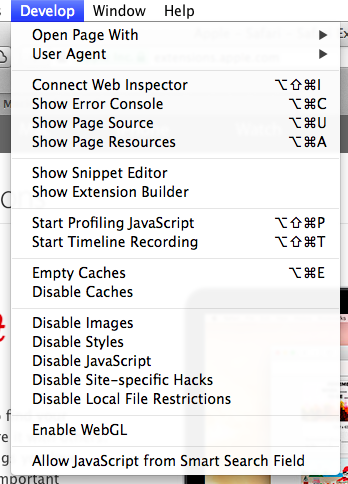
This is the option you need:
a
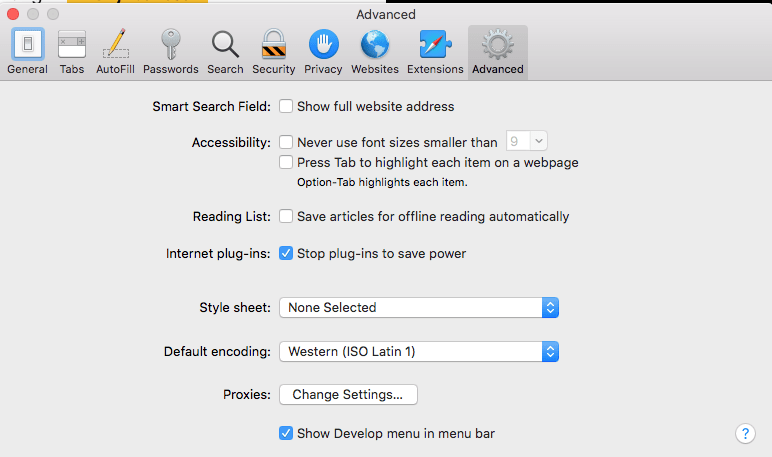
MacOS – Safari – Show Develop menu in menu bar
–jeroen
Posted in Apple, Development, Mac OS X / OS X / MacOS, Power User, Safari, Software Development, Web Browsers, Web Development | Leave a Comment »
Posted by jpluimers on 2022/01/20
For quite some time now, Chrome (think years) refuses to prompt for saving passwords whereas Firefox and Safari do prompt and save them, even for site types that it used to save passwords for in the past.
It has been annoying enough for too long now that I tried to do better than the Google searches I used back when I saw this happen first.
Below are some links based on new searches (starting with [Wayback] adding a password in chrome settings – Google Search); hopefully I can try them after I made a list of sites that Chrome does not show the password save prompt for.
Solutions I tried that failed (but maybe useful for others):
Solutions still to try:
Read the rest of this entry »
Posted in Chrome, Chrome, Communications Development, Development, Encryption, ESXi6, ESXi6.5, ESXi6.7, Firefox, Fritz!, Fritz!Box, Fritz!WLAN, Google, https, HTTPS/TLS security, Internet, Internet protocol suite, Let's Encrypt (letsencrypt/certbot), Power User, routers, Safari, Security, TCP, TLS, Virtualization, VMware, VMware ESXi, Web Browsers, Web Development | Leave a Comment »
Posted by jpluimers on 2021/12/10
Only recently, I learned this works on just about any web-browser:
Ctrl-9 (macOS: Command-9) goes to LAST tabCtrl-1 (macOS: Command-1) goes go FIRST tab
Via: [WayBack] Switch Between Tabs in Any Browser Using Shortcut Keys
For those keyboard ninjas who hate using the mouse, switching between tabs in your browser window is essential since most people probably have a bunch of tabs open at once. […]
…
If you want to go to a specific tab, you can press CTRL + N, where N is a number between 1 and 8. Unfortunately, you can’t go past 8, so if you have more than eight tabs, you’ll have to use a different keyboard shortcut or just click on it. CTRL + 9 will take you to the last tab, even if there are more than 8!
–jeroen
Posted in Chrome, Firefox, Internet Explorer, Keyboards and Keyboard Shortcuts, Opera, Power User, Safari, Web Browsers | Leave a Comment »


 The Wiert Corner - irregular stream of stuff