The Wiert Corner – irregular stream of stuff

Jeroen W. Pluimers on .NET, C#, Delphi, databases, and personal interests

  • My badges

  • Twitter Updates

  • My Flickr Stream

  • Pages

  • All categories

  • Enter your email address to subscribe to this blog and receive notifications of new posts by email.

    Join 1,835 other subscribers

Supermicro Bios Update – YouTube

Posted by jpluimers on 2020/09/14

I needed to get myself an OOB license for the BIOS update over the IPMI console or SUM (Supermicro Update Manager). An IPMI update can be done without an OOB license from the IPMI console, but the BIOS requires a license.

Links that initially helped me with that to get a feel for what I needed:

I thought that likely I need to purchase a key for it:

Obtain the license code from your IPMI BMC MAC address

But then I found out the below links on reverse engineering.

From those links, I checked both the Perl and Linux OpenSSL versions. Only the Perl version works on MacOS.

Then I fiddled with the bash version: unlike the OpenSSL version above, this one printed output. It wrongly printed the last groups of hex digits instead of the first groups of hex digits that the Perl script prints.

Here is the corrected bash script printing the first groups of hex digits (on my systems, I have an alias supermicro_hash_IPMI_BMC_MAC_address_to_get_OOB_license_for_BIOS_update for it):

#!/bin/bash
function hash_mac {
  mac="$1"
  key="8544e3b47eca58f9583043f8"
  sub="\x"
  #convert mac to hex
  hexmac="\x${mac//:/$sub}"
  #create hash
  code=$(printf "$hexmac" | openssl dgst -sha1 -mac HMAC -macopt hexkey:"$key")
  #DEBUG
  echo "$mac"
  echo "$hexmac"
  echo "$code"

  echo "${code:0:4}-${code:4:4}-${code:8:4}-${code:12:4}-${code:16:4}-${code:20:4}"
}

Steps

Reverse engineering links

  • [WayBack] The better way to update Supermicro BIOS is via IPMI – VirtualLifestyle.nl

    Another way to update the BIOS via the Supermicro IPMI for free is simply calculating the license key yourself as described here: https://peterkleissner.com/2018/05/27/reverse-engineering-supermicro-ipmi/ [WayBack].

    • [WayBack] Reverse Engineering Supermicro IPMI – peterkleissner.com

      Algorithm:

      MAC-SHA1-96(INPUT: MAC address of BMC, SECRET KEY: 85 44 E3 B4 7E CA 58 F9 58 30 43 F8)

      Update 1/14/2019: The Twitter user @astraleureka posted this code perl code which is generating the license key:

      #!/usr/bin/perl
      use strict;
      use Digest::HMAC_SHA1 'hmac_sha1';
      my $key  = "\x85\x44\xe3\xb4\x7e\xca\x58\xf9\x58\x30\x43\xf8";
      my $mac  = shift || die 'args: mac-addr (i.e. 00:25:90:cd:26:da)';
      my $data = join '', map { chr hex $_ } split ':', $mac;
      my $raw  = hmac_sha1($data, $key);
      printf "%02lX%02lX-%02lX%02lX-%02lX%02lX-%02lX%02lX-%02lX%02lX-%02lX%02lX\n", (map { ord $_ } split '', $raw);

      Update 3/27/2019: There is also Linux shell version that uses openssl:

      echo -n 'bmc-mac' | xxd -r -p | openssl dgst -sha1 -mac HMAC -macopt hexkey:8544E3B47ECA58F9583043F8 | awk '{print $2}' | cut -c 1-24
    • [WayBack] Modular conversion, encoding and encryption online — Cryptii

      Web app offering modular conversion, encoding and encryption online. Translations are done in the browser without any server interaction. This is an Open Source project, code licensed MIT.

      Steps:

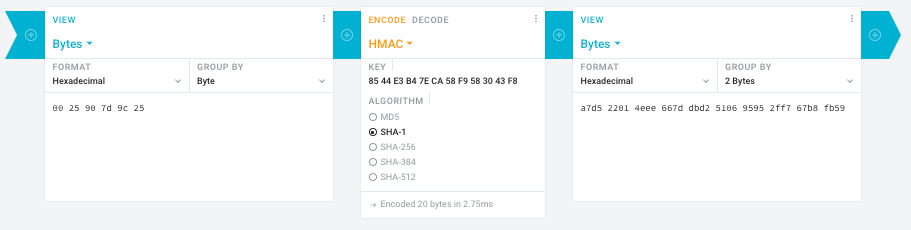
      1. In the left pane, select the “View” drop-down to be “Bytes”, then paste the HEX bytes of your IPMI MAC address there (like 00 25 90 7d 9c 25)
      2. In the middle pane, select the drop-down to become “HMAC” followed by the radio-group to be “SHA1“, then paste these bytes into the “Key” field: 85 44 E3 B4 7E CA 58 F9 58 30 43 F8
      3. In the right pane, select the drop-down to become “Bytes”, then the “Group by” to become “2 bytes”, which will you give the output (where the bold part is the license key: 6 groups of 2 bytes): a7d5 2201 4eee 667d dbd2 5106 9595 2ff7 67b8 fb59

      Result:
    • Michael Stapelberg’s private website, containing articles about computers and programming, mostly focused on Linux.[WayBack] Securing SuperMicro’s IPMI with OpenVPN
    • [WayBack] GitHub – ReFirmLabs/binwalk: Firmware Analysis Tool
  • [WayBack] The better way to update Supermicro BIOS is via IPMI – VirtualLifestyle.nl

    Ahh…..a few corrections :-P

    #!/bin/bash
    function hash_mac {
      mac="$1"
      key="8544e3b47eca58f9583043f8"
      sub="\x"
      #convert mac to hex
      hexmac="\x${mac//:/$sub}"
      #create hash
      code=$(printf "$hexmac" | openssl dgst -sha1 -mac HMAC -macopt hexkey:"$key")
      #DEBUG
      echo "$mac"
      echo "$hexmac"
      echo "$code"
      echo "${code:9:4} ${code:13:4} ${code:17:4} ${code:21:4} ${code:25:4} ${code:29:4}"
    }
    #hex output with input
    hash_mac "$1"
    
    #Look out for the quotes, they might get changed by different encoding
  • [WayBack] The better way to update Supermicro BIOS is via IPMI – VirtualLifestyle.nl

    Thanks Peter. For anyone interested, here’s a bash script that takes the MAC as the only argument and outputs the activation key:

    #!/bin/bash
    function hash_mac {
      mac="$1"
      key="8544e3b47eca58f9583043f8"
      sub="\x"
      #convert mac to hex
      hexmac="\x${mac//:/$sub}"
      #create hash
      code=$(printf "$hexmac" | openssl dgst -sha1 -mac HMAC -macopt hexkey:"$key")
      ## DEBUG
      echo "$mac"
      echo "$hexmac"
      echo "$code"
      echo "${code:9:4} ${code:13:4} ${code:17:4} ${code:21:4} ${code:25:4} ${code:29:4}"
    }
    ## hex output with input
    hash_mac "$1"


–jeroen

Read the rest of this entry »

Posted in Development, Encoding, Hardware, Hashing, HMAC, Mainboards, OpenSSL, Power User, Security, SHA, SHA-1, Software Development, SuperMicro, X10SRH-CF | Leave a Comment »

EditThisCookie – Chrome Web Store

Posted by jpluimers on 2020/09/14

Interesting, not just from a GDPR perspective:

EditThisCookie is a cookie manager. You can add, delete, edit, search, protect and block cookies!

[WayBack] EditThisCookie – Chrome Web Store

Via [WayBackError 400 on Google sites (YouTube, Maps, Search etc) · Issue #537 · deanoemcke/thegreatsuspender · GitHub

–jeroen

Posted in Chrome, Chrome, Google, LifeHacker, Power User, Web Browsers | Leave a Comment »

Happy Day of the Programmer!

Posted by jpluimers on 2020/09/12

Enjoy Day of the Programmer and [WayBack] Geek And Poke: The Art Of Programming: programmers are artists.

–jeroen

Related: Happy Day of the Programmer! 2018

Read the rest of this entry »

Posted in Development, Software Development | Leave a Comment »

On my list of things to figure out: how to force fsck with opensuse Tumbleweed on Raspberry Pi 3

Posted by jpluimers on 2020/09/11

Hopefully the below links will eventually get me further in figuring out how to force fsck with opensuse Tumbleweed on Raspberry Pi 3.

For now, I just reinstalled an SD card (my Mac didn’t support the file systems and I did not have time and equipment with me to mount it to another opensuse based device).

–jeroen

Posted in *nix, Linux, openSuSE, Power User, SuSE Linux, Tumbleweed | Leave a Comment »

FreePascal downloads I used to get Web Service Toolkit to compile since the Delphi WSDL importer has braindead include support

Posted by jpluimers on 2020/09/11

The Delphi WSDL importer maintenance has been in dormant mode for a long while, which means it still barfs on WSDL include directives.

In the day and age of REST and gRPC, I don’t think it will get any love soon.

Related bug entries are for instance RSP-18630: WSDL generate bad code and RSP-17321: “Import WSDL” generates invalid code without explanation of problem are examples of this, and I’m sure that QC had more if it were still alive; I could find these in the WayBack machine:

The problem manifests itself when the WSDL file includes one or more XSD files. The generated code will contain a section like this:

  // ************************************************************************ //
  // The following types, referred to in the WSDL document are not being represented
  // in this file. They are either aliases[@] of other types represented or were referred
  // to but never[!] declared in the document. The types from the latter category
  // typically map to predefined/known XML or Embarcadero types; however, they could also 
  // indicate incorrect WSDL documents that failed to declare or import a schema type.
  // ************************************************************************ //

Further below is a series of commented out types, all starting with a ! end ending in a column with the namespace of those types.

Searching for the first line gives numerous examples as far back as Delphi 7, for instance:

Based on those, I think the reason is that the WSDL importer fails on <soap:binding transport="http://schemas.xmlsoap.org/soap/http" style="document" /> which is quite common in the real world.

I did not want to pursue manually modifying the WSDL file, or manually generating the types as the WSDL and XSD files were prone to changes and manual steps would make the re-import process more tedious. If you do want to do that, these link might help:

This is what I used to get this to compile and run [WayBack] Web Service Toolkit – Free Pascal wiki:

Build steps

FPC installation

  1. Run the 32-bit installer
  2. Keep all options except on the second install screen, disable Associate .inc files with FreePascal IDE
  3. Add C:\FPC\3.0.4\bin\i386-win32 to the user path

Building

  1. Recursively unzip wst-0.7u.zip
  2. Open a command prompt in the wst-0.7u directory
  3. Verify there is a ws_helper subdirectory

When compiling in Delphi, then you definitely need the FreePascal RTL sources for the PasTree unit; see [WayBack] fcl-passrc – Free Pascal wiki.

Related:

–jeroen

Posted in Conference Topics, Conferences, Delphi, Development, Event, Software Development | 1 Comment »

Converting a virtual IDE disk to a virtual SCSI disk (1016192)

Posted by jpluimers on 2020/09/11

Just in case I have a VM with only IDE disks of which one ore more need to become SCSI disks: [WayBack] Converting a virtual IDE disk to a virtual SCSI disk (1016192)

TL;DR

  1. Add one SCSI disk
  2. Install drivers for it and get it recognised
  3. When the VM is shutdown:
    1. Modify the disk description of the IDE disk to SCSI (hack) or
    2. (often easier) remove the disk, then attach it to the SCSI controller

–jeroen

Posted in Power User, Virtualization, VMware, VMware ESXi | Leave a Comment »

Filename too long in Git for Windows – Stack Overflow

Posted by jpluimers on 2020/09/10

[WayBack] Filename too long in Git for Windows – Stack Overflow:

reg add "HKEY_LOCAL_MACHINE\SYSTEM\CurrentControlSet\Control\FileSystem" /v "LongPathsEnabled" /t REG_DWORD /d 1 /f

Related:

–jeroen

Posted in Development, DVCS - Distributed Version Control, git, Software Development, Source Code Management | Leave a Comment »

Mark Struberg on Twitter: “My key takaway is: “You can fix most conceptual problems of a Monolith by converting to MicroServices. And you can fix most conceptual problems of MicroServices by making a Monolith out of it”.

Posted by jpluimers on 2020/09/10

I wonder what the state of monoliths versus microservices is right now. Likely somewhere in the middle of SOA and Client/Server (:

[WayBack] Mark Struberg on Twitter: <<My key takaway is: “You can fix most conceptual problems of a Monolith by converting to MicroServices. And you can fix most conceptual problems of MicroServices by making a Monolith out of it”.… >>

–jeroen

Posted in Design Patterns, Development, Software Development, Systems Architecture | Leave a Comment »

Keep Your Project Files Clean With Project Magician – The Art of Delphi Programming

Posted by jpluimers on 2020/09/10

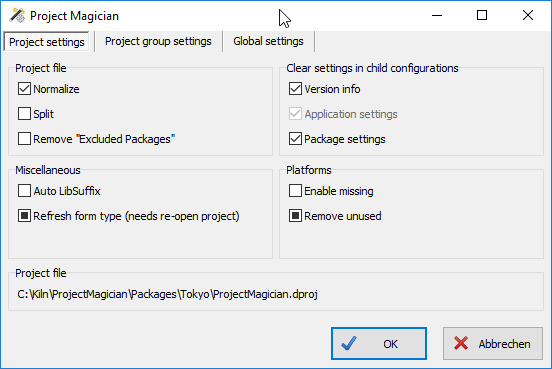
Reminder to self to install this to more than just the main dev VM as it combines DProjNormalizer and DProjSplitter, then adds a few more features: [WayBackKeep Your Project Files Clean With Project Magician – The Art of Delphi Programming

Example of the wizard that shows the additional features

[WayBack] Download

Via [WayBackKeep Your Project Files Clean With Project Magician – Uwe Raabe – Google+

–jeroen


Posted in Delphi, Development, Software Development | Leave a Comment »

Recursive loop, see loop, recursive

Posted by jpluimers on 2020/09/09

Recursion explained visually.

Via [WayBack] Wenn mehrere Generationen in den Feiertag / Vatertag starten.

[WayBack] Original picture at [WayBack] Bug Life | Chickie’s Rides | Pinterest | Vw, Volkswagen and Cars.

–jeroen


Posted in Conference Topics, Conferences, Development, Event, Fun, Software Development | Leave a Comment »