Posted by jpluimers on 2016/06/22
Woof is a small simple stupid webserver that can easily be invoked on a single file. Your partner can access the file with tools he trusts (e.g. wget). No need to enter passwords on keyboards where you don’t know about keyboard sniffers, no need to start a huge lot of infrastructure, just do a
$ woof filenameand
tell the recipient the URL woof spits out. When he got that file, woof will quit and everything is done.And when someone wants to send you a file, woof has a switch to offer itself, so he can get woof and offer a file to you. …
Woof needs Python on a unix’ish operating system. Some people have used it successfully on Windows within the cygwin environment.
Source: Woof – simply exchange files
Works from homebrew on OS X.
via: Web Offer One File – Thomas Mueller (dummzeuch) – Google+
Source: Web Offer One File
–jeroen
Posted in *nix, *nix-tools, Apple, BSD, Home brew / homebrew, Linux, Mac, Mac OS X / OS X / MacOS, Power User | Leave a Comment »
Posted by jpluimers on 2016/06/22
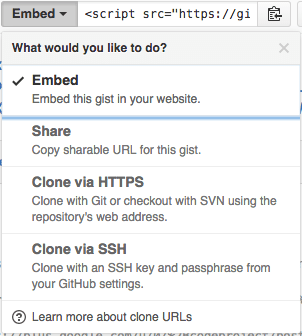
The “embed” dropdown allows to get URLs for sharing and git cloning.
Recently I did my very first JavaScript in HTML development. Since it was a one page experiment, I didn’t want to put it in an official repository of it’s own.
I will explain about the content in a future post, but first about getting it on-line as a HTML file that can run JavaScript.
This is the hosted page: Work around G+ “403. That’s an error.” errors.
Gists are the base
Gists are pretty amazing. They have history, syntax highlighting (which you can embed on your own page, see Using Github as a Syntax Highlighter for Your Blog or Website), can show an overview of files or even raw content. This holds for public and secret gists.
The history of all the files comes from a repository: in fact all gists are in fact git repositories of which you can get the URL (be it https or ssh) is under the “Embed” dropdown: see the screenshot on the right.
So the gist itself is available under these URLs:
- gist
- syntax highlight script
- git https
- git ssh
The individual files can either be viewed as syntax highlighted (when they’re small enough, not binary and github knows how to highlight them), or as raw files:
Read the rest of this entry »
Posted in Development, DVCS - Distributed Version Control, gist, git, GitHub, rawgit, Source Code Management | 2 Comments »
Posted by jpluimers on 2016/06/22
Some notes with the links I found them:
| Syntax |
Effective result |
$* |
$1 $2 $3 … ${N} |
$@ |
$1 $2 $3 … ${N} |
"$*" |
"$1c$2c$3c…c${N}" |
"$@" |
"$1" "$2" "$3" … "${N}" |
–jeroen
Posted in bash, Development, Scripting, Software Development | Leave a Comment »
Posted by jpluimers on 2016/06/21
A long time ago, I found out German trains can show a Kernel version number during their boot sequence (sometimes even at their station, in this case Hannover Central Station). Recently, I found who posted the original of the picture (Volker Briegleb) and through reddit that Volker had posted more pictures on a twitter thread.
So this train showed:
- Kernel: 6.1.0.0
- IP: 10.0.0.196
- MAC: 74:38:89:00:66:C9
The MAC address indicates the network device is made by ANNAX Anzeigesysteme GmbH.
–jeroen
Read the rest of this entry »
Posted in Development, Hardware, Software Development | Leave a Comment »
Posted by jpluimers on 2016/06/21
I’m using these Chrome Extensions for most of the http / https call mockups, and after that put them in SoapUI (which despite the name also does REST and has come a long way sinceSource: SoupUI – as sometimes that is the only thing that works):
You can get both Postman versions through GetPostman.com as well.
–jeroen
Posted in .NET, .NET 2.0, .NET 3.0, .NET 3.5, .NET 4.0, .NET 4.5, ASP.NET, C#, C# 3.0, C# 4.0, C# 5.0, Chrome, Communications Development, Development, Google, HTTP, Internet protocol suite, Power User, REST, Software Development, TCP | 1 Comment »
Posted by jpluimers on 2016/06/20
Posted in History | Leave a Comment »
Posted by jpluimers on 2016/06/20
Boy, don’t you dislike how hard it is to find direct download links…
Well, thanks to kenorb and jjlin (slightly edited):
Check: IE6, IE7, IE8, IE9, IE10, IE11 Offline Installers Download Links – kenorb Mar 20 ’15 at 13:39 – http://www.itechtics.com/download-internet-explorer-all-versions/ – note this does not provide hashes.
jjlin:
Try these Microsoft offline installer links:
These may refuse to work if you already have IE 11 installed, though. If it is refused, try this: http://stackoverflow.com/questions/20043971/how-to-downgrade-from-internet-explorer-11-to-internet-explorer-10
And in case these links ever stop working and you must obtain a copy from a non-Microsoft source, here are the SHA-512 hashes for posterity:
- 32-bit: d89ba3f9978be428ac05b182481198ab0f7b0c0651e4716e63cd0cf907d739cbc30f44ec9c444da683869473a548cd99e5c396467b2898f7c382b6345b3e70d2
- 64-bit: f1752bb6517fe15071e5f7a4fee4b8680da1bdad1df7054ab22bab78fe0f46aee177787f60ea2cfc86a2db2b08429e2cba3cfdd20ba6a2ab69e091c7784dfdae
Source: internet explorer 10 – Does Microsoft still have a link to download IE10 for Windows 7? – Super User
–jeroen
Posted in .NET, Development, Internet Explorer, Power User, Software Development, Visual Studio 2015, Visual Studio and tools, Web Browsers, Windows, Windows 7 | Leave a Comment »
Posted by jpluimers on 2016/06/20
HP Printers, PCL6 and drivers are always a fight to get right.
In this case the Microsoft stock Windows 8.1 x64 drivers always result in my HP LaserJet 9500 HDN printing a page like this from the same tray the last print job ran:
PCL XL error

        Warning: IllegalMediaSource
I’ve seen similar results with other Windows, printer and driver combinations (not limited to Microsoft drivers, but always PCL related), but never knew the solution.
Reading the answer, I totally recognise it: always some form of PCL6 driver was involved, and switching to PostScript solved it.
Note that there are three varieties of the HP Universal Print Driver for Windows:
So now I know to always install the first and the last (:
–jeroen
via: windows xp – PCL XL error Warning: IllegalMediaSource – Server Fault.
Posted in HP Printer Drivers, Power User, Printer drivers, Windows, Windows 7, Windows 8, Windows 8.1, Windows Vista, Windows XP | Leave a Comment »
Posted by jpluimers on 2016/06/17
The article I quote from is about Windows Server 2003 and Windows XP, but still holds for modern Windows Server and Client versions:
After you enable roaming profiles for a couple of users, the first thing that you will probably notice is that logins and log offs become extremely slow for those users. […]
The solution to obscenely long logons and log offs is to use folder redirection. Folder redirection allows you to save portions of the user’s profile in a different location on the network. […]
You can’t redirect every folder in a user’s profile.[…] The folders that you can redirect are:
- Application Data,
- Desktop,
- My Documents, and
- Start Menu.
[…] I recommend creating a share point on the server to which you can redirect these folders. […]
To redirect a folder, open the Group Policy Editor and navigate to User Settings | Windows Settings | Folder Redirection. The group policy requires you to redirect each of the four folders separately, but the procedure for doing so is the same for each folder:
- Set the folder’s Setting option to “Basic – Redirect Everyone’s Folder To The Same Location”.
- Next, select the Create A Folder For Each User Under The Root Path option from the Target Folder Location drop down list.
- Finally, enter your root path in the place provided.
–jeroen
via: Profile and Folder Redirection In Windows Server 2003 :: Windows 2003 :: Articles & Tutorials :: WindowsNetworking.com.
Posted in Power User, Windows, Windows 7, Windows 8, Windows 8.1, Windows 9, Windows Server 2003, Windows Server 2003 R2, Windows Server 2008, Windows Server 2008 R2, Windows Server 2012, Windows Server 2012 R2, Windows Vista, Windows XP | Leave a Comment »


 The Wiert Corner - irregular stream of stuff