Posted by jpluimers on 2016/05/16
This is so impressive: MOnSter 6502 basically a 6502 on a PC board running at 100s of kHz.
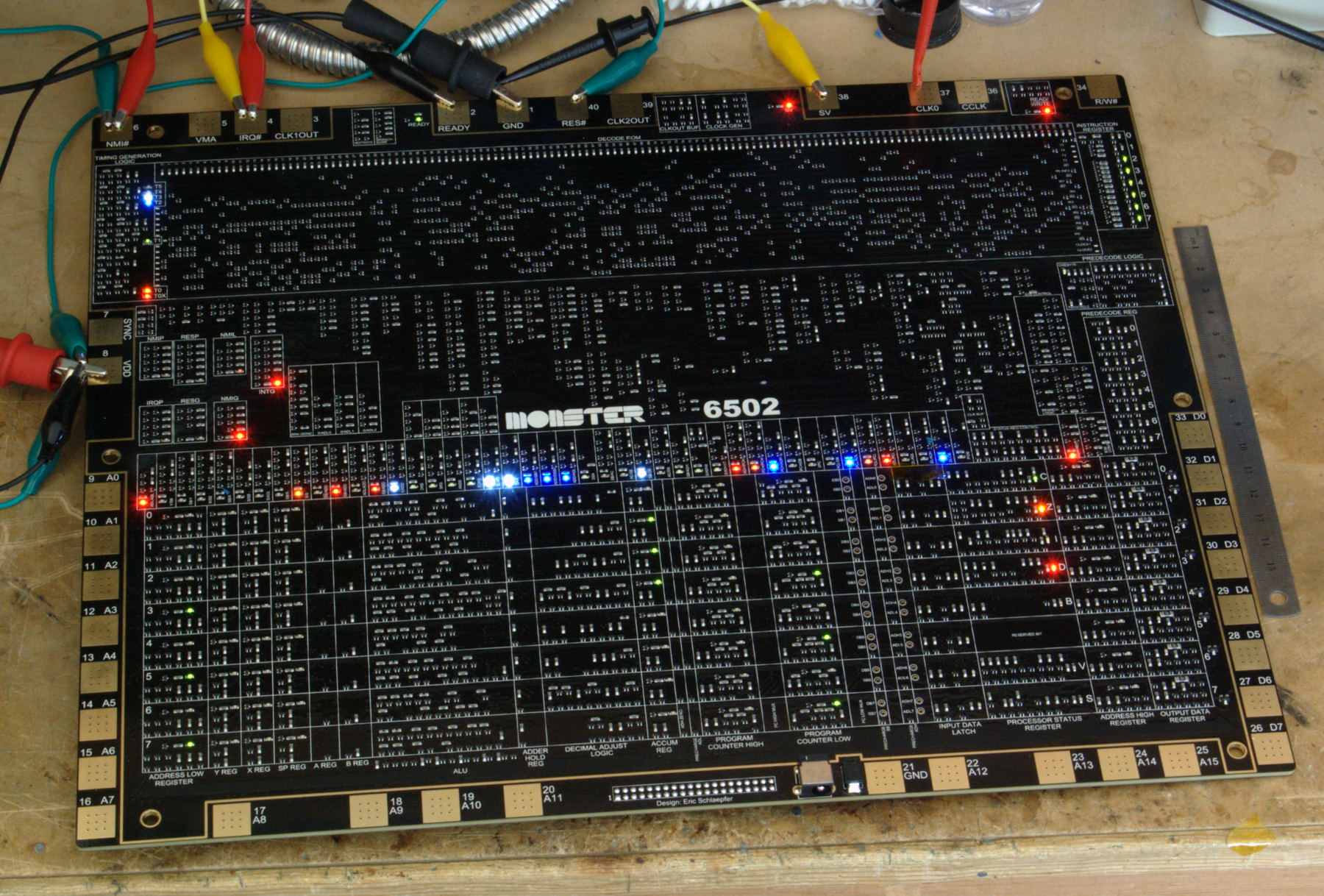
via:
–jeroen
Posted in 6502, 6502 Assembly, Assembly Language, Development, History | Leave a Comment »
Posted by jpluimers on 2016/05/16

Sometimes I connecting to various Windows systems over RDP fails. On Windows the mstsc (Remote Desktop Connection) application recognises the server has a certificate, presents you with a login dialog, then just stops without any message.
Connecting from Mac OS X edition of Microsoft Remote Desktop does give you error message “The server denied the logon with reason: 3489661694”.
Read the rest of this entry »
Posted in Power User, Remote Desktop Protocol/MSTSC/Terminal Services, Windows, Windows 8.1 | 4 Comments »
Posted by jpluimers on 2016/05/13
Buffalo WLAE-AG300N is one of those buggy DHCP clients… Even running firmware Ver.1.85 (R1.05/B1.00)), it gets the length of the DHCP host name wrong so adds a bogus NULL byte to that name.
@Buffalo: please fix this.
The DHCP client options are of structure Type/Length/Value so a client is supposed to set the length of the hostname to exactly the number of characters.
However there exist buggy clients that either send a length of 1 more and a \00 at the end of the name, or send a fixed length and pad it with \00 as necessary.
Source: DHCP server: Odd active hostname behaviour: some views have null character at the end, some don’t. – MikroTik RouterOS
Fromt a packet capture:
Read the rest of this entry »
Posted in Access Points, Buffalo, Hardware, Internet, MikroTik, Network-and-equipment, Power User, routers, WinBox | Leave a Comment »
Posted by jpluimers on 2016/05/13
RegJump.exe is really cool, and has already there for more than a year (:
This little command-line applet takes a registry path and makes Regedit open to that path. It accepts root keys in standard (e.g. HKEY_LOCAL_MACHINE) and abbreviated form (e.g. HKLM).
usage: regjump <<path>|-c>
-c Copy path from clipboard.
e.g.: regjump HKLM\Software\Microsoft\Windows
–jeroen
via: RegJump.
Posted in Power User, Windows, Windows 7, Windows 8, Windows 8.1, Windows 9, Windows Server 2000, Windows Server 2003, Windows Server 2003 R2, Windows Server 2008, Windows Server 2008 R2, Windows Server 2012, Windows Server 2012 R2, Windows Vista, Windows XP | Leave a Comment »
Posted by jpluimers on 2016/05/12
Since I need to do some lock-free multi-threaded queue work in Delphi shortly: The Delphi Geek: Lock-free vs. locking
Posted in Uncategorized | Leave a Comment »
Posted by jpluimers on 2016/05/12
[WayBack] Pandoc is so versatile that you sometimes forget a conversion can be as simple as a one-liner:
pandoc -s README.rst -o readme.html
This converts the reStructured text in README.rst to html.
Pandoc is smart enough to recognise the conversions without you telling the formats with -f (input format) and -t (output format) explicitly.
If you do need to explicitly specify the format, it is useful to query which formats are supported as per [WayBack] Pandoc – Pandoc User’s Guide: specifying formats:
pandoc --list-input-formatspandoc --list-output-formats
Read the rest of this entry »
Posted in Development, PDF, Power User, Scripting, Software Development | Leave a Comment »
Posted by jpluimers on 2016/05/11

Sometimes you want to run a batch file from a Task Scheduler task. For that, the user under which the task runs needs to Logon as a batch job right. If it hasn’t, you get this nice error message:
“This task requires that the user account specified has log on as batch job rights”.
Despite being part of the Windows Server 2003 Resource Kit Tools, you can still use ntrights in more modern Windows versions to grant or revoke this right.
As ntrights uses a hard to remember SeBatchLogonRight name for it and I tend to forget the ntrights syntax, I wrote two batch files to grant or revoke the Logon as Batch Job rights for the specified user:
Read the rest of this entry »
Posted in Batch-Files, Development, Power User, Scripting, Software Development, Windows, Windows 7, Windows 8, Windows 8.1, Windows 9, Windows Server 2008, Windows Server 2008 R2, Windows Server 2012, Windows Server 2012 R2, Windows Vista | Leave a Comment »





 The Wiert Corner - irregular stream of stuff