The Wiert Corner – irregular stream of stuff

Jeroen W. Pluimers on .NET, C#, Delphi, databases, and personal interests

  • My badges

  • Twitter Updates

  • Pages

  • All categories

  • Enter your email address to subscribe to this blog and receive notifications of new posts by email.

    Join 1,854 other subscribers

Delphi 2007: reproduction and workaround for “[DCC Error] ….pas(26): F2084 Internal Error: AV21BCE0AC-R00000000-0”

Posted by jpluimers on 2012/07/31

Just in case you come across this error ([WayBackQC 108189):

[DCC Error] CompilerAVUnit.pas(26): F2084 Internal Error: AV21BCE0AC-R00000000-0

I had this error in a really complicated unit that I tried to backport from Delphi XE2 to Delphi 2007 (as there was some non-unicode compliant app that needed this).

I could not find it searching for F2084 Internal Error, so I sat down and trimmed it down to the CompilerAVUnit below.

The workaround is simple: remove the static; from method Outer and it compiles fine.

I will post more details on the static keyword in Delphi in a future blog post. For now I’ll keep it at this: Read the rest of this entry »

Posted in Delphi, Delphi 2007, Development, F2084, QC, Software Development | 8 Comments »

Creating vSphere 5 ESXi embedded USB Stick (failed at first in HP XW6600, but with MBR partition table it works)

Posted by jpluimers on 2012/07/30

Installing and booting ESXi 5 from USB allows you to keep your storage exclusively for VMs and separately make backup of your boot configuration and data configuration (note you cannot put the DataStore on your USB stick).

A small stick (minimum 1 gigabyte) will suffice, and works on many systems, but at first not on my HP XW6600, despite the latest BIOS version 1.36a. You get a nice “Non-System disk or disk error” message.

Both methods I tried failed at first. I thought they failed because the BIOS on the HP has limited USB boot support. It did boot from single partition USB sticks, but seemed not to boot from multi-partition ones, no matter if they are removable or HDD (with the removable bit flipped).

The ESXi5 installer is a single partition one. The final ESXi5 installed image is a multi-partition one. That’s what got me thinking into the multi-partiton direction.

Since the problem is similar to the impossibility of booting VMware workstation VMs from USB stick, (this fails even from the BIOS), I tried Plop since Plop works for VMware Workstation. The Plop USB boot manager failed too. My final thought was to install Plop on a FAT formatted USB stick(which does boot) and continue from there to the ESXi5 one: that failed too.

Boy I was wrong: the failure was not caused by the multi-partition setup, but because of my “Google blindness”: I searched in the wrong direction with the wrong keywords, therefore not getting the right links as search results.

A VMware Communities forum threads on “No bootable device” after successful ESXI5 installation on Intel DG35EC desktop motherboard” and No boot after clean install  finally got me in the right direction:

As of ESXi5, the default partition table type is GPT (GUID Partition Table), not MBR (Master Boot Record) any more (thats why an ESXi4 install will work fine).

Booting from GPT is in the EFI standards (now in its second generation UEFI or United Extensible Firmware), allowing – among others – to boot from disks bigger than 2 terrabyte. You need a BIOS that is compatible with GPT to do so, and the HP XW6600 BIOS clearly isn’t compatible with GPT.

Not all is lost, as while installing ESXi5, you have an option – though well hidden – to force it to use MBR boot. That worked, and I will blog on the steps later.

The good news: it now works on my HP XW6600 workstations (that support both VT-x and VT-d, which means I can do PCI pass through).

How to create an ESXi5 install on a USB stick

First things first though: creating the USB stick in the first place. Read the rest of this entry »

Posted in BIOS, Boot, ESXi4, ESXi5, Hardware, HP XW6600, Power User, UEFI, Virtualization, VMware, VMware ESXi | 4 Comments »

Tonido as alternative to DropBox (via: Bei sensiblen Daten lieber eigene Cloud-Lösung – c’t – PresseBox)

Posted by jpluimers on 2012/07/30

On the research list (wow, Google Translate is very accurate this time!): Tonido

More and more programs allow users to cut the cord of cloud providers like Google and Dropbox. The Tonido software is suitable for example for users who want to make sensitive customer or patient data accessible on multiple devices without outsourcing it to an external server. “Once you have installed Tonido on your PC and create an account, you can in the local network, but also on the move access to a PC or mobile devices on the complete data set”

Original German text from the mid December 2011 issue of c’t Magazin:

Immer mehr Programme ermöglichen es Anwendern, sich von Cloud-Anbietern wie Google oder Dropbox abzunabeln. Die Software Tonido eignet sich beispielsweise für Nutzer, die sensible Kunden- oder Patientendaten auf mehreren Geräten zugänglich machen wollen – ohne sie auf einen externen Server auszulagern. “Sobald man Tonido auf dem eigenen PC installiert und ein Konto angelegt hat, kann man im lokalen Netz, aber auch von unterwegs mit PC oder Mobilgeräten auf den kompletten Datenbestand zugreifen”

Thanks Noud van Kruysbergen for translating the German c’t article into Dutch.

–jeroen

via: Bei sensiblen Daten lieber eigene Cloud-Lösung – c’t – PresseBox.

Posted in *nix, Linux, Mac, Mac OS X / OS X / MacOS, Mac OS X 10.5 Leopard, Mac OS X 10.6 Snow Leopard, Mac OS X 10.7 Lion, Power User, Windows, Windows 7, Windows 8, Windows Server 2003, Windows Server 2008, Windows Vista, Windows XP | Leave a Comment »

Does anyone knows how to get notified of new WHQL releases of the NVIDIA Quadro FX drivers (Windows 7 x64)? #dtv

Posted by jpluimers on 2012/07/27

About a month ago, NVidia updated their 296 series of WHQL drivers.

Does anyone know if there is a notification mechanism on new releases?

Version 296.88 current as of writing this blog entry (direct download link)

Version: 296.88 WHQL
Release Date: 2012.06.13
Operating System: Windows 7 64-bit, Windows Vista 64-bit
Language: English (U.S.)
File Size: 175 MB

–jeroen

via: NVIDIA DRIVERS 296.88WHQL.

Posted in Power User, Windows, Windows 7 | Leave a Comment »

Twee goede behulpzame zaken met vakkennis in Amsterdam: Muco Electronica en Modelbouw, Meijer IJzerwaren

Posted by jpluimers on 2012/07/27

Ik had wat spullen aan electronica en ijzerwaren nodig, en onderstaande zaken hebben me uitstekend geholpen.

Ze zijn beide niet groot, maar dat is juist hun kracht: ze weten alles van wat ze verkopen, geven juist advies en hebben vriendelijke bediening.

Daarnaast hebben ze beide naast hun winkel, ook een webshop.

Allereerst Meijer IJzerwaren. Read the rest of this entry »
Posted in About, LifeHacker, Opinions, Personal, Power User | Leave a Comment »

Asus RT N66U: steps to get “Tomato Backup Settings & Log to USB Drive Script – TomatoUSB” working on an Asus RT N66U @AustinStAubin

Posted by jpluimers on 2012/07/27

Below are some steps to get the  Tomato Backup Settings & Log to USB Drive Script – TomatoUSB by Austin Saint Aubin working on an Asus RT N66U router.

I presume you are using a Windows system (hence the FAT/FAT32 formatting of the USB stick) for doing the edits and copying of files to an USB stick. Read the rest of this entry »

Posted in *nix, ASUS RT-N66U, Internet, Network-and-equipment, Power User, TomatoUSB | Leave a Comment »

Mac OS X: Copy and paste the full path of a file in the Finder (via: Reality Distortion)

Posted by jpluimers on 2012/07/27

FilePathToClipCMPlugin is a live saver.

  1. Download it.
  2. Open the .dmg
  3. Open a new Finder window
  4. Point it to the folder “/Library/Contextual Menu Items/” or to “˜/Library/Contextual Menu Items/” (create the latter if it does not exist).
  5. Drag the required plugins there
  6. Restart your machine (restarting the Finder did not work for me)

–jeroen

via: Copy and paste the full path of a file in the Finder — Reality Distortion: Macs, Mac OS X, and Apple stuff.

Posted in Apple, Clipboard, Mac, Mac OS X / OS X / MacOS, Mac OS X 10.4 Tiger, Mac OS X 10.5 Leopard, Mac OS X 10.6 Snow Leopard, Mac OS X 10.7 Lion, MacBook, MacBook-Air, MacBook-Pro, Power User | Leave a Comment »

Current status on the “Android help needed: App that cleans up the Contacts mess that the LinkedIn app left behind” « The Wiert Corner – irregular stream of Wiert stuff

Posted by jpluimers on 2012/07/26

Again a status update (:

Basically the phone is now in an unusable state, as there is no memory left since the Contacts DB is growing itself (it is now close to 600 megabyte), see this quote on my StackExchange question:

Trying to solve Problem: Huge Contacts Database Read the rest of this entry »

Posted in Android Devices, Power User | 2 Comments »

XML and HTML escapes

Posted by jpluimers on 2012/07/26

While reviewing some client’s code, I noticed they were generating and parsing XML and HTML by hand (do not ever do that yourself!).

Before refactoring this into something that uses libraries that properly understand XML and HTML, I needed to assess some of the risks.

A major risk is to get the escaping (and unescaping) of XML and HTML right.

Time to finally organize some of my links on escaping HTML and XML that I had in my favourites list.

The starting point is the List of XML and HTML character entity references on Wikipedia. It is readable, complete and lists both kinds of escapes.

XML escapes

The official W3C text that describes XML escaping is hard to read.

There are only 5 predefined XML entities for characters that can (some must) be escaped. This table is derived from the Wikipedia article.

Name Character Unicode code point
(decimal)
Standard When to escape (from the XML 1.0 standard) Description
quot U+0022 (34) XML 1.0 To allow attribute values to contain both single and double quotes double quotation mark
amp & U+0026 (38) XML 1.0 Outside  comment, a processing instruction, or a CDATA section ampersand
apos U+0027 (39) XML 1.0 To allow attribute values to contain both single and double quotes apostrophe (= apostrophe-quote)
lt < U+003C (60) XML 1.0 Outside  comment, a processing instruction, or a CDATA section less-than sign
gt > U+003E (62) XML 1.0 in content, when that string is not marking the end of a CDATA section greater-than sign

HTML escapes

Read the rest of this entry »

Posted in " quot, & amp, > gt, < lt, ' apos, ASCII, Development, Encoding, HTML, Power User, SocialMedia, Software Development, Unicode, Web Development, WordPress, XML, XML escapes, XML/XSD | 1 Comment »

.NET/Visual Studio: disable “Step over properties and operators” – one of the settings I always change for a new Visual Studio Installation

Posted by jpluimers on 2012/07/25

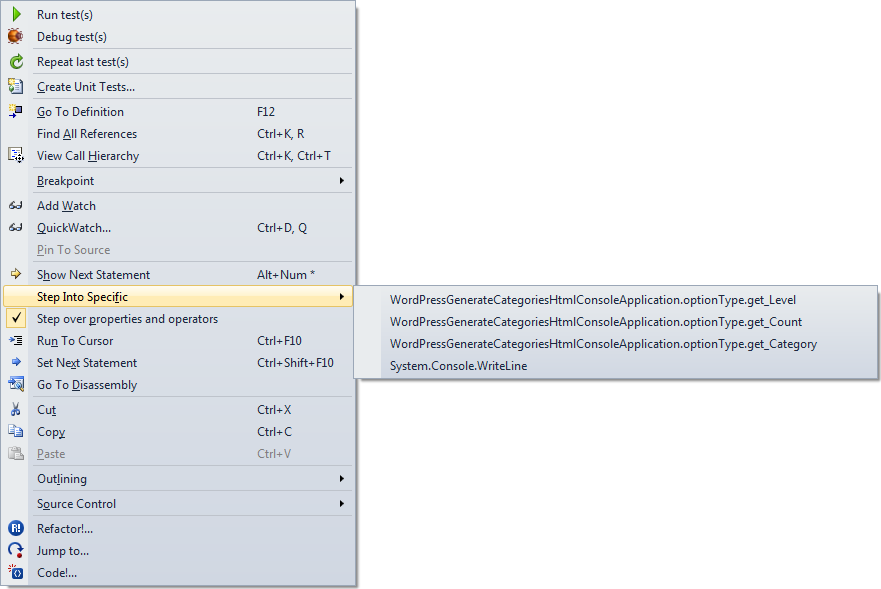
Boy I wish Visual Studio had a “Step into first property or operator” command. You can only do this through the context menu, and that is awfully cumbersome to use.

Just look at the context menu at the end of the post to see why.

Luckily, the option below it is “Step over properties and operators”, which you can easily disable. I usually have it disabled, so for me it is the way to temporarily enable it when I want to skip properties and operators.

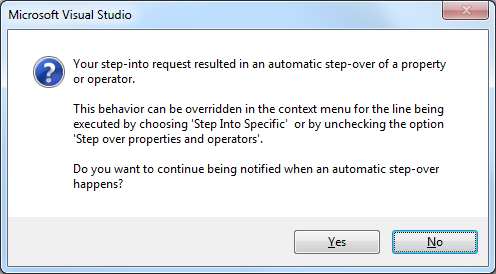
If you don’t then you get this message when tracing into properties (or operators):

[Microsoft Visual Studio]
Your step-into request resulted in an automatic step-over of a property or operator.
This behavior can be overridden in the context menu for the line being executed by choosing 'Step Into Specific' or by unchecking the option 'Step over properties and operators'.
Do you want to continue being notified when an automatic step-over happens?
[Yes] [No]

–jeroen

Posted in .NET, Development, Software Development, Visual Studio 11, Visual Studio 2005, Visual Studio 2008, Visual Studio 2010, Visual Studio and tools | Leave a Comment »