The Wiert Corner – irregular stream of stuff

Jeroen W. Pluimers on .NET, C#, Delphi, databases, and personal interests

  • My badges

  • Twitter Updates

  • Pages

  • All categories

  • Enter your email address to subscribe to this blog and receive notifications of new posts by email.

    Join 1,854 other subscribers

.NET/C#: workaround to solve small glitch with Visual Studio 2010, CodeRush with and string resources

Posted by jpluimers on 2012/08/08

CodeRush has a nice refactoring to extract a C# string into a resource.

There is a small glitch that when you press undo after that, and there was no string file in your project, then the empty resource file is not always saved.

Upon building your project, you will get an error like this:

---------------------------
Microsoft Visual Studio
---------------------------
The item 'Resources.resx' does not exist in the project directory. It may have been moved, renamed or deleted.
---------------------------
OK
---------------------------

The Resources.resx file is not visible in your Solution Explorer, so you cannot delete it there.

You have to manually edit your .csproj file and remove the Resources.resx reference there.

I’ve had this happen only a couple of times, and cannot yet reproduce this. Until I can reproduce, this is a workaround to remedy the effects.

–jeroen

Posted in .NET, C#, C# 1.0, C# 2.0, C# 3.0, C# 4.0, C# 5.0, Development, Software Development | Leave a Comment »

Correlation of Delphi Release/Update dates and activity on SourceForge project “RAD Studio Demo Code”

Posted by jpluimers on 2012/08/07

Now that the there are RadStudio XE3 demos available at SourceForge.net Repository – [radstudiodemos] Index of /branches/RadStudio_XE3, and a post on a Delphi Event in New Zeeland rumours of an eminent Delphi/RAD Studio XE3 version start to raise.

It is fun to watch the activity stats on the SourceForge project RAD Studio Demo Code and correlate them to the Delphi release and update dates.

I made PNG images of two graphs. Click on them to enlarge, or click on the links to get to the statistics pages.

Note that when the span is wide enough, activity gets summed to the start of the month (first picture).

Project statistics graphs

Project Statistics: RAD Studio Demo Code –
from 2009-10-01 until 2012-10-01
.
Project Statistics: RAD Studio Demo Code –
from 2012-07-15 until 2012-08-15
.

Correlation

The real fun is the correlation with the Delphi Release Dates – Delphi Programming and the Delphi update dates from the Delphi Registered User Downloads.:

Year-Month Date Delphi/
RAD Studio
version
Release/Update
2009-12 2009-12-14 2010 Update 4/5
2010-08 2010-08-30 XE Release
2011-07;2011-08 2011-09-02 XE2 Release
2011-11 2011-11-01 XE2 Update 2
2012-04 2012-05-18 XE2 Update 4 + Hotfix
2012-07 2012-??-?? XE3? Release?

–jeroen

via: RAD Studio Demo Code | Free software downloads at SourceForge.net.

Posted in Delphi, Delphi 2010, Delphi XE, Delphi XE2, Development, Software Development | 5 Comments »

Pricetracker/-watch/-drop alters/-history charts for Newegg.com, Amazon.com, Best Buy, BackCountry.com, Zzounds.com

Posted by jpluimers on 2012/08/06

Cool: sites that allow you to do track prices, get history charts, get alerts for price drops, etc. Got there through SSD prices in steady, substantial decline – The Tech Report.

Your account works at all of our price tracking sites:

And your account will work at any new sites we launch!

The SSD price drop together with the HDD Prices Not Expected to Decline Until 2014 makes me think: if/when I should finally ditch my RAID 5 storage server and build an ZFS server with server hybrid storage (which is totally different from desktop hybrid storage).

Many of the great references at Understanding how to use SSD as Hybrid Storage Pools for ZFS point to the old sun.com site, and suffer from link rot. A few I found back: Read the rest of this entry »

Posted in Hardware, Internet, LifeHacker, Power User, SSD | Leave a Comment »

When your WiFi fails, use Device Manager to disable/enable the Wireless LAN device

Posted by jpluimers on 2012/08/06

I’ve seen this happen on various brands of hardware, and various flavours of operating systems:

over time (usually a few days or even weeks of use) suddenly your WiFi connection doesn’t want to connect to some or any of your wireless networks. Most often this happens when you wake up your machine from sleep.

What doesn’t work is flipping the Wireless LAN device off and on using a physical switch.

What usually works for Mac, Windows and even Android is either of these (from least intrusive to most intrusive): Read the rest of this entry »

Posted in Power User, Windows, Windows 7, Windows Vista, Windows XP | Leave a Comment »

OpenVPN connect to the same LAN (bridged mode) (via: The VPN Menu — Endian UTM Appliance v2.4 documentation)

Posted by jpluimers on 2012/08/03

Another research item:

Need to provide access through OpenVPN to the same LAN as where the OpenVPN server runs on.

This is unusual, and requires a bridged OpenVPN solution.

Jürgen Schmidt wrote a nice article on this in 2008.

Endian community edition seems to support this out of the box:

Server configuration

In this panel you can enable the OpenVPN server and define in which zone it should run.

OpenVPN server enabled

Click this to make sure the OpenVPN server is started.

Bridged

If you want to run the OpenVPN server in one of the existing zones check this box. ..

note:

If the OpenVPN server is not bridged you must set the
firewall rules in the VPN firewall to make sure clients
can access any zone - unless you do not want them to.

VPN subnet

This option is only available if you disable bridged mode, which allows you to run the OpenVPN server in its own subnet that can be specified here.

Bridge to

If bridged mode has been selected here you can choose to which zone the OpenVPN server should be bridged.

Dynamic IP pool start address

The first possible IP address in the network of the selected zone that should be used for the OpenVPN clients.

Dynamic IP pool end address

The last possible IP address in the network of the selected zone that should be used for the OpenVPN clients.

–jeroen

via: The VPN Menu — Endian UTM Appliance v2.4 documentation.

Posted in *nix, Endian, Linux, OpenVPN, Power User | Leave a Comment »

Clearing the CodeRush SolutionCache directory from your roaming profile @CodeRush (via: The Curly Brace: How to Clear DevExpress CodeRush Assembly and Solution Cache)

Posted by jpluimers on 2012/08/02

Your CodeRush SolutionCache folder (which is in your roaming profile, how bad!) can grow to multi-gigabyte proportions as it is not auto-cleaned.

This can lead to very long times for doing logon/logoff in a corporate network.

Mike Christian describes how to clean it.

Note that as of a few versions ago, the AssemblyCache is now a subfolder inside the SolutionCache folder.

Another reason to clean it is when CodeRush starts acting weird.

–jeroen

via: The Curly Brace: How to Clear DevExpress CodeRush Assembly and Solution Cache.

Posted in .NET, C#, Development, Software Development, VB.NET, Visual Studio 11, Visual Studio 2005, Visual Studio 2008, Visual Studio 2010, Visual Studio and tools | Leave a Comment »

Dear fellow social media users, please post screen shots as PNG, not as JPEG image files

Posted by jpluimers on 2012/08/01

I still see many people post screen shots as JPEG images.

JPEG images introduce distortion, and usually are bigger than PNG images.

The PNG images are more crisp, and have more vibrant colors.

So dear fellow social media users: please post screen shots as PNG images.

Comparison: the JPEG on the left is 120 kilobyte, the PNG on the right only 60 kilobyte and looks much better.

JPEG PNG 

Posted in G+: GooglePlus, LinkedIn, Power User, SocialMedia, Twitter, WordPress | 4 Comments »

on my .NET research list: Mini (Raspberry Pi) and Micro (Arduino)

Posted by jpluimers on 2012/08/01

Computing on not so common platforms it so much fun, especially when you can use familiar tools for it.

A couple of years ago, I did a fun project with an USB WebCam, a Pololu USB servo controller, two servo motors, a servo relay and a laser pointer. The device would point the laser pointer at the biggest moving object in the WebCam view, and flash the laser pointer at it.

All code was C# running on Windows.

Basically there are two classes on “small” devices that run .NET code (apart from smartphones and tablets):

  • Raspberry Pi:
    Mini devices with more than a couple of megabytes memory running a kind of regular .NET Framework.
  • Arduino:
    Micro devices with maximum of a couple of dozen kilobytes memory (a megabyte if you are really lucky) running the .NET Micro Framework

This might be a chance to lift it to a new level and embed everything in one device (:

The cool thing about the .NET Micro Framework is that you can do real time stuff.

–jeroen

via:

Posted in .NET, Arduino, Development, Hardware Development, Raspberry Pi, Software Development | 2 Comments »

List of the bugs that are fixed in SQL Server 2008 R2 Service Pack 2

Posted by jpluimers on 2012/07/31

Close to 5 months after SQL Server 2012 got released to manufacturing, SQL Server 2008 R2 Service Pack 2 became available last week (July 26th, 2012).

A few links:

–jeroen

Posted in Database Development, Development, SQL Server, SQL Server 2008 R2, SQL Server 2012 | Leave a Comment »

.NET/C#: Generating a WordPress posting categories page – part 1

Posted by jpluimers on 2012/07/31

From the category cloud it is hard to see that the categories are organized as a hierarchy. The combobox on the right shows that, but does not have room to properly show the hierarchy. Since WordPress.com does not allow you to deploy your own code, I worked around it in this way using a small .NET C# console program:

  1. Extract the HTML for the All Categories combobox on the right of the page.
  2. Convert that HTML to XHTML (and therefore XML)
  3. Generate XSD from that XML
  4. Generate C# class wrappers from the XSD

Future posts will show more logic on how to handle the imported information, and generate nice category overviews. Preliminary source code is at the BeSharp.net source repository.

Extract the HTML

The HTML is not fully accurate (see my post on HTML and XML escapes from last week), but it is fairly easy to extract. Most web browsers allow you to view the source of your web page. Do that, then search for “All Categories”. Now you see HTML like this:

</pre>
<h2 class="widgettitle">All categories</h2>
<pre><select class="postform" name="cat"><option value="-1">Select Category</option></select><select class="postform" name="cat"><option class="level-0" value="256">About  (66)</option></select><select class="postform" name="cat"><option class="level-1" value="64">   Personal  (60)</option></select><select class="postform" name="cat"><option class="level-2" value="20254983">      Adest Musica  (7)</option></select><select class="postform" name="cat"><option class="level-2" value="32122">      Certifications  (2)</option></select><select class="postform" name="cat">...</select><select class="postform" name="cat"><option class="level-0" value="756">Comics  (3)</option></select><select class="postform" name="cat"><option class="level-0" value="780">Development  (473)</option></select><select class="postform" name="cat"><option class="level-1" value="872460">   Database Development  (55)</option></select><select class="postform" name="cat">...</select><select class="postform" name="cat"><option class="level-0" value="9280">User Experience  (3)</option></select>

I don’t need the H2 heading line, but the rest I do need to generate XML from. I saved the HTML into a text file for processing by the console app.

Convert the HTML to XML

The HTML contains loads of &nbsp;, but XML does not allow for that entity. So the & ampersand needs to be escaped into &amp;This also solves other uses of & in the HTML. The rest of the HTML is XHTML compliant, so does not require change, which results into this C# conversion method:

        private static string toXml(string inputHtml)
        {
            string result = inputHtml.Replace("&", "&");
            return result;
        }

Generate an XSD for the XML, then amend the XSD

Given my comparison of tools for generating XSD from XML, so I used the XmlForAsp XML Schema generator, with the “Separate Complex Types” option. (Note: I will link to the XSD before/after, as WordPress – yet again – screws the XSD sourcecode in the post; this should do for now). That gives me XSD like this (XML is also at pastebin):

<?xml version="1.0" encoding="utf-8"?>
<xsd:schema attributeFormDefault="unqualified" elementFormDefault="qualified" version="1.0" xmlns:xsd="http://www.w3.org/2001/XMLSchema">
 <xsd:element name="select" type="selectType" />
 <xsd:complexType name="selectType">
  <xsd:sequence>
   <xsd:element maxOccurs="unbounded" name="option" type="optionType" />
  </xsd:sequence>
  <xsd:attribute name="name" type="xsd:string" />
  <xsd:attribute name="id" type="xsd:string" />
  <xsd:attribute name="class" type="xsd:string" />
 </xsd:complexType>
 <xsd:complexType name="optionType">
  <xsd:attribute name="value" type="xsd:int" />
 </xsd:complexType>
</xsd:schema>

Which is not complete, but gives a good start. The actual XSD it needs to be like this with a more elaborate optionType complex type that also defines it’s own content as deriving from xsd:string, and adds the class attribute (XML is also at pastebin):

<?xml version="1.0" encoding="utf-8"?>
<xsd:schema attributeFormDefault="unqualified" elementFormDefault="qualified" version="1.0" xmlns:xsd="http://www.w3.org/2001/XMLSchema">
 <xsd:element name="select" type="selectType" />
 <xsd:complexType name="selectType">
  <xsd:sequence>
   <xsd:element maxOccurs="unbounded" name="option" type="optionType" />
  </xsd:sequence>
  <xsd:attribute name="name" type="xsd:string" />
  <xsd:attribute name="id" type="xsd:string" />
  <xsd:attribute name="class" type="xsd:string" />
 </xsd:complexType>
 <xsd:complexType name="optionType">
  <xsd:simpleContent>
  <xsd:extension base="xsd:string">
   <xsd:attribute name="class" type="xsd:string" />
   <xsd:attribute name="value" type="xsd:int" />
  </xsd:extension>
 </xsd:simpleContent>
 </xsd:complexType>
</xsd:schema>

Generate C# classes from the XSD

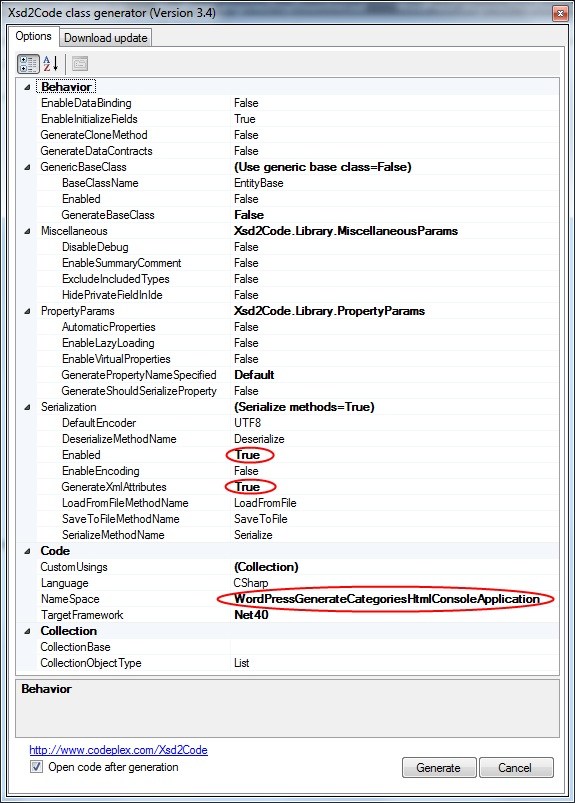
You can generate C# wrapper classes using the XSD.exe tool that ships with Visual Studio, but XSD.exe is hard to use, is hard to integrate into Visual Studio (despite Microsoft Connect request for it), the XSD.exe generated code still needs work for deserializing, and XSD.exe has very limited generation options (heck, after it changed from .NET 1.x to 2.0, it hasn’t been updated for about a decade). XSD2Code has some great reviews, to I used that in stead. And indeed, very well integrates into Visual Studio 2010, and generates very nice C#, especially when you use the options (see also the screenshot on the right):

  • Under Serialization, set Enabled to True
  • Under Serialization, set GenerateXmlAttributes to True

That way, loading the HTML, converting it to XML, then deserializing it into object instances is as simple as this:

                string inputFileName = args[0];
                string inputHtml = getHtml(inputFileName);
                string xml = toXml(inputHtml);
                selectType select = selectType.Deserialize(xml);

More on actually working with the loaded instances in the next episode, including the great benefit of XSD2Code: it generates C# code as partial classes.

–jeroen

Posted in .NET, C#, C# 4.0, C# 5.0, Development, SocialMedia, Software Development, Usability, User Experience (ux), Web Development, WordPress, WordPress, XML, XML escapes, XML/XSD, XSD | 2 Comments »