The Wiert Corner – irregular stream of stuff

Jeroen W. Pluimers on .NET, C#, Delphi, databases, and personal interests

  • My badges

  • Twitter Updates

  • My Flickr Stream

  • Pages

  • All categories

  • Email Subscription

    Enter your email address to subscribe to this blog and receive notifications of new posts by email.

    Join 717 other subscribers

Entity Framework 4 – security warning popup workaround: Do you trust all the T4 “text templates” on your system, even future ones?

Posted by jpluimers on 2011/04/13

When using Entity Framework 4, your transofmrations (model to classes, DB to model, etc) are performed by T4 Text Templates.

Those templates are executed all over the place (when saving your project, building your project, changing your model, etc).

Since anyone can insert a T4 Text Template into Visual Studio, and those are scripts, it is a potential vulnerability.

The default Visual Studio behaviour is to show you a dialog like this:
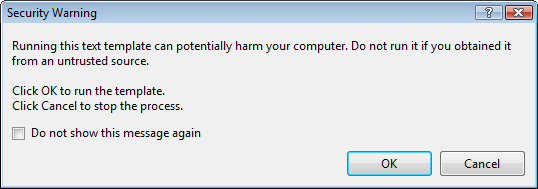
[sourcecode language=”text”]
[Security Warning]

Running this text template can potentially harm your computer. Do not run it if you
obtain if rtom an untrusted source.

Click OK. to run the template.
Click Cancel top stop the process.

[X] Do not show this message again

[OK] [Cancel]
[/sourcecode]

Some blogs mention Just click OK and feel free to check “do not show this message again.”

I’m not sure I want that: it would indicate I always trust T4 Text Templates, even the ones added in the future (T4 Text Templates are executable content, malicious software could find it’s way into your development environment; anyone remember the virus that hooked itself into the run-time library sources of a development system so it would spread through anything compiled on that system?).

But I also don’t want to click OK on that dialog.

It would be so nice if the dialog:

  1. Showed which template is about to be executed
  2. Allowed me to skip only for that particular template

Anyone better thoughts on this?

–jeroen

via Customizing EDM Code Gen in EF4 : Don’t Be Iffy.

Posted in .NET, C#, Delphi, Development, EF Entity Framework, Prism, Software Development | 4 Comments »

c# – List of new features in C#2.0, 3.0 and 4.0 – Stack Overflow

Posted by jpluimers on 2011/04/12

When maintaining software, you can’t always use the latest versions of your tools and languages.

Since C# has added a lot since version 1, it is handy to know what changed in which version.

Of course nothing beets the (paper and electronic!) editions of C# in Depth (covering C# 1, 2 and 3) and C# in Depth second edition (covering C# 2, 3 and 4).

Those books are thick (they need to, there is a truckload to cover!).
(The publisher (Manning) actually did a very good job on the e-book versions. Highly recommended, as it makes searching stuff so much easier).

The answers to the c# – List of new features in C#2.0, 3.0 and 4.0 Stack Overflow question contains a few concise lists of major changes in the language.

I really like the Bluffer’s Guide to C# 2, and the Bluffer’s Guide to C# 3 that Jon Skeet mentioned in his answer (and wish he wrote a Bluffer’s Guide to C# 4 as well), as they focus on some essential stuff in a very concise way.

If you want more detailed info, start with these stackoverflow questions:

Since stackoverflow wasn’t there when C# 2 was introduced in 2005, start with this nice C# 2 overview article on CSharpCorner.

Note: contrary to popular belief, there is no C# 3.5. There is .NET 3.5 (adding LINQ) and .NET 3.0 (adding WPF, WCF and WF) all based on the C# 3.0 and CLR 2 SP1 features.
(Yes, some expression tree features don’t work on CLR2 RTM, as that one has a few bugs, see Jared’s comment on this answer).

--jeroen

via: c# – List of new features in C#2.0, 3.0 and 4.0 – Stack Overflow.

Posted in .NET, C#, C# 2.0, C# 3.0, C# 4.0, Development, Jon Skeet, Software Development | Leave a Comment »

avast! antivirus 5: if you updated your engine/virus definitions to 110411-1, then please update them to ‎110411-2

Posted by jpluimers on 2011/04/11

The 1104011-1 engine/virus definitions of Avast contains a problem; it marks a lot of web-sites as and programs as false positives ago.

Right now, their web-sites and download servers are flooded with people frantically trying to update.

Be patient, but do update when you can. The past has shown the flood doesn’t really take that long.

From their Facebook page:

A few minutes ago: ‎110411-2 UPDATE IS OUT! PLEASE UPDATE YOUR DATABASE.

About 20 minutes ago: PROBLEM WILL BE FIXED WITH NEW DATABASE UPDATE SOON, PLEASE BE PATIENT. THANK YOU.

Oh BTW: If you use the FREE version of avast, then you will have a low priority and receive 403-errors while updating for some while:
Last encountered error: Other HTTP error (403)

–jeroen

via: avast! antivirus 5 Facebook page.

Posted in Power User | 4 Comments »

Spellen is lastig: Het is weer mis met de Chicagostraat – Almere – WebRegio.nl

Posted by jpluimers on 2011/04/11

In Almere is voor de 2e keer een bord met een foute spelling voor Chicagostraat opgehangen (eerst Chigacostraat, nu Chigagostraat).

Gerrit de Jager (Doorzon Daily) wijdde er zelfs een cartoon aan.

Dit doet me denken aan mijn schooltijd; de woorden “Mississippistraat” en “San Franciscostraat” schoten me meteen te binnen: daar moet ik altijd 2 keer over nadenken voor ik ze goed spel.

Gelukkig komen die een stuk minder voor als “Kerkstraat” of “Dorpsstraat” (hoewel “Dorpstraat” ook bestaat).

Spellen blijft moeilijk, en niet alleen Nederlandse woorden :-)

–jeroen

via: Het is weer mis met de Chicagostraat – Almere – WebRegio.nl – Almere.

Posted in Opinions | Leave a Comment »

SharePoint 2010 error: Retrieving the COM class factory for component with CLSID {BDEADF26-C265-11D0-BCED-00A0C90AB50F} failed due to the following error: 800703fa – SharePointWiz

Posted by jpluimers on 2011/04/11

Somehow in a production environment I did get this error too:

[sourcecode language=”text”]
System.Runtime.InteropServices.COMException (0x80040154): Retrieving the COM class factory for component with CLSID {BDEADF26-C265-11D0-BCED-00A0C90AB50F} failed due to the following error: 80040154.
[/sourcecode]

These two posts helped me to solve it:

SharePoint 2010 beta error: Retrieving the COM class factory for component with CLSID {BDEADF26-C265-11D0-BCED-00A0C90AB50F} failed due to the following error: 800703fa – SharePointWiz – Site Home – MSDN Blogs.

Rhythmic Coding: Retrieving the COM class factory for component with CLSID {BDEADF26-C265-11D0-BCED-00A0C90AB50F} failed due to the following error: 80040154.

The solution is deceptively simple:

Resolution: It is because you are trying to build a x86 application. Go to project properties and set type to x64 everywhere. Then rebuild and debug. The Error Vanishes!

The SharePoint 2010 dll’s are all x64, and Visual Studio 2010 by default still starts .NET projects in x86 mode for both Release and Debug settings.

–jeroen

Posted in .NET, .NET 4.0, C#, C# 4.0, Development, SharePoint, Software Development, Visual Studio 2010, Visual Studio and tools, Web Development | 8 Comments »

Lenovo Support – Drivers and software – ThinkPad T61, T61p

Posted by jpluimers on 2011/04/08

For me to remember: the drive matrix for my T61p: Lenovo Support – Drivers and software – ThinkPad T61, T61p.

–jeroen

Posted in Power User | Leave a Comment »

Lenovo Support – Power Manager for Windows 7 (32-bit, 64-bit), Vista (32-bit, 64-bit) – ThinkPad

Posted by jpluimers on 2011/04/08

So I won’t forget: Lenovo Support – Power Manager for Windows 7 (32-bit, 64-bit), Vista (32-bit, 64-bit) – ThinkPad.

–jeroen

Posted in Power User | Leave a Comment »

Got my Linksys WRT54GL working as a Client Bridge using dd-wrt: Client Bridged – DD-WRT Wiki

Posted by jpluimers on 2011/04/08

My primary wireless router is at the ground floor.

They made a small error when building our house some 15 years ago: all the spare PVC pipes running up stairs that were meant for additional cabling are full of concrete, so no way to get any network cabling upstairs.

I don’t need a lot of band width upstairs, but some of the devices are wired.

Solution:

  1. dig up my old Linksys WRT54GL router with hardware version 1.1
  2. ditch the Linskys firmware from my good old
  3. install dd-wrt mini as described on the dd-wrt Linksys WRT54GL pageI installed build 13064, the currently recommended build in the router database.
  4. run the steps in the Client Bridged – DD-WRT Wiki article (this YouTube video was also instructive, but the steps are better)
  5. connect a wired appliance

In fact, I had to make one change: the primary network is on 192.168.0.X, so the Linksys dd-wrt router is now on 192.168.0.50 (which is outside of the DHCP range of the primary router).

And I took a shortcut: I joined the WLAN of the primary router (on the site survey page)  instead of entering all the WLAN info manually.

It works, and took me less than 15 minutes total.

I could have gone one step less (Client only, which puts your LAN behind a NAT) or one step further: configure it into a Repeater Bridge (instead of a Client Bridge).
That would allow WLAN clients to my WRT54GL as well as LAN clients.
Right now I don’t need that.

Another option is Repeater Mode (where the WLAN and LAN clients of the WRT54GL are on a different subnet than the primary router).

Finally, if you run into trouble, read this thread on the dd-wrt forum on Broadcom based devices it contains a truckload of info in a very concise way.

–jeroen

via: Client Bridged – DD-WRT Wiki.

Posted in Power User, WiFi | 5 Comments »

Mono for Android 1.0 released: develop .NET software that runs on Android

Posted by jpluimers on 2011/04/07

Just released: Mono for Android.

This – like MonoTouch for iOS – allows you to develop, debug and deploy Android applications using .NET

Mono for Anroid includes Visual Studio 2010 integration.

If you have a MonoTouch license, you temporarily get a discount on Mono for Android.

Now you can use .NET for the major mobile platforms: iOS, Android and Windows Phone 7 sharing major portions of your code across those platforms.

–jeroen

Posted in .NET, Development, Mono for Android, MonoTouch, Software Development | Leave a Comment »

Visual Studio 2010 “Solution Explorer Tools” addin: Collapse all, Select current item, Collapse all except current item. Highly recommended.

Posted by jpluimers on 2011/04/07

When you have lots of projects in a solution, quickly the tree in the Solution Explorer gets a mess, especially if you have “Track Active Item in Solution Explorer” enabled.

“Solution Explorer Tools” addin for Visual Studio 2010 helps with that.

It adds three buttons to solution explorer

  1. Select current item
  2. Collapse all
  3. Collapse all except current item

The first one basically means you will never need to enable “Track Active Item in the Solution Explorer” again.

The second and third quickly get rid of the mess in the Solution Explorer.

Highly recommended!

–jeroen

via: Solution Explorer Tools.

Posted in .NET, Development, Software Development, Visual Studio and tools | Leave a Comment »