


How to automatically notify the user that it’s time to upgrade a Windows App http://feedly.com/e/iksFlEhd
Archive for April, 2014

Cool post from Marc’s Blog: Delphi XE2’s hidden hints and warnings options
Posted by jpluimers on 2014/04/05
A while ago, I had to disable a couple of warnings from legacy code so I could first perform the Unicode conversion, then make time to eliminate the actual warning cause.
This post was much helpful here:
Marc’s Blog: Delphi XE2’s hidden hints and warnings options.
He lists all the W#### and X#### warnings he could find in Delphi XE2 (XE3, XE4 and XE5 more or less have the same), including the mapping to the equivalent directive IDs used inside these blocks:
{$WARN SYMBOL_DEPRECATED ON}

{$WARN SYMBOL_DEPRECATED OFF}

{$WARN SYMBOL_DEPRECATED DEFAULT}

{$WARN SYMBOL_DEPRECATED ERROR}
I also learned that the DEFAULT value restores an option to what you specified in the project settings.
–jeroen
Share this:
Posted in Delphi, Delphi 2009, Delphi 2010, Delphi XE, Delphi XE2, Delphi XE3, Delphi XE4, Development, Encoding, Software Development, Unicode | 11 Comments »
Appmethod registry keys for trying to build Spring4D
Posted by jpluimers on 2014/04/04
I’m researching the Spring4D build engine to compile and install the packages and sources for the first Appmethod release.
These are the registry settings that I’ve found:
HKEY_CURRENT_USER\Software\Embarcadero\BDS\13.0
I wonder if the 13 has anything to do with http://docwiki.appmethod.com/appmethod/1.13.
Anyhow: it looks like the next Delphi (XE6) might not use the number 13. Again. Although Allen Bauer was in episode 13 (:
–jeroen
Share this:
Posted in Appmethod, Delphi, Delphi XE6, Development, Software Development | Tagged: Allen Bauer | 2 Comments »
8 different javascript emulators for popular and obscure 6502 machines at mos6502 – Google+
Posted by jpluimers on 2014/04/04
Wow: 8 different javascript emulators for popular and obscure 6502 machines (most of them JavaScript based) at mos6502 – Google+ – This week: 6502 machines running in your browser.
–jeroen
Share this:
Posted in 6502, History | Leave a Comment »
2014 and VMware Fusion has still no built-in “Clone this VM”. Workaround from VMware Communities
Posted by jpluimers on 2014/04/04
It is well into 2014 now, and VMware Fusion still has no way to Clone a VM like VMware Workstation can.
Too bad. Luckily, IrishMike posted a workaround for this about 7 years ago.
The easiest is if you keep these names very similar:
- Display Name of the VM (that shows up in your Virtual Machine Library)
- Name of the directory
- Name of the .VMDK files
- Name fo the .VMX files
I do moste of the editing from the console, and used this trick to edit text files from the console.
These are the steps to clone from “master” to “clone” with a little bit of post-editing from my side:
Re: How do we “copy” an entire virtual machine?
- Copy the directory holding all the “master” VMware Fusion files to a new one (lets call the directories “master.vmware” and “clone.vmware”).
- Inside the “clone.vmware” directory, change all the files named “master.” to “clone.”
- Inside the “clone.vmware” directory, remove these subdirectories if they exist:
– any directory ending in “.lck”
– Applications
– appListCache
– caches- Then in the same directory, edit the .vmx file changing all occurrences of “master” to “clone”
– any “fileName” entry
– any “displayName” entry
– any “nvram” entry
– any “extendedConfigFile”
– any “checkpoint.vmState”- Also in the same directory, edit the main .vmdk file and change the mane of the file from “master-flat.vmdk” to “clone-flat.vmdk”
- Then from the Finder or from VMware Fusion, open the .vmx file
- Finally tell VMware Fusion that you “copied” the VM, so it gets a new hardware ID.
Then we’re off and running.
–jeroen
via: VMware Communities: How do we “copy” an entire virtual….
Share this:
Posted in Apple, Fusion, Mac, Mac OS X / OS X / MacOS, Mac OS X 10.5 Leopard, Mac OS X 10.7 Lion, MacBook, OS X 10.8 Mountain Lion, Power User, VMware, VMware Workstation | Leave a Comment »
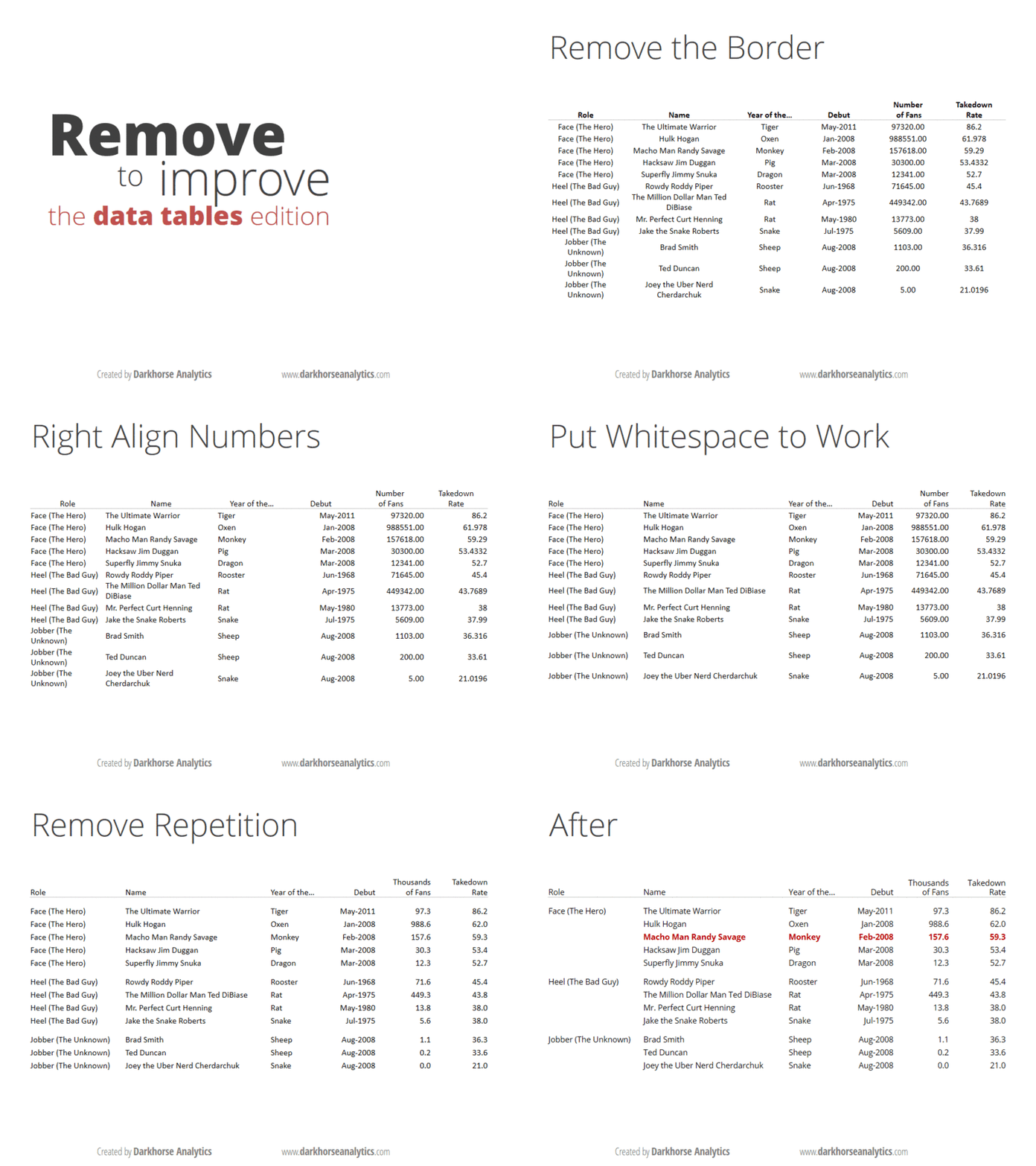
André Vatter – Google+ – Wie Tabellen eigentlich aussehen sollten:
Posted by jpluimers on 2014/04/03
Below is how tables should look like.
Thanks Thomas Mueller (dummzeuch) for pointing me to André Vatter – Google+ – Wie Tabellen eigentlich aussehen sollten: .
–jeroen

Share this:

Posted in Development, Software Development, UI Design | Leave a Comment »
PowerShell conditional and logical operators (via: PowerShell Pro!)
Posted by jpluimers on 2014/04/03
Switching between many different languages, I tend to forget the exact names and symbols of the PowerShell operators.
Most of the ones I use have to do with comparison and logic, o here they are:
Most used comparison operators
| Operator | Description |
|---|---|
| -eq | Equal to |
| -lt | Less than |
| -gt | Greater than |
| -ge | Greater than or Eqaul to |
| -le | Less than or equal to |
| -ne | Not equal to |
Logical operators
| Operator | Description |
|---|---|
| -not | Not |
| ! | Not |
| -and | And |
| -or | Or |
I find it funny that you have ! and -not, but not -!. Oh well (:
Talking about logicals: PowerShell can coerce a couple of values to $false, but I’m ambivalent to use that: it does shorten code, but is very PowerShell specific.
Before I forget: an operator that is undervalued, is the -f operator that does formatting.
It uses the standard .NET formatting strings, so that is an easy way to put your .NET knowledge to use. Some further reading on the -f operator:
- Use PowerShell and Conditional Formatting to Format Numbers – Hey, Scripting Guy! Blog – Site Home – TechNet Blogs.
- Windows PowerShell Tip: Formatting Numbers.
–jeroen
via: Conditional Logic | PowerShell Pro! :: PowerShell Pro!.
Share this:
Posted in CommandLine, Development, PowerShell, PowerShell, Scripting, Software Development | Tagged: comparison operators, Logical operators, PowerShell | Leave a Comment »
Escaping in PowerShell: the back-tick ` is the escape character.
Posted by jpluimers on 2014/04/03
Somehow I always forget this:
The PowerShell escape character is the backtick “`” character.
Use it for escaping quotes within quotes, or inserting special characters.
Don’t abuse it (see the great debate: do not use it as a line continuation).
Often you can avoid line continuation characters by using splatting, which is one of the “best kept secrets” in PowerShell.
–jeroen
via: Escaping in PowerShell.
Share this:
Posted in CommandLine, Development, PowerShell, PowerShell, Scripting, Software Development | Leave a Comment »
Android: “R cannot be resolved to a variable” What is R? Why is it so Cryptic? (via: Stack Overflow)
Posted by jpluimers on 2014/04/03
If I ever get “R cannot be resolved to a variable” in an Android project again, then I should read these posts:
- Android: What is R? Why is it so Cryptic? – Stack Overflow.
- eclipse – R cannot be resolved – Android error – Stack Overflow.
- android – How to duplicate an SDK-sample project into workspace? – Stack Overflow.
- android – com.example.helloandroid.R.id cannot be resolved – Stack Overflow.
One of the quotes was the culprit:
*Note: Eclipse sometimes likes to add an “import android.R” statement at the top of your files that use resources, especially when you ask Eclipse to sort or otherwise manage imports. This will cause your make to break. Look out for these erroneous import statements and delete them.*
–jeroen
Share this:
Posted in Android, Development, Mobile Development, Software Development | Leave a Comment »
Windows: setx sets environment variables in a persistent way (from values on cmd-line, registry or text files)
Posted by jpluimers on 2014/04/02
Wow, I totally missed the introduction of SETX.
From TechNet:
SETX:
Creates or modifies environment variables in the user or system environment, without requiring programming or scripting. The Setx command also retrieves the values of registry keys and writes them to text files.
Even better, is that it allows you take values from these sources so it is easy to get those into environment variables:
- Command-line parameter
- Registry key
- Text file (with some filtering/search options)
From a bit of searching around, I think it got introduced in a Windows Resource Kit, and got included by default starting Windows Vista.
Excellent addition to my toolset (:
–jeroen
via Setx.
Share this:
Posted in Batch-Files, Development, Power User, Scripting, Software Development, Windows, Windows 7, Windows 8, Windows 8.1, Windows Server 2008, Windows Server 2008 R2, Windows Vista | Leave a Comment »
 The Wiert Corner - irregular stream of stuff