The Wiert Corner – irregular stream of stuff

Jeroen W. Pluimers on .NET, C#, Delphi, databases, and personal interests

  • My badges

  • Twitter Updates

  • My Flickr Stream

  • Pages

  • All categories

  • Enter your email address to subscribe to this blog and receive notifications of new posts by email.

    Join 1,860 other subscribers

Archive for December, 2016

How to I show the changes which have been (non)staged or are about to be commited? – via: Stack Overflow

Posted by jpluimers on 2016/12/27

I love this StackOverflow answer by Abizern (who maintained a great 365git blog as well):

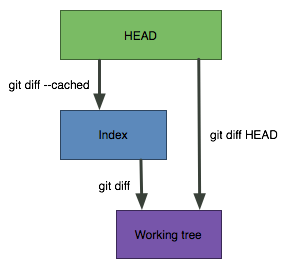
A simple graphic makes this clearer

git diff

Shows the changes between the working directory and the index. This shows what has been changed, but is not staged for a commit.

git diff --cached

Shows the changes between the index and the HEAD(which is the last commit on this branch). This shows what has been added to the index and staged for a commit.

git diff HEAD

Shows all the changes between the working directory and HEAD (which includes changes in the index). This shows all the changes since the last commit, whether or not they have been staged for commit or not.

–jeroen

Source: git – How do I show the changes which have been staged? – Stack Overflow

Posted in Development, DVCS - Distributed Version Control, git, Source Code Management | Leave a Comment »

Delphi class constructors and initialisation order

Posted by jpluimers on 2016/12/27

A long while ago, but still an interesting discussion: Is there a predictable order of execution for Class Constructors? leading to these links:

–jeroen

Posted in Conference Topics, Conferences, Delphi, Delphi 10 Seattle, Delphi 2010, Delphi x64, Delphi XE, Delphi XE2, Delphi XE3, Delphi XE4, Delphi XE5, Delphi XE6, Delphi XE7, Delphi XE8, Development, Event, Software Development | Leave a Comment »

tkannelid comments on The Death of CyanogenMod and What it Means for Development

Posted by jpluimers on 2016/12/26

if you have a CyanogenOS phone and can disable updates on it, do so.

For instance if you have a OnePlus One…

[WayBackReddit: tkannelid comments on The Death of CyanogenMod and What it Means for Development

–jeroen

Posted in Android Devices, OnePlus One, Power User | Leave a Comment »

Some notes on my Windows 10 upgrade processes

Posted by jpluimers on 2016/12/26

Shortly before the “Free Windows 10 Update” deadline I upgraded a bunch of physical and virtual machines each with different configurations providing various challenges.

Back then, I didn’t have time to properly write down notes so I saved a bunch of links. Now I found time to add a few notes below.

Windows Editions

Note there are fewer Windows 10 editions (Home/Pro/Enterprise) are different than before so there is a mapping (for instance Windows Ultimate does not map to Windows Enterprise): Windows 10 free upgrade matrix.

Getting the Windows 10 ISO image

It’s much easier, faster and disk-space friendly to install from ISO than waiting for GWX.exe or GWXUI.exe, especially when installing multiple systems in a row.

I don’t use x86 systems any more so I used Win10_1511_2_English_x64.iso which is slightly newer than Win10_1511_1_English_x64.iso and is likely to be outdated by now so get yours through https://www.microsoft.com/software-download/windows10.

If you insist, there is Win10_1511_2_English_x32.iso (note the x64 -> x32 consistency, many people refer to it as x86 though).

Mounting ISO images

Windows 10 does not like to upgrade when you have the Daemon Tools ISO mounting tool installed. But Portable WinCDEmu is fine.

The Windows 10 installer doesn’t suffer from Portable WinCDEmu not mounting after reboot: during the first install step it copies enough to continue without the ISO image mounted after reboot.

Installing using (Virtual) CD drive

Just run the SETUP.EXE in the root of the CD drive.

Creating bootable media

Some systems do not have optical media any more so you need to create bootable media.

In the past, you used ImageX for that (e.g. Step-by-Step: Basic Windows 7 Deployment for IT Professionals), but as of Windows 8/Server 2008 R2 there is DISM: Apply Images Using DISM.

I used this command-line to copy from H: (the content of the ISO image) to V: (the VHD drive):

dism /apply-image /imagefile:H:\Sources\install.wim /index:1 /ApplyDir:V:\

More information at DISM Image Management Command-Line Options and DISM.exe Replaces ImageX.exe – My Thoughts On IT… (you can even use it to backup/restore file-based Windows images).

Multi-boot / boot configuration data

In the past (think Windows XP and earlier), you had BOOT.INI to choose which one to boot. Now there are msconfig and Boot Configuration Data editors like bcdedit and bcdboot for that:

Installing on VHD

You cannot update Windows 10 on a “Boot to VHD” based system: it’s one of the limitations in What is not supported for native boot when using VHDs:

  • Upgrading the operating system booted from a VHD. If you boot from a VHD, you cannot upgrade the Windows version in the VHD to a newer version.

There is a cumbersome workaround using Hyper-V which I didn’t use (look for “How do I install the November Update if Windows 10 is running on a VHD using native boot?” in Hands-on with Windows 10: Upgrading, installing and activating in the real world | ZDNet).

These are the steps I used to get it on a VHD (based on the How to install Windows 10 to VHD and create a dual boot system with Win 7/8 video below):

  1. Download the ISO
  2. Mount the ISO
  3. Create a VHD using Disk Management (diskmgmt.msc)
    1. Ensure 20 gigabytes or larger (I used a pre-allocated disk)
    2. Name it appropriately (note the name)
    3. Initialise it using MBR
    4. Create a new “Simple Volume” formatted as NTFS
    5. Mount it (I used V: drive)
  4. Start a command prompt (cmd.exe) as Administrator and confirm the UAC prompt
    1. Image the ISO to the VHD using DISM (see command-line above)
    2. Add the VHD (drive V:) to the boot list: bcdboot V:\Windows
  5. Using MSCONFIG ensure the Windows 10 VHD boots as default (it will reboot at least once during installation)
  6. Complete the Windows 10 Installation
    1. Enter the key used for the original Windows system or a new Windows 10 ke
  7. Optionally Using MSCONFIG ensure the original Windows 10 VHD boots as default (it will reboot at least once during installation)

You can use an existing VHD for DISM in which case you might need to Resize/extend virtual hard disk to get more space under Windows 7/8/10.


Key validation issues

If you get an error 0x80041023 during key validation at install time, then retry it later. Often the validation then just works. If it doesn’t, try to Activate Your Windows 10 License via Microsoft Chat Support or phone based activation:

  1. Press Windows key + X then clickRun, then type: slui.exe 4
  2. Next press the ‘ENTER’ key
  3. Select your ‘Country’ from the list.
  4. Choose the ‘Phone Activation’ option.
  5. Stay on the phone (do not select/press any options) and wait for a person to help you with activation.
  6. Explain your problem clearly to the support person.

–jeroen

Read the rest of this entry »

Posted in Power User, Windows, Windows 10, Windows 7, Windows 8, Windows 8.1, Windows XP | Leave a Comment »

Organizational Doxing – Schneier on Security

Posted by jpluimers on 2016/12/26

X-mas day 2 thought:

best defense might be to refrain from doing things that don’t look good on the front pages of the world’s newspapers

Source: Organizational Doxing – Schneier on Security

–jeroen

via: »Organizations are increasingly getting hacked, and not by criminals wanting to steal credit card numbers or account information in order to commit fraud,… – Kristian Köhntopp – Google+

Posted in About, LifeHacker, Opinions, Personal, Power User | Leave a Comment »

Robert C Martin – Functional Programming; What? Why? When? – YouTube

Posted by jpluimers on 2016/12/26

Great after X-mas watch: Robert C Martin – Functional Programming; What? Why? When? – YouTube subtitled “the failure of state”.

Thanks [WayBackAndrew Rohn – YouTube for the timestamp list:

  • 4:07 “Functional Programming: What? When? Why?” or “The Failure of State”
  • 5:10 Rich Hickey is the author of Clojure. Listen to his talks. 5:40 What is state? Variables.
  • 11:15 Structure and Interpretation of Computer Programs. This is a fascinating book. For the first 250 pages, the book uses no assignment statements.
  • 14:15 Here’s how SICP’s model of computing worked before they introduced an assignment statement. Simply replace a function call with its implementation.
  • 15:58 Once you introduce assignment. You can no longer replace a function call with its implementation. Why? Because the state of the system may have changed. An assignment statement introduces the concept of time.
  • 18:04 Side effect: an assignment statement. If there’s no assignment, there’s no side effect.
  • 20:22 What “hack” have we done to protect us from memory leaks? Garbage collection.
  • 31:46 Functional programming was invented in 1957 before OO and structured. But memory was too expensive to make it practical. But memory is cheap now.
  • 32:53 Should we change how we program? We should because: 1) Functional programs are simpler – which makes them easier to write and maintain 2) There’s no temporal coupling – no worrying if some function was called before another function. 3) Fewer concurrency issues. In a purely functional program, there’s no concurrency because there is no state. 4) No asking, “What’s the state?”
  • 38:38 We’re using multicore CPU’s now because we can’t increase clock rate anymore. And hardware makers are doing bizarre tradeoffs. They’re making individual processors slower but putting more processors in. So individual cores slow down but the chip throughput goes up if you can take advantage of all the cores.
  • 42:00 How are you going to work with an abundance of cores? Maybe we need to walk away from the assignment statement.
  • 49:49 OO = procedure + state. OO is exposed procedure but hidden state (encapsulation). It’s possible to write functional programs using an OO style. All of the objects become immutable.

–jeroen

Posted in Design Patterns, Development, Functional Programming, Software Development | Leave a Comment »

Apple Tesseract 1992 prototype (not Tessaract)

Posted by jpluimers on 2016/12/23

A while ago that bitsavers published a picture of an Apple 1992 Tesseract Motherboard.

It’s from the 68k to PowerPC RISC transition Apple made in the second half of the 1980s and first half of the 1990s where several groups within Apple were working on new equipment.

More details of those are here:

Note this is not [Wayback] TesSeRact from the DOS TSR (Terminate and Stay Resident) days:

Via [Wayback] Ralf Brown’s Files

Downloadable files by Ralf Brown:x86/MS-DOS Interrupt List, RBcomm, SPAWNO, AMISLIB, DV-GLUE, RBdualVGA,RBkeyswap, RBspeed, PCICFG, CMU-EBMT. (20aug10)


–jeroen

Read the rest of this entry »

Posted in 68k, History, MS-DOS, Power User, PowerPC, Tesseract, TSR Terminate and Stay Resitent | Leave a Comment »

How to securely delete files in OS X 10.11 ‘El Capitan’ | MacIssues

Posted by jpluimers on 2016/12/23

Interesting: diskutil secureErase freespace LEVEL /Volumes/DRIVENAME

–jeroen

Source: How to securely delete files in OS X 10.11 ‘El Capitan’ | MacIssues

Posted in Apple, Mac, Mac OS X / OS X / MacOS, Mac OS X 10.4 Tiger, Mac OS X 10.5 Leopard, Mac OS X 10.6 Snow Leopard, Mac OS X 10.7 Lion, MacBook, MacBook Retina, MacBook-Air, MacBook-Pro, MacMini, OS X 10.10 Yosemite, OS X 10.8 Mountain Lion, OS X 10.9 Mavericks, Power User | Leave a Comment »

Where can I get the glossary of Microsoft’s standard translations for computer terms? – The Old New Thing

Posted by jpluimers on 2016/12/22

A while ago I bumped into [WayBackWhere can I get the glossary of Microsoft’s standard translations for computer terms? – The Old New Thing

Since I’m a non-digital pack-rat as well, I love [WayBack] this comment by [WayBack] Ian Boyd:

We have an *old* copy of the Microsoft Style Guide – an actual book. From that book i’ll always remember that e-mail has a hyphen in it.

I’ve that book too and write e-mail the same way.

But books are often hard to search through, so I love this list that [WayBack] Raymond Chen made:

I especially like the [WayBackinteractive search, but with any outcome, please remember that the context of your translation is very important.

For instance, I vividly remember a project some 20+ years ago where we had to translate the words “Close” and “Cancel” in the realm of the insurance business.

All guides indicated “Close” should become “Sluiten” which in that realm is colloquial for “Afsluiten” which means “to take out an insurance” implying a totally wrong action. Similarly “Cancel” translated to “Annuleren” which in the same realm would mean “to cancel an insurance”.

So we went for very specific translations narrowing down what exactly would happen in those screens, like:

  • “Verlaten” (English “Exit”)
  • “Bewaren” or “Opslaan” (English “Save”)
  • “Terug” (English “Back”)

–jeroen

Posted in Development, internatiolanization (i18n) and localization (l10), Software Development, The Old New Thing, Windows Development | Leave a Comment »

Delphi functional programming: Sequences

Posted by jpluimers on 2016/12/22

In functional programming, sequences are an important way of expressing logic.

This G+ post by Colin Johnsun discusses a library and a Spring4D way to handle sequences: I’ve release a library that allows you to iterate through a collection of items without using loops…

It’s interesting when mapping, reducing and solving many other problems in a functional way.

Background:

–jeroen

Posted in Delphi, Delphi 2009, Delphi 2010, Delphi XE, Delphi XE2, Delphi XE3, Delphi XE4, Delphi XE5, Delphi XE6, Delphi XE7, Delphi XE8, Development, Software Development | Leave a Comment »