


MikroTik has great hardware, but getting things to work can be a bit ehm intimidating.
So here are some links that were useful getting my CCR1009 and CRS226 configurations to do what I wanted.
Posted by jpluimers on 2017/04/25
MikroTik has great hardware, but getting things to work can be a bit ehm intimidating.
So here are some links that were useful getting my CCR1009 and CRS226 configurations to do what I wanted.

Posted in DNS, Hardware, Internet, IPSec, MikroTik, Network-and-equipment, OpenVPN, Power User, PPTP, routers, VPN, WinBox | Leave a Comment »
Posted by jpluimers on 2017/04/24
ANSI HTML Adapter example installation on OpenSuSE Tumbleweed:
zypper addrepo http://download.opensuse.org/repositories/utilities/openSUSE_Factory/utilities.repo

zypper refresh

zypper install aha
On Mac OS X:
brew install aha
Output looks like this: ANSI HTML Adapter example:
diaspore:/etc # aha --version

Ansi Html Adapter Version 0.4.9.0

diaspore:/etc # aha --version | grep aha

diaspore:/etc # aha --version | aha
Ansi Html Adapter Version 0.4.9.0
And the aha --help output on Mac OS X:
Ansi Html Adapter Version 0.4.8.0
aha takes SGR-colored Input and prints W3C conform HTML-Code
use: aha <options> [-f file]
     aha (--help|-h|-?)
aha reads the Input from a file or stdin and writes HTML-Code to stdout
options: --black,      -b: Black Background and White "standard color"
         --pink,       -p: Pink Background
         --stylesheet, -s: Use a stylesheet instead of inline styles
         --iso X,    -i X: Uses ISO 8859-X instead of utf-8. X must be 1..16
         --title X,  -t X: Gives the html output the title "X" instead of
                           "stdin" or the filename
         --line-fix,   -l: Uses a fix for inputs using control sequences to
                           change the cursor position like htop. It's a hot fix,
                           it may not work with any program like htop. Example:
                           echo q | htop | aha -l > htop.htm
         --word-wrap,  -w: Wrap long lines in the html file. This works with
                           CSS3 supporting browsers as well as many older ones.
         --no-header,  -n: Don't include header into generated HTML,
                           useful for inclusion in full HTML files.
Example: aha --help | aha --black > aha-help.htm
         Writes this help text to the file aha-help.htm

Copyleft Alexander Matthes aka Ziz 2015
         zizsdl@googlemail.com
         http://ziz.delphigl.com/tool_aha.php
This application is subject to the MPL or LGPL.
–jeroen
| diaspore:/etc # aha –version | |
| Ansi Html Adapter Version 0.4.9.0 | |
| diaspore:/etc # aha –version | aha | |
| <?xml version="1.0" encoding="UTF-8" ?> | |
| <!DOCTYPE html PUBLIC "-//W3C//DTD XHTML 1.0 Strict//EN" "http://www.w3.org/TR/xhtml1/DTD/xhtml1-strict.dtd"> | |
| <!– This file was created with the aha Ansi HTML Adapter. https://github.com/theZiz/aha –> | |
| <html xmlns="http://www.w3.org/1999/xhtml"> | |
| <head> | |
| <meta http-equiv="Content-Type" content="application/xml+xhtml; charset=UTF-8" /> | |
| <title>stdin</title> | |
| </head> | |
| <body> | |
| <pre> | |
| <span style="color:red;font-weight:bold;">Ansi Html Adapter</span> Version 0.4.9.0 | |
| </pre> | |
| </body> | |
| </html> |
Posted in *nix, Linux, openSuSE, Power User, SuSE Linux, Tumbleweed | Leave a Comment »
Posted by jpluimers on 2017/04/24
I don’t use Wireshark enough to be fluent, so here are some links and quotes that proved to be useful for me:
(ip.dst == 192.168.99.61 && ip.src == 192.168.99.38) || (ip.dst == 192.168.99.38 && ip.src == 192.168.99.61) && http(ip.addr == 192.168.99.61 && ip.src == 192.168.99.38) && httphttp contains "SOAPAction:" || http contains "HTTP"src 213.146.155.196 and tcp port 8500ether host MAC 00:21:AC:01:08:B1frame contains clause will match any binary content in the frame (you can be more specific with for instance tcp containsor data contains (which uses the data dissector). Example: (frame contains 21:00 || frame contains 00:21) && tcp.len > 0data.data matches "\xa4.\xc3...\xb2"eth.src == MAC 00:21:AC:01:08:B1GET as tcp[((tcp[12:1] & 0xf0) >> 2):4] = 0x47455420POST as tcp[((tcp[12:1] & 0xf0) >> 2):4] = 0x504f5354 && tcp[((tcp[12:1] & 0xf0) >> 2) + 4:1] = 0x20–jeroen
Posted in *nix, *nix-tools, Power User, Wireshark | Leave a Comment »
Posted by jpluimers on 2017/04/21
For future research: opensuse – How to run my script after SuSE finished booting up? – Unix & Linux Stack Exchange
Reason? Want to show the output of this as the last boot sequence line:
hostname
ip route

echo

ip address | grep -w 'UP\|flags\|inet\|inet6'

echo more detailed info through "ip address" and "ip route"

cat /etc/resolv.conf | grep nameserver
–jeroen
Posted in *nix, *nix-tools, bash, Linux, openSuSE, Power User, SuSE Linux, Tumbleweed | Leave a Comment »
Posted by jpluimers on 2017/04/21
Vulnerability in Chrome, Firefox, and Opera makes users susceptible to phishing with Unicode domains.
Source: [Archive.is] Phishing with Unicode Domains – Xudong Zheng
Basically these are not the same sites:
Depending on the font used, you might notice it if you look very careful.
Keywords: Unicode codepoints, visual similarity, codepoint to character mapping in fonts, Punycode
Via: [WayBack] Same URL, two websites? (notice the difference)1. https://www.аррӏе.com/2. https://www.apple.com/ – Jean-Luc Aufranc – Google+
References:
apple with аррӏе.–jeroen
Posted in Power User, Security | Leave a Comment »
Posted by jpluimers on 2017/04/21
This extension finds videos on the web sites you are browsing and allows you to play them on your Chromecast device.
Works nice if you need it, but uses a lot of CPU (on my Retina MacBook with latest chrome: about 75% of one CPU core) so it drains battery fast.
You can view this high CPU usage in the Chrome Task Manager (which used to be available through chrome://tasks, but this is one of the use full Find Hidden Features On Chrome’s Internal Chrome:// Pages features they removed). Fire up the Chrome Task Manager through the Window menu.
Verdict
Enable only when you need it. Disable after use in chrome://extensions
–jeroen
via: CastBuddy – Chrome Web Store:
When it finds Chromecast comptible videos ( .webm, .mp4, .mkv etc), count of videos is shown over extension’s menubar icon, which you can click to Select a video and extension will send it to your Chromecast device. Once a casting session is established, you can control video playback from Extension’s popup page.
Posted in Chrome, Google, Power User | 2 Comments »
Posted by jpluimers on 2017/04/20
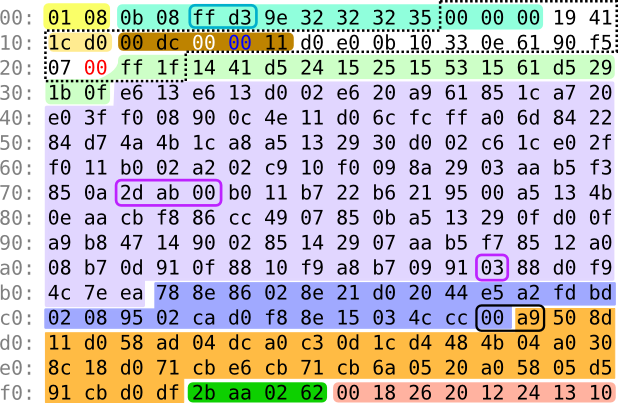 Geek pr0n on the C64:
Making a demo in just 256 bytes would be a formidable challenge regardless of platform. A Mind Is Born is my attempt to do it on the Commodore 64. In the absence of an actual 256-byte compo, it was submitted to the Oldskool 4K Intro compo at [WayBack] Revision 2017, where it ended up on 1st place.
Source: [WayBack] A Mind Is Born
Via:
–jeroen

Posted in 6502, C64, Commodore, Development, History, Software Development | Leave a Comment »
Posted by jpluimers on 2017/04/20
Note this works only when the VMs have VMware Tools installed (more on that below):
VMWare provides, not surprisingly, a built in tool for this, vmrun. It’s under
/Applications/VMware Fusion.app/Contents/Library/vmrunalthough it has moved around in other Fusion releases a bit.
🍺 vmrun list Total running VMs: 1 .docker/machine/machines/myvm.vmx

🍺 vmrun getGuestIPAddress ~/.docker/machine/machines/myvm.vmx 172.16.213.128
via: How do I find the IP address of a virtual machine using VMware Fusion? – Super User [WayBack]
vmrun [WayBack] is barely documented and most of is in PDF of which this is the most recent I could find: www.vmware.com/pdf/vix180_vmrun_command.pdf [WayBack]
Based on the above path, I added this to my ~/.bash_profile file:
alias vmrun='/Applications/VMware\ Fusion.app/Contents/Library/vmrun'
alias vmrun-list-running-VMs='vmrun list | grep vmx'
vmrun-list-ipv4-of-running-VMs()
{
  vmrun-list-running-VMs | while read line ; do echo $line && vmrun getGuestIPAddress $line; done
}
Now I can do this:
$ vmrun-list-ipv4-of-running-VMs
/Users/jeroenp/VM/W81Entx64DelphiRegression.vmwarevm/W81Entx64.vmx
172.16.172.135
/Users/jeroenp/VM/diaspore-opensuse-Tumbleweed-x64.vmwarevm/diaspore-opensuse-Tumbleweed-x64.vmx
Error: The VMware Tools are not running in the virtual machine: /Users/jeroenp/VM/diaspore-opensuse-Tumbleweed-x64.vmwarevm/diaspore-opensuse-Tumbleweed-x64.vmx
$ vmrun-list-ipv4-of-running-VMs
/Users/jeroenp/VM/diaspore.opensuse-Tumbleweed-x64/diaspore.opensuse-Tumbleweed-x64.vmx
Error: Unable to get the IP address
/Users/jeroenp/VM/W81Entx64DelphiRegression.vmwarevm/W81Entx64.vmx
172.16.172.135
$ vmrun-list-ipv4-of-running-VMs
/Users/jeroenp/VM/diaspore.opensuse-Tumbleweed-x64/diaspore.opensuse-Tumbleweed-x64.vmx
Error: Unable to get the IP address
/Users/jeroenp/VM/W81Entx64DelphiRegression.vmwarevm/W81Entx64.vmx
172.16.172.135
$ vmrun-list-ipv4-of-running-VMs
/Users/jeroenp/VM/diaspore.opensuse-Tumbleweed-x64/diaspore.opensuse-Tumbleweed-x64.vmx
172.16.172.134
/Users/jeroenp/VM/W81Entx64DelphiRegression.vmwarevm/W81Entx64.vmx
172.16.172.135
$ vmrun-list-ipv4-of-running-VMs
/Users/jeroenp/VM/diaspore.opensuse-Tumbleweed-x64/diaspore.opensuse-Tumbleweed-x64.vmx
172.16.172.134
/Users/jeroenp/VM/W81Entx64DelphiRegression.vmwarevm/W81Entx64.vmx
172.16.172.142
These are the messages I observed:
Error: The VMware Tools are not running in the virtual machine: /Users/jeroenp/VM/diaspore-opensuse-Tumbleweed-x64.vmwarevm/diaspore-opensuse-Tumbleweed-x64.vmx
Error: Unable to get the IP address
172.16.172.135
The first one means a machine is running but has no VMware Tools installed. For an OpenSuSE machine you can install it with zypper install open-vm-tools, for other Linux systems read VMware Tools auf Ubuntu, Mint, CentOS oder openSUSE installieren | ITrig [WayBack]
Some more examples of vmrun for VMware Fusion are at Control VMware Fusion from the Command Line | James Reuben Knowles [WayBack]
–jeroen
Posted in *nix, bash, Development, Fusion, openSuSE, Power User, Scripting, Software Development, SuSE Linux, Tumbleweed, Virtualization, VMware | Leave a Comment »
Posted by jpluimers on 2017/04/20
Some 23 years ago…
Posted in Apple, Classic Macintosh, History, Macintosh SE/30, Power User | Leave a Comment »
Posted by jpluimers on 2017/04/20
You think you know Unicode? Think again, then read [Wayback] Dark corners of Unicode / fuzzy notepad.
On basics, sorting, comparison, decomposition, composition, width, whitespace, encoding, emoji, interesting code planes and dark corners. Lots of dark corners.
The examples are in Python, but hold for almost any programming language
–jeroen
via: Kristian Köhntopp
Posted in Conference Topics, Conferences, Development, Encoding, Event, Software Development, Unicode | Leave a Comment »
 The Wiert Corner - irregular stream of stuff