The Wiert Corner – irregular stream of stuff

Jeroen W. Pluimers on .NET, C#, Delphi, databases, and personal interests

  • My badges

  • Twitter Updates

  • My Flickr Stream

  • Pages

  • All categories

  • Enter your email address to subscribe to this blog and receive notifications of new posts by email.

    Join 1,860 other subscribers

Archive for July, 2018

Agile &: Core Agile Practices

Posted by jpluimers on 2018/07/19

There is a lot of noise in the agility world. Choosing what practices your team does and why can be a tedious job. Each team is different and evolves over time, so you need to find the ones best fitting to your team and repeat that.

The [WayBackAgile &: Core Agile Practices post has done a pre-selection of practices that could work well for your team. Try them, test them out and find which work well as best practice for your team.

Via: [WayBack] Core Agile Practices – Marjan Venema – Google+

–jeroen

Posted in Agile, Development, Software Development | Leave a Comment »

Pretty printing HTML is the same as formatting code: How do you format code in Visual Studio Code (VSCode) – Stack Overflow

Posted by jpluimers on 2018/07/18

I was looking for a HTML pretty printer (…) but in Visual Studio code, that is called code formatting, which supports many languages out of the box (including HTML) without requiring extensions like Atom.io (see below).

The shortcuts are at [WayBack] How do you format code in Visual Studio Code (VSCode) – Stack Overflow.

For Mac OS X/OS X/MacOS they are (the second one only appears when you have a code selection):

  • document: ShiftOptionF
  • selection: CommandK CommandF

Read the rest of this entry »

Posted in Development, Software Development, Visual Studio and tools, vscode Visual Studio Code | Leave a Comment »

ColorButton unit with TColorButton saved for posterity as http://delphi.about.com got hi-jacked.

Posted by jpluimers on 2018/07/18

Hopefully my blog will last longer than the original delphi.about.org articles.

Last year, I noticed yet another path into bit rot: [WayBack] The title reads “Source Code for the TColorButton Delphi Component”… I must be going blind because I can’t find it – Thomas Mueller (dummzeuch) – Google+

In this case, http://delphi.about.com/library/weekly/aa061104a.htm got redirected via http://delphi.about.com/od/vclusing/fl/Source-Code-for-the-TColorButton-Delphi-Component.htm to [WayBackhttps://www.thoughtco.com/source-code-for-tcolorbutton-4077901 which is a copy of the original article failing to preserve the download links of the original source code.

It doesn’t help that the original source download at http://delphi.about.com/library/code/ncaa061104a.htm also redirects to https://www.thoughtco.com/delphi-programming-4133475 a generic catch all of [WayBackDelphi Programming where http://delphi.about.com also redirects to.

In other words:

http://delphi.about.com got hi-jacked.

So here are some links to various forms of that source code:

–jeroen

Posted in Color (software development), Delphi, Development, Software Development | 2 Comments »

Firebird: the way you compare dates highly influences fetch times

Posted by jpluimers on 2018/07/18

I was amazed the influence on how you compare dates would be a factor 1000 change in fetch times even though I wrote about date, time and timestamp conversions before in Source: Firebird – adjusting Delphi stored TDateTime (or OLE Automation date) fields that contain Dates, Times or DateTimes.

All queries were ran at 20170410.

Slow

select id, date '1899-12-30' + data.datadate as datestamp
from   data
where  1=1
-- slow: prepared 0.066 sec; fetched 10.549 sec 250 rows
    and date '1899-12-30' + data.datadate >= '2017-04-08' -- last 2 days
    and date '1899-12-30' + data.datadate <= '2017-04-10' -- today

Fast

select id, date '1899-12-30' + data.datadate as datestamp
from   data
where  1=1
-- fast: prepared 0.063 sec; fetched 0.009 sec 250 rows
    and data.DATADATE >= date 'Now' - date '1899-12-30' - 2 -- last 2 days 
    and data.DATADATE <= date 'Now' - date '1899-12-30' -- today 

Fast

select id, date '1899-12-30' + data.datadate as datestamp
from   data
where  1=1
-- fast: prepared 0.070 sec; fetched 0.011 sec 250 rows
    and data.DATADATE >= date '2017-04-10' - date '1899-12-30' - 2 -- last 2 days 
    and data.DATADATE <= date '2017-04-10' - date '1899-12-30' -- today

Fast

select id, date '1899-12-30' + data.datadate as datestamp
from   data
where  1=1
-- fast: prepared 0.073 sec; fetched 0.009 sec 250 rows
    and data.DATADATE >= date '2016-04-08' - date '1899-12-30' -- specific date range start 
    and data.DATADATE <= date '2016-04-10' - date '1899-12-30' -- specific date range end

The table looks like this:

CREATE TABLE "DATA" 
(
  ID                        INTEGER         NOT NULL,
  DATADATE         DOUBLE PRECISION,
  DATATIME         DOUBLE PRECISION
);
CREATE ASC INDEX DATA_DATADATE ON "DATA" (DATADATE);

–jeroen

Posted in Database Development, Development, Firebird | Leave a Comment »

From the bragging “Did you know the IDE starts almost twice as fast in 10.2.2 as it did in 10.1?”

Posted by jpluimers on 2018/07/17

An interesting discussion sprouted from the bragging [WayBack] Did you know the IDE starts almost twice as fast in 10.2.2 as it did in 10.1? https://community.embarcadero.com/blogs/entry/new-in-10-2-2-welcome-page-… – David Millington – Google+.

I do not care very much about IDE start times (Visual Studio starts faster, others like Android Studio start slower than Delphi), more about productivity.

Which means loading projects, opening files and forms, switching projects, etcetera need to be fast and stable.

For me this is when on Delphi projects, I start about half a dozen copies of Delphi about 10 seconds apart (otherwise you get exceptions in any Galileo version), make some tea, then come back.

Each time an IDE crashes, I kill it, start a new one, switch to an existing one, load the projects I need and continue. On a full day working with Delphi, this happens about a dozen times a day.

After that I want to be productive.

Here is where I was so surprised by the great tip from Yusuf Zorlu

+Asbjørn Heid you should try to disable all “livebinding” packages + rename dclbindcomp250.bpl . If i opened a form before i had to wait 20 to 40 seconds … now it is superfast and opens forms under 5 seconds. I don’t need LiveBindings …

and the response by Asbjørn Heid

+Yusuf Zorlu Thank you! Holy cow that’s a difference! As you say, even our most complex forms are down to 4 seconds now.

I never use LiveBindings as they are way to convoluted, unstable and result in logic being in designers as opposed to tool-manageable code.

In addition, LiveBindings have never been really optimised since their inception in Delphi XE2.

This saves a lot of time!

So one day, I need to update Source: Delphi packages I have disabled by prefixing their description with an underscore (and why) and create a batch file with the various [WayBack] reg add commands modifying the package loads.

Related:

–jeroen

Posted in Conference Topics, Conferences, Delphi, Development, Event, Software Development | 2 Comments »

GExperts “Set Component Properties”

Posted by jpluimers on 2018/07/17

I totally forgot about [Archive.isGExperts Help: Set Component Properties

The main reason is that I hardly use any live connections in Delphi applications any more for mainly two reasons:

  • timing issues (varying from taking way too long to open something, via order what needs to be opened different between run-time and design-time, to )
  • pushing business logic further away from the user interface so it is easier to automatically test the business logic

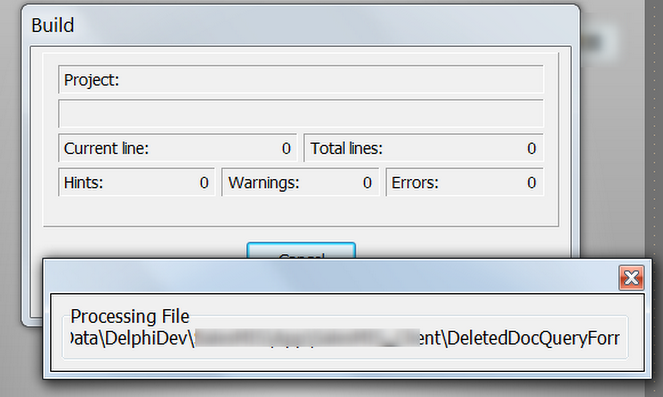
But once every while I’m on a new site that has their own tool-chain installed and I see screens like this one:

I’m not alone on this: [WayBack] Does anybody know where the following dialog window come from? I need to disable it but failed to find the source IDE plugin – Edwin Yip – Google+

The good thing is that it can bring certain components into a know state before compiling your application.

But this is a thing your CI environment should already do for you.

–jeroen


Posted in Delphi, Development, GExperts, Software Development | Leave a Comment »

PowerShell on Mac OS X and other non-Windows systems

Posted by jpluimers on 2018/07/17

I wasn’t expecting it to be so easy to install PowerShell on Mac OS X:

brew install Caskroom/cask/powershell

In the background it executes this script: https://github.com/caskroom/homebrew-cask/blob/master/Casks/powershell.rb. which indirectly goes through the URL template https://github.com/PowerShell/PowerShell/releases/download/v#{version}/powershell-#{version}.pkg.

On other non-Windows systems, you have to go through GitHub yourself: https://github.com/powershell/PowerShell. The PowerShell team at Microsoft has many more repositories including the Win32-OpenSSH port which you can find through https://github.com/PowerShell.

At the time of writing, PowerShell was available for these platforms:

Platform Downloads How to Install
Windows 10 / Server 2016 (x64) .msi Instructions
Windows 8.1 / Server 2012 R2 (x64) .msi Instructions
Windows 7 (x64) .msi Instructions
Windows 7 (x86) .msi Instructions
Ubuntu 16.04 .deb Instructions
Ubuntu 14.04 .deb Instructions
CentOS 7 .rpm Instructions
OpenSUSE 42.1 .rpm Instructions
Arch Linux Instructions
Many Linux distributions .AppImage Instructions
macOS 10.11 .pkg Instructions
Docker Instructions

The first version I installed on Mac OS X was this: ==> Downloading https://github.com/PowerShell/PowerShell/releases/download/v6.0.0-alpha.17/powershell-6.0.0-alpha.17.pkg

By now I really hope it is out of Alpha state.

–jeroen

via:

Posted in *nix, Apple, CommandLine, Development, iMac, Linux, Mac, Mac OS X / OS X / MacOS, MacBook, MacBook Retina, MacBook-Air, MacBook-Pro, MacMini, openSuSE, Power User, PowerShell, PowerShell, Scripting, Software Development, SuSE Linux, Ubuntu | Leave a Comment »

Interesting take by Robin Message on Twitter: “I wrote an thing: How Scrum disempowers developers (and destroyed Agile)”

Posted by jpluimers on 2018/07/16

A very interesting first post that promises to become a series: [WayBackRobin Message on Twitter: “I wrote an thing: How Scrum disempowers developers (and destroyed Agile)”:

The article is at [WayBack] Lambda Cambridge – How Scrum destroyed Agile and part two is at [WayBack] Lambda Cambridge – How Scrum disempowers developers (and destroys agile) already mentioning part three, so it is indeed becoming a series.

Read the rest of this entry »

Posted in Agile, Development, Scrum, Software Development | Leave a Comment »

Windows FireWall administration: I need to put some time in learning netsh

Posted by jpluimers on 2018/07/16

It seems netsh is something different than bash or csh as it is the command-line interface to many (all?) Windows Firewall settings.

So I need to put some time into learning it.

This gives you all the names of firewall rules, ready for text searching it (with find, grep, etc):

netsh advfirewall firewall show rule name=all

An alternative might be PowerShell as it too has a lot of Windows Firewall plumbing: [WayBackHow to manage the Windows firewall settings with PowerShell – James O’Neill’s blog

Choices, choices.

–jeroen

via: [WayBackwindows firewall – How can I use netsh to find a rule using a pattern – Server Fault

Posted in Firewall, Power User, Windows | Leave a Comment »

Disable HTML5 Autoplay – Chrome Web Store

Posted by jpluimers on 2018/07/16

Cool plugin that “Disables autoplay of all HTML5 audio and video”

Source: Disable HTML5 Autoplay – Chrome Web Store

Via:

–jeroen

Posted in Chrome, Google, Power User | Leave a Comment »