[WayBack] Thread by @0xdade: Today I learned that you can put zero width spaces in file names on Linux. Have fun. I’m playing with this because punycode/IDN is fascinati…
Today I learned that you can put zero width spaces in file names on Linux. Have fun.I’m playing with this because punycode/IDN is fascinating, and I wanted to know what happened when I started shoving unicode in the path portion of the url, which isn’t part of how browsers try to protect URLs, as far as I can tell
I think it’s more entertaining to have a file that is named *only* a zero width space, but I think using them throughout a filename is better to break tab completion and not stand out too much. A filename that is just blank looks strange in ls output.Thank goodness adduser is looking out for our best interests.Oooh this one is pretty subtle.Just about pissed myself with this one.Not related to the terminal fun, but related to zero width characters:
You can:
– Break url previews https://0xda.de
– @0xdade without tagging
– Make a word like systemd not searchable twitter.com/search?q=from%…Okay but back to command line crap. I really like this one. Create a directory named .[ZWS]One thing that is cool about using zero width spaces is that “ls” has a flag, “-b”, that is meant to escape non-graphic characters. Inserting a newline, for instance, would be escaped to \n. But the zero width space is technically a graphic character, so nothing happens.
Fun.
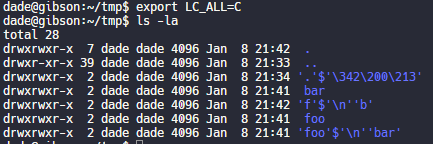
Have no fear, though. It’s not unbeatable. It’s only fun if the language and LC settings are set to support utf-8. If you set LC_ALL=C or whatever that isn’t utf-8, then it looks like this.Putting a link to this tweet here so that I don’t lose it again in the future.
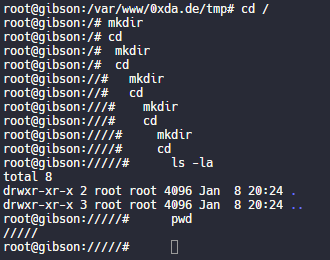
dade@0xdadeMy god, it is beautiful. I mean except all the whitespace I can’t get rid of before the command lmao.



And these tweets:
- [WayBack] dade в Twitter: “Today I learned that you can put zero width spaces in file names on Linux. Have fun.… “
- [WayBack] @zeratax (fake) Twitterissä: “newline char in filenames is also very “fun”… “
- [WayBack] healthyoutlet on Twitter: “using a zero width space and a zero width nonjoiner as the two possible states of a bit you can hide binary secrets in tweets! … “
- [WayBack] Garth “No CVEs” Mortensen on Twitter: “Quick function to get a zero width space in your clipboard (OS X, use
xselfor linux).zws () { echo -n '\u200D' | pbcopy }… “ - [WayBack] Duncan on Twitter: “Terminal escape sequences are fun too some command line tools on some operating systems will escape them, others don’t.… “

- [WayBack] aaron on Twitter: “lol when I was new at CTF and thought guessctf challenges were fun, I made a “forensics” chal where there is a tarball containing a ton of junk and a single file named a zero-width space with permissions
000. If you cat it, there were\bchars to hide the flag. Super tedious.… “ - [WayBack] َ (@Maxwellcrafter) on Twitter: “I’m pretty sure that this works with Windows too, at least folders, and it messes with stuff sometimes… “
- [WayBack] Uri Granta on Twitter: “Wait till you discover that
Variation Selectors(U+FE00..U+FE0F) are zero-width invisible modifiers with theID_Continueproperty, so can be used inside variable names in languages like Python or C#. And since they’re modifiers, the cursor doesn’t stop when it passes them.… “ - [WayBack] Harri Luuppala on Twitter: “Insert an bell in a filename for your friends. In most terminals, when the Bell character (ASCII code 7,
\ain C) is printed by the program, it will cause the terminal to ring its bell.… “ - [WayBack] J. Neko on Twitter: “Zero width spaces can be very useful. Have also used them in usernames, and to avoid character length rules, and…… “
- [WayBack] ALP on Twitter: “that is nothing. one day i’ve managed to put a backspace in the name of the file! it was more than frustrating trying to delete file that had a hidden typo in its name…… “
- [WayBack] Lucky225🍀 2️⃣ 2️⃣ 5️⃣✸ on Twitter: “I put zero width characters in fucking everything. I’ve found it useful in bypassing a shit ton of shit.… “
- [WayBack] dade on Twitter: “I have more than one “Last name” of zero width.… “
- [WayBack] Lucky225🍀 2️⃣ 2️⃣ 5️⃣✸ on Twitter: “I’ve been using it to avoid having a first name at all in certain places. It’s also fun to put them in passwords. All kinds of fun stuff you can do.… “
- [WayBack] Lucky225🍀 2️⃣ 2️⃣ 5️⃣✸ on Twitter: “This field is required? Okay here’s some ZW chars… “
- [WayBack] dade on Twitter: “I think it’s more entertaining to have a file that is named *only* a zero width space, but I think using them throughout a filename is better to break tab completion and not stand out too much. A filename that is just blank looks strange in ls output.… “
- [WayBack] dade on Twitter: “You could put zw spaces in config files to make it look like it’s reading one file when it’s really reading a different file.… “
- [WayBack] Dylan Katz on Twitter: “This one is my fave: ‘⁄’ (\u2044) or ‘∕’ (\u2215) Allow for this: …”
- [WayBack] dade on Twitter: “Does chrome/firefox’s IDN algorithms not punycode these for lookalike characters? or mixed script confusables? or the unicodeset blacklist?… “
- [WayBack] Dylan Katz on Twitter: “So for the first one they do, for the second one, it strips the user. Also, a lot of this is more on the platform imo. For instance, on mobile devices, users may not be checking the url bar. For instance, I was originally using that trick for QR codes urls… “
- [WayBack] Dylan Katz on Twitter: “(whoops, doubled up on “for instance” there) Basically, depends on the platform, but I feel like creating a convincing link in the app (twitter, slack, whatever) is enough… “
- [WayBack] dade on Twitter: “Well it still shows as a blank line in the ls of the parent directory, so it isn’t flawless.… “
- [WayBack] dade on Twitter: “My god, it is beautiful. I mean except all the whitespace I can’t get rid of before the command lmao.… “
- [WayBack] eater 🥰 on Twitter: “ha yes,, rendering letters that have no width as full width, classic… “
- [WayBack] dade on Twitter: “But it renders the width on the wrong side of the prompt, which is what is particularly interesting. My guess is that has something to do with it being characters that are greater than one byte. It also only does that until I leave that sesssion and go into another one.… “
- [WayBack] Peter Martini on Twitter: “My favorite joke Perl module: … “
[WayBack] Acme::Bleach – For really clean programs – metacpan.org
- [WayBack] dade on Twitter: “Just about pissed myself with this one.… “

- [WayBack] eater 🥰 on Twitter: “ha yes,, rendering letters that have no width as full width, classic… “
- [WayBack] dade on Twitter: “Not related to the terminal fun, but related to zero width characters: You can: – Break url previews
https://0xda.de–@0xdadewithout tagging – Make a word likesystemdnot searchable “


[WayBack] Thread by @Plazmaz: @0xdade Was doing some real fucking around with urls recently: gist.github.com/Plazmaz/565a5c… (was gonna flesh it out more but didn’t find…:
Was doing some real fucking around with urls recently:(was gonna flesh it out more but didn’t find the time)
This one is my fave:
‘⁄’ (\u2044)
or
‘∕’ (\u2215)
Allow for this:
google.com⁄search⁄query⁄.example.com
google.com⁄search⁄query⁄@example.com[WayBack] url-screwiness.md · GitHub:
This is a list of methods for messing with urls. These are often useful for bypassing filters, SSRF, or creating convincing links that are difficult to differentiate from legitimate urls.
And a bit of documentation links:
- [WayBack] Zero-width space – Wikipedia
- [WayBack] Zero-width non-joiner – Wikipedia
- [WayBack] Variation Selectors (Unicode block) – Wikipedia
- [WayBack] Where to find Unicode 5 characters from specific category? – Super User
- [WayBack] Bidirectional text: Overrides – Wikipedia
–jeroen













 The Wiert Corner - irregular stream of stuff