The Wiert Corner – irregular stream of stuff

Jeroen W. Pluimers on .NET, C#, Delphi, databases, and personal interests

  • My badges

  • Twitter Updates

  • My Flickr Stream

  • Pages

  • All categories

  • Enter your email address to subscribe to this blog and receive notifications of new posts by email.

    Join 1,861 other subscribers

Archive for January, 2022

Alexander Klöpping. Juist nu. on Twitter: “Is er een voice recorder app waarbij je met een druk op de knop tijdcodes kunt markeren omdat vlak voordat moment iets belangrijks gezegd werd? Zodat je achteraf makkelijk de belangrijke momenten kunt terugzoeken?” / Twitter

Posted by jpluimers on 2022/01/07

[Archive.is1/Archive.is2] Alexander Klöpping. Juist nu. on Twitter: “Is er een voice recorder app waarbij je met een druk op de knop tijdcodes kunt markeren omdat vlak voordat moment iets belangrijks gezegd werd? Zodat je achteraf makkelijk de belangrijke momenten kunt terugzoeken?” / Twitter

https://twitter.com/AlexanderNL/status/1277519084117164032

Selectie voor Android / Windows / MacOS:

Read the rest of this entry »

Posted in Android Devices, Audacity, Audio, Media, Power User, Windows | Leave a Comment »

Covid-19 herstelbewijs geldig van 12-180 dagen na je positieve PCR test verwerkt door GGD (Corona, SARS-CoV-2)

Posted by jpluimers on 2022/01/07

Ik had dus gemist dat in oktober 2021 de spelregels rondom een corona herstelbewijs.

De reden is dat de communicatie rondom corona in Nederland niet echt top is.

Het laatste voorbeeld: terwijl boosters voor iedereen van 18 jaar en ouder beschikbaar zijn en sommige vaccinatielocaties inmiddels weer vrije inloop hebben, hebben velen dat in mijn omgeving nog niet aangevraagd, want “ik heb nog geen uitnodiging ontvangen”, en/of “ik wist niet dat het al kon”. Anderen ervaren hetzelfde, dus dit soort berichten zijn belangrijk:

Terug naar herstelbewijs: de meeste linkjes hieronder zijn namelijk niet van GGDGHOR, RIVM of Rijksoverheid.

De enige GGD website die de communicatie rondom herstelbewijs qua volledigheid en duidelijkheid op orde heeft is GGD zhz (Zuid-Holland Zuid). Complimenten!

Hier de linkjes (via [Wayback/Archive] herstelbewijs corona aanvragen – Google Search):

–jeroen

Posted in Covid-19/SARS-CoV-2/Coronavirus, Health, Power User, Vaccinations | Leave a Comment »

Removing yourself from a twitter list means you have to temporarily block the user maintaining the list

Posted by jpluimers on 2022/01/07

Removing yourself from a list has been possible for a long time (since at least 2013) by blocking the list owner, then unblocking, but was only documented late 2019 in [WayBack] How to use Twitter Lists:

A Twitter List is a curated group of Twitter accounts. Create your own or subscribe to a List created by someone else to view a streamlined timeline.

How to remove yourself from a List

You can view which Lists you are a member of through your Lists tab. To remove yourself from a List you will need to block the creator of that List.

It was public knowledge though, for instance documented at [WayBack] How journalists can remove themselves from Twitter lists – & why it matters – Poynter, which also documents this:

How can I find out which Twitter lists I’m on?

When using Twitter on the web, click on lists. You will arrive at “Subscribed To.” Next to that heading, you’ll see “Member Of.” Click on it to see the Twitter lists that include you as a member. This list of lists is chronological starting at the bottom — the first list you see at the top will be the one that most recently added you.

For me this is twitter.com/jpluimers/lists/memberships


The same trick also works when you want to have someone un-follow you:

Read the rest of this entry »

Posted in Power User, SocialMedia, Twitter | Leave a Comment »

When MySQL characterset ‘utf’ does not allow you to enter some Unicode code points

Posted by jpluimers on 2022/01/06

Contrary to what many believe is that MySQL utf8 is not always full blown UTF-8 support, but actually utf8mb3, which has been deprecated for a while now.

Only utf8mb4 will give you full blown UTF-8 support.

This when someone reminded me of this in a Delphi application:

When I insert :joy: emoji into mysql varchar filed I got an error :
#22007 Incorrect string value: '\xF0\x9F\x98\x82' for column 'remarks' at row 1

database charset is utf8

Note that the :joy: emoji is 😂 and has Unicode code point U+1F602 which is outside the basic multilingual plane.

See:

–jeroen

Posted in Conference Topics, Conferences, Database Development, Delphi, Development, Encoding, Event, MySQL, Software Development, UTF-8, UTF8 | Leave a Comment »

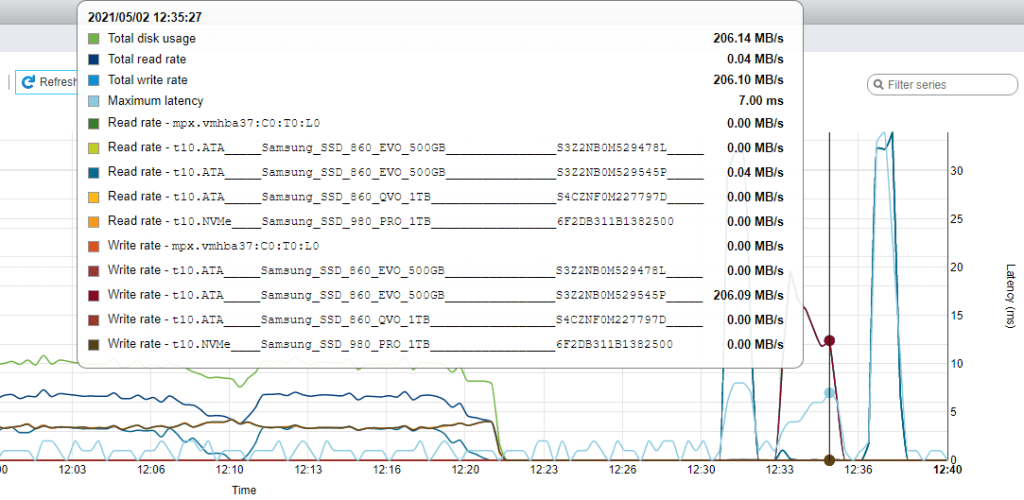
Some links and graphs on ESXi capping/throtteling disk speeds

Posted by jpluimers on 2022/01/06

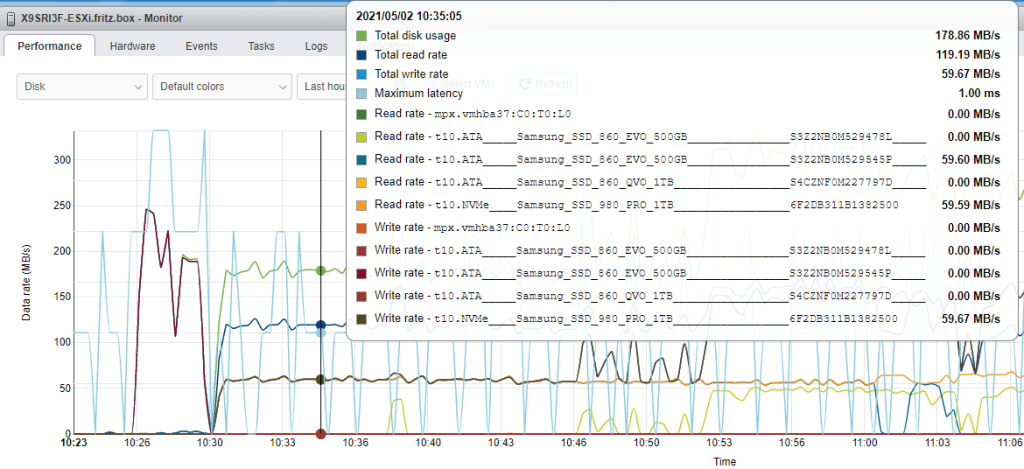
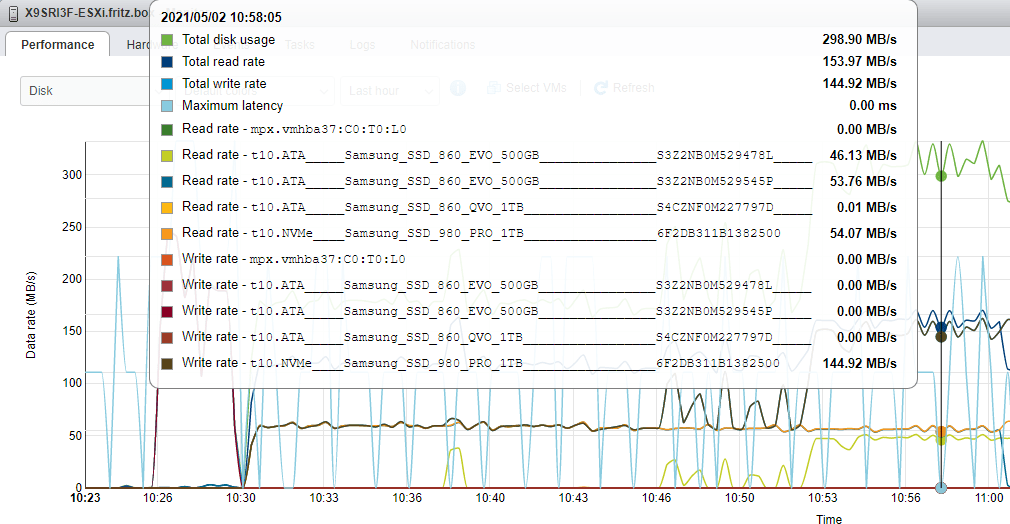
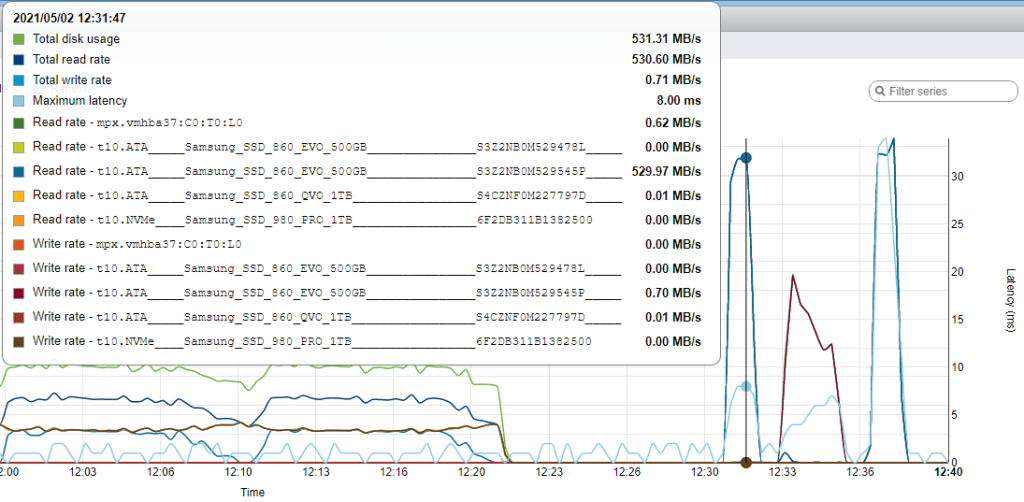
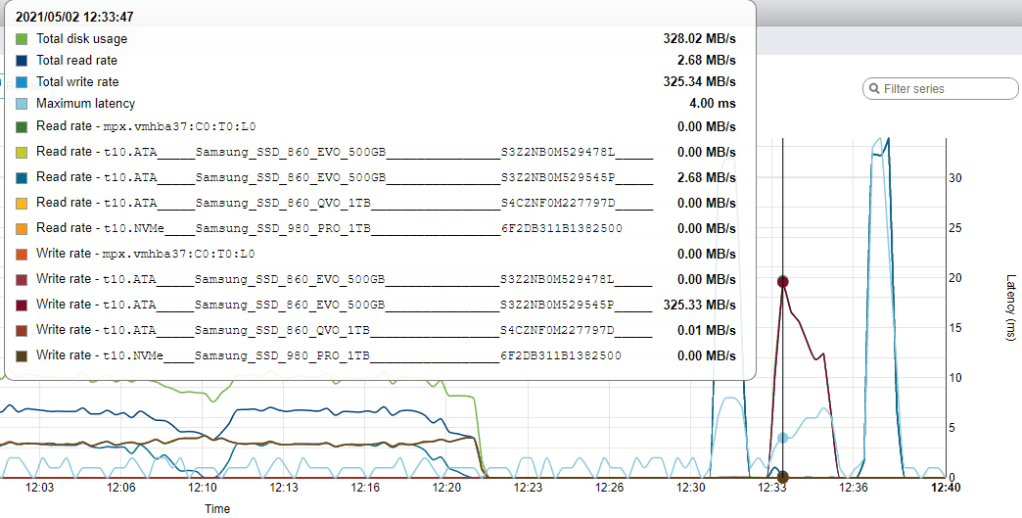
As promised in “Solution” on ESXi 6.7 smartinfo throwing error Cannot open device, here are a few links in capping throttling disk speeds by ESXi followed by a few graphs of my own:

My own observations on ESXi 6.7 update 3:

  1. One rsync operation:
    1 rsync from 860 EVO SSD to 960 PRO NVMe

    1 rsync from 860 EVO SSD to 960 PRO NVMe

  2. Two rsync operations:
    2 rsync from 860 EVO SSD to 960 PRO NVMe

    2 rsync from 860 EVO SSD to 960 PRO NVM

  3. Resume actions were about 10 times faster than the single rsync read speeds:
    Resume action

    Resume action

  4. Suspend actions were between 4 and 6 times faster than rsync write speeds:
    Start of suspend action

    Start of suspend action


    Finish of suspend action

    Finish of suspend action

For each rsync operation, I had a separate SSH session going, and the speed doubled.

The resume action of all Virtual Machines was almost a flat speed curve.

The suspend action of all Virtual Machines started fast (when all machines were suspending) and finished slower (when only the largest virtual machines were still suspending)

–jeroen

Posted in ESXi5, ESXi5.1, ESXi5.5, ESXi6, ESXi6.5, ESXi6.7, ESXi7, Power User, Virtualization, VMware, VMware ESXi | Leave a Comment »

LIDL Radio Controlled Wall Clock IAN 100489 English manual

Posted by jpluimers on 2022/01/06

Model 100489-14-01 wall clock

Model 100489-14-01 wall clock

Just in case I need it again.

The signal quality fluctuates during the day (it is a lot better at night when there is less inionisation in the atmosphere), and is worsened by concrete walls (like our home).

Best way to get prolonged reception is at night, on the top floor behind a window or outside.

The clock usually needs between 3 and 10 minutes to pick up the DCF77 signal from the transmitter.

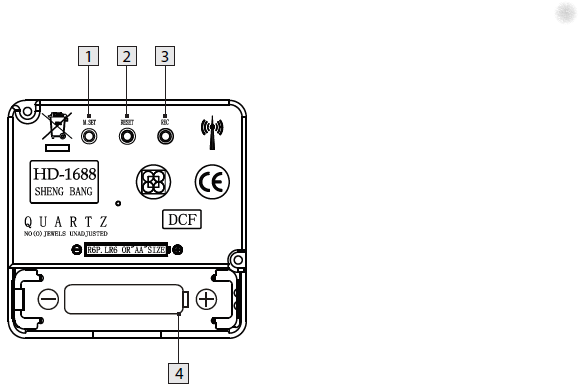
Wall clock manual: [Wayback] 100489_EN.pdf of which this abstract:

DCF77 HD-1688 clock mechanism

DCF77 HD-1688 clock mechanism

Numbers:

  1. M.SET button
    • Press and keep pressed the M.SET button 1 at least 3 seconds. The wall clock switches into manual mode.
    • Press and keep pressed the M.SET button again until the hands reach the correct position for you to set the time.
    • Briefly pressing the M.SET button moves the hands forward in one minute steps to enable you to set the current time manually.
      Note: After 8 seconds without pressing the M.SET button, the wall clock switches out of manual mode and keeps the time as normal. The manually set value is overwritten as soon as reception of the DCF radio time signal is successful.
  2. RESET button
    • Press the RESET button 2 to reset the radio clock settings. Alternatively, remove the batteries from the device and insert them again.
    • The product now automatically starts to search for the DCF radio time signal.
  3. REC button
    • Press and keep pressed the REC button 3 at least 5 seconds. The wall clock attempts to receive the DCF radio time signal. This process takes a few minutes to complete.
  4. Battery compartment
    • Battery type: 1 x 1.5 V ⎓ AA, LR6


More on the signal, transmitter and encoding: DCF77 – Wikipedia, where the below images are from:

DCF77 reception area from Mainflingen

DCF77 signal strength over a 24-hour period measured in Nerja, on the south coast of Spain 1,801 km (1,119 mi) from the transmitter. Around 1 AM it peaks at ≈ 100 µV/m signal strength. During the day, the signal is weakened by ionization of the ionosphere due to solar activity.

Another DCF77 clock I have: CSL Bearware 302658 DCF clock manual

–jeroen

Posted in Development, Encoding, Hardware Development, LifeHacker, Power User, Software Development | 2 Comments »

Google calendar: add a yearly repeating event on the last/#th/first weekday of a month

Posted by jpluimers on 2022/01/05

TL;DR: recurrence in Google Calendar can be tough.

Adding a yearly repeating event on a last weekday (where weekday is any day of the week: sunday, monday, etc) of a month in Google Calendar was a lot less obvious than I hoped for.

The easiest path “Custom Event” by default does not show last/#th/first, only a fixed date when selecting yearly or monthly repeating events, which is contrary to the suggested answer at [Wayback/Archive.is] Google calendar question: How to set an event to repeat on the first Monday of a specific Month : google:

Create an event on September 3rd. Choose custom recurrence. Repeat every 12 months monthly on the first Monday. I just tested that out on the browser version of Google calendar

The trick is to first select a normally repeating monthly event on the last#th/first weekday day of a month.

Note that for the 5th week, you cannot do this in the Google Calendar UI as per [Wayback] google calendar – Schedule an event for last Sunday (or another day of week) of each month – Web Applications Stack Exchange:

If you actually want a day on the 5th week of every month (versus the last week), the Google Calendar UI does not support this, but you can do it by importing an .ics file

Below is an example while writing this: adding a yearly recurring event on the last Sunday of May (which in 2021 was Sunday the 30th of May).

These are the steps:

Read the rest of this entry »

Posted in Google, GoogleCalendar, LifeHacker, Power User | Leave a Comment »

“Solution” on ESXi 6.7 `smartinfo` throwing `error Cannot open device`

Posted by jpluimers on 2022/01/05

After writing Some notes on ESXi smartinfo throwing error Cannot open device, I bit the bullet and experimented with disabling the vmw_ahci driver (shown as ahci in the storage adapters view), which forces the sata_ahci driver to be used (shown as ahci in the storage adapters view).

Poof! All problems were gone.

All? Not all: on the console and terminal, there seems to be some throttling going on, as I observed the read or write speed limit to be capped somewhere close to 60 MB/s. More on that in a future post.

Basically, the smartinfo trouble tripped me into thinking the device was bad, where I should have understood that the latency warnings in the vmkernel.log file indicated the vmw_ahci driver was the culprit. Oh well: never too old to learn.

References

I’m not alone on this; these posts also discuss latency issued:

This is different from the transfer speed issues that were part of ESXi 4, though I have a gut feeling there is some correlation:

On AHCI: Advanced Host Controller Interface – Wikipedia

On native drivers versus legacy drivers:

  • [Wayback] Troubleshooting native drivers in ESXi 5.5 or later

    A new native driver model feature is introduced in VMware ESXi 5.5 that replaces an older model that employs a Linux compatibility layer.

    In this article:

    • Drivers using the new model are referred to as native drivers
    • Drivers using the old model are referred to as legacy VMKLinux drivers

    This article provides troubleshooting information for the native driver model.

    The following inbox Native Drivers are included in default installation of ESXi 5.5: – See more at: http://www.virtuallyghetto.com/2013/11/esxi-55-introduces-new-native-device.html
  • [Wayback] ESXi 5.5 introduces a new Native Device Driver Architecture Part 2

    A new concept of driver priority loading is introduced with the Native Device Driver model and the diagram below provides the current ordering of how device drivers are loaded.

    As you can see OEM drivers will have the highest priority and by default Native Drivers will be loaded before “legacy” vmklinux drivers. On a clean installation of ESXi 5.5 you should see at least two of these directories: /etc/vmware/default.map.d/ and /etc/vmware/driver.map.d/ which contains driver map files pertaining to Native Device and “legacy” vmklinux drivers.

Steps

This is how you disable the native vmware_ahci driver:

  1. Suspend all virtual machines
  2. Bring the ESXi box into maintenance mode, for instance by running esxcli system maintenanceMode set --enable true
  3. On the console or terminal, run this:
    # esxcli system module set --enabled=false --module=vmw_ahci
    # reboot
  4. After booting, get the ESXi box out of maintenance mode, for instance by running esxcli system maintenanceMode set --enable false
  5. Power on all suspended virtual machines

To re-enable the native vmware_ahci driver (in case not all your SATA devices are recognised):

  1. Suspend all virtual machines
  2. Bring the ESXi box into maintenance mode, for instance by running esxcli system maintenanceMode set --enable true
  3. On the console or terminal, run this:
    # esxcli system module set --enabled=true --module=vmw_ahci
    # reboot
  4. After booting, get the ESXi box out of maintenance mode, for instance by running esxcli system maintenanceMode set --enable false
  5. Power on all suspended virtual machines

Suspending and unsuspending all virtual machines can be done on the console/terminal, see Source: VMware ESXi console: viewing all VMs, suspending and waking them up: part 5 how.

Results: storage adapters

With native vmware_ahci, the storage adapters are these:

Storage adapters with vmw_ahci enabled

Storage adapters with vmw_ahci enabled

With legacy ahci, the storage adapters are these:

Storage adapters with vmw_ahci disabled

Storage adapters with vmw_ahci disabled

What you see is that the Patsburg 6 Port SATA AHCI Controller has been split from a single vmw_ahci adapter in six separate ahci adapters.

Results: read/write speeds and latency when suspending/unsuspending all virtual machines

With vmware_ahci, the storage adapters are these:

Latency issues after resume/suspend cycle of all virtual machines: the latency stays up in the 15 millisecond region

Latency issues after resume/suspend cycle of all virtual machines: the latency stays up in the 15 millisecond region

With ahci, the storage adapters are these:
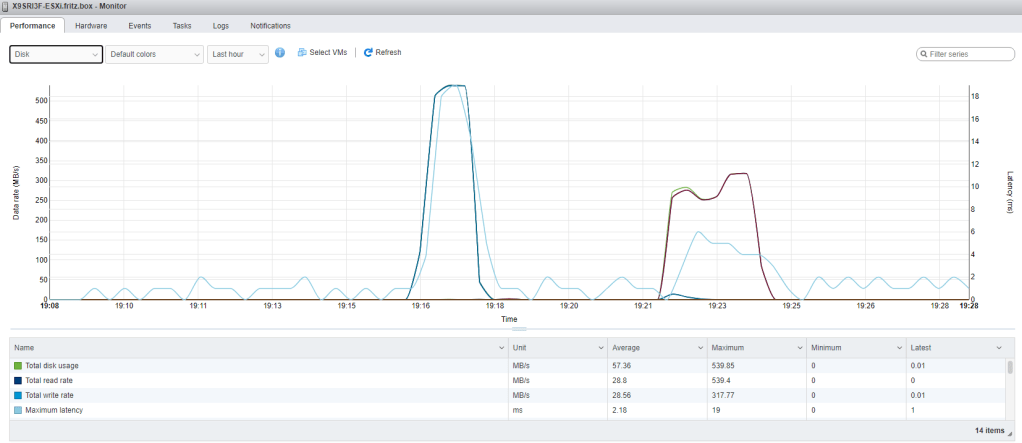
Latency after resume/suspend cycle of all virtual machines: the latency goes down to the 2 millisecond region

Latency after resume/suspend cycle of all virtual machines: the latency goes down to the 2 millisecond region

For both cases, the read and write rates are roughly the same (and OK for an EVO 860 SATA device). The latency drops a lot (and with prolonged vmw_ahci use goes up to like 15+ seconds, that is 15000+ milliseconds):

[Wayback] SSD 860 EVO 2.5″ SATA III 500GB Memory & Storage – MZ-76E500B/AM | Samsung US

Speeds are consistent, even under heavy workloads and multi-tasking allowing for faster file transfer. The 860 EVO performs at sequential read speeds up to 550 MB/s* with Intelligent TurboWrite technology, and sequential write speeds up to 520 MB/s. The TurboWrite buffer size* is upgraded from 12 GB to 78 GB.

–jeroen

Posted in ESXi6, ESXi6.5, ESXi6.7, ESXi7, Power User, Virtualization, VMware, VMware ESXi | Leave a Comment »

Work Chronicles | Comics about Work on Twitter: “Fast-paced Environment… “

Posted by jpluimers on 2022/01/05

Even when young, this transcript should raise all the red flags:

  1. Recruiter: At this job, you will get to work at a fast paced environment.
  2. Recruiter: You will get to thrive under pressure.
  3. Recruiter: And you will be part of a dynamic team.
  4. Applicant: Great, new that you’ve outlined the cons, what are the pros?

[Archive.is] Work Chronicles | Comics about Work on Twitter: “Fast-paced Environment… “ and [Wayback] Fast-paced Environment | Work Chronicles:

–jeroen

Read the rest of this entry »

Posted in About, Development, LifeHacker, Personal, Power User, Software Development | Leave a Comment »

I wish I had known “How to rename multiple files at once on Mac | iMore” ages ago

Posted by jpluimers on 2022/01/04

Coming from a Windows and Linux background, I was used that mass renaming files was a non-stock feature and getting it right usually a pain in the butt.

How glad I was to find out [Wayback] How to rename multiple files at once on Mac | iMore

Believe it or not, it used to be a real pain to batch-rename files on Mac. Times have changed and so have the names of those 15 files.

Prior to OS X Yosemite, there was no simple way to rename multiple files at the same time on the Mac. Some people set up Automator rules. Others tried workarounds to rename files in third-party apps. Finally, Apple realized our heartache and created a much simpler way to rename multiple files at once, and it’s only gotten easier as macOS updates continue. Here’s how to batch-rename files on your Mac.

The only mass-rename I regularly need is fixing typos or OCR errors in filenames: this means replacing certain text with another piece of text.

That’s this easy:

Read the rest of this entry »

Posted in Apple, Mac OS X / OS X / MacOS, macOS 10.12 Sierra, macOS 10.13 High Sierra, OS X 10.10 Yosemite, OS X 10.11 El Capitan, Power User | Leave a Comment »