


PSA: The ASUS Hyper M.2 x16 Gen 4 Card Is VERY Long (~27cm) and tall (~12cm); replacement thermal padding via Amazon
Posted by jpluimers on 2026/09/28
[Wayback/Archive] amp8888 comments on PSA: The ASUS Hyper M.2 x16 Gen 4 Card Is VERY Long (~27cm) via [Wayback/Archive] PSA: The ASUS Hyper M.2 x16 Gen 4 Card Is VERY Long (~27cm) : homelab
Just a quick PSA to everyone out there: the PCIe gen 4 version of the ASUS Hyper M.2 x16 card is very long, so take that into consideration if you’re planning to use them in a server.
Note at at 12.2cm, the card is also quote tall. This tool can be a problem on many 19″ rackmount systems. For instance on my Dell R730xd, I had to remove part of the aluminium chassis above PCIe slot #4 in order to make the card fit. This was easy using a set of pliers and does not interfere with any of the mounting mechanisms.
Older versions of the ASUS card are smaller, but cannot do PCIe 4.0:
- [Wayback/Archive] HYPER M.2 X16 GEN 4 CARD – Specifications|Motherboards|ASUS United Kingdom
PCIe 4.0/3.0 x16 interface, compatible with PCIe x8 and x16 slots, support data transfer rates up to 256 Gbps.
- [Wayback/Archive] HYPER M.2 X16 CARD V2 – Specifications|Motherboards|ASUS United Kingdom
PCI Express 3.0 x16 interface, compatible with PCI Express x8 and x16 slots, support data transfer rates up to 128 Gbps.
- [Wayback/Archive] HYPER M.2 X16 CARD – Tech Specs|Motherboards|ASUS Global
PCI Express 3.0 x16 interface, compatible with PCI Express x8 and x16 slots, support data transfer rates up to 128 Gbps.
The cards originally were meant for ASUS mother boards (which support more options, see [Wayback/Archive] [Motherboard] Compatibility of PCIE bifurcation between Hyper M.2 series Cards and Add-On Graphic Cards | Official Support | ASUS Global) but since the 4x4x4x4x bifurcation works on many more systems (especially data center grade ones) I have fitted two in my Dell R730xd.
Note this sets the R730xd apart from the R730 which only has one x16 in x16 slot!
In there, installing one in PCIe slot #6 was easy, but installing one in PCIe slot #4 needed a small hardware modification.
Fitting the card in a Dell R730xd slot #4
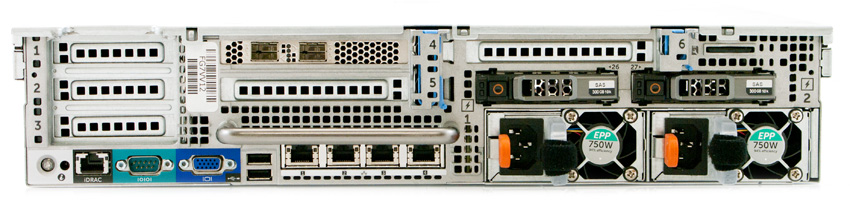
From the back side, you see the PCIe slot numbers.
- Half height, short length, CPU#2, x8 in x16 slot
- Half height, short length, CPU#2, x8 in x16 slot
- Half height, short length, CPU#2, x8 in x16 slot
- Full height, full length, CPU#2, x16 in x16 slot
- Full height, full length, CPU#1, x8 in x16 slot
- Full height, full length, CPU#2, x16 in x16 slot
[Wayback/Archive] StorageReview-Dell-PowerEdge-R730XD-Rear.jpg (850×207) from [Wayback/Archive] Dell PowerEdge 13G R730xd Review – StorageReview.com
[Wayback/Archive] Dell PowerEdge R730xd Owner’s Manual | Dell Singapore
EXPANSION CARD RISER PCIE SLOTS ON THE RISER HEIGHT LENGTH LINK Riser 1 Slot 1 half-height low-profile x8 Riser 1 Slot 2 half-height low-profile x8 Riser 1 Slot 3 half-height low-profile x8 Riser 2 Slot 4 full-height full-length x16 Riser 2 Slot 5 full-height full-length x8 Riser 3 (alternate) Slot 6 full-height full-length x16 NOTE: When using slots 1 through 4 on the riser, ensure that both the processors are installed on the system.
[Wayback/Archive] Dell PowerEdge R730xd Owner’s Manual | Dell Singapore
PCIE SLOT RISER PROCESSOR CONNECTION HEIGHT LENGTH LINK WIDTH SLOT WIDTH 1 1 Processor 2 Low Profile Half Length x8 x16 2 1 Processor 2 Low Profile Half Length x8 x16 3 1 Processor 2 Low Profile Half Length x8 x16 4 2 Processor 2 Full Height Full Length x16 x16 5 2 Processor 1 Full Height Full Length x8 x16 6 3 (alternate) Processor 1 Full Height Full Length x16 x16 NOTE: To use PCIe slots 1 through 4 on the risers 1 and 2, both the processors must be installed.NOTE: The expansion card slots are not hot-swappable.
When you look at the top side from the back, then next to the blue card holder you see a small aluminium part giving extra support for the Slot #6 riser card which you can break away to fit the ASUS card in:
[Wayback] cdn11.bigcommerce.com/s-017c0/images/stencil/1280×1280/products/13039/57339/Dell-R730XD-RSA-5__66431.1588858919.1280.1280__53786.1589395209.jpg?c=2 from [Wayback/Archive] Dell PowerEdge R730XD Server | Save on Dell PowerEdge Servers | Flagship Technologies.

I found the above picture with PCIe slot numbers later than the below one with slot numbers are at the bottom of the picture:
[Wayback/Archive] dell-perc730xd-banner_1.png (700×404) from [Wayback/Archive] Refurbished Dell PowerEdge R730xd 24-Port (which is the same model as I have)

Finally: replacement thermal padding
If you are careful, you can remove the heat sink from the ASUS card without damaging the thermal pads.
If you did damage it, or you have NVMe cards with unequal chip heights then you need extra pads. I used these pads for it: [Wayback/Archive] Aukuoy 3 Pack 12.8W/mK Thermal Conducting Pads, 100 x 100 x 0.5mm/1mm/1.5mm High Temperature Heat Resistant Silicone Grease Thermal Pads for PC Laptop Heat Sink CPU GPU LED SSD IC SMD Cooler: Amazon.de: Computer & Accessories.
Found those via [Wayback/Archive] Amazon.de : m.2 thermal pad 12.8w mk after following the tips in [Wayback/Archive] Amazon.de:Customer Reviews: ASUS Hyper M.2 X16 PCIe 4.0 X4 expansion card supports 4 NVMe M.2 (2242/2260/2280/22110) up to 256 Gbps for AMD 3rd Ryzen sTRX40, AM4 Socket and Intel VROC NVMe Raid (which has some indispensable tips for bifurcation and speeds: recommended reading)
Related:
- [Wayback/Archive] Need to cool laptop M.2 SSDs? | Page 2 | Windows 11 Forum
- [Wayback/Archive] Do we need to replace the thermal pad for m.2 driv… – Republic of Gamers Forum – 832912
Queries
- [Wayback/Archive] “asus hyper m.2 x16” “thermal pad” – Google Search
- [Wayback/Archive] “asus hyper m.2 x16” “fan” “replacement” – Google Search
- [Wayback/Archive] R730xd pcie slot bracket – Google Search
- [Wayback/Archive] R730xd pcie slot bracket – Google Image Search
- [Wayback/Archive] R730xd pcie slot numbering – Google Search
- [Wayback/Archive] R730xd pcie slot numbering – Google Image Search
–jeroen

Leave a Comment