The Wiert Corner – irregular stream of stuff

Jeroen W. Pluimers on .NET, C#, Delphi, databases, and personal interests

  • My badges

  • Twitter Updates

  • My Flickr Stream

  • Pages

  • All categories

  • Enter your email address to subscribe to this blog and receive notifications of new posts by email.

    Join 1,854 other subscribers

Archive for the ‘C#’ Category

On my research list: AsyncBridge (adds C#5 async features for .NET 4 projects)

Posted by jpluimers on 2012/09/18

Having a done a lot of Async stuff in the .NET 2, 3.x and 4 era with multimedia applications (oh, the days of SynchronizationContext), this project seems very interesting:

AsyncBridge

Adds the new C#5 async features for .NET 4 projects

Download this project as a .zip file
Download this project as a tar.gz file

What does it do?

AsyncBridge lets you use the VS 11 C#5 compiler to write code that uses the async and await keywords, but to target .NET 4.0. It was published by Daniel Grunwald (from SharpDevelop) here.

As an extra, I’ve thrown in the new C#5 caller info attributes, which lets you automatically add the method name, line number or file path to your code.

Authors and Contributors

Daniel Grunwald (@dgrunwald) – Original code.

Omer Mor (@OmerMor) – Turned it into a full blown github repo with the complimentary nuget.

Alex Davies (@alexdavies74) – Wrote the blog post that inspired this, and is actively improving the code.

–jeroen

via: AsyncBridge.

Posted in .NET, .NET 4.5, C#, C# 4.0, C# 5.0, Development, Software Development | Leave a Comment »

Things I tripped over when implementing the “Elf proef”: digit check for Dutch bank account numbers and social security numbers (bankrekeningnummer, BSN/Sofinummer)

Posted by jpluimers on 2012/09/13

It was a long time ago that I ever did something with the Elf proef.

It is the algorithm that is used to calculate the check digit for Dutch bank account numbers (bankrekeningnummers) and a variation for BSNs (Social Security Numbers).

I needed it (or more exactly: a variation of it) in order to support anonymization of customer data for the DTA/OTA portions of a DTAP/OTAP environment.

So, I started reading on the Elf proef, and getting some sample data to setup some unit tests.

Wrong and wrong:

To start with the latter, they get it wrong because the check digit is modulo 11 (like the ISBN 10 check digit), but only numeric digits are valid. Their bank.js algorithm module tries to accommodate for that in the wrong way.

In addition they copy-pasted code between their other number generation algorithms which you can see form the variable SofiNr which is an abbreviation for SofiNummer,  the old name for the Dutch Social Security Number (now called Burgerservicenummer aka BSN).

Their generated sample 290594880 is wrong because the check digit should be 10, and 10 is not a digit. Their generated number 936977590 is OK as the check digit should be zero (0) which it is.

More on their fault a bit further on. First lets concentrate on getting proper test data, and the right algorithm.

I will cover code for the bankrekeningnummer here. The complete code including BSN is at BeSharp.CodePlex.com. Read the rest of this entry »

Posted in .NET, C#, C# 3.0, C# 4.0, C# 5.0, Development, JavaScript/ECMAScript, Scripting, Software Development | 4 Comments »

Online C#/VB.NET code fragment conversion tools

Posted by jpluimers on 2012/09/11

A few on-line code fragment conversion tools that I have come across in the past:

–jeroen

Posted in .NET, C#, Development, Python, Ruby, Scripting, Software Development, VB.NET | Leave a Comment »

Creating a blank Visual Studio solution without a directory, and sln Format Version numbers

Posted by jpluimers on 2012/09/06

A while ago, I blew quite a few Visual Studio Solution and Project builds because I was experimenting in a suite of solutions with the Configuration Manager adding other Solution Configurations than Release and Debug, and mixing x86/AnyCPU platforms to facilitate Debug & Continue.

Lesson learned: don’t do that!

Keep it simple:

  1. Keep your Solution Configurations at Release and Debug,
  2. Perform conditional defines in your automated build server,
  3. Limit the mixing your platforms to a minimum.

We noted the anomalies a little late in the process (in retrospect, when taking over the solution suite, we should have started with setting up and Build Automation right at the beginning, then fix all the solutions that came from Visual Source Shredder, but alas: you are never too old to learn from your mistakes).

The anomalies were spurious (and hard to reproduce) build failures at developer workstations, wrong builds of assemblies ending up on the final build directories and more. And best of all: Visual Studio not failing, warning or hinting upon most issues.

Fixing projects and solutions from wrong Solution Configurations

The history in the version control system was not helpful enough to assist in fixing it, so the fix was this:

  1. Manually edit the .csproj files, and remove the PropertyGroup elements other than “Debug|AnyCPU” and “Release”AnyCPU”.
    This is easy to do inside Visual Studio and with automatic checkout from TFS of the project files:

    1. In the Solution Explorer, select all the projects
    2. Right click on a project
    3. Choose “Unload Project”
      (because you selected all the projects, it is the second menu item from the bottom, and way easier to find when you do this per project)
    4. For each project
      1. Right click the project
      2. Choose “Edit ….”
      3. Remove the PropertyGroup elemts you don’t need
      4. Save and close the file
      5. Right click the project
      6. Choose “Reload Project”
  2. Fix the solution files

The last step is a lot more complex, because of a couple of reasons:

My workaround was as follows:

  1. Start with an empty solution in the same directory as the original solution
  2. Add all the Solution Folders, Solution Items, and projects to it that  were in the original solution
    (having two copies of Visual Studio next to each other on a dual monitor setup is of great help)
  3. Compare the .sln files to each other
  4. Check out the original .sln file
  5. Merge any changes into the original .sln file
  6. Build it
  7. Check in
  8. Run a build on the CruiseControl.net automated build server
  9. Fix build errors
  10. Delete the temporary local .sln file

Creating an empty solution in a directory

Finally, I get to the title of this blog entry: Visual Studio will always generate a directory when creating a Blank Solution, and does not support creating an Empty Solution in a directory.

There are many posts describing how to workaround this, but the actual downloads are usually gone because of link rot (Jakob Nielsen’s alert from 1998 still is totally right about it). Thanks to they webarchive.org WayBackMachine though for keeping some of them alive.

So I went with Peter Provost’s solution, and amended it from Visual Studio 2005 to all Visual Studio versions that support .NET that I have used or still use: 2002, 2003, 2005, 2008, 2010 and 2012 a.k.a. VS11.

All files are in Change set 89386 on BeSharp.CodePlex.com.

His solution uses the ShellNew command for .sln file extensions that is stored in the registry:

  1. Create an empty solution file for the Visual Studio version you are using
  2. Copy that as a template file to %Windir%\ShellNew
    (you need to be administrator for that)
  3. Import a small .reg file binding that template file to the ShellNew command for .sln files

ShellNew is versatile, so you can also embed the fresh solution file into the .reg file, see this ShellNew article for a few nice examples.

Note that generating a new ShellNew verb for .sln is something other than loading a .sln (loading a .sln is done through VisualStudioLauncher).

Back to the .sln file: this one is different for any version of Visual Studio. Historically, the basic format is the same though (and I think this – in combination with VisualStudioLauncher – is the main reason it is not XML).

An empty solution file looks like this (note the empty line at the beginning), as described in Hack the Project and Solution Files:


Microsoft Visual Studio Solution File, Format Version 12.00
# Visual Studio 11
Global
	GlobalSection(SolutionProperties) = preSolution
		HideSolutionNode = FALSE
	EndGlobalSection
EndGlobal

The accompanying .reg file like this:

Windows Registry Editor Version 5.00

[HKEY_CLASSES_ROOT\.sln\ShellNew]
"FileName"="Visual Studio Solution - VS11.sln"

When you look at the Format Version inside the .sln version, you see that it (12) is one bigger than the internal Visual Studio Version (11).

That is because Microsoft stepped up the internal version from Visual Studio .NET (2002) and Visual Studio 2003 from 7.0 to 7.1, but the solution file format version from 7.00 to 8.00 as the table below shows.

Note that the .NET 1.x versions of Visual Studio (2002 for .NET 1.0, 2003 for .NET 1.1) don’t have the GlobalSection/HideSolutionNode/EndGlobalSection part and the # Visual Studio xx line.

With a little bit of querying, I got at this table:

Visual Studio version Internal version Solution file format version
Visual Studio .NET (2002) 7.0 Microsoft Visual Studio Solution File, Format Version 7.00
Visual Studio 2003 7.1 Microsoft Visual Studio Solution File, Format Version 8.00
Visual Studio 2005 8.0 Microsoft Visual Studio Solution File, Format Version 9.00
Visual Studio 2008 9.0 Microsoft Visual Studio Solution File, Format Version 10.00
Visual Studio 2010 10.0 Microsoft Visual Studio Solution File, Format Version 11.00
Visual Studio 2012 (a.k.a. VS11) 11.0 Microsoft Visual Studio Solution File, Format Version 12.00

All files to get you going are in Change set 89386 on BeSharp.CodePlex.com.

It was a bit hard to get all those version numbers, so here are the sources I used:

–jeroen

Posted in .NET, C#, C# 1.0, C# 2.0, C# 3.0, C# 4.0, C# 5.0, Development, Internet, link rot, Power User, Software Development, Visual Studio 11, Visual Studio 2002, Visual Studio 2003, Visual Studio 2005, Visual Studio 2008, Visual Studio 2010, Visual Studio and tools, WWW - the World Wide Web of information | Leave a Comment »

Many more event videos available at Channel 9 (was: PDC10 – view Microsoft PDC 2010 sessions on your PC)

Posted by jpluimers on 2012/08/28

Dang; I thought this had long left the posting queue, but somehow it ended in the drafts (:

Since then, many more event videos made it to Channel 9, including Build 2011, and TechDays 2012.

Anyway, here it is:

Microsoft’s PDC 2010 was held at the end of October 2010 in Redmond, WA, USA.

For the people that could not attend, it is very nice to view the sessions using the PDC10 player (it seems still people didn’t learn and start stripping the century parts from years again!).

Even if you are not using Visual Studio, .NET Azure or other Microsoft Technologies, there are a lot of interesting sessions showing the directions that Microsoft is taking.
Comparing that to what you do today is always a good thing to do: it helps you reflect, an important part of your personal development.

A few things I found interesting (in no particular order):

  • Asynchrony support in C# 5 and VB.NET 11 based on the Task Parallel Library
  • The choice to favour HTML 5 over SilverLight, even though Internet Explorer 9 and Microsoft’s HTML 5 authoring/development tools are far from ready
  • Azure reporting: is reporting the next big thing on clouds?
  • Offline versus online in the cloud world
  • NuPack – does it bring package management to the same level as Ruby or *nix?
  • XNA for XBox, Windows and Windows Phone

Enjoy!

–jeroen

Posted in .NET, .NET 4.5, C#, C# 4.0, C# 5.0, Channel9, Cloud Development, Database Development, Delphi, Development, HTML, HTML5, Mobile Development, SilverLight, SocialMedia, Software Development, Visual Studio 11, Visual Studio 2010, Visual Studio and tools, Web Development, Windows Azure, Windows Phone Development, XNA | 2 Comments »

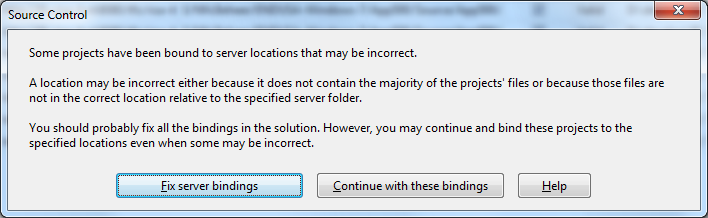
Solving the “Some projects have been bound to server locations that may be incorrect.” in Visual Studio 2010 when using Team Foundation System 2010 #VS2010 #TFS2010

Posted by jpluimers on 2012/08/23

A while ago, I inherited a bunch of C# and VB.NET projects. One of them always generated the below error when including it in Team Foundation System (yes, the original projects were salvaged from Visual Source Shredder version 6.0c):

[Source Control]
Some projects have been bound to server locations that may be incorrect.
A location may be incorrect either because it does not contain the majority of the projects' files or because those files are not in the correct location relative to the specified server folder.
You should probably fix all the bindings in the solution. However, you may continue and bind these projects to the specified locations even when some may be incorrect.
[Fix server bindings] [Continue with these bindings] [Help]

First I tried the Help button: it links to a Help page on MSDN explaining the error can be cause with some statistics on projects not being in the source control system. Since all projects were, there, I looked for more information.

I tried finding a “Fix Server Bindings” or a 2010 “Some projects have been bound to server locations that may be incorrect” link that fitted my use case (getting projects from VSS into TFS), but the solutions I tried eventually all led to the same issue.

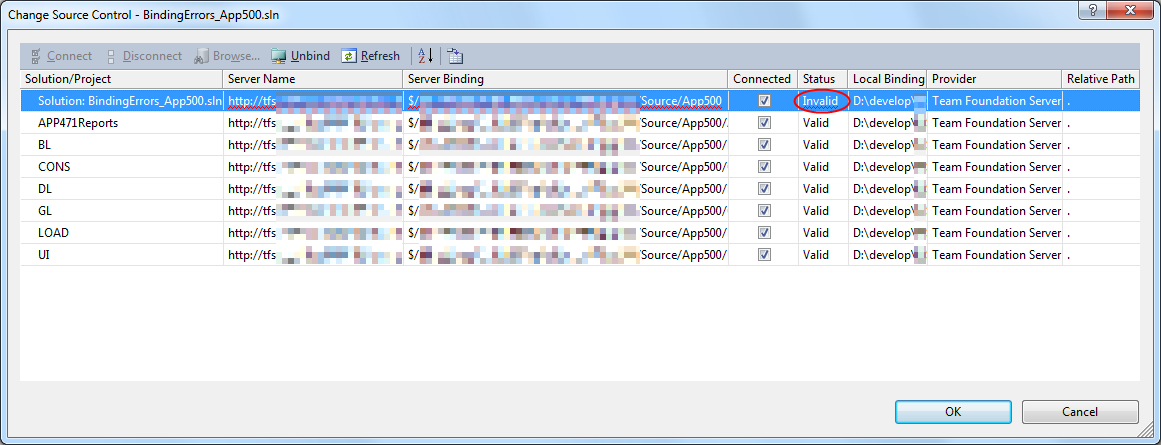
Fixing the server bindings would always fail: the solution (which itself is also a project) would get the status Invalid.

The next steps were these:

  1. add an empty solution in the same directory as the original one,
  2. add that solution to TFS
  3. add the projects from the original solution to this solution one by one
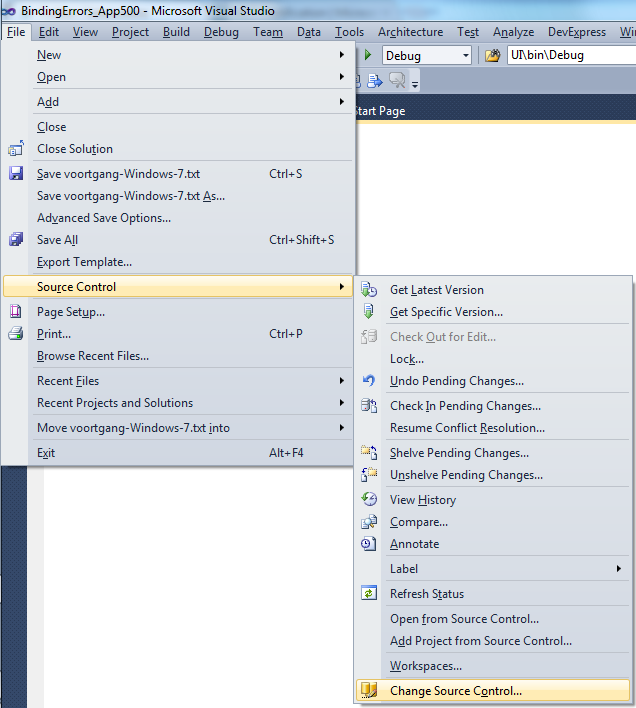
  4. check after each addition of the bindings were still OK using the “File”, “Source Control”, “Change Source Control” sequence on the right.
    (note that you don’t always see “Change Source Control”, if you don’t select the solution in the Solution Explorer before going to the File menu).
  5. text compare both .SLN solution files
  6. observe that “Solution Items” actually is a project just like the others:
    Project("{2150E333-8FDC-42A3-9474-1A3956D46DE8}") = "Solution Items", "Solution Items", "{8D9964D4-6129-4B8F-9238-F9161A02B968}"
    ProjectSection(SolutionItems) = preProject
    ...
    Framework\Config.dll = Framework\Config.dll
    ...
    EndProjectSection
    EndProject
  7. add the existing solution item from the original solution to this solution one by one, check
  8. check after each addition of the bindings were still OK using the “File”, “Source Control”, “Change Source Control” sequence on the right.
    (note that you don’t always see “Change Source Control”, if you don’t select the solution in the Solution Explorer before going to the File menu).
  9. copy the non-existing solution items to the solution one by one using the text compare tool (yes, a lot of the projects are dirty and contain references to files that are not in the version control system)
    save after every copy, then reload the project in Visual Studio
  10. check after each addition of the bindings were still OK using the “File”, “Source Control”, “Change Source Control” sequence on the right.
    (note that you don’t always see “Change Source Control”, if you don’t select the solution in the Solution Explorer before going to the File menu).
  11. after a few files, suddenly the “Invalid” appeared, so the issue has to do with missing files.

Reading the Help more carefully, with in the back of my mind keeping “Solution Items” all as projects, I finally got the cause:

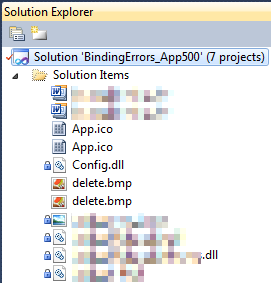
When some percentage of Solution Items cannot be found locally, and are not in the version control system, Visual Studio marks the solution binding to the version control system as “Invalid”.

The temporary solution is to ignore the error, until I have found all the missing files (they are scattered around some network shares), or made sure they are not needed at all.
There are many of those (you recognize them from the missing padlock icon in the Solution Explorer).

Version control rot is just like link rot, that’s why one of the high priority action items is to introduce for build automation at this client, then deploy those as clean builds into the Develop and Test stages of the DTAP, then verify if the solutions still work).

–jeroen

Posted in .NET, C#, C# 1.0, C# 2.0, C# 3.0, C# 4.0, C# 5.0, Development, Internet, link rot, Power User, Software Development, Source Code Management, TFS (Team Foundation System), VB.NET, Visual Studio 2010, Visual Studio and tools, WWW - the World Wide Web of information | Leave a Comment »

.NET/C#: Generating a WordPress posting categories page – part 2

Posted by jpluimers on 2012/08/22

In Generating a WordPress posting categories page – part 1, you learned how to

  1. get the HTML with all the category information from your WordPress.com blog,
  2. convert that to XHTML,
  3. generate an XSD for the XHTML,
  4. generate C# classes from that XSD

This episode, you will learn how the data read from the XHTML can be transformed to a simple tree in HTML suited for a posting categories page like mine.

In the final post, the same data will be transferred into a real category cloud with font sizes indicating the frequency of the category usage.

From there, you can go into other directions (for instance generating squarified treemaps from the data).

That’s the cool thing about data: there are many ways to visualize, and this series was meant – next to some groundwork on how to get the data – as inspiration into some forms of visualization.
Hope you had fun reading it!

Getting a HTML tree from the optionType items

                StringBuilder outputHtml = new StringBuilder();
                string rootUrl = args[1];
                foreach (optionType item in select.option)
                {
                    if (item.Level == optionType.RootLevel)
                        continue;

                    // <a style="font-size: 100.3986332574%; padding: 1px; margin: 1px;" title="XML/XSD (23)" href="https://wiert.me/category/development/xmlxsd/">XML/XSD</a>
                    string url = String.Format("{0}/category{1}", rootUrl, item.HtmlPath);
                    string prefix = new string('.', item.Level * 5);// optionType.NbspEscaped.Repeat(item.Level);
                    outputHtml.AppendFormat("{0}<a title="{2}" href="{1}">{2} ({3})</a>", prefix, url, item.Category, item.Count);
                    outputHtml.AppendLine();
                }

One way of generating an HTML tree, is to prefix every node with a series of dots corresponding with the level of that node. Not the most pretty sight, but it will suffice for this episode.

Inside each node, I want to show the Category and Count.

Since the optionType as generated from the XSD only contains the below properties, a major portion on this posting is how to decode the Value so we can generate HTML like this:

...............<a href='https://wiert.me/category/development/software-development/net/c-' title='C#'>C#&nbsp;(118)</a>
....................<a href='https://wiert.me/category/development/software-development/net/c-/c--2-0' title='C# 2.0'>C# 2.0&nbsp;(46)</a>
....................<a href='https://wiert.me/category/development/software-development/net/c-/c--3-0' title='C# 3.0'>C# 3.0&nbsp;(33)</a>
....................<a href='https://wiert.me/category/development/software-development/net/c-/c--4-0' title='C# 4.0'>C# 4.0&nbsp;(31)</a>
....................<a href='https://wiert.me/category/development/software-development/net/c-/c--5-0' title='C# 5.0'>C# 5.0&nbsp;(2)</a>

Decoding the optionType Value property

optionType only contains the these properties:

  1. class
    • the class used to reference the style in the stylesheet
    • example value: “level-4”
  2. value
    • internal unique WordPress ID for the category (this allows you to alter the Slug and Value without breaking the links between posts and categories
    • example value: “45149061”
  3. Value
    • string that WordPress uses to make the category combobox look like a tree structure
    • example value: “&nbsp;&nbsp;&nbsp;&nbsp;&nbsp;&nbsp;&nbsp;&nbsp;&nbsp;&nbsp;&nbsp;&nbsp;C# 5.0&nbsp;&nbsp;(2)”

The extra properties needed for the HTML generation logic above are these:

  1. Category
    • the Value undone from leading non breaking space character escapes, and the trailing count information
    • example value: C# 5.0
  2. Count
    • the Value undone from leading non breaking space character escapes, Caption information, separator non breaking space character escapes, and surrounding parenthesis
    • example value: 2
  3. Level
    • the class undone from the level- prefix
    • example value: 4
  4. Slug
    • the category slug is the unique value for a category that WordPress uses to form category urls. It is auto-generated from the Category, but you can also edit it. I don’t, as it is not in the combobox HTML, so I derive it from the Category. Note there are also posting slugs used in the permalink of each post.
    • example value: c--5-0 (it consists of lowercase letters and hyphens derived from the Category)
  5. HtmlPath
  6. parent (used internally for making the HtmlPath code much easier

The really cool thing about XSD2Code is that it generated the optionType C# code as a partial class.
Which means we can extend the generated partial classes in a seperate C# file like the code fragments below (you can download it from the WordPressCategoriesDropDown.cs file at BeSharp.CodePlex.com)

    partial class optionType
    {
        public const int RootLevel = -1;

        private const string slash = "/";
        private const char hyphen = '-';
        public const string NbspEscaped = "&nbsp;";
        private const string emptyCountInParenthesis = "(-1)";

        public optionType parent { get; set; }

        public string Category
        {
            get
            {
                string result;
                string countInParenthesis;
                splitValue(out result, out countInParenthesis);
                return result;
            }
        }

        public int Count
        {
            get
            {
                string category;
                string countInParenthesis;
                splitValue(out category, out countInParenthesis);
                string count = countInParenthesis.Substring(1, countInParenthesis.Length - 2);
                int result = int.Parse(count);
                return result;
            }
        }

        public int Level
        {
            get
            {
                if (string.IsNullOrWhiteSpace(@class))
                    return RootLevel;
                string[] split = @class.Split(hyphen);
                string number = split[1];
                int result = int.Parse(number);
                return result;
            }
        }

        /// <summary>
        /// This is the HTML part that WordPress uses to reference a Category
        /// </summary>
        public string Slug
        {
            get
            {
                StringBuilder result = new StringBuilder();
                foreach (char item in Category)
                {
                    if (char.IsLetterOrDigit(item))
                        result.Append(item.ToString().ToLower());
                    else
                        if (result.Length > 0)
                            result.Append(hyphen);
                }
                return result.ToString();
            }
        }

        public string HtmlPath
        {
            get
            {
                if (RootLevel == Level)
                    return string.Empty;

                string result = Slug;
                if (null != parent)
                    result = parent.HtmlPath + slash + result;
                return result;
            }
        }

        private void splitValue(out string category, out string countInParenthesis)
        {
            // might want to do this using RegEx, but that is a write-only language https://wiert.me/category/development/software-development/regex/
            string result = Value;
            int nbspCountToStripFromLeftOfValue = Level * 3; // strip 3 &nbsp; for each Level
            for (int i = 0; i < nbspCountToStripFromLeftOfValue; i++)
            {
                int nbspEscapedLength = NbspEscaped.Length;
                if (result.StartsWith(NbspEscaped))
                    result = result.Substring(nbspEscapedLength, result.Length - nbspEscapedLength);
            }
            string doubleNbspEscaped = NbspEscaped + NbspEscaped;
            if (result.Contains(doubleNbspEscaped))
            {
                string[] separators = new string[] { doubleNbspEscaped };
                string[] split = result.Split(separators, StringSplitOptions.None);
                category = split[0];
                countInParenthesis = split[1];
            }
            else
            {
                category = result;
                countInParenthesis = emptyCountInParenthesis;
            }
        }

        public override string ToString()
        {
            string result = string.Format("Level {0}, Count {1}, Slug {2}, HtmlPath {3}, Category '{4}'", Level, Count, Slug, HtmlPath, Category);
            return result;
        }
    }

The bulk of the above code is in the splitValue method (that could have used RegEx, but I try to avoid RegEx when I can do without it).
Note that the HtmlPath propererty uses the parent property. Without it, the HtmlPath code would have been very complex. The value of the parent properties for all optionType instances is generated in the selectType.FixParents method below since the selectType instance contains all the optionType instances in its’ option property.

    partial class selectType
    {
        public void FixParents()
        {
            Stack<optionType> itemStack = new Stack<optionType>();
            optionType parent = null;
            int previousLevel = optionType.RootLevel;

            foreach (optionType item in option)
            {
                int itemLevel = item.Level;
                if (itemLevel == previousLevel)
                {
                    if (optionType.RootLevel != itemLevel)
                    {
                        itemStack.Pop();
                        item.parent = parent;
                    }
                    itemStack.Push(item);
                }
                else
                {
                    if (itemLevel > previousLevel)
                    {
                        parent = itemStack.Peek();
                    }
                    else
                    {
                        do
                        {
                            itemStack.Pop();
                            parent = itemStack.Peek();
                            previousLevel = parent.Level;
                        }
                        while (previousLevel >= itemLevel);
                    }
                    itemStack.Push(item);
                    item.parent = parent;
                    previousLevel = itemLevel;
                }
            }
        }
    }

–jeroen

Posted in .NET, C#, C# 4.0, C# 5.0, Development, LINQ, Software Development, Usability, User Experience (ux), Web Development, WordPress, WordPress, XML, XML escapes, XML/XSD, XSD | 4 Comments »

An important reason to get the .NET 4.5 RTM: c# – What’s the cause of this strange bug? – Stack Overflow

Posted by jpluimers on 2012/08/16

The .NET 4.5 beta has a bug that manifests itself as an AV or an FatalExecutionEngineError in certain circumstances of String.Empty handling, which is fixed by the .NET 4.5 RTM that shipped earlier this month followed by Visual Studio 2010 RTM today.

Eric Lippert on this:

Thanks both to the original poster for reporting it here, and to Michael for his excellent analysis.

My counterparts on the CLR tried to reproduce the bug here and discovered that it reproduces on the “Release Candidate” version of the 64 bit CLR, but not on the final “Released To Manufacturing” version, which had a number of bug fixes post-RC. (The RTM version will be available to the public on August 15th, 2012.)

They therefore believe this to be the same issue as the one that was reported here:

http://connect.microsoft.com/VisualStudio/feedback/details/737108/accessviolationexception-bug-in-net-4-5-beta

Many apologies for the error.

–jeroen

via: c# – What’s the cause of this strange bug? – Stack Overflow.

Posted in .NET, .NET 4.5, C#, C# 4.0, C# 5.0, Development, Software Development | Leave a Comment »

Need some help: parsing almost well formed XML fragments: how to skip over multiple XML headers – Stack Overflow

Posted by jpluimers on 2012/08/16

If anyone knows a better solution than string search/replace, please let me know:

I’m required to write a tool that can handle the below XML fragment that is not well formed as it contains XML declarations in the middle of the stream.

The company already has these kinds files in use for a long time, so there is no option to change the format.

There is no source code available that does the parsing, and the platform of choice for new tooling is .NET 4 or newer preferably with C#.

This is how the fragments look like: Read the rest of this entry »

Posted in .NET, .NET 2.0, .NET 3.0, .NET 3.5, .NET 4.0, C#, C# 2.0, C# 3.0, C# 4.0, Development, Software Development, XML, XML/XSD | Leave a Comment »

Great session on how to prevent SQL Injection Myths and Fallacies

Posted by jpluimers on 2012/08/15

A few weeks ago, Bill Karwin did a must watch webinar on the prevention SQL Injection titled  “SQL Injection Myths and Fallacies“.

Bill Karwin (twitter, new blog, old blog, Amazon) is famous for much work in the SQL database community, including InterBase/Firebird, mySQL, Oracle and many more.

He also:

Anyway, his webinar is awesome. Be sure to get the slides, watch the replay, and read the questions follow up.

Watching it you’ll get a better understanding of defending against SQL injection.

A few very valuable points he made: Read the rest of this entry »

Posted in .NET, .NET 3.5, .NET 4.5, .NET ORM, ASP.NET, Batch-Files, C#, C# 1.0, C# 2.0, C# 3.0, C# 4.0, C# 5.0, C++, Cloud Development, COBOL, CommandLine, Database Development, Delphi, Delphi for PHP, Delphi x64, Delphi XE2, Development, EF Entity Framework, F#, Firebird, FireMonkey, History, InterBase, iSeries, Java, JavaScript/ECMAScript, Jet OLE DB, LINQ, LLBLGen, MEF, Microsoft Surface, Mobile Development, PHP, PowerShell, Prism, Scripting, SharePoint, SilverLight, Software Development, SQL, SQL Server, SQL Server 2000, SQL Server 2005, SQL Server 2008, SQL Server 2008 R2, SQL Server 2012, SQL Server 7, VB.NET, VBS, Visual Studio 11, Visual Studio 2002, Visual Studio 2003, Visual Studio 2005, Visual Studio 2008, Visual Studio 2010, Visual Studio and tools, Web Development, Windows Azure, WinForms, WPF, XAML, xCode/Mac/iPad/iPhone/iOS/cocoa | 1 Comment »