


Never thought this would work so smoothly: Install Visual Studio 2010 AFTER Visual Studio 2012 – Stack Overflow.
–jeroen
Posted by jpluimers on 2013/08/06
Never thought this would work so smoothly: Install Visual Studio 2010 AFTER Visual Studio 2012 – Stack Overflow.
–jeroen

Posted in .NET, .NET 2.0, .NET 3.0, .NET 3.5, .NET 4.0, .NET 4.5, C#, C# 2.0, C# 3.0, C# 4.0, C# 5.0, Development, Software Development, VB.NET, VB.NET 10.0, VB.NET 11.0, VB.NET 8.0, VB.NET 9.0, Visual Studio 11, Visual Studio 2010, Visual Studio and tools | 7 Comments »
Posted by jpluimers on 2013/08/03
If you ever get something similar to
InvalidCastException: [A]Person cannot be cast to [B]Person.
then you are (or more precise: your process is) probably loading the same assembly twice, but from a different context.
.NET allows that, and for reason (side by side loading, appdomains, etc).
Delphi doesn’t (thanks Warren Postma for noticing). But a mistake you see quite often is that Delphi developers try to load the same Delphi type from both an EXE and a DLL wondering why they don’t match. If you want to spread your types in Delphi, then use BPLs (run-time packages) for that. BPLs are similar to .NET assemblies, but cannot be loaded in memory twice.
–jeroen
via c# – InvalidCastException for two Objects of the same type – Stack Overflow.
Posted in .NET, .NET 2.0, .NET 3.0, .NET 3.5, .NET 4.0, .NET 4.5, C#, C# 2.0, C# 3.0, C# 4.0, C# 5.0, Development, Software Development, VB.NET, VB.NET 10.0, VB.NET 11.0, VB.NET 8.0, VB.NET 9.0, Visual Studio 11, Visual Studio 2005, Visual Studio 2008, Visual Studio 2010, Visual Studio and tools | Leave a Comment »
Posted by jpluimers on 2013/06/19
I hadn’t done Charting for a while, but these got going very quickly:
There are example downloads for ASP.NET and WinForms requiring .NET 4 or higher.
In addition, these starting points also proved to be really helpful:
Since my objective was adding charts to an existing WinForms business app, this was the namespace at hand: System.Windows.Forms.DataVisualization.Charting Namespace ().
If you are at .NET 3.5, then start at DataVisualization.Charting.Chart simple example – C# – Snipplr Social Snippet Repository.
–jeroen
Posted in .NET, .NET 4.0, .NET 4.5, ASP.NET, C#, C# 3.0, C# 4.0, Development, Software Development, VB.NET, Visual Studio 2010, WinForms | Leave a Comment »
Posted by jpluimers on 2012/12/06
Thanks Nick Craver for answering this on StackOverflow.
Array initializers can be specified in field declarations (§17.4), local variable declarations (§15.5.1), and
array creation expressions (§14.5.10.2).
The array initializer can end in a comma, which makes some things way easier (boy, I wish I had this in other programming languages).
From Nick’s answer:
It has no special meaning, just the way the compiler works, it’s mainly for this reason:
[FlagsAttribute]
public enum DependencyPropertyOptions : byte
{
Default = 1,
ReadOnly = 2,
Optional = 4,
DelegateProperty = 32,
Metadata = 8,
NonSerialized = 16,
//EnumPropertyIWantToCommentOutEasily = 32
}
[/language]By comment request: This info comes straight out of the ECMA C# Specification (Page 363/Section 19.7)“Like Standard C++, C# allows a trailing comma at the end of an array-initializer. This syntax provides flexibility in adding or deleting members from such a list, and simplifies machine generation of such lists.”
–jeroen
via c# – .NET Enumeration allows comma in the last field – Stack Overflow.
Posted in .NET, C#, C# 1.0, C# 2.0, C# 3.0, C# 4.0, C# 5.0, C++, Delphi, Development, Java, JavaScript/ECMAScript, PHP, Software Development, VB.NET | 5 Comments »
Posted by jpluimers on 2012/11/28
I was involved in porting a Visual Studio 2003 VB.NET solution to the latest Visual Studio.
One of the things present was a binary (don’t ask) version of the VBPowerPack, which used to be available on GotDotNet.
Though you can link against .NET 1.1 assemblies from .NET 2.0 and up, I’d rather have source.
That allows me to fix things whenever something comes up (it probably does, as VBPowerPack was pre-Aero, so the controls in it might need some adjustments).
GotDotNet was hated by many people, and finally closed in 2007 by Microsoft in favour of CodePlex (don’t you just love the cloud?).
Luckily, people do archive stuff, so VB Helper has VBPowerPack.
The download is a simple MSI installer, that you can extract using something like this:
msiexec /a PathToMSIFile /qb TARGETDIR=DirectoryToExtractTo
–jeroen
via:
Posted in .NET, Development, Software Development, VB.NET, Visual Studio 11, Visual Studio 2002, Visual Studio 2003, Visual Studio 2005, Visual Studio 2008, Visual Studio 2010, Visual Studio and tools | 1 Comment »
Posted by jpluimers on 2012/11/20
A while ago I had a “duh” moment while calling a method that had many overloads, and one of the overloads was using int, not the char I’d expect.
The result was that a default value for that char was used, and my parameter was interpreted as a (very small) buffer size. I only found out something went wrong when writing unit tests around my code.
The culprit is this C# char feature (other implicit type conversions nicely summarized by Muhammad Javed):
A char can be implicitly converted to ushort, int, uint, long, ulong, float, double, or decimal. However, there are no implicit conversions from other types to the char type.
Switching between various development environments, I totally forgot this is the case in languages based on C and Java ancestry. But not in VB and Delphi ancestry (C/C++ do numeric promotions of char to int and Java widens 2-byte char to 4-byte int; Delphi and VB.net don’t).
I’m not the only one who was confused, so Eric Lippert wrote a nice blog post on it in 2009: Why does char convert implicitly to ushort but not vice versa? – Fabulous Adventures In Coding – Site Home – MSDN Blogs.
Basically, it is the C ancestry: a char is an integral type always known to contain an integer value representing a Unicode character. The opposite is not true: an integer type is not always representing a Unicode character.
Lesson learned: if you have a large number of overloads (either writing them or using them) watch for mixing char and int parameters.
Note that overload resolution can be diffucult enough (C# 3 had breaking changes and C# 4 had breaking changes too, and those are only for C#), so don’t make it more difficult than it should be (:
Below a few examples in C# and VB and their IL disassemblies to illustrate their differnces based on asterisk (*) and space ( ) that also show that not all implicits are created equal: Decimal is done at run-time, the rest at compile time.
Note that the order of the methods is alphabetic, but the calls are in order of the type and size of the numeric types (integral types, then floating point types, then decimal).
A few interesting observations:
Here is the example code: Read the rest of this entry »
Posted in .NET, Agile, Algorithms, C#, C# 1.0, C# 2.0, C# 3.0, C# 4.0, C# 5.0, C++, Delphi, Development, Encoding, Floating point handling, Java, Software Development, Unicode, Unit Testing, VB.NET | 1 Comment »
Posted by jpluimers on 2012/11/14
Over the course of development time, each suite of projects is bound to get some renames.
Doing that from the Visual Studio IDE is a pain, so I was glad to find Visual Studio Project Renamer by ComVisible.
Though it only supports C# and VB.NET projects (so no solution rename or rename of F#, Database or Reporting Service projects, nor stuff outside of the Microsoft realm like Prism).
These Just geeks: Renaming a Visual Studio Project link led me to the project.
Renaming solutions still is largely a manual operation as it involves renaming directories. You have to re-add some (sometimes all) projects later where this tool can come in handy: CoolCommands by SharpToolbox.
–jeroen
via:
Posted in .NET, C#, C# 2.0, C# 3.0, C# 4.0, C# 5.0, Development, F#, Prism, Software Development, VB.NET, Visual Studio and tools | Leave a Comment »
Posted by jpluimers on 2012/09/11
A few on-line code fragment conversion tools that I have come across in the past:
–jeroen
Posted in .NET, C#, Development, Python, Ruby, Scripting, Software Development, VB.NET | Leave a Comment »
Posted by jpluimers on 2012/08/23
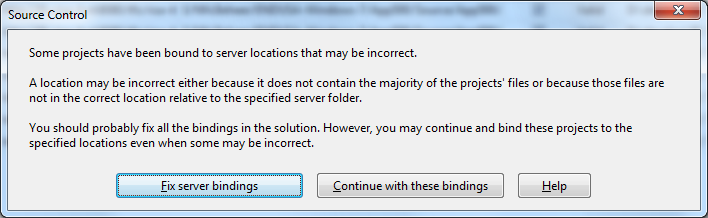 A while ago, I inherited a bunch of C# and VB.NET projects. One of them always generated the below error when including it in Team Foundation System (yes, the original projects were salvaged from Visual Source Shredder version 6.0c):
[Source Control]

Some projects have been bound to server locations that may be incorrect.

A location may be incorrect either because it does not contain the majority of the projects' files or because those files are not in the correct location relative to the specified server folder.

You should probably fix all the bindings in the solution. However, you may continue and bind these projects to the specified locations even when some may be incorrect.

[Fix server bindings] [Continue with these bindings] [Help]
First I tried the Help button: it links to a Help page on MSDN explaining the error can be cause with some statistics on projects not being in the source control system. Since all projects were, there, I looked for more information.
I tried finding a “Fix Server Bindings” or a 2010 “Some projects have been bound to server locations that may be incorrect” link that fitted my use case (getting projects from VSS into TFS), but the solutions I tried eventually all led to the same issue.
Fixing the server bindings would always fail: the solution (which itself is also a project) would get the status Invalid.
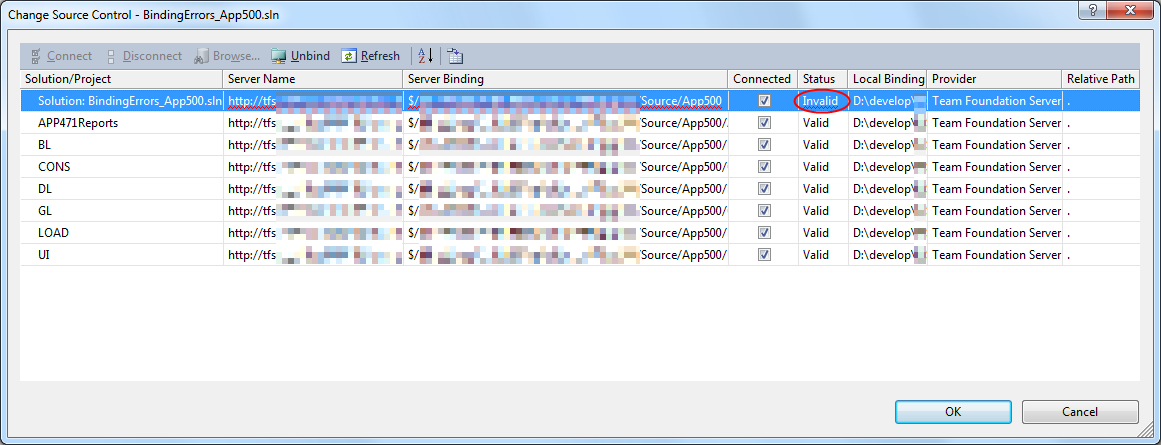
The next steps were these: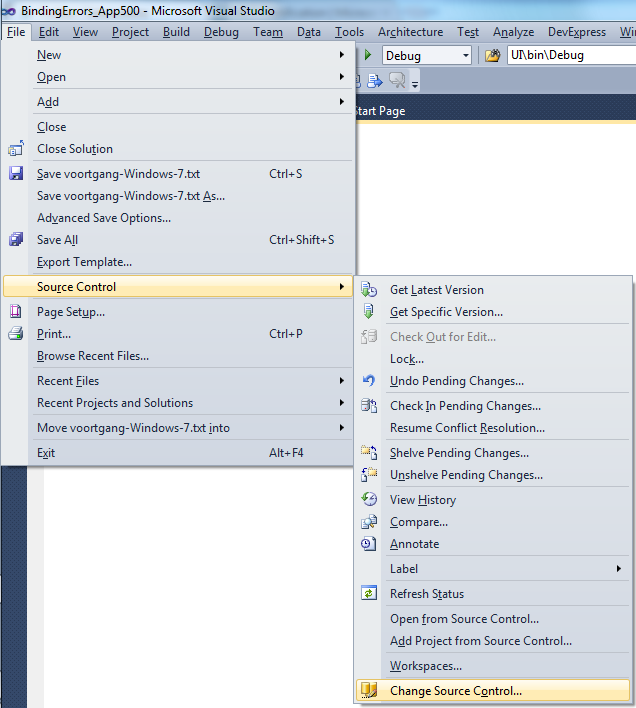
Project("{2150E333-8FDC-42A3-9474-1A3956D46DE8}") = "Solution Items", "Solution Items", "{8D9964D4-6129-4B8F-9238-F9161A02B968}"

ProjectSection(SolutionItems) = preProject

...

Framework\Config.dll = Framework\Config.dll

...

EndProjectSection

EndProjectReading the Help more carefully, with in the back of my mind keeping “Solution Items” all as projects, I finally got the cause:
When some percentage of Solution Items cannot be found locally, and are not in the version control system, Visual Studio marks the solution binding to the version control system as “Invalid”.
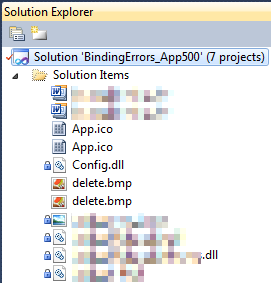 The temporary solution is to ignore the error, until I have found all the missing files (they are scattered around some network shares), or made sure they are not needed at all.
There are many of those (you recognize them from the missing padlock icon in the Solution Explorer).
Version control rot is just like link rot, that’s why one of the high priority action items is to introduce for build automation at this client, then deploy those as clean builds into the Develop and Test stages of the DTAP, then verify if the solutions still work).
–jeroen

Posted in .NET, C#, C# 1.0, C# 2.0, C# 3.0, C# 4.0, C# 5.0, Development, Internet, link rot, Power User, Software Development, Source Code Management, TFS (Team Foundation System), VB.NET, Visual Studio 2010, Visual Studio and tools, WWW - the World Wide Web of information | Leave a Comment »
Posted by jpluimers on 2012/08/15
A few weeks ago, Bill Karwin did a must watch webinar on the prevention SQL Injection titled “SQL Injection Myths and Fallacies“.
Bill Karwin (twitter, new blog, old blog, Amazon) is famous for much work in the SQL database community, including InterBase/Firebird, mySQL, Oracle and many more.
He also:
Anyway, his webinar is awesome. Be sure to get the slides, watch the replay, and read the questions follow up.
Watching it you’ll get a better understanding of defending against SQL injection.
A few very valuable points he made: Read the rest of this entry »
Posted in .NET, .NET 3.5, .NET 4.5, .NET ORM, ASP.NET, Batch-Files, C#, C# 1.0, C# 2.0, C# 3.0, C# 4.0, C# 5.0, C++, Cloud Development, COBOL, CommandLine, Database Development, Delphi, Delphi for PHP, Delphi x64, Delphi XE2, Development, EF Entity Framework, F#, Firebird, FireMonkey, History, InterBase, iSeries, Java, JavaScript/ECMAScript, Jet OLE DB, LINQ, LLBLGen, MEF, Microsoft Surface, Mobile Development, PHP, PowerShell, Prism, Scripting, SharePoint, SilverLight, Software Development, SQL, SQL Server, SQL Server 2000, SQL Server 2005, SQL Server 2008, SQL Server 2008 R2, SQL Server 2012, SQL Server 7, VB.NET, VBS, Visual Studio 11, Visual Studio 2002, Visual Studio 2003, Visual Studio 2005, Visual Studio 2008, Visual Studio 2010, Visual Studio and tools, Web Development, Windows Azure, WinForms, WPF, XAML, xCode/Mac/iPad/iPhone/iOS/cocoa | 1 Comment »
 The Wiert Corner - irregular stream of stuff