Archive for the ‘PowerShell’ Category
Posted by jpluimers on 2017/02/22
A while ago, I bitched that Microsoft moved away the Windows Update out of the Control panel into a language depended place (in Windows 10 1511 update broke the Hyper-V networking – Fix network connection issues ).
Since then I had to maintain too many locales running Windows 10. So here is the batch file:
for /f "delims=" %%A in ('PowerShell -Command "(Get-Culture).Name"') do explorer "%LocalAppData%\Packages\windows.immersivecontrolpanel_cw5n1h2txyewy\LocalState\Indexed\Settings\%%A\AAA_SystemSettings_MusUpdate_UpdateActionButton.settingcontent-ms"
It uses these tricks:
Set output of a command as a variable (in this case a for loop variable)Execute PowerShell script in a .bat file
PowerShell Get-Culture (which gets a .NET CultureInfo instance)
CultureInfo.Name property (which has the nl-NL, en-US, etc codes in it)
It replaced this simple batch-file which has worked for like 10 years:
%windir%\System32\rundll32.exe url.dll,FileProtocolHandler wuapp.exe
–jeroen
via: Windows Update Shortcut – Create in Windows 10 – Windows 10 Forums
Posted in .NET , .NET 1.x , .NET 2.0 , .NET 3.0 , .NET 3.5 , .NET 4.0 , .NET 4.5 , Batch-Files , CommandLine , Development , Power User , PowerShell , Scripting , Software Development , Windows , Windows 10 | Leave a Comment »
Posted by jpluimers on 2016/07/25
PowerShell 4.0 is madly in love with “English (United States)”
A long time ago I started writing up my blog post like this in March 2015 when I bumped into this the first time when upgrading from PowerShell 2 to PowerShell 4:
It seems there is no real workaround:
Good and not so good news: after reading the below linked posts, this is what works:
PowerShell 4 and up works fine with any [Wayback ] Lucida Console size (including 12) and boldness
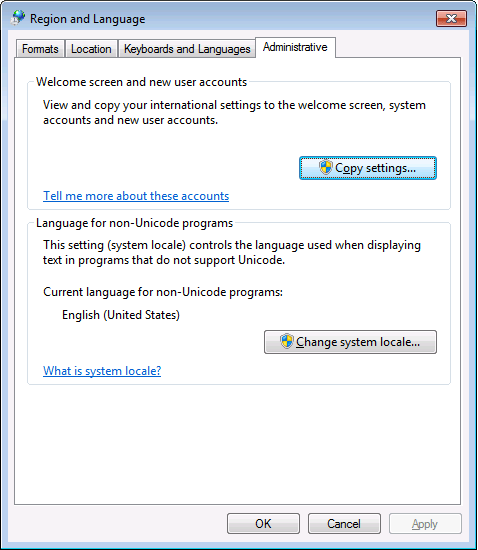
only when the “Language for non-Unicode programs” is set to “English (United States)”.
PowerShell 4 works fine with [Wayback ] Consolas on any size and boldness
for any “Language for non-Unicode programs”
So if you’re like me and switch between “Dutch (Netherlands)” and “English (Ireland)” a lot (both use the EURO as currency, but have distinct enough other locale settings to cover a lot of European stuff) then you need to get used to the Consolas font.
Source:
Edit 20210930: a possible solution
I need to fire up some old systems having PowerShell v3 or v4 on them to test the below possible solution.
Read the rest of this entry »
Posted in CommandLine , Development , Font , Lucida Console , Power User , PowerShell , PowerShell , Scripting , Software Development , Windows , Windows 10 , Windows 7 , Windows 8 , Windows 8.1 , Windows 9 | Leave a Comment »
Posted by jpluimers on 2016/02/03
Every once in a while, I need to see which EXE paths.
In [Wayback /Archive ] this particular case , I wanted to see which [Wayback /Archive ] Spring.Tests unit tests instances of [Wayback /Archive ] Spring4D were running.
This case I needed to see which DevEnv were running (because somehow I got my .csproj bindings wrong).
Since [Wayback /Archive ] tasklist Wayback /Archive ] pslist
[Wayback /Archive ] list-running-processes.bat
Learn more about bidirectional Unicode characters
[Wayback /Archive ] get-Full-Exe-Path-of-a-Running-Process.bat
@echo off
:: http://superuser.com/questions/768984/show-exe-path-of-running-processes-on-the-command-line-in-windows
  if [%1] == [] goto :help
  PowerShell Get-Process %* ^| Format-List Path
goto :eof
:help
  echo Syntax:
  echo   %0 ProcessName
  echo Shows the full EXE paths of any running process with the ProcessName name.
  echo Example:
  echo   %0 DevEnv
  echo Shows the paths of running Visual Studio processes
PowerShell PowerShell [Wayback /Archive ] Get-Process
First I used [Wayback /Archive ] Get-Member Get-Process
PowerShell Get-Process ^| Get-Member
Then I [Wayback /Archive ] filtered the Path from Get-Process to figure out which Spring.Tests processes were running:
PowerShell Get-Process Spring.Tests ^| Format-List Path
resulting in:
Path : C:\Users\Developer\Versioned\Spring4D\Tests\Bin\DelphiXE\Spring.Tests.exe
The second batch file escapes the pipe (|) by using a carret (^) , so it is passed from the command-line to PowerShell.
–jeroen
Posted in CommandLine , Development , PowerShell , Software Development | 2 Comments »
Posted by jpluimers on 2015/05/19
Now that DynamicDNS moved itself to a fully payed service, named it DynDns Pro, then renamed it Remote Access and limiting it to 30 hosts for USD 25 a year , I looked for alternatives, and noticed NO-IP.
I like it for a few reasons:
OK, last year, there was this Microsoft Legal Action and Controversy , but I think that is a once time thing (some people even argue that Microsoft wasn’t thinking ), so I created the last script below in PowerShell.
A few open-source scripts to keep your NO-IP account happy (that also work on most other DDNS providers like Duck DNS ):
Read the rest of this entry »
Posted in *nix , *nix-tools , bash , CommandLine , Development , Perl , PHP , Power User , PowerShell , Scripting , Software Development | 1 Comment »
Posted by jpluimers on 2015/04/23
Boy, I wish I had read these PowerShell articles earlier:
PowerShell One-Liners: Help, Syntax, Display and Files .PowerShell One-Liners: Variables, Parameters, Properties, and Objects .PowerShell One-Liners: Collections, Hashtables, Arrays and Strings .PowerShell One-Liners: Accessing, Handling and Writing Data .
Besides being in depth, the articles also contain a ton of examples all in this form:
Action Command Example
Basic help for x
Get-Help cmd (cmd is a full name)
help Get-ChildItem
Help in separate window
Show-Command cmd; then select the help icon
Show-Command Get-ChildItem
–jeroen
Posted in CommandLine , Development , PowerShell , Software Development | Leave a Comment »
Posted by jpluimers on 2015/01/22
Wow: I feel like having lived under a stone for 8 years, as RosettaCode has been alive since it was founded in 2007 by Mike Mol .
The idea is that you solve a task and learn from that, or learn by seeing how others have solved tasks or draft tasks .
So in a sense it is similar to the Rosetta stone : it has different languages phrasing the same tasks.
There are already a whole bunch of languages on RosettaCode (of which a few are in the categories below), and you can even suggest or add your own languages.
When you want to solve tasks, be sure to look at the list unimplemented tasks by language that leads to automatic reports by language (for instance two of the languages I use most often: C# and Delphi ).
I’m sure there are lots of programming chrestomathy sites , even beyond the ones, and it feels very similar to programming kata sites .
–jeroen
Posted in .NET , APL , Awk , bash , Batch-Files , C , C# , C++ , COBOL , CommandLine , Delphi , Development , Fortran , FreePascal , Java , JavaScript/ECMAScript , Lazarus , Object Pascal , Office VBA , Pascal , Perl , PHP , PowerShell , PowerShell , Prism , Scripting , sed script , Sh Shell , Software Development , Turbo Prolog , VB.NET , VBS , VBScript , Visual Studio and tools , Web Development | Leave a Comment »
Posted by jpluimers on 2014/12/20
Earlie this month, I wrote a review about Delphi Cookbook .
Well: as of last thursday, you can get that for USD 5 (or EUR 4.80, so better get yourself a USA account: just ensure your address is in the USA).
Heck: until januari 6th, you can get any eBook or Video on Packt for USD 5 .
Note there is even an x-Mas countdown on the way (with each day a free book that is readable/downloadable for 24 hours).
There’s over 2500+ books to choose from, so I’m grabbing this chance to learn a few things on OpenCV, Scala, and PowerShell.
–jeroen
via: Book review: Delphi Cookbook by Daniele Teti, Packt publishing .
Posted in .NET , CommandLine , Delphi , Delphi XE , Delphi XE2 , Delphi XE3 , Delphi XE4 , Delphi XE5 , Delphi XE6 , Delphi XE7 , Development , Java Platform , PowerShell , Scala , Scripting , Software Development | Tagged: Delphi Cookbook , Packt | Leave a Comment »
Posted by jpluimers on 2014/11/05
Thanks Ryant for posting this answer , which I’ve paraphrased a bit:
not itself is not a boolean operator in PowerShell.
The reason is that PowerShell borrows a lot from *nix history, and this has been in *nix forever .
So there are 3 ways of negating a boolean, all equivalent: Read the rest of this entry »
Posted in CommandLine , Development , PowerShell , Software Development | Leave a Comment »
Posted by jpluimers on 2014/10/31
When searching for powershell ise indent tab, I came across this very nice post by rpscripter :
If one selects multiple lines, then pressing tab will indent them all. Pressing shift+tab will un-indent them all.
Yes, I know the PowerShell is limited, so the indents are tabs (not spaces) and you cannot change the tab size: Powershell ISE – change indent/tab size + keep tabs .
–jeroen
via:
Posted in CommandLine , Development , Power User , PowerShell , PowerShell , Scripting , Software Development , Windows , Windows 7 , Windows 8 , Windows Server 2003 , Windows Server 2003 R2 , Windows Server 2008 , Windows Server 2008 R2 , Windows Vista , Windows XP | Leave a Comment »
Posted by jpluimers on 2014/06/19
Many people confuse a shell with a console.
They are distinct: the shell executes commands, and the console hooks up video and keyboard to them.
Some products (like Take Command Console, of which Noah Coad is a huge fan ) combine the two.
Some shells you can use for Windows: Read the rest of this entry »
Posted in Batch-Files , CommandLine , Development , PowerShell , PowerShell , Scripting , Software Development | Leave a Comment »



 The Wiert Corner - irregular stream of stuff