Archive for the ‘Web Development’ Category
Posted by jpluimers on 2022/03/28
Suddenly, a while ago, because of a stuck modifier key I suddenly had the WordPress classic editor running in full screen without any indication to go back, nor an opportunity to save the content.
It wasn’t the usual “Shift-Alt-W” [Wayback] Distraction Free Writing – Make WordPress Support (which still allows you to hover over the sidebars to make them visible, and has a visual indication of the mode).
After lot’s of trying, I figured out the toggle “Shift-Ctrl-F” toggles between normal and full screen mode. It seems unavailable in the new editor, so that might be a reason ([Wayback] Keyboard Shortcuts | WordPress.org)
The shortcut is odd too, as in most tooling “Ctrl-F” modifications like “Shift-Ctrl-F” have something to do with find or replace operations.
It was quite tough finding any reference to this shortcut, as my initial search revealed none: [Wayback] “WordPress” “Shift-Ctrl-F” full screen – Google Search.
Later I reversed the modifiers in [Wayback] “WordPress” “Ctrl-Shift-F” full screen – Google Search and found [Wayback] How to disable non-system hotkeys on Windows – gHacks Tech News
Simple Disable Key is a free software program for Microsoft Windows devices that enables you to block non-system hotkeys.
…
Not all hotkeys are useful however. When I work on a WordPress site for instance, I sometimes press the shortcut Ctrl-Shift-F by accident. This switches the editor to full screen view which I never use.
First time I invoked the full screen editor I had to look up the shortcut as I could not reproduce it.
–jeroen
Posted in Development, SocialMedia, Software Development, Web Development, WordPress, WordPress | Leave a Comment »
Posted by jpluimers on 2022/03/18
For my link list as WordPress.com is actively hiding them:
- Posts:
- Categories:
- Tags:
- Comments:
- Pages:
- Blogroll???
- Post:
Notes
You can see the old versus new infrastructure by comparing these branches:
WordPress.com does not have the “Classic Editor” plugin, but just gradually discourages use of the old infrastructure which is far more feature rich, thereby screwing old users.
Some of these features from the old infrastructure that are gone (despite the pretentious name of the Gutenberg editor):
- Posts/Pages/Tags/Categories/Comments overviews are paginated, can be filtered and have bulk-actions
- Classic-Editor has lots of useful keyboard shortcuts and allows for nested quotes
For reference, WordPress – Wikipedia: Gutenberg versus classic-editor:
WordPress 5.0 “Bebo”[edit]
The December 2018 release of WordPress 5.0, “Bebo”, is named in homage to the pioneering Cuban jazz musician Bebo Valdés.[90]
It included a new default editor “Gutenberg” – a block-based editor; it allows users to modify their displayed content in a much more user friendly way than prior iterations. Blocks are abstract units of markup that, composed together, form the content or layout of a web page.[91] Past content that was created on WordPress pages is listed under what is referred to as a Classic Block.[92] Prior to Gutenberg, there were several block-based editors available as WordPress plugins, e.g. Elementor, and following the release of Gutenberg Elementor was compared to existing plugins.[93][94]
Classic Editor plugin[edit]
The Classic Editor Plugin was created as a result of User preferences and helped website developers maintain past plugins only compatible with WordPress 4.9.8, giving plugin developers time to get their plugins updated & compatible with the 5.0 release. Having the Classic Editor plugin installed restores the “classic” editing experience that WordPress has had up until the WordPress 5.0 release.[95] The Classic Editor Plugin will be supported at least until 2022.[96]
The Classic Editor plugin is active on over 5,000,000 installations of WordPress.[97]
–jeroen
Posted in Classic editor, Development, Gutenberg editor, Power User, SocialMedia, Software Development, Web Development, WordPress, WordPress | Leave a Comment »
Posted by jpluimers on 2022/02/24
IoT devices still often use the ‘Basic’ HTTP Authentication Scheme for authorisation, see [Wayback] RFC7617: The ‘Basic’ HTTP Authentication Scheme (RFC ) and [Wayback] RFC2617: HTTP Authentication: Basic and Digest Access Authentication (RFC ).
Often this authentication is used even over http instead of over https, for instance the Egardia/Woonveilig alarm devices I wrote about yesterday at Egardia/Woonveilig: some notes about logging on a local gateway to see more detailed information on the security system. This is contrary to guidance in:
- RFC7617:
   This scheme is not considered to be a secure method of user
   authentication unless used in conjunction with some external secure
   system such as TLS (Transport Layer Security, [RFC5246]), as the
   user-id and password are passed over the network as cleartext.
- RFC2617:
   "HTTP/1.0", includes the specification for a Basic Access
   Authentication scheme. This scheme is not considered to be a secure
   method of user authentication (unless used in conjunction with some
   external secure system such as SSL [5]), as the user name and
   password are passed over the network as cleartext.
Fiddling with those alarm devices, I wrote these two little bash functions (with a few notes) that work both on MacOS and in Linux:
# `base64 --decode` is platform neutral (as MacOS uses `-D` and Linux uses `-d`)
# `$1` is the encoded username:password
function decode_http_Basic_Authorization(){
  echo $1 | base64 --decode
  echo
}

# `base64` without parameters encodes
# `echo -n` does not output a new-line
# `$1` is the username; `$2` is the password
function encode_http_Basic_Authorization(){
  echo $1:$2 | base64
}
The first decodes the <credentials> from a Authorization: Basic <credentials> header into a username:password clean text followed by a newline.
The second one encodes a pair of username and password parameters into such a <credentials> string.
They are based on these initial posts that were not cross platform or explanatory:
- [Wayback] Decode HTTP Basic Access Authentication – Stack Pointer
- [Wayback] Create Authorization Basic Header | MJ’s Web Log
–jeroen
Posted in *nix, *nix-tools, Apple, Authentication, bash, bash, Communications Development, Development, HTTP, Internet protocol suite, Linux, Mac OS X / OS X / MacOS, Power User, Scripting, Security, Software Development, TCP, Web Development | Leave a Comment »
Posted by jpluimers on 2022/02/23
Yesterday I wrote about I consider stealing the user’s time because of a bad UX design among the Dark Patterns.
It was about a site blocking the paste of an e-mail field.
I forgot about an almost Dark Pattern on the same site that might be not obvious for English and French readers, but (though there is little documentation on this) there are a lot of countries having the house number put after the street name.
When filling out forms, it makes a lot of sense to put the house number and street name fields in the order of use for the majority of people living that country.
Not doing so rates a form almost as Dark Pattern, for instance the Dutch “MijnOLVG” site, as this is their account sign-up form:
Read the rest of this entry »
Posted in Dark Pattern, Development, Power User, Software Development, User Experience (ux), Web Development | Leave a Comment »
Posted by jpluimers on 2022/02/08
As a precursor to a post tomorrow showing that serving UTF8 does not mean organisations go without unicode problems, first some statistics.
The first Unicode ideas got drafted some 30 years ago in 1987. In 1991, more than 30 years ago, the Unicode Consortium saw the light. Nowadays more than 95% percent of the web-pages (close to 100% when you include plain ASCII) is served using the UTF-8 encoding.
It means that nowadays there is a very small chance you
will see mangled characters (what Japanese call mojibake) when you’re surfing the web.
Some nice graphs of unicode growth are at these locations are at these locations:
I think especially important are 2008 (when UTF-8 had outgrown all other individual encodings) and slightly after 2010, when UTF-8 alone covered more than 50% of the pages served. These exclude ASCII-only pages. Adding those would make the figures even larger.
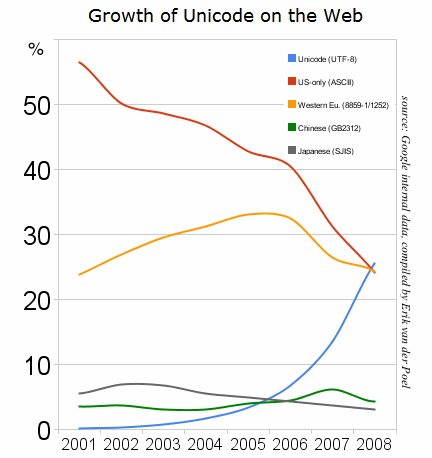


Historical yearly trends in the usage statistics of character encodings for websites, June 2021
–jeroen
Posted in Development, Encoding, Software Development, UTF-8, UTF8, Web Development | Leave a Comment »
Posted by jpluimers on 2022/02/01
[Wayback] Jeroen Wiert Pluimers on Twitter: “”Too special” password character password woos at @HORNBACH_NL : [ Het wachtwoord moet minstens acht tekens lang zijn, en minstens een getal en een letter (a-zA-Z) bevatten. De volgende speciale tekens zijn toegestaan: !”#$%&'()*+,.:;?@_|} ] 1/”
I wonder what kind of parser they use, as these printable special ASCII characters are forbidden:
- \-/[\]^`{~
- space (0x20)
- tab (0x9)
- line feed (0xa)
- carriage return (0xb
- vertical tab (0xb)
- form feed (0xc)
Seems no JSON or SQL to me: there I would expect other limitations.
What would break if you use them in other fields or pass them in an HTML POST-request?
I mean: these passwords should be salted and hashed immediately when the HTML-POST request is received, so certainly they would not be stored somewhere or passed many layers into code, right?
Oh, in order to activate an account there, you need to accept some 40+ A4 sized pages of legal stuff. Brave Dutch judge that will put these all in favour of Hornbach.
–jeroen
Read the rest of this entry »
Posted in Development, LifeHacker, Power User, Security, Software Development, Web Development | Leave a Comment »
Posted by jpluimers on 2022/02/01
Sometimes it is easier to have current and public CA signed TLS certificates for internal servers than to setup and maintain an internal CA and register it on all affected browsers (including mobile phones).
One of my reasons to investigate this is that Chrome refuses to save credentials on servers that have no verifiable TLS certificate, see my post Some links on Chrome not prompting to save passwords (when Firefox and Safari do) about a week ago.
Below are some links for my link archive that hopefully will allow me to do this with Let’s Encrypt (msot via [Wayback/Archive] letsencrypt for internal servers – Google Search):
Read the rest of this entry »
Posted in Cloud, Cloudflare, Development, Encryption, ESXi6, ESXi6.5, ESXi6.7, ESXi7, Fritz!, Fritz!Box, Fritz!WLAN, Infrastructure, Internet, Let's Encrypt (letsencrypt/certbot), Power User, Security, Software Development, Virtualization, VMware, VMware ESXi, Web Development | Leave a Comment »
Posted by jpluimers on 2022/01/20
For quite some time now, Chrome (think years) refuses to prompt for saving passwords whereas Firefox and Safari do prompt and save them, even for site types that it used to save passwords for in the past.
It has been annoying enough for too long now that I tried to do better than the Google searches I used back when I saw this happen first.
Below are some links based on new searches (starting with [Wayback] adding a password in chrome settings – Google Search); hopefully I can try them after I made a list of sites that Chrome does not show the password save prompt for.
Solutions I tried that failed (but maybe useful for others):
Solutions still to try:
Read the rest of this entry »
Posted in Chrome, Chrome, Communications Development, Development, Encryption, ESXi6, ESXi6.5, ESXi6.7, Firefox, Fritz!, Fritz!Box, Fritz!WLAN, Google, https, HTTPS/TLS security, Internet, Internet protocol suite, Let's Encrypt (letsencrypt/certbot), Power User, routers, Safari, Security, TCP, TLS, Virtualization, VMware, VMware ESXi, Web Browsers, Web Development | Leave a Comment »
Posted by jpluimers on 2021/12/29
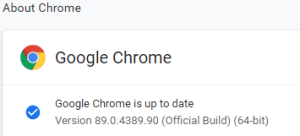 This option in Chrome has moved around a bit, so here is how it was in Version 89.0.4389.90 (Official Build) (64-bit) when I documented it.
- Browse to
chrome://discards/
- Don’t be intimidated by the many rows and columns; only the rightmost 8 (at the time of writing) are interesting:

- Search for the URL (in my chase
https://web.whatsapp.com/ , so I searched for whatsapp which you see as orange in the screenshots below) for which you want to ensure it will never sleep/hibernate (Chrome calls this “discardable”)

- Click
Toggle under the checkmark ✔ so it changes into a cross ✘️ (so the URL will never be discarded, hence always stays awake)

Do this only for tabs that are not CPU/memory/traffic intensive
I got there via these posts:
When searching for discards, I found this post: [Wayback] How to Prevent Chrome from Reloading Tabs When You Switch to Them
Chrome has built-in memory management that causes inactive tabs to “sleep” as RAM is filled. When you click the tab again, it has to reload the page. It’s annoying.
–jeroen
Posted in Chrome, Development, Google, Power User, SocialMedia, Software Development, Web Development, WhatsApp | Leave a Comment »
Posted by jpluimers on 2021/12/28
People around me often wonder why things that seem so obvious does not work, and ask me if I bump into similar things.
I do, and often wonder why banks do not pay users to do testing for them instead of the other way around.
Below the fold a few Twitter threads. They might be mainly involving ING, but that’s just because I use their business and consumer portals more than those of other banks.
Here are the summaries:
Read the rest of this entry »
Posted in Development, Software Development, Web Development | Leave a Comment »


 The Wiert Corner - irregular stream of stuff