Archive for the ‘Cloud’ Category
Posted by jpluimers on 2021/10/22
If you think download speeds are slow for large downloads (or multi-media playback is slow or quality is low) on a fast link, then consider your DNS.
Many people report that using one of the centralised DNS services (like Google/Cloudflare/…) causes slowness because they direct CDN lookups to a small pool of servers that get overloaded.
Some links:
Via [WayBack ] How to check whether DNS is working through a browser? – Super User
Google DNS also allows for interactive querying, for example [WayBack ] Google Public DNS
Read the rest of this entry »
Posted in Cloud , Cloudflare , DNS , Hardware , Infrastructure , Internet , Network-and-equipment , Power User | Leave a Comment »
Posted by jpluimers on 2021/09/02
DNS over HTTPS
For my link archive:
JSON DNS output
Some DNS over HTTSP providers support dns-json, which Cloudflare delivers non-pretty printed.
Read the rest of this entry »
Posted in Cloud , Cloudflare , Communications Development , Development , DNS , Encryption , HTTP , https , HTTPS/TLS security , Infrastructure , Internet , Internet protocol suite , Power User , Security , Software Development , TCP , TLS | Leave a Comment »
Posted by jpluimers on 2021/08/10
SES mail servers at the time of writing
*n*x:
# nslookup -type=TXT amazonses.com | grep "v=spf1"
amazonses.com   text = "v=spf1 ip4:199.255.192.0/22 ip4:199.127.232.0/22 ip4:54.240.0.0/18 ip4:69.169.224.0/20 ip4:76.223.180.0/23 ip4:76.223.188.0/24 ip4:76.223.189.0/24 ip4:76.223.190.0/24 -all"I
Windows
C:\>nslookup -type=TXT amazonses.com | find "v=spf1"
Non-authoritative answer:
        "v=spf1 ip4:199.255.192.0/22 ip4:199.127.232.0/22 ip4:54.240.0.0/18 ip4:69.169.224.0/20 ip4:76.223.180.0/23 ip4:76.223.188.0/24 ip4:76.223.189.0/24 ip4:76.223.190.0/24 -all"
These addresses use a compact CIDR notation to denote ranges of networks containing ranges of network IPv4 addresses.
CIRD processing to sendmail access file
(this is linux sendmail only)
Converting the nslookup outout to a CIDR based sendmail /etc/mail/access excerpt goes via a pipe sequence of multiple sed commands:
# nslookup -type=TXT amazonses.com | grep "v=spf1" | sed 's/\(^.*"v=spf1 ip4:\| -all"$\)//g' | sed 's/\ ip4:/\n/g' | xargs -I {} sh -c "prips {} | sed 's/$/\tRELAY/g'"
199.255.192.0   RELAY
199.255.192.1   RELAY
...
76.223.190.254  RELAY
76.223.190.255  RELAY
What happens here is this:
Filter out only spf1 records using grep.
Remove the head (.*v=spf1 ip4:) and tail ( -all") of the output, see [WayBack ] use of alternation “|” in sed’s regex – Super User .
Replaces all ip4: with newlines (so the output get split over multiple lines), see [WayBack ] linux – splitting single line into multiple line in numbering format using awk – Stack Overflow .
Convert the CIDR notation to individual IP addresses (as sendmail cannot handle CIDR),
This uses a combination of xargs sh trickprips
Alternatively, use
Replaces all end-of-line anchor ($) with a tab followed by RELAY, see
You can append the output of this command to /etc/mail/access, then re-generate /etc/mail/access.db and restart sendmail; see for instance [WayBack ] sendmail access.db by example | LinuxWebLog.com .
Without the xargs, the output would look like this:
# nslookup -type=TXT amazonses.com | grep "v=spf1" | sed 's/\(^.*"v=spf1 ip4:\| -all"$\)//g' | sed 's/\ ip4:/\n/g'
199.255.192.0/22
199.127.232.0/22
54.240.0.0/18
69.169.224.0/20
76.223.180.0/23
76.223.188.0/24
76.223.189.0/24
76.223.190.0/24
Via
–jeroen
Posted in *nix , *nix-tools , Amazon SES , Amazon.com/.de/.fr/.uk/... , Cloud , Communications Development , Development , Infrastructure , Internet protocol suite , Power User , sendmail , SMTP , Software Development | Leave a Comment »
Posted by jpluimers on 2021/08/03
There are many reasons to disable DNS over HTTPS (DoH), of which enough are discussed in the links below.
Disabling DoH always talks about setting TTR (the abbreviation Mozilla uses for it) to 5 (like [WayBack ] Thread by @isotopp: “Firefox is about to break DNS by enabling DNS-over-HTTP by default […]” ), but hardly ever explains the meaning of 5, or any other potential values.
After some searching, I found [WayBack ] Firefox disable trr | Knowledge Base :
0: Off by default1: Firefox chooses faster2: TRR default w/DNS fallback3: TRR only mode5: Disabled
I imagine the setting we’re all looking for is: user_pref(“network.trr.mode”, 5);
It pointed me to [WayBack ] Trusted Recursive Resolver – MozillaWiki :
Read the rest of this entry »
Posted in Cloud , Cloudflare , Communications Development , Development , DNS , Firefox , Infrastructure , Internet protocol suite , Power User , TCP , Web Browsers | Leave a Comment »
Posted by jpluimers on 2021/07/26
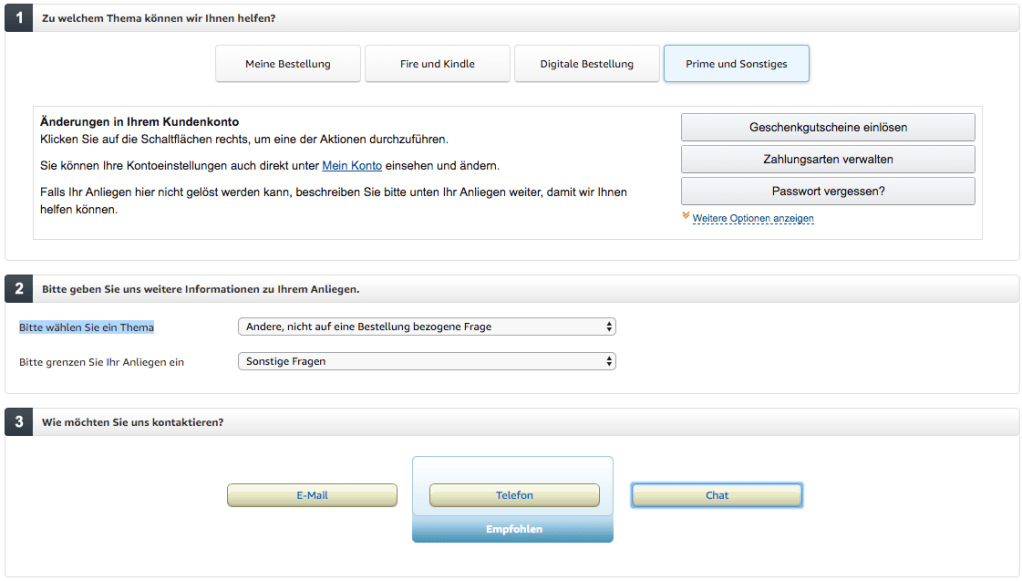
Visit https://smile.amazon.de/gp/help/customer/contact-us/ref=hp_abgt_cu_cu?nodeId=508510
Click “Prime und Sonstiges”
In the “Bitte wählen Sie ein Thema” selector, choose “Andere, nicht auf eine Bestellung bezogene Frage”
In the “Bitte grenzen Sie Ihr Anliegen ein” selector, choose “Sonstige Fragen”
Now a “Chat” button appears:
–jeroen
Posted in Amazon.com/.de/.fr/.uk/... , Cloud , Infrastructure , Power User | Leave a Comment »
Posted by jpluimers on 2021/05/05
A while ago I wrote about Helping the WayBack ArchiveTeam team: running their Warrior virtual appliance on ESXi .
Since it was scheduled before my cancer treatment started and got posted when still recovering from it, I missed that version 3.2 of the [Wayback ] ArchiveTeam Warrior appliance appeared in the [Wayback ] Releases · ArchiveTeam/Ubuntu-Warrior at [Wayback ] Release v3.2 · ArchiveTeam/Ubuntu-Warrior . You can download it form these places:
These two sites have not yet been updated, so they contain the older versions:
The source code now has been moved three times:
Read the rest of this entry »
Posted in *nix , *nix-tools , ArchiveTeamWarrior , Cloud , Containers , diff , Docker , ESXi5 , ESXi5.1 , ESXi5.5 , ESXi6 , ESXi6.5 , ESXi6.7 , ESXi7 , Infrastructure , Internet , InternetArchive , Kubernetes (k8n) , KVM Kernel-based Virtual Machine , patch , Power User , VirtualBox , Virtualization , VMware , VMware ESXi , VMware Workstation , WayBack machine | Leave a Comment »
Posted by jpluimers on 2021/04/16
[WayBack ] Ryan James Spencer on Twitter :
“I wrote a quick Dockerfile so people who purchase Bite Size Networking from @b0rk can quickly have access to the tools. You can slim the image down to do debugging on docker networks once you get comfortable with which tools are most useful to you.”
He is planning to do more, so maybe a few of [WayBack ] wizard zines get encapsulated into dockerfiles as well.
–jeroen
PS: [WayBack ] Dockerfile | Docker Documentation
Learn more about bidirectional Unicode characters
# N.B. The only tool missing here that is mentioned in the document is `zenmap`
# purely because this image is intended to be run via a CLI and `zenmap` is a GUI
# to `nmap` i.e. one can play around with the tools by running:
#
# $ docker build –name bite_size_networking:latest .
# $ docker run –rm -d –name bsn_test bite_size_networking:latest
# $ docker exec -it bsn_test bash
#
# Alternatively, one can change the `ENTRYPOINT` to `["bash"]` and run:
#
# $ docker run -it –name bsn_test bite_size_networking:latest
#
# then later (after exiting the shell):
#
# $ docker start bsn_test
# $ docker attach bsn_test
#
# One can also run this image on a docker network to capture packets and so
# forth for debugging purposes. Once you've found the tooling that best suits
# your needs, it may make sense to make a slimmed down version of this
# Dockerfile and, if wireguard isn't needed, base this image off
# `debian:stable` instead.
#
# Lastly, you can purchase Bite Size Networking or Julia's other fantastic
# zines over at https://wizardzines.com/
# We use `unstable` here since we install `wireguard` below
FROM debian:unstable
RUN apt update && \
DEBIAN_FRONTEND=noninteractive apt install -y \
dnsutils \
curl \
nmap \
tcpdump \
ngrep \
mitmproxy \
iptables \
ethtool \
stunnel \
hping3 \
lsof \
ipcalc \
p0f \
iperf \
apache2-utils \
wget \
python3 \
iftop \
nethogs \
iptraf \
httpie \
nload \
aria2 \
nftables \
tcpflow \
telnet \
openvpn \
links \
wireguard \
tshark
ENTRYPOINT ["sh", "-c", "while true; do sleep $(( 60 * 60 * 24 )); done"]
Posted in *nix , *nix-tools , Cloud , Containers , Docker , Infrastructure , Power User | Leave a Comment »
Posted by jpluimers on 2021/03/19
The [WayBack ] Archiveteam helps the WayBack machine with feeding new content.
You can help that team by running one or more “warrior” virtual machine instances. The VM is distributed as a virtual appliance in an ova file according to the Open Virtualization Format .
That format sounds more generic than it actually is, so the (at the time of writing) archiveteam-warrior-v3-20171013.ova file at [WayBack ] Index of /downloads/warrior3/ was created for VirtualBox .X
This meant running it on VMware ESXi or VMware vSphere takes a few steps for patching it, then uploading it to your VMware host.
Since I might want to run the appliance on multiple places or multiple instances, I wanted to have a ready-to-go solution, I created a git repository with both the patch instructions and the update at [WayBack ] wiert.me / public / ova / archiveteam-warrior-v3-20171013.ESXi · GitLab .
Read the rest of this entry »
Posted in ArchiveTeamWarrior , Cloud , Containers , Docker , Infrastructure , Internet , InternetArchive , Kubernetes (k8n) , Power User , WayBack machine | Leave a Comment »









 The Wiert Corner - irregular stream of stuff