Archive for the ‘Mac OS X / OS X / MacOS’ Category
Posted by jpluimers on 2016/10/10
Really interesting stuff: ttystudio. It allows to record an apng or gif of a terminal session (so it should work on headless systems).
Anyone knowing alternatives for OpenSuSE and Mac OS X?
(Cockos Incorporated | LICEcap might cut it on Mac OS X, but not on headless systems so GNOME/byzanz doesn’t cut it either)
Sources:
Handy as well:
–jeroen
Posted in *nix, *nix-tools, Apple, Linux, Mac, Mac OS X / OS X / MacOS, MacBook, MacBook Retina, MacBook-Air, MacBook-Pro, MacMini, openSuSE, Power User, SuSE Linux, Tumbleweed | Leave a Comment »
Posted by jpluimers on 2016/10/07
The most recent versions of Joe don’t even build from stock in OS X any more and there are no direct installers for them.
But there are two most recent older versions that have installers, and a formula recent brew based HomeBrew installation:
- joe-3.7-0.pkg – rudix-snowleopard – JOE – Rudix: The hassle-free way to get Unix programs on Mac OS X – Google Project Hosting.
- PROJECT DETAIL for Joe’s Own Editor.
- Homebrew Formulas – Joe.
After experimenting for a while without brew preferring the first over second, I’ve installed the the third as:
- The first actually installs version 3.6, but has the syntax highlighting files installed in the correct place, so you get syntax highlighting.
- The second does install version 3.7, but since the syntax highlighting files are in the wrong place: you get no syntax highlighting.
- The brew formula has an up to date joe version 4.0 and installs the syntax highlighting in the right place: you get syntax highlighting.
Before making a choice, you might want to consider reading about joe versions in JOE – Joe’s own editor / … /NEWS.md.
Having a background partially in the Linux world, I tried building joe from source on my Mac following the steps at JOE – Joe’s own editor / Discussion / joe-editor-general:Mac binary for 3.3 does not run on OS/X 10.8. It failed because the Mercurial 3.8 branch required automake and autoconf which are not available on just a Mac + Xcode. So I’m happy that others have bit the bullet and make a good HomeBrew build.
What makes HomeBrew so great is that it is based on a fully versioned git/ruby combination, allows for multiple Python versions, allows for binaries through bintray served bottles and has zillions (well, thousands) of installable formulae, all versioned.
–jeroen
Posted in *nix, *nix-tools, Apple, joe, Mac OS X / OS X / MacOS, Mac OS X 10.4 Tiger, Mac OS X 10.5 Leopard, Mac OS X 10.6 Snow Leopard, Mac OS X 10.7 Lion, MacBook, MacBook Retina, MacBook-Air, MacBook-Pro, MacMini, OS X 10.10 Yosemite, OS X 10.8 Mountain Lion, OS X 10.9 Mavericks, Power User | Leave a Comment »
Posted by jpluimers on 2016/09/26
Posted in Apple, Mac, Mac OS X / OS X / MacOS, MacBook, MacBook Retina, MacBook-Air, MacBook-Pro, MacMini, OS X 10.10 Yosemite, OS X 10.11 El Capitan, OS X 10.9 Mavericks, Power User | Leave a Comment »
Posted by jpluimers on 2016/09/23
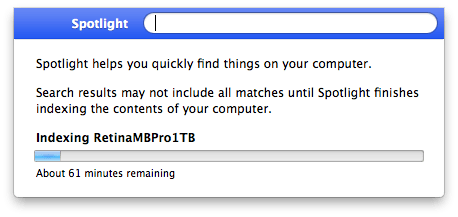
I was looking for some PDF files that I knew for sure were on my SSD but Spotlight would not find them. Looking for more obvious files I noticed Spotlight was returning hardly any files at all: somehow the index was messed up.
Years ago I also had Spotlight issues; then it would find nothing (now it did find some files) which was solved by a reboot: Spotlight refuses to be enabled on Lion: reboot helped.
Screenshot 2016-06-29 12.57.34
Now this was right after a reboot, and because Spotlight did find some files I know Spotlight was turned on (no need for mdutil tricks mentioned in After restoring fresh HDD from Time Machine Backup: No results from Spotlight).
So I dug a bit deeper and decided to try [WayBack] Rebuild the Spotlight index on your Mac – Apple Support with these steps:
- Search for something that returns few results (in my case Xyzzy)
- Click
Spotlight Preferences...
- Go to the
Privacy tab
- From the
Finder, drag your disk(s) to the Prevent Spotlight from searching these locations list.
- Remove your disk(s) from that lists using the minus (-) button.
- Wait for re-indexing to complete
That worked like a charm to refresh the index: it started indexing again which took about one hour.
After a few minutes though, I found back the 32pfl7404h_12_dfu_nld.pdf I was looking for.
A second time, it had lost the index to iTunes, and found it back in about 2 hours (as the SSD was much more full).
A third time, this trick from [WayBack/Archive.is] Re-Index Spotlight from the Terminal, Re-Gain Valuable Time for Life [OS X Tips] | Cult of Mac worked:
sudo mdutil -E /
This basically re-indexes from the root (/) folder.
I find it easier than the above 6 steps (which are also on [WayBack/Archive.is] Make Spotlight Work Again [OS X Tips] | Cult of Mac).
–jeroen
Posted in Apple, Mac, Mac OS X / OS X / MacOS, MacBook, MacBook Retina, MacBook-Pro, OS X 10.10 Yosemite, OS X 10.11 El Capitan, OS X 10.9 Mavericks, Power User, SpotLight | Leave a Comment »
Posted by jpluimers on 2016/08/30
Thanks David Berneda for sharing this a while ago:
Cool little trick to show all the preset variables for your GCC/Clang compiler:
clang -E -dM - < /dev/null
I’ve always wondered how to get these. Some are kind of surprising, especially since there are 320 of them, at least on my system.
On my system (Mavericks, I wish the sw_vers console tool would tell that): 170 lines.
Read the rest of this entry »
Posted in Apple, C, C++, Development, Mac OS X / OS X / MacOS, OS X 10.9 Mavericks, Power User, Software Development | Leave a Comment »
Posted by jpluimers on 2016/08/17
A while ago, testssl.sh [WayBack] needed Darwin binaries (for OS X): Supply Darwin binaries + install documentation · Issue #127 · drwetter/testssl.sh [WayBack]
So I created the small Bourne shell (sh) script below to deliver them.
It allows me to update these gists:
The build script itself is in a gist as well: https://gist.github.com/f4de3937630b87753133.git [WayBack]
It helped me to contribute to these testssl.sh issues:
Not all of these binaries are in https://github.com/drwetter/testssl.sh/tree/master/bin [WayBack] as it makes the testssl.sh repository too bloated. Some (including non-OSX builds made by others) are here:
Eventually the script might get merged into https://github.com/drwetter/testssl.sh/blob/master/utils/make-openssl.sh [WayBack] as there is a Darwin switch in this commit: https://github.com/drwetter/testssl.sh/commit/6efc3e90f52e5926b0853d3b2fb221b631dcf452 [WayBack]
Read the rest of this entry »
Posted in Apple, Development, Mac, Mac OS X / OS X / MacOS, Mac OS X 10.4 Tiger, Mac OS X 10.5 Leopard, Mac OS X 10.6 Snow Leopard, Mac OS X 10.7 Lion, MacBook, MacBook Retina, MacBook-Air, MacBook-Pro, MacMini, OpenSSL, OS X 10.10 Yosemite, OS X 10.8 Mountain Lion, OS X 10.9 Mavericks, Power User, Security, Software Development, xCode/Mac/iPad/iPhone/iOS/cocoa | Leave a Comment »
Posted by jpluimers on 2016/08/15
The culprit is usually the mds [WayBack] process (metadata server).
Simple command-line solution:
sudo killall mds
A more convoluted way with the Activity Monitor is in the link below.
–jeroen
via: Fix the OS X Finder not displaying the contents of specific folders | MacIssues [WayBack]
Posted in Apple, Mac, Mac OS X / OS X / MacOS, Mac OS X 10.4 Tiger, Mac OS X 10.6 Snow Leopard, MacBook, MacBook Retina, MacBook-Air, MacBook-Pro, MacMini, OS X 10.10 Yosemite, OS X 10.8 Mountain Lion, Power User | Leave a Comment »
Posted by jpluimers on 2016/07/29
One day I’m going to need this: Make A Bootable Windows 10 USB Install Stick On Linux With WinUSB Fork ~ Web Upd8: Ubuntu / Linux blog
So I’m glad WinUSB (which hadn’t been maintained for a long time) got forked on github by slaka.
Since my day-to-day unix-like system is OS X, I’d love a good working solution there too which means I probably need to investigate a bit along these lines:
- Using diskpart in a Windows VM (which is kind of backwards):
- Using Disk Utility and UEFI (only works for Windows 8 and up):
- Using Boot Camp Assistant and a modified Info.plist (which for El Capitan needs some extra work):
–jeroen
via: Make A Bootable Windows 10 USB Install Stick On Linux With WinUSB Fork WebUpd8 – Google+ / DoorToDoorGeek “Stephen McLaughlin” – Google+
Posted in *nix, Apple, BIOS, Boot, BSD, Linux, Mac OS X / OS X / MacOS, OS X 10.10 Yosemite, OS X 10.11 El Capitan, OS X 10.9 Mavericks, Power User, Ubuntu, UEFI, Windows, Windows 10, Windows 7, Windows 8, Windows 8.1, Windows 9, Windows Server 2000, Windows Server 2003, Windows Server 2003 R2, Windows Server 2008, Windows Server 2008 R2, Windows Server 2012, Windows Server 2012 R2, Windows Vista, Windows XP | Leave a Comment »
Posted by jpluimers on 2016/07/06
via: Lesson Learned – I Can’t Get My Git Repo Clean! | DrupalEasy
One file kept getting added to the git modified list: service/src/main/MySOAPdefinition.pas.
It was part of a repository that had been migrated from SVN (more on that in a future blog post) and along the way been renamed in directory service/src/main from MySOAPdefinition.pas to MySoapDefinition.pas. SVN (and TortoiseSVN) don’t object to this. But git does.
You’d see this on the command-line:
>git status
On branch develop
Your branch is up-to-date with 'origin/develop'.
Changes not staged for commit:
  (use "git add ..." to update what will be committed)
  (use "git checkout -- ..." to discard changes in working directory)

        modified:   service/src/main/MySOAPdefinition.pas

no changes added to commit (use "git add" and/or "git commit -a")

>git add service\src\main\MySoapDefinition.pas

>git status
On branch develop
Your branch is up-to-date with 'origin/develop'.
Changes not staged for commit:
  (use "git add ..." to update what will be committed)
  (use "git checkout -- ..." to discard changes in working directory)

        modified:   service/src/main/MySOAPdefinition.pas

no changes added to commit (use "git add" and/or "git commit -a")
Basically the add would do nothing.
On Windows, this is how to get around this:
Read the rest of this entry »
Posted in Delphi, Delphi XE8, Development, git, Mac OS X / OS X / MacOS, OS X 10.9 Mavericks, Power User, Software Development, Source Code Management, SourceTree, Windows, Windows 7 | 1 Comment »
Posted by jpluimers on 2016/07/05
Not on the terminal, but only in SourceTree I got this error (full text below):
Can't locate SVN/Core.pm in @INC
Well, the Xcode binaries were here:
$ xcode-select -p

/Applications/Xcode.app/Contents/Developer
On Mavericks, perl is this version:
$ perl --version | grep -w for

This is perl 5, version 16, subversion 2 (v5.16.2) built for darwin-thread-multi-2level

(with 3 registered patches, see perl -V for more detail)
and git is this:
$ git --version

git version 1.9.5 (Apple Git-50.3)
Steps for fixing are at these blog entries:
All these solutions point you to change the system Perl installation, but since on my system it failed only on SourceTree, but from the terminal, I wanted to fix SourceTree.
Read the rest of this entry »
Posted in Apple, Development, DVCS - Distributed Version Control, git, Mac OS X / OS X / MacOS, OS X 10.9 Mavericks, Power User, Source Code Management, Subversion/SVN | 4 Comments »


 The Wiert Corner - irregular stream of stuff