


Hopefully an example ssh config will follow.
[WayBack] Jeroen Pluimers on Twitter: “Would you mind sharing a trimmed down version of your ~/.ssh/config file? The bits from your posts are a bit fragmented now, so I’ve lost the overview (:”
–jeroen
Posted by jpluimers on 2021/08/10
Hopefully an example ssh config will follow.
[WayBack] Jeroen Pluimers on Twitter: “Would you mind sharing a trimmed down version of your ~/.ssh/config file? The bits from your posts are a bit fragmented now, so I’ve lost the overview (:”
–jeroen

Posted in *nix, Communications Development, Development, Internet protocol suite, Power User, SSH, ssh/sshd, TCP | Leave a Comment »
Posted by jpluimers on 2021/08/10
*n*x:
# nslookup -type=TXT amazonses.com | grep "v=spf1"
amazonses.com   text = "v=spf1 ip4:199.255.192.0/22 ip4:199.127.232.0/22 ip4:54.240.0.0/18 ip4:69.169.224.0/20 ip4:76.223.180.0/23 ip4:76.223.188.0/24 ip4:76.223.189.0/24 ip4:76.223.190.0/24 -all"I
Windows
C:\>nslookup -type=TXT amazonses.com | find "v=spf1"
Non-authoritative answer:
        "v=spf1 ip4:199.255.192.0/22 ip4:199.127.232.0/22 ip4:54.240.0.0/18 ip4:69.169.224.0/20 ip4:76.223.180.0/23 ip4:76.223.188.0/24 ip4:76.223.189.0/24 ip4:76.223.190.0/24 -all"
These addresses use a compact CIDR notation to denote ranges of networks containing ranges of network IPv4 addresses.
(this is linux sendmail only)
Converting the nslookup outout to a CIDR based sendmail /etc/mail/access excerpt goes via a pipe sequence of multiple sed commands:
# nslookup -type=TXT amazonses.com | grep "v=spf1" | sed 's/\(^.*"v=spf1 ip4:\| -all"$\)//g' | sed 's/\ ip4:/\n/g' | xargs -I {} sh -c "prips {} | sed 's/$/\tRELAY/g'"
199.255.192.0   RELAY
199.255.192.1   RELAY
...
76.223.190.254  RELAY
76.223.190.255  RELAY
What happens here is this:
spf1 records using grep..*v=spf1 ip4:) and tail ( -all") of the output, see [WayBack] use of alternation “|” in sed’s regex – Super User. ip4: with newlines (so the output get split over multiple lines), see [WayBack] linux – splitting single line into multiple line in numbering format using awk – Stack Overflow.xargs with the sh trick to split the CIDR list into separate arguments, and prips (which prints the IP addresses for a CIDR); see:
xargs with sh: [WayBack] shell – Piping commands after a piped xargs – Unix & Linux Stack Exchangeprips: [WayBack] prips / Prips · GitLab and [WayBack] Sendmail Open Source FAQs 0 (PDF).cidrexpand (which requires Perl), see [WayBack] sendmail access file and cidrexpand and [WayBack] cidrexpand in sendmail | source code search engine$) with a tab followed by RELAY, see
You can append the output of this command to /etc/mail/access, then re-generate /etc/mail/access.db and restart sendmail; see for instance [WayBack] sendmail access.db by example | LinuxWebLog.com.
Without the xargs, the output would look like this:
# nslookup -type=TXT amazonses.com | grep "v=spf1" | sed 's/\(^.*"v=spf1 ip4:\| -all"$\)//g' | sed 's/\ ip4:/\n/g'
199.255.192.0/22
199.127.232.0/22
54.240.0.0/18
69.169.224.0/20
76.223.180.0/23
76.223.188.0/24
76.223.189.0/24
76.223.190.0/24
–jeroen
Posted in *nix, *nix-tools, Amazon SES, Amazon.com/.de/.fr/.uk/..., Cloud, Communications Development, Development, Infrastructure, Internet protocol suite, Power User, sendmail, SMTP, Software Development | Leave a Comment »
Posted by jpluimers on 2021/08/09
There is an autossh binary for Windows available on GitHub: [WayBack] GitHub – jazzl0ver/autossh: Windows binary for autossh v1.4c.
Combined with NSSM (which for instance you can install through [WayBack] Chocolatey Software | NSSM – the Non-Sucking Service Manager) you can not only automatically build and maintain an SSH connection, but also ensure the autossh process is up and running as a service without the need for an active logon.
This allows for SSH based tunnels from and to your Windows system.
For this usage scenario, there is no need for these tools any more:
Future research:
These are in part based on:
Download the most recent [WayBack] Releases · jazzl0ver/autossh · GitHub (see below for updates).
I used the 1.4g version: [WayBack] autossh.exe, then put on my Windows PATH.
Since it is on chocolatey ([WayBack] Chocolatey Software | NSSM – the Non-Sucking Service Manager 2.24.101.20180116), this will suffice:
choco install --yes nssm
Check the value of MaxAuthTries in /etc/ssh/sshd_config.
# grep MaxAuthTries /etc/ssh/sshd_configMaxAuthTries 1
The value needs to be at least 3 or higher for ssh-copy-id to work properly.
When changing the value, be sure to restart the sshd daemon.
Without a low value of
MaxAuthTriesin/etc/ssh/sshd_config,ssh-copy-idwill give an errorERROR: Received disconnect from myRemoteComputer port 2222:2: Too many authentication failures.See also these link via [WayBack ]“INFO: attempting to log in with the new key(s), to filter out any that are already installed” “Too many authentication failures” – Google Search:
Temporarily change the user shell to /bin/bash to allow [WayBack] ssh-copy-id to work at all.
This is explained in more detail by [WayBack] shell – ssh dissable login, but allow copy-id – Server Fault.
You need an ssh public and private key, then transfer this to your Windows client. You can for instance use these as a base:
For instance (where myLocalUser is the local user generate the key-pair for for, and myRemoteUser plus myRemoteComputer is the remote user and computer you want to autossh to):
ssh-keygen -t rsa -b 4096 -f %UserProfile%\.ssh\id_rsa_myLocalUser@%ComputerName%_autossh_myRemoteUser@myRemoteComputerssh-keygen -t ed25519 -f %UserProfile%\.ssh\id_ed25519_myLocalUser@%ComputerName%_autossh_myRemoteUser@myRemoteComputerSince git includes ssh-copy-id (which you need in the next step, it is at %Program Files%\Git\usr\bin\ssh-copy-id) and git is on chocolatey ([WayBack] Chocolatey Software | Git (Install) 2.23.0):
choco install --yes git.install --params "/GitAndUnixToolsOnPath /NoGitLfs /SChannel /NoAutoCrlf /WindowsTerminal"
Use bash with ssh-copy-id to transfer the generated public keys to a remote system (replace 2222 with the SSH port number on the remote computer; often it is just 22):
pushd %UserProfile%\.ssh
bash -c "ssh-copy-id -i %UserProfile%\.ssh\id_rsa_myLocalUser@%ComputerName%_autossh_myRemoteUser@myRemoteComputer -p 2222 myRemoteUser@myRemoteComputer"
bash -c "ssh-copy-id -i %UserProfile%\.ssh\id_ed25519_myLocalUser_%ComputerName%_autossh_myRemoteUser@myRemoteComputer -p 2222 myRemoteUser@myRemoteComputer"
popd
This sounds overly complicated, but is the only way to incorporate the environment variables.
These two ssh commands should succeed; choose the one for which you prefer the rsa or ed25519 algorithm.
ssh -i %UserProfile%\.ssh\id_rsa_myLocalUser@%ComputerName%_autossh_myRemoteUser@myRemoteComputer -p 2222 myRemoteUser@myRemoteComputerssh -i %UserProfile%\.ssh\id_ed25519_myLocalUser_%ComputerName%_autossh_myRemoteUser@myRemoteComputer -p 2222 myRemoteUser@myRemoteComputerAfter this, try with autossh:
autossh -M 0 -o "ServerAliveInterval 30" -o "ServerAliveCountMax 3" -i %UserProfile%\.ssh\id_rsa_myLocalUser@%ComputerName%_autossh_myRemoteUser@myRemoteComputer -p 2222 myRemoteUser@myRemoteComputerautossh -M 0 -o "ServerAliveInterval 30" -o "ServerAliveCountMax 3" -i %UserProfile%\.ssh\id_ed25519_myLocalUser_%ComputerName%_autossh_myRemoteUser@myRemoteComputer -p 2222 myRemoteUser@myRemoteComputerThis disables the autossh port monitoring (the -M 0 option, but uses a combination of interval/count-max from ssh itself to monitor the connection (the -o "ServerAliveInterval 30" -o "ServerAliveCountMax 3" options).
Note that there is no default monitoring port, as it can be any one: [WayBack] linux – What is the default monitoring port for autossh? – Super User
a
Depending on which algorithm you like most, use either of the below 2 (replace 2222 with the SSH port number on the remote computer; often it is just 22):
ssh -i %UserProfile%\.ssh\id_rsa_myLocalUser@%ComputerName%_autossh_myRemoteUser@myRemoteComputer -p 2222 myRemoteUser@myRemoteComputerssh -i %UserProfile%\.ssh\id_ed25519_myLocalUser_%ComputerName%_autossh_myRemoteUser@myRemoteComputer -p 2222 myRemoteUser@myRemoteComputer
C:\Users\jeroenp>ssh-keygen -t ed25519 -f %UserProfile%\.ssh\id_ed25519_myUser_%ComputerName%_autossh_revue
Generating public/private ed25519 key pair.
Enter passphrase (empty for no passphrase):
Enter same passphrase again:
Your identification has been saved in C:\Users\jeroenp\.ssh\id_ed25519_myUser_D10U003_autossh_revue.
Your public key has been saved in C:\Users\jeroenp\.ssh\id_ed25519_myUser_D10U003_autossh_revue.pub.
The key fingerprint is:
SHA256:6qjzXhQtZpTzU6aryHMYuwVs5b4a/2COKxFGFQj0Eg4 jeroenp@D10U003
The key's randomart image is:
+--[ED25519 256]--+
|E+ oo...         |
|o =  .o.  o      |
| + .  *o.+       |
|  +. = o+        |
| . .+ o So       |
|  ...+ ..        |
|   o.=B.         |
|  o *@oo         |
|  .*O*=..        |
+----[SHA256]-----+

C:\Users\jeroenp>ssh-keygen -t rsa -b 4096 -f %UserProfile%\.ssh\id_rsa_myUser_%ComputerName%_autossh_revue
Generating public/private rsa key pair.
Enter passphrase (empty for no passphrase):
Enter same passphrase again:
Your identification has been saved in C:\Users\jeroenp\.ssh\id_rsa_myUser_D10U003_autossh_revue.
Your public key has been saved in C:\Users\jeroenp\.ssh\id_rsa_myUser_D10U003_autossh_revue.pub.
The key fingerprint is:
SHA256:WaWRoAnr4OuXAnc+MekpbdnNto71SgdMykp7XqylQr8 jeroenp@D10U003
The key's randomart image is:
+---[RSA 4096]----+
|    .   .....    |
|     o o  .+     |
|  . . o . o      |
| . o . + o       |
|  . o.o S        |
|. .o*o . .       |
| o.*oO.o* .      |
| .o %ooO+o       |
|  .= oE++o.      |
+----[SHA256]-----+
NSSM is really cool to run any application as a service: [WayBack] NSSM – the Non-Sucking Service Manager
nssm is a service helper which doesn’t suck. srvany and other service helper programs suck because they don’t handle failure of the application running as a service. If you use such a program you may see a service listed as started when in fact the application has died. nssm monitors the running service and will restart it if it dies. With nssm you know that if a service says it’s running, it really is. Alternatively, if your application is well-behaved you can configure nssm to absolve all responsibility for restarting it and let Windows take care of recovery actions.
nssm logs its progress to the system Event Log so you can get some idea of why an application isn’t behaving as it should.
nssm also features a graphical service installation and removal facility. Prior to version 2.19 it did suck. Now it’s quite a bit better.
After installing, everything is command-line based (I cut away some blank lines for readability):
C:\bin\bin>nssm --help
NSSM: The non-sucking service manager
Version 2.24-101-g897c7ad 64-bit, 2017-04-26
Usage: nssm [ ...]

To show service installation GUI:

        nssm install []

To install a service without confirmation:

        nssm install   [ ...]

To show service editing GUI:

        nssm edit

To retrieve or edit service parameters directly:

        nssm dump
        nssm get   []
        nssm set   []
        nssm reset   []

To show service removal GUI:

        nssm remove []

To remove a service without confirmation:

        nssm remove  confirm

To manage a service:

        nssm start
        nssm stop
        nssm restart
        nssm status
        nssm statuscode
        nssm rotate
        nssm processes
If it is behind on [WayBack] autossh (see version history at [WayBack] autossh/CHANGES.txt), then just ask for a new version; usually it gets built and released quickly: [WayBack] Any plans for 1.4g? · Issue #3 · jazzl0ver/autossh · GitHub
[WayBack] Releases · jazzl0ver/autossh · GitHub at the time of writing:
–jeroen
Posted in *nix, *nix-tools, Communications Development, Development, Internet protocol suite, Power User, SSH, TCP | Leave a Comment »
Posted by jpluimers on 2021/08/09
The chocolatey package for OpenVPN has not been updated for quite a while. It looks like it has to do with the current dependency to verify the OpenVPN signature.
The current [Wayback] Chocolatey Software | OpenVPN 2.4.7 version is both outdated on the major version number ([Wayback/Archive.is] Release OpenVPN v2.5.3 release · OpenVPN/openvpn) and minor version ([Wayback/Archive.is] Release OpenVPN v2.4.11 release · OpenVPN/openvpn). The version 2.4 Windows installers are now called “Legacy Windows Installers”.
Luckily less than a day after the start of the [Wayback/Archive.is] RFM – openvpn · Issue #1024 · chocolatey-community/chocolatey-package-requests, a volunteer stepped forward.
Hopefully by now the package is being maintained again.
–jeroen
Posted in Network-and-equipment, OpenVPN, Power User, VPN | Leave a Comment »
Posted by jpluimers on 2021/08/09
[WayBack] How to turn on automatic logon in Windows
Describes how to turn on the automatic logon feature in Windows by editing the registry.
Most archivals of the above post fail with a 404-error after briefly flashing the content, but this particular one usually succeeds displaying.
It is slightly different from the one referenced in my blog post automatic logon in Windows 2003, and because of the archival issues, I have quoted most of it below.
A few observations, at least in Windows 10 and 8.1:
reg add "HKEY_LOCAL_MACHINE\Software\Microsoft\Windows NT\CurrentVersion\Winlogon" /v DefaultDomainName /t REG_SZ /d %ComputerName% /fI wrote a batch file enable-autologon-for-user-parameter.bat that makes it easier:
if [%1] == [] goto :help

:enable
  reg add "HKEY_LOCAL_MACHINE\SOFTWARE\Microsoft\Windows NT\CurrentVersion\Winlogon" /v AutoAdminLogon /t REG_SZ /d 1 /f
:setUserName
  reg add "HKEY_LOCAL_MACHINE\SOFTWARE\Microsoft\Windows NT\CurrentVersion\Winlogon" /v DefaultUserName /t REG_SZ /d %1 /f
:removePasswordIfItExists
  reg delete "HKEY_LOCAL_MACHINE\SOFTWARE\Microsoft\Windows NT\CurrentVersion\Winlogon" /v DefaultPassword /f
if [%2] == [] goto :eof
:setPassword
  reg add "HKEY_LOCAL_MACHINE\SOFTWARE\Microsoft\Windows NT\CurrentVersion\Winlogon" /v DefaultPassword /t REG_SZ /d %2 /f
  goto :eof

:help
  echo Syntax:
  echo   %0 username password
The article quote:
Posted in Batch-Files, Development, Microsoft Surface on Windows 7, Power User, Scripting, Software Development, Windows, Windows 10, Windows 7, Windows 8, Windows 8.1, Windows 9, Windows Server 2003, Windows Server 2003 R2, Windows Server 2008, Windows Server 2008 R2, Windows Server 2012, Windows Server 2012 R2, Windows Server 2016, Windows Vista, Windows XP | Leave a Comment »
Posted by jpluimers on 2021/08/09
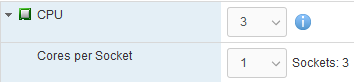
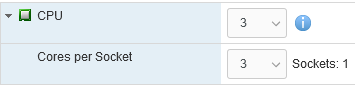
After finding out that Windows 8.1 only uses 2 of of 3 CPU cores, I found [WayBack] How many physical processors does Windows 8 Support? – Super User.
This especially matters when doing virtualisation: here you can choose over how many CPU sockets the cores are divided.
So this limits Windows 8.x to 2 CPU cores, because they 3 cores are spread over 3 sockets:
And this allows Windows 8.x to use 3 CPU cores as it is in one socket:
Note this still applies to more recent non-Server Microsoft products ([Wayback] Windows 10 Home/Pro: 1/2 CPU sockets 64/128 cores; [Wayback] SQL Server Express/Standard: lesser of 1/4 CPU sockets, 4/24 cores) as well. Not sure why the OS would be limited so much, as for development purposes it can make sense to have a 2+ CPU socket machine running a non-server OS.
–jeroen

Posted in Power User, Windows, Windows 8, Windows 8.1 | Leave a Comment »
Posted by jpluimers on 2021/08/06
[WayBack] The curious Kabri | How to force VMware to generate a new MAC address for a virtual machine
- Shut down the Guest OS.
- Open up the .vmx file.
- Delete the following lines (that begin with…):
ethernet0.addressType uuid.location = uuid.bios = ethernet0.generatedAddress = ethernet0.generatedAddressOffset =- Boot up the Guest OS again, and it should generate new details in the vmx file (I’d check afterwards to be doubly sure).
In my experience, start with the bold values.
If the address is the same, fiddle with ethernet0.generatedAddressOffset
Be careful with the other values, as it might force your OS to think so much hardware has changed, that license keys have become invalid.
Via: [WayBack] Re-generate MAC addresses for VMs |VMware Communities
Related:
…
2>/dev/null esxcfg-info | grep -i "system uuid"…
–jeroen
Posted in ESXi6, ESXi6.5, ESXi6.7, Power User, Virtualization, VMware, VMware ESXi | Leave a Comment »
Posted by jpluimers on 2021/08/06
According to [WayBack] Software for the ScanSnap:
ABBYY FineReader for ScanSnap
This application can perform text recognition on the scanned images using OCR (Optical Character Recognition) to convert the image data into Word, Excel, or PowerPoint files that can be edited.
Install ABBYY FineReader for ScanSnap from ScanSnap Online Update after ScanSnap Home is installed.
Display the [WayBack] Main Window of ScanSnap Home and select [Help] → [Online update (check for updates)] in the menu to run ScanSnap Online Update.
The piece above is untrue if you updated, as instructed by [WayBack] ScanSnap iX1500 Before you buy 03 – Fujitsu Global

Posted in Fujitsu ScanSnap, Hardware, ix1500, Power User, Scanners | Leave a Comment »
Posted by jpluimers on 2021/08/06
I was hoping for a quick install of the ScanSnap ix1500 on a machine that had a fully working ix500 workflow, just biting the bullet after contemplating about [WayBack] Thoughts on ix500; should I get an ix1500? for a while.
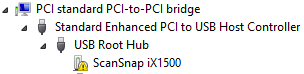
That didn’t work as expected: the Windows machine would not recognise the ix1500 when connected over USB or WiFi:
One problem here is that with the Ix500 installed, only the ix500 driver is known to Windows (on my machine it was in C:\Windows\Inf\oem12.inf which is identical to C:\Windows\SSDriver\SSMini\SSiX500-x64.inf) and the ScanSnap Installer software did not copy all drivers to C:\Windows\SSDriver\SSMini:
fi5110e-x64.cab
fi5110e-x64.cat
fi5110e-x64.inf
S1100-x64.cab
s1100-x64.cat
S1100-x64.inf
S1300-x64.cab
s1300-x64.cat
S1300-x64.inf
S1300i-x64.cab
s1300i-x64.cat
S1300i-x64.inf
S1500-x64.cab
S1500-x64.cat
S1500-x64.inf
S300-x64.cab
s300-x64.cat
S300-x64.inf
S500-x64.cab
s500-x64.cat
S500-x64.inf
SSiX100-x64.cab
ssix100-x64.cat
SSiX100-x64.inf
SSiX500-x64.cab
ssix500-x64.cat
SSiX500-x64.inf
SV600-x64.cab
sv600-x64.cat
SV600-x64.inf
I later found out that the ix1500 is incompatible with the ScanSnap Manager: [WayBack] ScanSnap iX1500 Before you buy 03 – Fujitsu Global

Posted in Fujitsu ScanSnap, Hardware, ix1500, ix500, Power User, Scanners | Leave a Comment »
Posted by jpluimers on 2021/08/05
There is a known saying phrased using cardinal, adverbial or ordinal numbers, and several naming for the first:
Sometimes the second can lead to a pattern.
Posted in Algorithms, Development, LifeHacker, Power User, Software Development | Leave a Comment »
 The Wiert Corner - irregular stream of stuff