The Wiert Corner – irregular stream of stuff

Jeroen W. Pluimers on .NET, C#, Delphi, databases, and personal interests

  • My badges

  • Twitter Updates

  • My Flickr Stream

  • Pages

  • All categories

  • Enter your email address to subscribe to this blog and receive notifications of new posts by email.

    Join 1,854 other subscribers

Archive for the ‘Power User’ Category

Chocolatey: I favor ‘choco upgrade’ over ‘choco install’

Posted by jpluimers on 2021/05/06

A while ago I found out that choco upgrade will install a package when it is not installed, and that choco upgrade all will upgrade all installed packages.

So I looked up the documentation of both choco install and choco upgrade (and choco update which will be deprecated) where I bolded parts of the upgrade command:

Given that upgrade can do both an upgrade and an install, I have switched all my install scripts to use upgrade in steaf of install.

Not all of the above commands accept the same set of [Wayback] Chocolatey Software Docs | Commands: Default Options and Switches

-?, --help, -h
     Prints out the help menu.

 -d, --debug
     Debug - Show debug messaging.

 -v, --verbose
     Verbose - Show verbose messaging. Very verbose messaging, avoid using 
       under normal circumstances.

     --trace
     Trace - Show trace messaging. Very, very verbose trace messaging. Avoid 
       except when needing super low-level .NET Framework debugging. Available 
       in 0.10.4+.

     --nocolor, --no-color
     No Color - Do not show colorization in logging output. This overrides 
       the feature 'logWithoutColor', set to 'False'. Available in 0.10.9+.

     --acceptlicense, --accept-license
     AcceptLicense - Accept license dialogs automatically. Reserved for 
       future use.

 -y, --yes, --confirm
     Confirm all prompts - Chooses affirmative answer instead of prompting. 
       Implies --accept-license

 -f, --force
     Force - force the behavior. Do not use force during normal operation - 
       it subverts some of the smart behavior for commands.

     --noop, --whatif, --what-if
     NoOp / WhatIf - Don't actually do anything.

 -r, --limitoutput, --limit-output
     LimitOutput - Limit the output to essential information

     --timeout, --execution-timeout=VALUE
     CommandExecutionTimeout (in seconds) - The time to allow a command to 
       finish before timing out. Overrides the default execution timeout in the 
       configuration of 2700 seconds. '0' for infinite starting in 0.10.4.

 -c, --cache, --cachelocation, --cache-location=VALUE
     CacheLocation - Location for download cache, defaults to %TEMP% or value 
       in chocolatey.config file.

     --allowunofficial, --allow-unofficial, --allowunofficialbuild, --allow-unofficial-build
     AllowUnofficialBuild - When not using the official build you must set 
       this flag for choco to continue.

     --failstderr, --failonstderr, --fail-on-stderr, --fail-on-standard-error, --fail-on-error-output
     FailOnStandardError - Fail on standard error output (stderr), typically 
       received when running external commands during install providers. This 
       overrides the feature failOnStandardError.

     --use-system-powershell
     UseSystemPowerShell - Execute PowerShell using an external process 
       instead of the built-in PowerShell host. Should only be used when 
       internal host is failing. Available in 0.9.10+.

     --no-progress
     Do Not Show Progress - Do not show download progress percentages. 
       Available in 0.10.4+.

     --proxy=VALUE
     Proxy Location - Explicit proxy location. Overrides the default proxy 
       location of ''. Available for config settings in 0.9.9.9+, this CLI 
       option available in 0.10.4+.

     --proxy-user=VALUE
     Proxy User Name - Explicit proxy user (optional). Requires explicit 
       proxy (`--proxy` or config setting). Overrides the default proxy user of 
       ''. Available for config settings in 0.9.9.9+, this CLI option available 
       in 0.10.4+.

     --proxy-password=VALUE
     Proxy Password - Explicit proxy password (optional) to be used with 
       username. Requires explicit proxy (`--proxy` or config setting) and 
       user name.  Overrides the default proxy password (encrypted in settings 
       if set). Available for config settings in 0.9.9.9+, this CLI option 
       available in 0.10.4+.

     --proxy-bypass-list=VALUE
     ProxyBypassList - Comma separated list of regex locations to bypass on 
       proxy. Requires explicit proxy (`--proxy` or config setting). Overrides 
       the default proxy bypass list of ''. Available in 0.10.4+.

     --proxy-bypass-on-local
     Proxy Bypass On Local - Bypass proxy for local connections. Requires 
       explicit proxy (`--proxy` or config setting). Overrides the default 
       proxy bypass on local setting of 'True'. Available in 0.10.4+.

     --log-file=VALUE
     Log File to output to in addition to regular loggers. Available in 0.1-
       0.8+.

–jeroen

Posted in Batch-Files, Chocolatey, Development, Power User, Scripting, Software Development, Windows | Leave a Comment »

ESXi: where are my log files actually stored? Actually, most of them are in `/scratch/log` which points to a hidden `.locker` directory in a datastore.

Posted by jpluimers on 2021/05/05

A summary of the full gist at [Wayback/Archive.is] ESXi-where-are-my-log-files-stored.txt:

# ls -al / /var/ /var/log/ /var/run/ /scratch/ /scratch/log/ | grep "/\|log\|-\>"
/:
...
lrwxrwxrwx    1 root     root            57 Apr  4 18:16 scratch -> /vmfs/volumes/5ce2d440-72311161-75c5-0025907d9d5c/.locker
...
/scratch/:
drwxr-xr-x    1 root     root        106496 Apr 10 08:40 log
/scratch/log/:
-rw-------    1 root     root           411 Apr  4 18:20 Xorg.log
...
-rw-------    1 root     root         78835 Apr  4 10:30 syslog.0.gz
-rw-------    1 root     root         61136 Mar 18 15:05 syslog.1.gz
-rw-------    1 root     root         60589 Feb 24 00:30 syslog.2.gz
-rw-------    1 root     root         60373 Feb  1 08:01 syslog.3.gz
-rw-------    1 root     root         60203 Jan  9 15:50 syslog.4.gz
-rw-------    1 root     root         59889 Dec 17 23:20 syslog.5.gz
-rw-------    1 root     root         60398 Nov 25 06:50 syslog.6.gz
-rw-------    1 root     root         60563 Nov  2 14:25 syslog.7.gz
-rw-------    1 root     root        531794 Apr 10 09:35 syslog.log
...
-rw-------    1 root     root        157255 Apr  4 18:17 vvold.log
/var/:
...
drwxr-xr-x    1 root     root           512 Apr  5 19:19 log
...
/var/log/:
-rw-r--r--    1 root     root           416 Apr  4 18:16 .vmsyslogd.err
...
-rw-r--r--    1 root     root         38069 Apr  4 18:20 configRP.log
-rw-r--r--    1 root     root             0 Apr  4 18:16 cryptoloader.log
...
-rw-r--r--    1 root     root            87 Apr  5 21:57 esxcli.log
...
-rw-------    1 root     root          3350 Apr  4 18:16 init.log
-rw-r--r--    1 root     root           966 Apr  4 18:16 iofilter-init.log
...
-rw-r--r--    1 root     root         21769 Apr  4 18:16 jumpstart-esxcli-stdout.log
-rw-r--r--    1 root     root         18857 Apr  4 18:16 jumpstart-native-stdout.log
-rw-r--r--    1 root     root         10837 Apr  4 18:16 jumpstart-stdout.log
-rw-r--r--    1 root     root             0 Apr  4 18:16 kickstart.log
...
-rw-------    1 root     root         10916 Apr  4 18:16 sysboot.log
...
-rw-------    1 root     root            64 Apr 10 09:13 tallylog
...
/var/run/:
lrwxrwxrwx    1 root     root            12 Apr  4 18:16 log -> /scratch/log
  • Almost all log files (most from /var/log and all from /var/run/log) are actually persistently stored in /scratch/log and survive reboots. Just a few are non-persistent.
  • /var/log/syslog is being archived as .gz files (compressed by gzip).
  • syslog is special: the location can be configured, and even be external: [Wayback] Configuring syslog on ESXi (2003322)

    VMware vSphere ESXi 5.0 and higher hosts run a Syslog service (vmsyslogd) that provides a standard mechanism for logging messages from the VMkernel and other system components. By default in ESXi, these logs are placed on a local scratch volume or a ramdisk. To preserve the logs further, ESXi can be configured to place these logs to an alternate storage location on disk and to send the logs across the network to a Syslog server.

  • A summary of some of the above log files is at [Wayback] ESXi Log File Locations

–jeroen

Posted in *nix, *nix-tools, ash/dash, ash/dash development, BusyBox, Development, ESXi6, ESXi6.5, ESXi6.7, ESXi7, gzip, Power User, Scripting, Software Development, Virtualization, VMware, VMware ESXi | Leave a Comment »

Running ArchiveTeam Warrior version 3.2 on ESXi

Posted by jpluimers on 2021/05/05

A while ago I wrote about Helping the WayBack ArchiveTeam team: running their Warrior virtual appliance on ESXi.

Since it was scheduled before my cancer treatment started and got posted when still recovering from it, I missed that version 3.2 of the [Wayback] ArchiveTeam Warrior appliance appeared in the [Wayback] Releases · ArchiveTeam/Ubuntu-Warrior at [Wayback] Release v3.2 · ArchiveTeam/Ubuntu-Warrior. You can download it form these places:

These two sites have not yet been updated, so they contain the older versions:

The source code now has been moved three times:

Read the rest of this entry »

Posted in *nix, *nix-tools, ArchiveTeamWarrior, Cloud, Containers, diff, Docker, ESXi5, ESXi5.1, ESXi5.5, ESXi6, ESXi6.5, ESXi6.7, ESXi7, Infrastructure, Internet, InternetArchive, Kubernetes (k8n), KVM Kernel-based Virtual Machine, patch, Power User, VirtualBox, Virtualization, VMware, VMware ESXi, VMware Workstation, WayBack machine | Leave a Comment »

From Yahoo closing Answers tonight to blocking ads on YouTube

Posted by jpluimers on 2021/05/04

The discussion on Yahoo closing Answers tonight quickly went from alternative text based question/answer sites to long YouTube videos having hardly any content but ads, to blocking these ads: [Wayback] Yahoo sluit Answers-dienst na vijftien jaar en verwijdert inhoud – IT Pro – Nieuws – Tweakers

So here are some links where I can learn a bit of browser plugin and Android development technology as well:

(What I dislike most about ads is that they start at unnatural positions in the stream and cover topics I’m totally not interested in).

–jeroen

Posted in Android, Android Devices, Development, Mobile Development, Power User, SocialMedia, Software Development, Web Development, YouTube | Leave a Comment »

authentication – Bypassing Windows 10 password with Utilman.exe trick – fixed? – Information Security Stack Exchange

Posted by jpluimers on 2021/05/03

It is debatable if these tricks are vulnerabilities or not: [WayBack] authentication – Bypassing Windows 10 password with Utilman.exe trick – fixed? – Information Security Stack Exchange.

There are arguments that leaving a system open to physical access or allow operating system manipulation, it means it is busted.

On the other hand, making systems more resilient to modification, helps alleviate these problems.

So it pays for developers to harden operating systems against modification.

From the question:

Of the sethc.exe, Utilman.exe, and osk.exe ones in Windows, Utilman.exe seems to have been fixed.

Related:

–jeroen

Posted in Power User, Windows, Windows 10, Windows 7, Windows 8, Windows 8.1 | Leave a Comment »

Supermicro: 5 BIOS beeps might just mean internal VGA is disabled

Posted by jpluimers on 2021/05/03

A while ago, I got a second hand Supermicro workstation and wondered why the IPMI KVM would not show anything.

The video card in it worked fine, so I used it as a desktop machine setup for a while, happily running VMS.

I finally decided to move into a closet, so I removed the video card, and rebooted.

Then it beeped 5 times, which was odd: I expected it to switch from the video card to the internal video. It didn’t.

Older BIOS codes: [WayBack] AMI BIOS Beep Codes – Thomas-Krenn-Wiki

From PDF [WayBack] BIOS POST Codes for C7/X9/X10/X11/B9/B10/B1/A1 Motherboards

PEI Beep Codes

# of Beeps Description
1 Memory not Installed
1 Memory was installed twice (InstallPeiMemory routine in PEI Core called twice)
2 Recovery started
3 DXEIPL was not found
3 DXE Core Firmware Volume was not found
4 Recovery failed
4 S3 Resume failed
7 Reset PPI is not available

DXE Beep Codes

# of Beeps Description
1 Invalid password
4 Some of the Architectural Protocols are not available
5 No Console Output Devices are found
5 No Console Input Devices are found
6 Flash update is failed
7 Reset protocol is not available
8 Platform PCI resource requirements cannot be met

So I did a bit of reading in the manual, then found about a jumper which had happily been living out of view, under the video card:

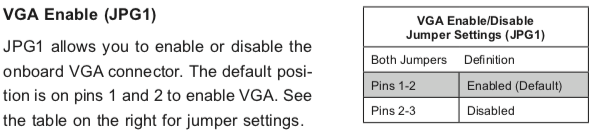
VGA Enable (JPG1)

JPG1 allows you to enable or disable the onboard VGA connector. The default position is on pins 1 and 2 to enable VGA.

Setting the jumper to pins 1&2 made internal VGA available again, it happily booted and showed in the IPMI KVM.

Later I understood why the jumper was set to VGA disabled: when having two video cards, by default Windows will extend your desktop to an invisible monitor.

The easiest workaround for that is just to disable VGA. However, you can also change Windows

Older versus newer boards

It appears that most older SuperMicro systems have a hardware switch, but for newer chipsets supporting Intel Quick Sync Video a there is a BIOS setting: [WayBack] Enable internal graphics in SUPERMICRO servers | Any IT here? Help Me!

Windows 10 fixing video cards and ACPI_BIOS_ERROR

The reboot did not work fine: Windows 10 would not initialise properly, but hung when detecting video cards.

Read the rest of this entry »

Posted in Hardware, IPMI, Mainboards, Power User, SuperMicro, X10SRH-CF, X9SRi-3F, X9SRi-F | Leave a Comment »

Windows 10: when “wmic path SoftwareLicensingService get OA3xOriginalProductKey” fails, try ProduKey from NirSoft.

Posted by jpluimers on 2021/05/03

Somehow, many Windows 10 systems, when I try on an Administrative command prompt wmic path SoftwareLicensingService get OA3xOriginalProductKey, the result is empty:

Microsoft Windows [Version 10.0.17763.475]
(c) 2018 Microsoft Corporation. All rights reserved.

C:\WINDOWS\system32>wmic path SoftwareLicensingService get OA3xOriginalProductKey
OA3xOriginalProductKey


C:\WINDOWS\system32>

On those systems, [Wayback] NirSoft ProduKey always works.

Having a product key at hand is a great help when re-installing Windows 10: often it does not automatically obtain a digital license on the same hardware.

Most of those systems have been upgrades from previous Windows versions, but not all of them: even some new systems have this behaviour.

Related:

–jeroen

Read the rest of this entry »

Posted in Power User, Windows, Windows 10 | Leave a Comment »

VMware ESXi console: viewing all VMs, suspending and waking them up: part 5

Posted by jpluimers on 2021/04/30

Yesterday’s post got a bit longer than anticipated as there were most steps than I hoped for to create the listing script vim-cmd-list-all-VMs.sh:

#!/bin/sh
# https://wiert.me/2021/04/29/vmware-esxi-console-viewing-all-vms-suspending-and-waking-them-up-part-4/
vmids=`vim-cmd vmsvc/getallvms | sed -n -E -e "s/^([[:digit:]]+)\s+((\S.+\S)?)\s+(\[\S+\])\s+(.+\.vmx)\s+(\S+)\s+(vmx-[[:digit:]]+)\s*?((\S.+)?)$/\1/p"`
for vmid in ${vmids} ; do
    powerState=`vim-cmd vmsvc/power.getstate ${vmid} | sed '1d'`
    name=`vim-cmd vmsvc/get.config ${vmid} | sed -n -E -e '/\(vim.vm.ConfigInfo\) \{/,/files = \(vim.vm.FileInfo\) \{/ s/^ +name = "(.*)",.*?/\1/p'`
    vmPathName=`vim-cmd vmsvc/get.config ${vmid} | sed -n -E -e '/files = \(vim.vm.FileInfo\) \{/,/tools = \(vim.vm.ToolsConfigInfo\) \{/ s/^ +vmPathName = "(.*)",.*?/\1/p'`
    echo "VM with id ${vmid} has power state ${powerState} (name = ${name}; vmPathName = ${vmPathName})."
done

This means that today there is a new try to cover the rest of these lists I started yesterday with:

Available commands

  • vim-cmd vmsvc/power.getstate vmid
  • vim-cmd vmsvc/power.hibernate vmid
  • vim-cmd vmsvc/power.off vmid
  • vim-cmd vmsvc/power.on vmid
  • vim-cmd vmsvc/power.reboot vmid
  • vim-cmd vmsvc/power.reset vmid
  • vim-cmd vmsvc/power.shutdown vmid
  • vim-cmd vmsvc/power.suspend vmid
  • vim-cmd vmsvc/power.suspendResume vmid

Unavailable commands

  • vim-cmd vmsvc/power.startup vmid
  • vim-cmd vmsvc/power.resume vmid
  • vim-cmd vmsvc/power.wakeup vmid

So here we go:

vim-cmd-hibernate-running-VMs.sh and vim-cmd-suspend-running-VMs.sh

These files are almost the same: the echo and command are different (Hibernating versus Suspending and power.hibernate versus suspend)

#!/bin/sh
# https://wiert.me/2021/04/30/vmware-esxi-console-viewing-all-vms-suspending-and-waking-them-up-part-5/
vmids=`vim-cmd vmsvc/getallvms | sed -n -E -e "s/^([[:digit:]]+)\s+((\S.+\S)?)\s+(\[\S+\])\s+(.+\.vmx)\s+(\S+)\s+(vmx-[[:digit:]]+)\s*?((\S.+)?)$/\1/p"`
for vmid in ${vmids} ; do
    powerState=`vim-cmd vmsvc/power.getstate ${vmid} | sed '1d'`
    name=`vim-cmd vmsvc/get.config ${vmid} | sed -n -E -e '/\(vim.vm.ConfigInfo\) \{/,/files = \(vim.vm.FileInfo\) \{/ s/^ +name = "(.*)",.*?/\1/p'`
    vmPathName=`vim-cmd vmsvc/get.config ${vmid} | sed -n -E -e '/files = \(vim.vm.FileInfo\) \{/,/tools = \(vim.vm.ToolsConfigInfo\) \{/ s/^ +vmPathName = "(.*)",.*?/\1/p'`
    # echo "VM with id ${vmid} has power state ${powerState} (name = ${name}; vmPathName = ${vmPathName})."
    if [ "${powerState}" == "Powered on" ] ; then
        echo "Powered on  VM with id ${vmid} and name: $name"
        echo "Hibernating VM with id ${vmid} and name: $name"
        vim-cmd vmsvc/power.hibernate ${vmid}
    fi
done

This hibernates all VMs with power state Powered on and waits for each VM to complete hibernation.

#!/bin/sh
# https://wiert.me/2021/04/30/vmware-esxi-console-viewing-all-vms-suspending-and-waking-them-up-part-5/
vmids=`vim-cmd vmsvc/getallvms | sed -n -E -e "s/^([[:digit:]]+)\s+((\S.+\S)?)\s+(\[\S+\])\s+(.+\.vmx)\s+(\S+)\s+(vmx-[[:digit:]]+)\s*?((\S.+)?)$/\1/p"`
for vmid in ${vmids} ; do
    powerState=`vim-cmd vmsvc/power.getstate ${vmid} | sed '1d'`
    name=`vim-cmd vmsvc/get.config ${vmid} | sed -n -E -e '/\(vim.vm.ConfigInfo\) \{/,/files = \(vim.vm.FileInfo\) \{/ s/^ +name = "(.*)",.*?/\1/p'`
    vmPathName=`vim-cmd vmsvc/get.config ${vmid} | sed -n -E -e '/files = \(vim.vm.FileInfo\) \{/,/tools = \(vim.vm.ToolsConfigInfo\) \{/ s/^ +vmPathName = "(.*)",.*?/\1/p'`
    # echo "VM with id ${vmid} has power state ${powerState} (name = ${name}; vmPathName = ${vmPathName})."
    if [ "${powerState}" == "Powered on" ] ; then
        echo "Powered on VM with id ${vmid} and name: $name"
        echo "Suspending VM with id ${vmid} and name: $name"
        vim-cmd vmsvc/power.suspend ${vmid}
    fi
done

This suspends all VMs with power state Powered on and waits for each VM to complete suspending.

vim-cmd-resume-suspended-VMs.sh and vim-cmd-wakeup-suspended-VMs.sh

#!/bin/sh
# https://wiert.me/2021/04/30/vmware-esxi-console-viewing-all-vms-suspending-and-waking-them-up-part-5/
vmids=`vim-cmd vmsvc/getallvms | sed -n -E -e "s/^([[:digit:]]+)\s+((\S.+\S)?)\s+(\[\S+\])\s+(.+\.vmx)\s+(\S+)\s+(vmx-[[:digit:]]+)\s*?((\S.+)?)$/\1/p"`
for vmid in ${vmids} ; do
    powerState=`vim-cmd vmsvc/power.getstate ${vmid} | sed '1d'`
    name=`vim-cmd vmsvc/get.config ${vmid} | sed -n -E -e '/\(vim.vm.ConfigInfo\) \{/,/files = \(vim.vm.FileInfo\) \{/ s/^ +name = "(.*)",.*?/\1/p'`
    vmPathName=`vim-cmd vmsvc/get.config ${vmid} | sed -n -E -e '/files = \(vim.vm.FileInfo\) \{/,/tools = \(vim.vm.ToolsConfigInfo\) \{/ s/^ +vmPathName = "(.*)",.*?/\1/p'`
    # echo "VM with id ${vmid} has power state ${powerState} (name = ${name}; vmPathName = ${vmPathName})."
    if [ "${powerState}" == "Suspended" ] ; then
        echo "Suspended VM with id ${vmid} and name: $name"
        echo "Resuming  VM with id ${vmid} and name: $name"
        vim-cmd vmsvc/power.on ${vmid}
    fi
done

This resumes (as there is no vim-cmd vmsvc/power.resume vmid) all VMs with power state Suspended and waits for each VM to complete resume.

vim-cmd-power-off-powered-on-VMs.sh

#!/bin/sh
# https://wiert.me/2021/04/30/vmware-esxi-console-viewing-all-vms-suspending-and-waking-them-up-part-5/
vmids=`vim-cmd vmsvc/getallvms | sed -n -E -e "s/^([[:digit:]]+)\s+((\S.+\S)?)\s+(\[\S+\])\s+(.+\.vmx)\s+(\S+)\s+(vmx-[[:digit:]]+)\s*?((\S.+)?)$/\1/p"`
for vmid in ${vmids} ; do
    powerState=`vim-cmd vmsvc/power.getstate ${vmid} | sed '1d'`
    name=`vim-cmd vmsvc/get.config ${vmid} | sed -n -E -e '/\(vim.vm.ConfigInfo\) \{/,/files = \(vim.vm.FileInfo\) \{/ s/^ +name = "(.*)",.*?/\1/p'`
    vmPathName=`vim-cmd vmsvc/get.config ${vmid} | sed -n -E -e '/files = \(vim.vm.FileInfo\) \{/,/tools = \(vim.vm.ToolsConfigInfo\) \{/ s/^ +vmPathName = "(.*)",.*?/\1/p'`
    # echo "VM with id ${vmid} has power state ${powerState} (name = ${name}; vmPathName = ${vmPathName})."
    if [ "${powerState}" == "Powered on" ] ; then
        echo "Powered on   VM with id ${vmid} and name: $name"
        echo "Powering off VM with id ${vmid} and name: $name"
        vim-cmd vmsvc/power.off ${vmid}
    fi
done

This powers off all VMs with power state Power on and waits for each VM to start powering off (but does not wait for them to complete powering off, so parts run in parallel).

vim-cmd-power-on-powered-off-VMs.shvim-cmd-power-on-shutdown-VMs.sh and vim-cmd-startup-shutdown-VMs.sh

#!/bin/sh
# https://wiert.me/2021/04/30/vmware-esxi-console-viewing-all-vms-suspending-and-waking-them-up-part-5/
vmids=`vim-cmd vmsvc/getallvms | sed -n -E -e "s/^([[:digit:]]+)\s+((\S.+\S)?)\s+(\[\S+\])\s+(.+\.vmx)\s+(\S+)\s+(vmx-[[:digit:]]+)\s*?((\S.+)?)$/\1/p"`
for vmid in ${vmids} ; do
    powerState=`vim-cmd vmsvc/power.getstate ${vmid} | sed '1d'`
    name=`vim-cmd vmsvc/get.config ${vmid} | sed -n -E -e '/\(vim.vm.ConfigInfo\) \{/,/files = \(vim.vm.FileInfo\) \{/ s/^ +name = "(.*)",.*?/\1/p'`
    vmPathName=`vim-cmd vmsvc/get.config ${vmid} | sed -n -E -e '/files = \(vim.vm.FileInfo\) \{/,/tools = \(vim.vm.ToolsConfigInfo\) \{/ s/^ +vmPathName = "(.*)",.*?/\1/p'`
    # echo "VM with id ${vmid} has power state ${powerState} (name = ${name}; vmPathName = ${vmPathName})."
    if [ "${powerState}" == "Powered off" ] ; then
        echo "Powered off VM with id ${vmid} and name: $name"
        echo "Powering on VM with id ${vmid} and name: $name"
        vim-cmd vmsvc/power.on ${vmid}
    fi
done

These powers on all VMs with power state Powered off and waits for each VM to complete power on (but does not wait for them to complete boot, so part runs in parallel!).

These are exactly the same, as you cannot distinguish a VM that has been shutdown by vim-cmd vmsvc/power.off vmid from vim-cmd vmsvc/shutdown vmid.

vim-cmd-reboot-powered-on-VMs.sh

#!/bin/sh
# https://wiert.me/2021/04/30/vmware-esxi-console-viewing-all-vms-suspending-and-waking-them-up-part-5/
vmids=`vim-cmd vmsvc/getallvms | sed -n -E -e "s/^([[:digit:]]+)\s+((\S.+\S)?)\s+(\[\S+\])\s+(.+\.vmx)\s+(\S+)\s+(vmx-[[:digit:]]+)\s*?((\S.+)?)$/\1/p"`
for vmid in ${vmids} ; do
    powerState=`vim-cmd vmsvc/power.getstate ${vmid} | sed '1d'`
    name=`vim-cmd vmsvc/get.config ${vmid} | sed -n -E -e '/\(vim.vm.ConfigInfo\) \{/,/files = \(vim.vm.FileInfo\) \{/ s/^ +name = "(.*)",.*?/\1/p'`
    vmPathName=`vim-cmd vmsvc/get.config ${vmid} | sed -n -E -e '/files = \(vim.vm.FileInfo\) \{/,/tools = \(vim.vm.ToolsConfigInfo\) \{/ s/^ +vmPathName = "(.*)",.*?/\1/p'`
    # echo "VM with id ${vmid} has power state ${powerState} (name = ${name}; vmPathName = ${vmPathName})."
    if [ "${powerState}" == "Powered on" ] ; then
        echo "Powered on VM with id ${vmid} and name: $name"
        echo "Rebooting  VM with id ${vmid} and name: $name"
        vim-cmd vmsvc/power.reboot ${vmid}
    fi
done

This reboots all VMs with power state Power on and waits for each VM to start rebooting (but does not wait for them to complete reboot, so parts run in parallel).

vim-cmd-reset-powered-on-VMs.sh

#!/bin/sh
# https://wiert.me/2021/04/30/vmware-esxi-console-viewing-all-vms-suspending-and-waking-them-up-part-5/
vmids=`vim-cmd vmsvc/getallvms | sed -n -E -e "s/^([[:digit:]]+)\s+((\S.+\S)?)\s+(\[\S+\])\s+(.+\.vmx)\s+(\S+)\s+(vmx-[[:digit:]]+)\s*?((\S.+)?)$/\1/p"`
for vmid in ${vmids} ; do
    powerState=`vim-cmd vmsvc/power.getstate ${vmid} | sed '1d'`
    name=`vim-cmd vmsvc/get.config ${vmid} | sed -n -E -e '/\(vim.vm.ConfigInfo\) \{/,/files = \(vim.vm.FileInfo\) \{/ s/^ +name = "(.*)",.*?/\1/p'`
    vmPathName=`vim-cmd vmsvc/get.config ${vmid} | sed -n -E -e '/files = \(vim.vm.FileInfo\) \{/,/tools = \(vim.vm.ToolsConfigInfo\) \{/ s/^ +vmPathName = "(.*)",.*?/\1/p'`
    # echo "VM with id ${vmid} has power state ${powerState} (name = ${name}; vmPathName = ${vmPathName})."
    if [ "${powerState}" == "Powered on" ] ; then
        echo "Powered on VM with id ${vmid} and name: $name"
        echo "Resetting  VM with id ${vmid} and name: $name"
        vim-cmd vmsvc/power.reset ${vmid}
    fi
done

This resets all VMs with power state Power on and waits for each VM to start rebooting (but does not wait for them to complete reboot, so parts run in parallel).

vim-cmd-suspendResume-powered-on-VMs.sh

#!/bin/sh
# https://wiert.me/2021/04/30/vmware-esxi-console-viewing-all-vms-suspending-and-waking-them-up-part-5/
vmids=`vim-cmd vmsvc/getallvms | sed -n -E -e "s/^([[:digit:]]+)\s+((\S.+\S)?)\s+(\[\S+\])\s+(.+\.vmx)\s+(\S+)\s+(vmx-[[:digit:]]+)\s*?((\S.+)?)$/\1/p"`
for vmid in ${vmids} ; do
    powerState=`vim-cmd vmsvc/power.getstate ${vmid} | sed '1d'`
    name=`vim-cmd vmsvc/get.config ${vmid} | sed -n -E -e '/\(vim.vm.ConfigInfo\) \{/,/files = \(vim.vm.FileInfo\) \{/ s/^ +name = "(.*)",.*?/\1/p'`
    vmPathName=`vim-cmd vmsvc/get.config ${vmid} | sed -n -E -e '/files = \(vim.vm.FileInfo\) \{/,/tools = \(vim.vm.ToolsConfigInfo\) \{/ s/^ +vmPathName = "(.*)",.*?/\1/p'`
    # echo "VM with id ${vmid} has power state ${powerState} (name = ${name}; vmPathName = ${vmPathName})."
    if [ "${powerState}" == "Powered on" ] ; then
        echo "Powered on      VM with id ${vmid} and name: $name"
        echo "SuspendResuming VM with id ${vmid} and name: $name"
        vim-cmd vmsvc/power.suspendResume ${vmid}
    fi
done

This suspends and resumes on all VMs with power state Power on and waits for each VM to start this shirt cycle (but does not wait for them to complete the suspend and resume cycle, so parts run in parallel).

Future episodes

For now, this is OK enough for me, but I might write a new installment trying to run more of these in parallel (as parts already are done on the ESXi side).

–jeroen

Posted in *nix, *nix-tools, ash/dash, ash/dash development, Development, ESXi6, ESXi6.5, ESXi6.7, ESXi7, Power User, Scripting, sed, sed script, Software Development, Virtualization, VMware, VMware ESXi | Leave a Comment »

Mac SE/30 recap links

Posted by jpluimers on 2021/04/30

Some links for my archive:

Via:

–jeroen

Read the rest of this entry »

Posted in Apple, Classic Macintosh, Macintosh SE/30, Power User | Leave a Comment »

AstraZeneca: tweede prik gaat gewoon door (via Rijksoverheid.nl)

Posted by jpluimers on 2021/04/30


Posted in About, LifeHacker, Personal, Power User | Leave a Comment »