Posted by jpluimers on 2020/09/18
Interesting video explaining there is a lot of work to do around me, meaning I probably need more in stead of less people around me (:
- Nurture diversity: Creativity managers dislike brains being the same.
- Create markets: Creativity managers favor coopetition in networks.
- Rely on merits: Creativity managers embrace networks and gameplay.
- Make no predictions: Creativity managers keep many options open.
- Update the workplace: Creativity managers work the environment.
- Change constraints: Creativity managers optimize for exploration.
- Open boundaries: Creativity managers connect instead of protect.
Via [WayBack] 7 Rules for Creativity Managers – Marjan Venema – Google+ (who is a great coach).
–jeroen
Read the rest of this entry »
Posted in Agile, Development, LifeHacker, Power User | Leave a Comment »
Posted by jpluimers on 2020/09/16
To prevent a screen-saver from kicking in [WayBack] jiggling the mouse – twm’s blog:
My solution then is this procedure:
procedure JiggleMouse;
var
  Inpt: TInput;
begin
  Inpt.Itype := INPUT_MOUSE;
  Inpt.mi.dx := 0;
  Inpt.mi.dy := 0;
  Inpt.mi.mouseData := 0;
  Inpt.mi.dwFlags := MOUSEEVENTF_MOVE;
  Inpt.mi.time := 0;
  Inpt.mi.dwExtraInfo := 0;
  SendInput(1, Inpt, SizeOf(Inpt));
end;
Call it in regular intervals and the screen saver will not start.
This is now (or soon will be) in the u_dzOsUtils unit which is part of my dzlib utility library.
–jeroen
Posted in Delphi, Development, Power User, Software Development, Windows | 1 Comment »
Posted by jpluimers on 2020/09/14
When you have the forrest and trees problem on Amazon Instances, then these will help a lot:
It is open source too: [WayBack] GitHub – powdahound/ec2instances.info: Amazon EC2 instance comparison site
Found this because I wanted to know instance difference because the 2018 addition of local NVMe storage to C5/M5 instances:
–jeroen
Posted in Azure Cloud, Cloud, Infrastructure, LifeHacker, Power User | Leave a Comment »
Posted by jpluimers on 2020/09/14
I needed to get myself an OOB license for the BIOS update over the IPMI console or SUM (Supermicro Update Manager). An IPMI update can be done without an OOB license from the IPMI console, but the BIOS requires a license.
Links that initially helped me with that to get a feel for what I needed:
I thought that likely I need to purchase a key for it:
Obtain the license code from your IPMI BMC MAC address
But then I found out the below links on reverse engineering.
From those links, I checked both the Perl and Linux OpenSSL versions. Only the Perl version works on MacOS.
Then I fiddled with the bash version: unlike the OpenSSL version above, this one printed output. It wrongly printed the last groups of hex digits instead of the first groups of hex digits that the Perl script prints.
Here is the corrected bash script printing the first groups of hex digits (on my systems, I have an alias supermicro_hash_IPMI_BMC_MAC_address_to_get_OOB_license_for_BIOS_update for it):
#!/bin/bash
function hash_mac {
  mac="$1"
  key="8544e3b47eca58f9583043f8"
  sub="\x"
  #convert mac to hex
  hexmac="\x${mac//:/$sub}"
  #create hash
  code=$(printf "$hexmac" | openssl dgst -sha1 -mac HMAC -macopt hexkey:"$key")
  #DEBUG
  echo "$mac"
  echo "$hexmac"
  echo "$code"

  echo "${code:0:4}-${code:4:4}-${code:8:4}-${code:12:4}-${code:16:4}-${code:20:4}"
}
Steps
Reverse engineering links
- [WayBack] The better way to update Supermicro BIOS is via IPMI – VirtualLifestyle.nl
Another way to update the BIOS via the Supermicro IPMI for free is simply calculating the license key yourself as described here: https://peterkleissner.com/2018/05/27/reverse-engineering-supermicro-ipmi/ [WayBack].
- [WayBack] Reverse Engineering Supermicro IPMI – peterkleissner.com
Algorithm:
MAC-SHA1-96(INPUT: MAC address of BMC, SECRET KEY: 85 44 E3 B4 7E CA 58 F9 58 30 43 F8)
Update 1/14/2019: The Twitter user @astraleureka posted this code perl code which is generating the license key:
#!/usr/bin/perl
use strict;
use Digest::HMAC_SHA1 'hmac_sha1';
my $key  = "\x85\x44\xe3\xb4\x7e\xca\x58\xf9\x58\x30\x43\xf8";
my $mac  = shift || die 'args: mac-addr (i.e. 00:25:90:cd:26:da)';
my $data = join '', map { chr hex $_ } split ':', $mac;
my $raw  = hmac_sha1($data, $key);
printf "%02lX%02lX-%02lX%02lX-%02lX%02lX-%02lX%02lX-%02lX%02lX-%02lX%02lX\n", (map { ord $_ } split '', $raw);
Update 3/27/2019: There is also Linux shell version that uses openssl:
echo -n 'bmc-mac' | xxd -r -p | openssl dgst -sha1 -mac HMAC -macopt hexkey:8544E3B47ECA58F9583043F8 | awk '{print $2}' | cut -c 1-24
- [WayBack] Modular conversion, encoding and encryption online — Cryptii
Web app offering modular conversion, encoding and encryption online. Translations are done in the browser without any server interaction. This is an Open Source project, code licensed MIT.
Steps:
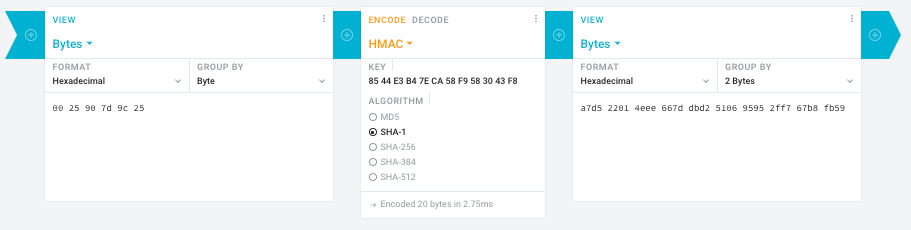
- In the left pane, select the “View” drop-down to be “Bytes”, then paste the HEX bytes of your IPMI MAC address there (like
00 25 90 7d 9c 25)
- In the middle pane, select the drop-down to become “HMAC” followed by the radio-group to be “SHA1“, then paste these bytes into the “Key” field:
85 44 E3 B4 7E CA 58 F9 58 30 43 F8
- In the right pane, select the drop-down to become “Bytes”, then the “Group by” to become “2 bytes”, which will you give the output (where the bold part is the license key: 6 groups of 2 bytes):
a7d5 2201 4eee 667d dbd2 5106 9595 2ff7 67b8 fb59
Result:
- Michael Stapelberg’s private website, containing articles about computers and programming, mostly focused on Linux.[WayBack] Securing SuperMicro’s IPMI with OpenVPN
- [WayBack] GitHub – ReFirmLabs/binwalk: Firmware Analysis Tool
- [WayBack] The better way to update Supermicro BIOS is via IPMI – VirtualLifestyle.nl
Ahh…..a few corrections :-P
#!/bin/bash
function hash_mac {
  mac="$1"
  key="8544e3b47eca58f9583043f8"
  sub="\x"
  #convert mac to hex
  hexmac="\x${mac//:/$sub}"
  #create hash
  code=$(printf "$hexmac" | openssl dgst -sha1 -mac HMAC -macopt hexkey:"$key")
  #DEBUG
  echo "$mac"
  echo "$hexmac"
  echo "$code"
  echo "${code:9:4} ${code:13:4} ${code:17:4} ${code:21:4} ${code:25:4} ${code:29:4}"
}
#hex output with input
hash_mac "$1"

#Look out for the quotes, they might get changed by different encoding
- [WayBack] The better way to update Supermicro BIOS is via IPMI – VirtualLifestyle.nl
Thanks Peter. For anyone interested, here’s a bash script that takes the MAC as the only argument and outputs the activation key:
#!/bin/bash
function hash_mac {
  mac="$1"
  key="8544e3b47eca58f9583043f8"
  sub="\x"
  #convert mac to hex
  hexmac="\x${mac//:/$sub}"
  #create hash
  code=$(printf "$hexmac" | openssl dgst -sha1 -mac HMAC -macopt hexkey:"$key")
  ## DEBUG
  echo "$mac"
  echo "$hexmac"
  echo "$code"
  echo "${code:9:4} ${code:13:4} ${code:17:4} ${code:21:4} ${code:25:4} ${code:29:4}"
}
## hex output with input
hash_mac "$1"
–jeroen
Read the rest of this entry »
Posted in Development, Encoding, Hardware, Hashing, HMAC, Mainboards, OpenSSL, Power User, Security, SHA, SHA-1, Software Development, SuperMicro, X10SRH-CF | Leave a Comment »
Posted by jpluimers on 2020/09/14
Interesting, not just from a GDPR perspective:
EditThisCookie is a cookie manager. You can add, delete, edit, search, protect and block cookies!
[WayBack] EditThisCookie – Chrome Web Store
Via [WayBack] Error 400 on Google sites (YouTube, Maps, Search etc) · Issue #537 · deanoemcke/thegreatsuspender · GitHub
–jeroen
Posted in Chrome, Chrome, Google, LifeHacker, Power User, Web Browsers | Leave a Comment »
Posted by jpluimers on 2020/09/11
Hopefully the below links will eventually get me further in figuring out how to force fsck with opensuse Tumbleweed on Raspberry Pi 3.
For now, I just reinstalled an SD card (my Mac didn’t support the file systems and I did not have time and equipment with me to mount it to another opensuse based device).
–jeroen
Posted in *nix, Linux, openSuSE, Power User, SuSE Linux, Tumbleweed | Leave a Comment »
Posted by jpluimers on 2020/09/11
Just in case I have a VM with only IDE disks of which one ore more need to become SCSI disks: [WayBack] Converting a virtual IDE disk to a virtual SCSI disk (1016192)
TL;DR
- Add one SCSI disk
- Install drivers for it and get it recognised
- When the VM is shutdown:
- Modify the disk description of the IDE disk to SCSI (hack) or
- (often easier) remove the disk, then attach it to the SCSI controller
–jeroen
Posted in Power User, Virtualization, VMware, VMware ESXi | Leave a Comment »
Posted by jpluimers on 2020/09/07
For a simple comma separated list (no quotes), I was expecting a sed script (and indeed it is possible), but tr is more elegant:
Use tr to change , into newlines:
tr , "\n" < list.txt
See https://en.wikipedia.org/wiki/Tr_(Unix)
Source: [WayBack] bash – convert comma separated values into a list of values using shell script – Stack Overflow.
–jeroen
Posted in *nix, *nix-tools, bash, bash, Development, Power User, Scripting, Software Development | Leave a Comment »


 Interesting article: [WayBack] USBKill – Wikipedia.


 The Wiert Corner - irregular stream of stuff